SQL course · Module 6: Subqueries and CTEs · Lesson 22 of 40
Quick answer: A SQL recursive CTE is a CTE that reads its own result: WITH RECURSIVE name AS (anchor UNION ALL recursive part). The anchor runs once; the recursive part runs again and again on the rows from the step before, and stops when a step returns no rows. Use it to walk trees (categories, org charts) and to build number or date series, and always give it a stop condition.
In this lesson you will learn:
- how
WITH RECURSIVEworks: anchor, recursive part,UNIONvsUNION ALL - how to walk a category tree and add depth and path columns
- how to build a date series, and how it compares with
generate_series - how to stop infinite loops, including the
CYCLEandSEARCHclauses of PostgreSQL 14+
Before you start: Lesson 21, SQL CTE: WITH Clause and CTE vs Subquery and Lesson 14, SQL Self Join, CROSS JOIN, Semi-Joins and Anti-Joins.
We ran every example on PostgreSQL 16.15 with the shop database and checked the current PostgreSQL 18 manual. SEARCH and CYCLE need PostgreSQL 14 or newer. We create one small table, categories, and drop it at the end; the shop tables do not change.
Table of Contents
How a SQL recursive CTE works
Start with the smallest possible example: count from 1 to 5.
WITH RECURSIVE nums AS (
    SELECT 1 AS n                          -- anchor: runs once
    UNION ALL
    SELECT n + 1 FROM nums WHERE n < 5     -- recursive part: runs again and again
)
SELECT n FROM nums;
n
---
1
2
3
4
5
(5 rows)The two parts are joined by UNION ALL (or UNION), and “only the recursive term can contain a reference to the query’s own output” (PostgreSQL docs: WITH Queries). Step by step:
- The anchor runs once and gives the row
1. It goes into the result and into a “working table”. - The recursive part runs with
numsmeaning only the working table (1) and gives2. That row joins the result and becomes the new working table. - This repeats:
3,4,5. - With
5in the working table,WHERE n < 5returns no rows, so the query stops.
The manual says such queries are “evaluated iteratively”: it is a loop.
UNION ALL vs UNION
UNION ALL keeps every new row. UNION throws away rows that are exactly the same as a row it already has (Lesson 15). In a recursive CTE this can end a loop:
WITH RECURSIVE t AS (
    SELECT 1 AS n
    UNION
    SELECT n % 3 + 1 FROM t
)
SELECT n FROM t;
n
---
1
2
3
(3 rows)n % 3 + 1 goes 1, 2, 3, 1, 2, 3 … When it comes back to 1, UNION drops that duplicate, the working table is empty, and the query stops. With UNION ALL it never ends. Do not count on this: a depth or path column makes every row different, and in our test the same query with a depth column ran until a LIMIT stopped it. Use UNION ALL with a real stop condition.
Walk a category tree
A tree is stored with a column that points to the parent row in the same table, as in the self join of Lesson 14. Let us put the shop’s four product categories in a small tree:
CREATE TABLE categories (
    id        integer PRIMARY KEY,
    name      text NOT NULL,
    parent_id integer REFERENCES categories (id)
);

INSERT INTO categories (id, name, parent_id) VALUES
    (1, 'All products', NULL),
    (2, 'Tech',         1),
    (3, 'Office',       1),
    (4, 'Electronics',  2),
    (5, 'Accessories',  2),
    (6, 'Home Office',  3),
    (7, 'Stationery',   3);
CREATE TABLE
INSERT 0 7A self join finds one level. For all levels, the anchor takes the top (parent_id IS NULL), and the recursive part finds the children of the rows from the step before:
WITH RECURSIVE tree AS (
    SELECT id, name, parent_id, 0 AS depth, name AS path
    FROM categories
    WHERE parent_id IS NULL
    UNION ALL
    SELECT c.id, c.name, c.parent_id, t.depth + 1, t.path || ' > ' || c.name
    FROM categories c
    JOIN tree t ON c.parent_id = t.id
)
SELECT id, depth, path
FROM tree
ORDER BY path;
id | depth | path
----+-------+-------------------------------------
1 | 0 | All products
3 | 1 | All products > Office
6 | 2 | All products > Office > Home Office
7 | 2 | All products > Office > Stationery
2 | 1 | All products > Tech
5 | 2 | All products > Tech > Accessories
4 | 2 | All products > Tech > Electronics
(7 rows)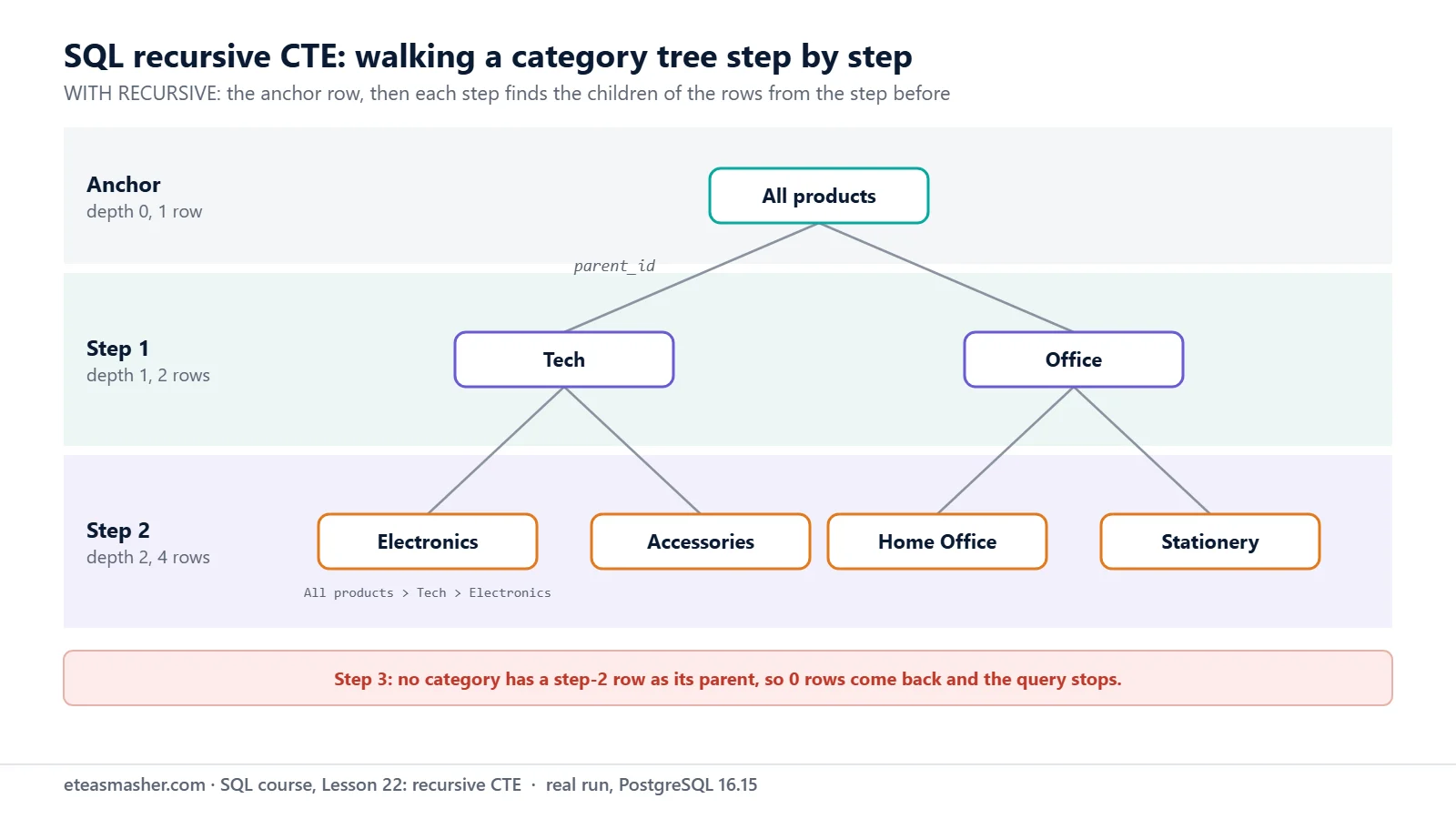
Two extra columns do the useful work:
- depth starts at 0 and adds 1 in each step: how far the row is from the top.
- path adds
>and the child’s name in each step. Sorting by it puts every child under its parent.
The anchor gave 1 row, the first step 2 rows, the second step 4 rows. The third step found no children, so the query stopped.
With repeat() the depth becomes an indent:
WITH RECURSIVE tree AS (
    SELECT id, name, 0 AS depth, name AS path
    FROM categories
    WHERE parent_id IS NULL
    UNION ALL
    SELECT c.id, c.name, t.depth + 1, t.path || ' > ' || c.name
    FROM categories c
    JOIN tree t ON c.parent_id = t.id
)
SELECT repeat('    ', depth) || name AS category
FROM tree
ORDER BY path;
category
---------------------
All products
Office
Home Office
Stationery
Tech
Accessories
Electronics
(7 rows)Use the tree with real data
Start the anchor at Tech to get only its branch, then count the shop’s products in it:
WITH RECURSIVE under_tech AS (
    SELECT id, name FROM categories WHERE name = 'Tech'
    UNION ALL
    SELECT c.id, c.name
    FROM categories c
    JOIN under_tech u ON c.parent_id = u.id
)
SELECT u.name AS category, count(p.id) AS products
FROM under_tech u
LEFT JOIN products p ON p.category = u.name
GROUP BY u.name
ORDER BY products DESC;
category | products
-------------+----------
Electronics | 5
Accessories | 1
Tech | 0
(3 rows)Six products sit under Tech; the LEFT JOIN keeps Tech itself with 0.
SEARCH DEPTH FIRST and BREADTH FIRST (PostgreSQL 14+)
PostgreSQL 14 added the SQL-standard SEARCH and CYCLE clauses (PostgreSQL 14 release notes). SEARCH, written after the CTE’s closing bracket, builds the sort column for you:
WITH RECURSIVE tree AS (
    SELECT id, name, 0 AS depth
    FROM categories
    WHERE parent_id IS NULL
    UNION ALL
    SELECT c.id, c.name, t.depth + 1
    FROM categories c
    JOIN tree t ON c.parent_id = t.id
) SEARCH DEPTH FIRST BY name SET ordercol
SELECT repeat('    ', depth) || name AS category
FROM tree
ORDER BY ordercol;
category
---------------------
All products
Office
Home Office
Stationery
Tech
Accessories
Electronics
(7 rows)SET ordercol names the column PostgreSQL adds; ORDER BY ordercol sorts by it. DEPTH FIRST gives the tree order, BREADTH FIRST one level after the other:
WITH RECURSIVE tree AS (
    SELECT id, name, 0 AS depth
    FROM categories
    WHERE parent_id IS NULL
    UNION ALL
    SELECT c.id, c.name, t.depth + 1
    FROM categories c
    JOIN tree t ON c.parent_id = t.id
) SEARCH BREADTH FIRST BY name SET ordercol
SELECT depth, name
FROM tree
ORDER BY ordercol;
depth | name
-------+--------------
0 | All products
1 | Office
1 | Tech
2 | Accessories
2 | Electronics
2 | Home Office
2 | Stationery
(7 rows)A date series: recursive CTE vs generate_series
Reports often need one row per day, even for days with no data. Orders per day in the first week of September:
WITH RECURSIVE days AS (
    SELECT DATE '2026-09-01' AS day
    UNION ALL
    SELECT day + 1 FROM days WHERE day < DATE '2026-09-07'
)
SELECT d.day, count(o.id) AS orders
FROM days d
LEFT JOIN orders o ON o.order_date = d.day
GROUP BY d.day
ORDER BY d.day;
day | orders
------------+--------
2026-09-01 | 0
2026-09-02 | 2
2026-09-03 | 0
2026-09-04 | 0
2026-09-05 | 0
2026-09-06 | 0
2026-09-07 | 0
(7 rows)day + 1 adds one day to a date. Only 2 September has orders (14 and 15), but every day appears because the series is on the left of the LEFT JOIN.
PostgreSQL has a built-in function for this, generate_series, which “generates a series of values from start to stop, with a step size of step” (PostgreSQL docs: Set Returning Functions):
SELECT d::date AS day, count(o.id) AS orders
FROM generate_series(DATE '2026-09-01', DATE '2026-09-07', INTERVAL '1 day') AS d
LEFT JOIN orders o ON o.order_date = d::date
GROUP BY d
ORDER BY d;
day | orders
------------+--------
2026-09-01 | 0
2026-09-02 | 2
2026-09-03 | 0
2026-09-04 | 0
2026-09-05 | 0
2026-09-06 | 0
2026-09-07 | 0
(7 rows)Same result. There is no generate_series for dates, so the values come back as timestamp with time zone (we checked with pg_typeof), like date_trunc in Lesson 8. Hence d::date.
| recursive CTE | generate_series | |
|---|---|---|
| length | longer | one line |
| databases | PostgreSQL, MySQL, SQLite | PostgreSQL (in SQLite only as an extension) |
| can follow rows in a table (trees) | yes | no |
| result type for dates | date, if you keep it a date | timestamp, cast it back |
In PostgreSQL, use generate_series for simple series. Use the recursive CTE for trees, or when the same SQL must also run elsewhere. (Our tree and date series also ran in SQLite 3.53.1, with DATE(day, '+1 day') for the next day.)
Stop infinite loops
Without a stop condition, a recursive CTE runs until something stops it. The manual’s tip for testing is a LIMIT in the outer query:
WITH RECURSIVE forever AS (
    SELECT 1 AS n
    UNION ALL
    SELECT n + 1 FROM forever
)
SELECT n FROM forever LIMIT 3;
n
---
1
2
3
(3 rows)The manual warns: “Using this trick in production is not recommended, because other systems might work differently.” A time limit is a safety net for any statement: statement_timeout will “abort any statement that takes more than the specified amount of time” (PostgreSQL docs: Client Connection Defaults):
SET statement_timeout = '2s';

WITH RECURSIVE forever AS (
    SELECT 1 AS n
    UNION ALL
    SELECT n + 1 FROM forever
)
SELECT count(*) FROM forever;

RESET statement_timeout;
SET
ERROR: canceling statement due to statement timeout
RESETLoops in the data: the CYCLE clause
Bad data can loop too. Say someone makes Stationery the parent of All products, a circle:
UPDATE categories SET parent_id = 7 WHERE id = 1;UPDATE 1Walk up from Electronics to its parents (with a LIMIT, to be safe):
WITH RECURSIVE up AS (
    SELECT id, name, parent_id, 0 AS step
    FROM categories
    WHERE name = 'Electronics'
    UNION ALL
    SELECT c.id, c.name, c.parent_id, u.step + 1
    FROM categories c
    JOIN up u ON c.id = u.parent_id
)
SELECT step, name FROM up LIMIT 8;
step | name
------+--------------
0 | Electronics
1 | Tech
2 | All products
3 | Stationery
4 | Office
5 | All products
6 | Stationery
7 | Office
(8 rows)Three names repeat forever. The classic fix: carry an array of visited ids and skip an id already in it:
WITH RECURSIVE up AS (
    SELECT id, name, parent_id, ARRAY[id] AS visited
    FROM categories
    WHERE name = 'Electronics'
    UNION ALL
    SELECT c.id, c.name, c.parent_id, u.visited || c.id
    FROM categories c
    JOIN up u ON c.id = u.parent_id
    WHERE NOT c.id = ANY (u.visited)
)
SELECT name, visited FROM up;
name | visited
--------------+-------------
Electronics | {4}
Tech | {4,2}
All products | {4,2,1}
Stationery | {4,2,1,7}
Office | {4,2,1,7,3}
(5 rows)In PostgreSQL 14 and newer, the CYCLE clause does this for you. The manual says it takes “the list of columns to track for cycle detection, then a column name that will show whether a cycle has been detected, and finally the name of another column that will track the path”:
WITH RECURSIVE up AS (
    SELECT id, name, parent_id
    FROM categories
    WHERE name = 'Electronics'
    UNION ALL
    SELECT c.id, c.name, c.parent_id
    FROM categories c
    JOIN up u ON c.id = u.parent_id
) CYCLE id SET is_cycle USING path
SELECT name, is_cycle, path FROM up;
name | is_cycle | path
--------------+----------+---------------------------
Electronics | f | {(4)}
Tech | f | {(4),(2)}
All products | f | {(4),(2),(1)}
Stationery | f | {(4),(2),(1),(7)}
Office | f | {(4),(2),(1),(7),(3)}
All products | t | {(4),(2),(1),(7),(3),(1)}
(6 rows)The last row came back to id 1, so is_cycle is t (true) and the recursion stopped there. Add WHERE NOT is_cycle to hide it; its path shows where the bad data is. Fix the data:
UPDATE categories SET parent_id = NULL WHERE id = 1;UPDATE 1Try it yourself
Run these while the categories table still exists.
Exercise 1: Every month, with its orders
Use a recursive CTE to make the first day of each month from June to October 2026, then count the orders in each month.
Exercise 2: Everything under Office
List Office and every category below it, with a depth column (Office = 0).
Exercise 3: From Stationery up to the top
Walk up from Stationery and print one row with its full path, like Stationery < Office < All products.
Solutions
Solution 1
WITH RECURSIVE months AS (
    SELECT DATE '2026-06-01' AS month
    UNION ALL
    SELECT (month + INTERVAL '1 month')::date
    FROM months
    WHERE month < DATE '2026-10-01'
)
SELECT m.month, count(o.id) AS orders
FROM months m
LEFT JOIN orders o ON date_trunc('month', o.order_date)::date = m.month
GROUP BY m.month
ORDER BY m.month;
month | orders
------------+--------
2026-06-01 | 4
2026-07-01 | 5
2026-08-01 | 4
2026-09-01 | 4
2026-10-01 | 5
(5 rows)+ INTERVAL '1 month' gives a timestamp, so ::date keeps the column a date (see Common mistakes).
Solution 2
WITH RECURSIVE under_office AS (
    SELECT id, name, 0 AS depth
    FROM categories
    WHERE name = 'Office'
    UNION ALL
    SELECT c.id, c.name, u.depth + 1
    FROM categories c
    JOIN under_office u ON c.parent_id = u.id
)
SELECT name, depth FROM under_office ORDER BY depth, name;
name | depth
-------------+-------
Office | 0
Home Office | 1
Stationery | 1
(3 rows)Only the anchor changed: it starts at Office instead of the top.
Solution 3
WITH RECURSIVE up AS (
    SELECT id, parent_id, name AS path
    FROM categories
    WHERE name = 'Stationery'
    UNION ALL
    SELECT c.id, c.parent_id, u.path || ' < ' || c.name
    FROM categories c
    JOIN up u ON c.id = u.parent_id
)
SELECT path FROM up WHERE parent_id IS NULL;
path
------------------------------------
Stationery < Office < All products
(1 row)Walking up joins on c.id = u.parent_id; the top row (no parent) has the full path.
When you are done, remove the practice table:
DROP TABLE categories;DROP TABLECommon mistakes
- Forgetting the word RECURSIVE. Without it the CTE cannot see itself:
relation "nums" does not exist, with the hintUse WITH RECURSIVE. - No stop condition. The query never ends. Add a
WHEREliken < 5, and usestatement_timeoutas a safety net. - Different types in the two parts.
day + INTERVAL '1 day'is a timestamp, but the anchor is a date:recursive query "days" column 1 has type date in non-recursive term but type timestamp without time zone overall. Cast with::date, or useday + 1. - An aggregate in the recursive part.
SELECT max(n) + 1 FROM numsgivesaggregate functions are not allowed in a recursive query's recursive term. Do the counting in the outer query.
Frequently asked questions
What is a recursive CTE used for?
For rows that point to other rows in the same table: category trees, org charts (a manager_id column, with the boss as the anchor), folders, comment replies, routes. Also for number or date series that fill gaps in reports.
Does MySQL support recursive CTEs?
Yes, also written WITH RECURSIVE. MySQL has a built-in brake: “By default, cte_max_recursion_depth has a value of 1000″, so a CTE that recurses past 1000 levels is stopped (MySQL docs: WITH). In PostgreSQL, write the stop condition yourself.
How do I limit the depth of a recursive CTE?
Add a depth column that starts at 0 and adds 1 in each step, and put WHERE t.depth < 5 (or any number) in the recursive part. This also stops loops in the data, although CYCLE shows better where the loop is.
Summary
- A SQL recursive CTE has an anchor that runs once and a recursive part that runs until it returns no rows.
- Use
UNION ALLwith a real stop condition;UNIONonly drops rows that are exactly the same. - Depth and path columns place each row in a tree;
SEARCH(PostgreSQL 14+) builds the sort order for you. - For date series,
generate_seriesis shorter in PostgreSQL; a recursive CTE works in more databases. - Stop loops with a
WHERE, a visited-ids array orCYCLE(PostgreSQL 14+); useLIMITorstatement_timeoutwhile testing.
Next lesson
Next: Lesson 23, SQL Views: CREATE VIEW and Materialized Views in PostgreSQL.
Sources
- PostgreSQL documentation: WITH Queries (recursive queries, search order, cycle detection)
- PostgreSQL documentation: SELECT, WITH clause (SEARCH and CYCLE)
- PostgreSQL 14 release notes (SEARCH and CYCLE)
- PostgreSQL documentation: Set Returning Functions (generate_series)
- PostgreSQL documentation: Client Connection Defaults (statement_timeout)
- MySQL 8.4 Reference Manual: WITH (Common Table Expressions)
- SQLite documentation: The WITH Clause