
SQL course · Module 7: Window functions · Lesson 24 of 40
Quick answer: SQL window functions compute a value across a group of related rows but keep every row in the result. You turn a function into a window function with OVER: AVG(price) OVER () is the average of all rows, and AVG(price) OVER (PARTITION BY category) is the average of each row’s own category, shown next to every product. GROUP BY would merge the rows instead. Window functions run after WHERE, GROUP BY and HAVING, so you cannot use them in WHERE; filter on them in a CTE or subquery.
In this lesson you will learn:
- the difference between an aggregate with
GROUP BYand a window function - what
OVER ()andOVER (PARTITION BY ...)do - how
ORDER BYinsideOVERchanges a sum into a running sum - where window functions run in the logical order, and how to fix “window functions are not allowed in WHERE”
- how to name a window once with the
WINDOWclause
Before you start: Lesson 23, SQL Views: CREATE VIEW and Materialized Views in PostgreSQL, plus Lesson 10, SQL GROUP BY and HAVING and Lesson 21, SQL CTE: WITH Clause and CTE vs Subquery.
We ran every example on PostgreSQL 16.15 with the shop database from Lesson 3 and checked the current PostgreSQL 18 manual. Everything here works on newer versions too. This lesson only reads data. If you did not run \i shop.sql at the end of Lesson 23, run it now so your numbers match ours.
Table of Contents
Aggregate vs window function
In Lesson 9 and Lesson 10 you used AVG with GROUP BY. That gives one row per group:
SELECT category, ROUND(AVG(price), 2) AS avg_price
FROM products
GROUP BY category
ORDER BY category;
category | avg_price
-------------+-----------
Accessories | 45.00
Electronics | 71.48
Home Office | 145.50
Stationery | 9.63
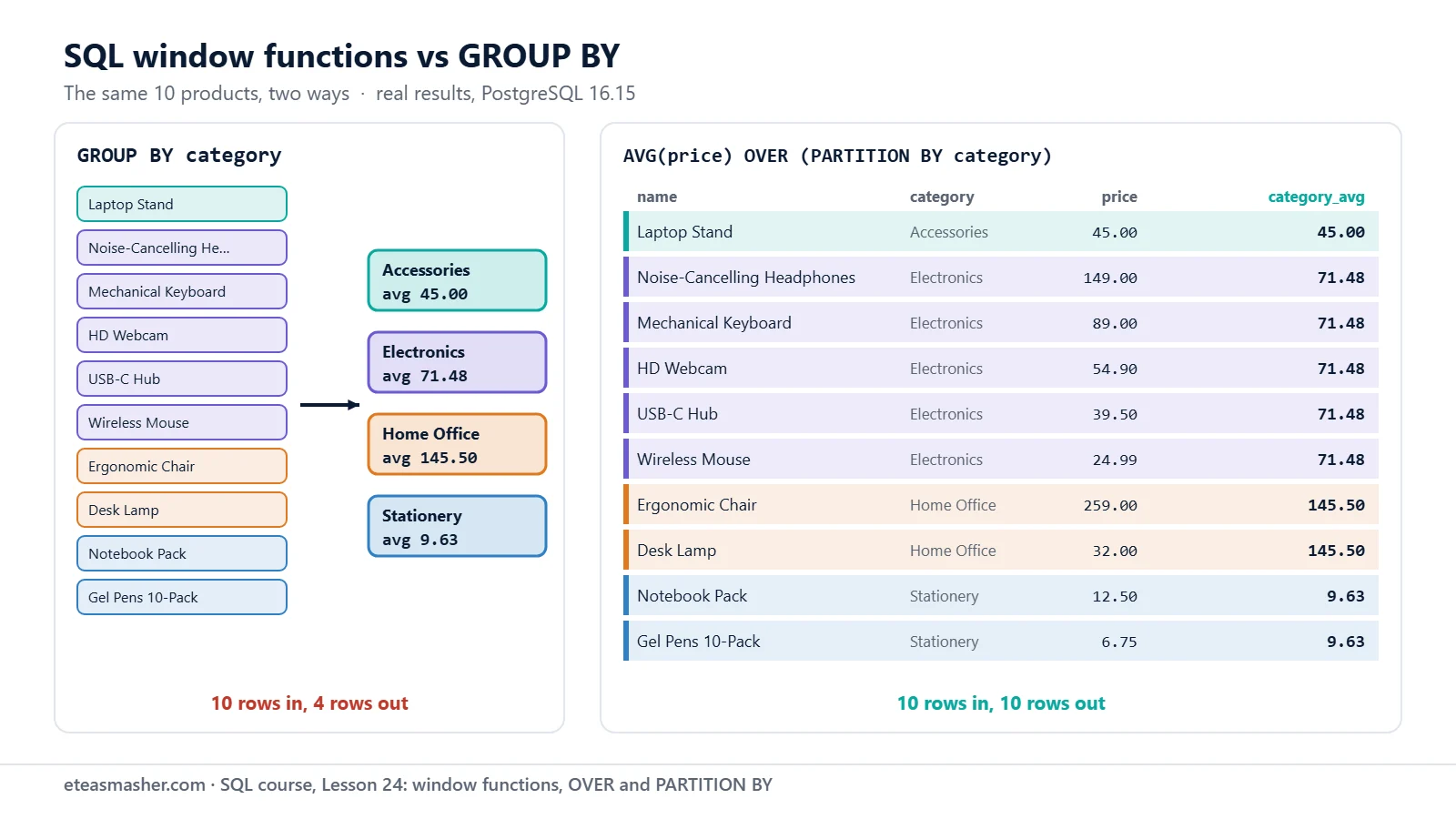
(4 rows)Ten products became four rows, and the products are gone. To show each product next to its category average, you need a window function. The PostgreSQL tutorial says window functions “do not cause rows to become grouped into a single output row like non-window aggregate calls would. Instead, the rows retain their separate identities” (PostgreSQL tutorial: Window Functions).
OVER (): one window over all rows
Add OVER () after an aggregate, and it becomes a window function. Empty brackets mean “the window is all rows of the result”:
SELECT name, price,
       ROUND(AVG(price) OVER (), 2) AS avg_all,
       COUNT(*) OVER () AS products
FROM products
ORDER BY price DESC;
name | price | avg_all | products
-----------------------------+--------+---------+----------
Ergonomic Chair | 259.00 | 71.26 | 10
Noise-Cancelling Headphones | 149.00 | 71.26 | 10
Mechanical Keyboard | 89.00 | 71.26 | 10
HD Webcam | 54.90 | 71.26 | 10
Laptop Stand | 45.00 | 71.26 | 10
USB-C Hub | 39.50 | 71.26 | 10
Desk Lamp | 32.00 | 71.26 | 10
Wireless Mouse | 24.99 | 71.26 | 10
Notebook Pack | 12.50 | 71.26 | 10
Gel Pens 10-Pack | 6.75 | 71.26 | 10
(10 rows)All 10 rows stay. Each one shows the average of all prices (71.26) and the count of all rows (10).
PARTITION BY: one window per group
PARTITION BY splits the rows into groups, called partitions. The function then works only inside the current row’s partition. The tutorial says: “For each row, the window function is computed across the rows that fall into the same partition as the current row.”
SELECT name, category, price,
       ROUND(AVG(price) OVER (PARTITION BY category), 2) AS category_avg
FROM products
ORDER BY category, price DESC;
name | category | price | category_avg
-----------------------------+-------------+--------+--------------
Laptop Stand | Accessories | 45.00 | 45.00
Noise-Cancelling Headphones | Electronics | 149.00 | 71.48
Mechanical Keyboard | Electronics | 89.00 | 71.48
HD Webcam | Electronics | 54.90 | 71.48
USB-C Hub | Electronics | 39.50 | 71.48
Wireless Mouse | Electronics | 24.99 | 71.48
Ergonomic Chair | Home Office | 259.00 | 145.50
Desk Lamp | Home Office | 32.00 | 145.50
Notebook Pack | Stationery | 12.50 | 9.63
Gel Pens 10-Pack | Stationery | 6.75 | 9.63
(10 rows)These are the four averages that GROUP BY gave, now next to every product.
A window value is a normal column, so you can calculate with it. Here is each Electronics product’s distance from the category average and its share of the category’s total price:
SELECT name, category, price,
       price - ROUND(AVG(price) OVER (PARTITION BY category), 2) AS diff,
       ROUND(100 * price / SUM(price) OVER (PARTITION BY category), 1) AS pct_of_category
FROM products
WHERE category = 'Electronics'
ORDER BY price DESC;
name | category | price | diff | pct_of_category
-----------------------------+-------------+--------+--------+-----------------
Noise-Cancelling Headphones | Electronics | 149.00 | 77.52 | 41.7
Mechanical Keyboard | Electronics | 89.00 | 17.52 | 24.9
HD Webcam | Electronics | 54.90 | -16.58 | 15.4
USB-C Hub | Electronics | 39.50 | -31.98 | 11.1
Wireless Mouse | Electronics | 24.99 | -46.49 | 7.0
(5 rows)The headphones cost 77.52 more than the average and make up 41.7% of the category’s prices.
ORDER BY inside OVER: a running sum (preview)
You can also put ORDER BY inside OVER. For SUM, this changes the meaning: each row now adds up the rows from the start up to itself.
SELECT name, price,
       SUM(price) OVER () AS total,
       SUM(price) OVER (ORDER BY price) AS running_sum
FROM products
ORDER BY price;
name | price | total | running_sum
-----------------------------+--------+--------+-------------
Gel Pens 10-Pack | 6.75 | 712.64 | 6.75
Notebook Pack | 12.50 | 712.64 | 19.25
Wireless Mouse | 24.99 | 712.64 | 44.24
Desk Lamp | 32.00 | 712.64 | 76.24
USB-C Hub | 39.50 | 712.64 | 115.74
Laptop Stand | 45.00 | 712.64 | 160.74
HD Webcam | 54.90 | 712.64 | 215.64
Mechanical Keyboard | 89.00 | 712.64 | 304.64
Noise-Cancelling Headphones | 149.00 | 712.64 | 453.64
Ergonomic Chair | 259.00 | 712.64 | 712.64
(10 rows)total is always 712.64; running_sum grows row by row up to 712.64. The rows a function can see are called the window frame. With ORDER BY inside OVER, the default frame runs “from the start of the partition up through the current row, plus any following rows that are equal to the current row” (tutorial). That last part matters when rows tie; Lesson 26 shows it with real ties. For now: OVER () gives a total, OVER (ORDER BY ...) a running total.
Where window functions run in the logical order
In Lesson 11 you learned the order in which PostgreSQL processes a query. Window functions are computed with the SELECT list. The MySQL manual gives the same order in one sentence: rows are found “after WHERE, GROUP BY, and HAVING processing, and windowing execution occurs before ORDER BY, LIMIT, and SELECT DISTINCT” (MySQL 8.4 manual: Window Function Concepts and Syntax).
| step | clause | what it means for window functions |
|---|---|---|
| 1 | FROM, WHERE | the window sees only rows that passed WHERE |
| 2 | GROUP BY, HAVING | the window sees the groups, so it can wrap an aggregate |
| 3 | SELECT | window functions are computed here |
| 4 | DISTINCT, ORDER BY, LIMIT | can use the window results |
Step 2 gives a useful trick. This query finds each category’s revenue (leaving out cancelled orders), then a window adds up the grouped rows to get each category’s share:
SELECT p.category,
       SUM(oi.quantity * oi.unit_price) AS revenue,
       ROUND(100 * SUM(oi.quantity * oi.unit_price)
             / SUM(SUM(oi.quantity * oi.unit_price)) OVER (), 1) AS pct
FROM order_items oi
JOIN orders o   ON o.id = oi.order_id
JOIN products p ON p.id = oi.product_id
WHERE o.status <> 'cancelled'
GROUP BY p.category
ORDER BY pct DESC;
category | revenue | pct
-------------+---------+------
Electronics | 1478.21 | 71.9
Stationery | 283.00 | 13.8
Home Office | 160.00 | 7.8
Accessories | 135.00 | 6.6
(4 rows)Read SUM(SUM(...)) OVER () from the inside out. The inner SUM is the normal aggregate for each category. The outer SUM ... OVER () adds the four category totals together (2,056.21). ORDER BY pct works because ORDER BY runs after the window.
“window functions are not allowed in WHERE”
Now find the products that cost more than their category average. The first idea is to put the window function in WHERE:
SELECT name, category, price
FROM products
WHERE price > AVG(price) OVER (PARTITION BY category);
ERROR: window functions are not allowed in WHERE
LINE 3: WHERE price > AVG(price) OVER (PARTITION BY category);
^This fails because of step 1: WHERE runs before the window values exist. The PostgreSQL tutorial says window functions are “forbidden elsewhere, such as in GROUP BY, HAVING and WHERE clauses. This is because they logically execute after the processing of those clauses.” The fix is to compute the window value in a CTE (Lesson 21), then filter outside:
WITH priced AS (
    SELECT name, category, price,
           AVG(price) OVER (PARTITION BY category) AS category_avg
    FROM products
)
SELECT name, category, price, ROUND(category_avg, 2) AS category_avg
FROM priced
WHERE price > category_avg
ORDER BY category, price DESC;
name | category | price | category_avg
-----------------------------+-------------+--------+--------------
Noise-Cancelling Headphones | Electronics | 149.00 | 71.48
Mechanical Keyboard | Electronics | 89.00 | 71.48
Ergonomic Chair | Home Office | 259.00 | 145.50
Notebook Pack | Stationery | 12.50 | 9.63
(4 rows)Inside the CTE, the window runs on all 10 products. Outside, category_avg is an ordinary column, so WHERE can use it. The Laptop Stand is not in the result: it is the only Accessories product, so its price equals the average (45.00) and is not greater. A subquery in FROM (Lesson 20) works the same way and returns the same 4 rows:
SELECT name, category, price
FROM (
    SELECT name, category, price,
           AVG(price) OVER (PARTITION BY category) AS category_avg
    FROM products
) AS priced
WHERE price > category_avg
ORDER BY category, price DESC;
The WINDOW clause: name a window once
Writing PARTITION BY category again for every function is long and easy to get wrong. The tutorial suggests a WINDOW clause: “each windowing behavior can be named in a WINDOW clause and then referenced in OVER.”
SELECT name, category, price,
       MIN(price) OVER w AS cheapest,
       MAX(price) OVER w AS dearest,
       COUNT(*)   OVER w AS in_category
FROM products
WINDOW w AS (PARTITION BY category)
ORDER BY category, price;
name | category | price | cheapest | dearest | in_category
-----------------------------+-------------+--------+----------+---------+-------------
Laptop Stand | Accessories | 45.00 | 45.00 | 45.00 | 1
Wireless Mouse | Electronics | 24.99 | 24.99 | 149.00 | 5
USB-C Hub | Electronics | 39.50 | 24.99 | 149.00 | 5
HD Webcam | Electronics | 54.90 | 24.99 | 149.00 | 5
Mechanical Keyboard | Electronics | 89.00 | 24.99 | 149.00 | 5
Noise-Cancelling Headphones | Electronics | 149.00 | 24.99 | 149.00 | 5
Desk Lamp | Home Office | 32.00 | 32.00 | 259.00 | 2
Ergonomic Chair | Home Office | 259.00 | 32.00 | 259.00 | 2
Gel Pens 10-Pack | Stationery | 6.75 | 6.75 | 12.50 | 2
Notebook Pack | Stationery | 12.50 | 6.75 | 12.50 | 2
(10 rows)Write OVER w without brackets to use the window unchanged. The WINDOW clause goes after WHERE, GROUP BY and HAVING, and before ORDER BY. You can also extend a named window: OVER (w ORDER BY price) adds an order, but the new window “cannot specify its own PARTITION BY clause” (PostgreSQL docs: SELECT).
In MySQL, SQLite and SQL Server
MySQL 8.0 and later support window functions and a WINDOW clause (MySQL 8.0 manual: Window Functions). SQLite added them in version 3.25.0 (SQLite: Window Functions); the category-average and named-window queries above gave the same values in SQLite 3.53.1. SQL Server has OVER with PARTITION BY, and its WINDOW clause needs SQL Server 2022 with database compatibility level 160 (Microsoft Learn: WINDOW clause).
Try it yourself
Exercise 1: Orders per customer
Show each order of customers 1, 2 and 3 (id, customer_id, order_date) with a column customer_orders: how many orders that customer placed.
Exercise 2: Orders above the average
List the orders whose total is above the average order total of all 22 orders. Compute the totals with GROUP BY and the average with a window function in a CTE.
Exercise 3: Distance from the cheapest
For every product, show the cheapest price in its category and how much more the product costs. Use a named window.
Solutions
Solution 1
SELECT id, customer_id, order_date,
       COUNT(*) OVER (PARTITION BY customer_id) AS customer_orders
FROM orders
WHERE customer_id IN (1, 2, 3)
ORDER BY customer_id, order_date;
id | customer_id | order_date | customer_orders
----+-------------+------------+-----------------
1 | 1 | 2026-06-03 | 4
4 | 1 | 2026-06-22 | 4
11 | 1 | 2026-08-11 | 4
17 | 1 | 2026-09-29 | 4
2 | 2 | 2026-06-09 | 3
8 | 2 | 2026-07-20 | 3
19 | 2 | 2026-10-14 | 3
3 | 3 | 2026-06-15 | 3
13 | 3 | 2026-08-25 | 3
22 | 3 | 2026-10-30 | 3
(10 rows)WHERE runs first, but it keeps all orders of these three customers, so the counts are right.
Solution 2
WITH order_totals AS (
    SELECT order_id,
           SUM(quantity * unit_price) AS total,
           AVG(SUM(quantity * unit_price)) OVER () AS avg_total
    FROM order_items
    GROUP BY order_id
)
SELECT order_id, total, ROUND(avg_total, 2) AS avg_total
FROM order_totals
WHERE total > avg_total
ORDER BY total DESC;
order_id | total | avg_total
----------+--------+-----------
11 | 181.00 | 100.50
22 | 174.00 | 100.50
14 | 158.99 | 100.50
3 | 149.00 | 100.50
16 | 149.00 | 100.50
9 | 128.50 | 100.50
2 | 111.99 | 100.50
12 | 109.80 | 100.50
21 | 102.50 | 100.50
(9 rows)The window averages the 22 grouped totals; the outer WHERE filters on it.
Solution 3
SELECT name, category, price,
       MIN(price) OVER w AS cheapest,
       price - MIN(price) OVER w AS above_cheapest
FROM products
WINDOW w AS (PARTITION BY category)
ORDER BY category, price;
name | category | price | cheapest | above_cheapest
-----------------------------+-------------+--------+----------+----------------
Laptop Stand | Accessories | 45.00 | 45.00 | 0.00
Wireless Mouse | Electronics | 24.99 | 24.99 | 0.00
USB-C Hub | Electronics | 39.50 | 24.99 | 14.51
HD Webcam | Electronics | 54.90 | 24.99 | 29.91
Mechanical Keyboard | Electronics | 89.00 | 24.99 | 64.01
Noise-Cancelling Headphones | Electronics | 149.00 | 24.99 | 124.01
Desk Lamp | Home Office | 32.00 | 32.00 | 0.00
Ergonomic Chair | Home Office | 259.00 | 32.00 | 227.00
Gel Pens 10-Pack | Stationery | 6.75 | 6.75 | 0.00
Notebook Pack | Stationery | 12.50 | 6.75 | 5.75
(10 rows)One WINDOW w serves both MIN calls.
Common mistakes
- A window function in WHERE or HAVING.
window functions are not allowed in WHERE(inHAVING:window functions are not allowed in HAVING). Compute it in a CTE or subquery and filter outside. - Using the window column’s alias in WHERE.
column "category_avg" does not exist. Aliases are made inSELECT, afterWHERE. The CTE fix solves this too. - Putting WINDOW before WHERE.
syntax error at or near "WHERE". The order isFROM,WHERE,GROUP BY,HAVING,WINDOW,ORDER BY. - Nesting window functions.
SUM(AVG(price) OVER ()) OVER ()giveswindow function calls cannot be nested. Compute one in a CTE first. (Wrapping a normal aggregate, as inSUM(SUM(...)) OVER (), is fine.) - Expecting a total and getting a running total.
ORDER BYinsideOVERchangesSUMinto a running sum. Leave it out when you want the whole partition.
Frequently asked questions
What is the difference between GROUP BY and PARTITION BY?
GROUP BY merges each group into one output row. PARTITION BY inside OVER only tells the window function which rows belong together; every input row stays in the result. You can use both in one query: GROUP BY runs first, then the window works on the grouped rows.
Can I use a window function in WHERE?
No. Window functions are computed after WHERE, GROUP BY and HAVING, so PostgreSQL stops with “window functions are not allowed in WHERE” (SQLite says “misuse of window function”). Put the window function in a CTE or a subquery in FROM, and filter on its column outside.
Is OVER () the same as PARTITION BY nothing?
Yes. Empty OVER () means one partition that holds all the rows of the result, so AVG(price) OVER () is the average of every row that passed WHERE.
Summary
- SQL window functions compute across related rows and keep every row;
GROUP BYmerges rows. OVER ()uses all rows;OVER (PARTITION BY col)uses the current row’s group.ORDER BYinsideOVERturnsSUMinto a running sum (Lesson 26 explains frames).- Window functions run after
WHERE,GROUP BYandHAVINGand beforeORDER BY, so filter on them in a CTE or subquery. - The
WINDOWclause names a window once, so several functions can share it.
Window functions are the base of the SQL window functions practice problems in Lesson 27; the next two lessons add ranking and running totals first.
Next lesson
Next: Lesson 25, SQL ROW_NUMBER, RANK and DENSE_RANK: Top N per Group.
Sources
- PostgreSQL tutorial: Window Functions
- PostgreSQL documentation: Window Function Calls
- PostgreSQL documentation: SELECT (WINDOW clause)
- MySQL 8.4 manual: Window Function Concepts and Syntax
- MySQL 8.0 manual: Window Functions
- SQLite: Window Functions
- Microsoft Learn: SELECT – WINDOW clause