Python course · Module 6: Modules and environments · Lesson 28 of 63
Quick answer: Any .py file is a module. Save your functions in prices.py, and another file in the same folder can use them with import prices. A package is a folder of modules with an __init__.py file, imported with dots, like from shop.cart import cart_total. Every module has a variable __name__: it is "__main__" when you run the file directly and the module’s own name when it is imported, so code under Python’s if __name__ == "__main__": line runs only when you run that file yourself.
In this lesson you will learn:
- how to turn your own
.pyfile into a module and import it - what
__name__is and whyif __name__ == "__main__":exists - how to build a package with
__init__.py, and absolute vs relative imports - how to run a module inside a package with
python -m - what a circular import error is and how to fix it
Before you start: finish Lesson 27, Python Modules: import and the Standard Library. You need functions from Lesson 22 and running scripts from Lesson 3. All examples were tested on Python 3.14.6 and gave the same output on Python 3.15.2, the newest release on python.org, apart from the version number in the __pycache__ file names.
Table of Contents
Your own module: any .py file
Bigger programs are split into files. Our project starts with two files in one folder, shop_project:
prices.pyholds price helpers we want to reuse.checkout.pyis the program we run.
This is prices.py. It has a constant and two functions:
"""Helpers for working with prices in the shop."""

TAX_RATE = 0.10


def add_tax(price):
    return round(price * (1 + TAX_RATE), 2)


def format_price(amount):
    return f"Rs {amount:,.2f}"
And this is checkout.py, which imports it:
import prices

cart = [450, 60, 40]
total = sum(cart)
print("Total:", prices.format_price(total))
print("With tax:", prices.format_price(prices.add_tax(total)))
print("Tax rate:", prices.TAX_RATE)
$ python3 checkout.py
Total: Rs 550.00
With tax: Rs 605.00
Tax rate: 0.1import prices works because Python searches the script’s own folder first (Lesson 27). You import without .py and reach the contents with a dot, like math.sqrt. Give modules short, lowercase names; PEP 8 says “Modules should have short, all-lowercase names.”
Problem: code at the top of a module runs on import
It is natural to add a quick test at the bottom of prices.py:
"""Helpers for working with prices in the shop."""

TAX_RATE = 0.10


def add_tax(price):
    return round(price * (1 + TAX_RATE), 2)


def format_price(amount):
    return f"Rs {amount:,.2f}"


print("Testing prices.py")
print(format_price(add_tax(1000)))
Running prices.py shows the test, which is what we want. But now run checkout.py, which only imports it:
$ python3 checkout.py
Testing prices.py
Rs 1,100.00
Total: Rs 550.00
With tax: Rs 605.00
Tax rate: 0.1
The test lines appear in the checkout too. Importing a module runs all of its top-level code, from top to bottom, once. def lines only create functions, but print() lines really print. We need a way to say “run this only when I run this file myself”.
What is __name__?
Python gives every module a variable called __name__ (two underscores on each side). Its value depends on how the file was started. Save this as name_check.py:
print("In name_check.py, __name__ is", repr(__name__))Then make show_name.py, which imports it, and run both:
import name_check

print("In show_name.py, __name__ is", repr(__name__))
$ python3 name_check.py
In name_check.py, __name__ is '__main__'
$ python3 show_name.py
In name_check.py, __name__ is 'name_check'
In show_name.py, __name__ is '__main__'- The file you run gets the name
'__main__'. - A file that is imported gets its module name, here
'name_check'.
The __main__ docs say the same: when a module is imported, “__name__ is set to the module’s name”, but in the top-level code environment it “is set to the string '__main__'“.
Python if __name__ == “__main__”: run code only when the file is run
Now we can fix prices.py. Put the test code inside an if statement that checks __name__:
"""Helpers for working with prices in the shop."""

TAX_RATE = 0.10


def add_tax(price):
    return round(price * (1 + TAX_RATE), 2)


def format_price(amount):
    return f"Rs {amount:,.2f}"


if __name__ == "__main__":
    print("Testing prices.py")
    print(format_price(add_tax(1000)))
$ python3 checkout.py
Total: Rs 550.00
With tax: Rs 605.00
Tax rate: 0.1
$ python3 prices.py
Testing prices.py
Rs 1,100.00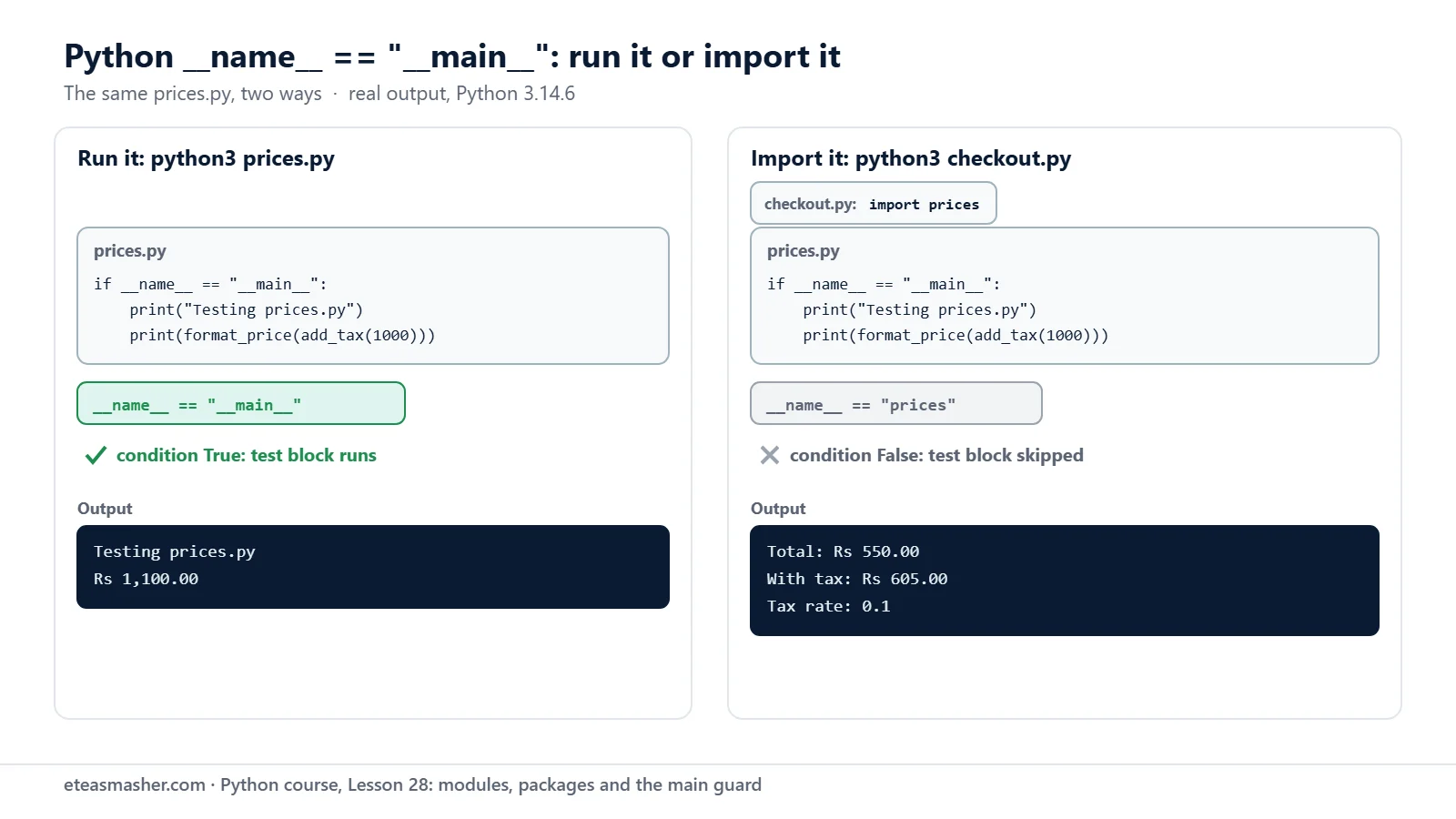
When checkout.py imports prices, __name__ is "prices", so the test is skipped. When you run prices.py yourself, __name__ is "__main__", so the test runs. One file now works both as a reusable module and as a small program.
The docs advise “Putting as few statements as possible” in this block; bigger programs often put their work in a main() function and only call it here.
Packages: a folder of modules with __init__.py
A folder of modules with an __init__.py file inside is a package. Our project now looks like this:
shop_project/app.py: the program we runshop_project/shop/__init__.py: marksshopas a packageshop_project/shop/pricing.py:TAX_RATE,add_tax()andformat_price(), as beforeshop_project/shop/cart.py: a newcart_total()function
__init__.py is often empty. Ours prints a line, only so you can see when it runs:
"""The shop package: prices and shopping carts."""

print("The shop package is loading")
cart.py uses the functions from pricing.py:
from .pricing import add_tax, format_price


def cart_total(prices):
    return add_tax(sum(prices))


if __name__ == "__main__":
    print("Module name:", __name__)
    print("Test:", format_price(cart_total([100, 200])))
And app.py imports from the package with dotted names:
from shop.cart import cart_total
from shop.pricing import format_price
import shop.pricing

print(format_price(cart_total([450, 60, 40])))
print("Tax rate:", shop.pricing.TAX_RATE)
print("pricing module name:", shop.pricing.__name__)
$ python3 app.py
The shop package is loading
Rs 605.00
Tax rate: 0.1
pricing module name: shop.pricingThe tutorial explains that a dotted name like A.B “designates a submodule named B in a package named A“. So shop.pricing is the pricing.py module inside the shop folder, and that is also its __name__. “The shop package is loading” appears once, although app.py imports from the package three times: Python runs __init__.py on the first import and then remembers the module.
After the run, Python has also created a __pycache__ folder:
$ ls shop/__pycache__
__init__.cpython-314.pyc
cart.cpython-314.pyc
pricing.cpython-314.pyc
These are compiled copies that make the next import faster; the name “generally contains the Python version number”, says the tutorial. Python updates them by itself, so you can ignore the folder or delete it.
Absolute and relative imports
Inside a package, there are two ways for cart.py to import from pricing.py:
- Relative:
from .pricing import add_tax. The dot means “the package I am in”. Two dots,.., would mean the parent package. - Absolute:
from shop.pricing import add_tax. The full path, starting from the top package.
Both work when the package is imported normally, as from app.py. PEP 8 says “Absolute imports are recommended”, but “explicit relative imports are an acceptable alternative”. Whichever you choose, be consistent within one project.
Run a module inside a package with python -m
cart.py has a test block. Try to run it like a normal script:
$ python3 shop/cart.py
Traceback (most recent call last):
  File "/home/learner/python-course/shop_project/shop/cart.py", line 1, in <module>
    from .pricing import add_tax, format_price
ImportError: attempted relative import with no known parent package
When you run a file by its path, Python treats it as a lone script named __main__, not as part of shop, so the dot in .pricing has nothing to point to. The tutorial warns that modules meant to be run directly “must always use absolute imports”.
The fix is to run it as a module with -m, from the project folder, using the dotted name and no .py:
$ python3 -m shop.cart
The shop package is loading
Module name: __main__
Test: Rs 330.00
The command line docs say -m will “Locate the module using the standard import mechanism and execute its contents as the __main__ module”. Python imports the shop package first (see the loading line), so the relative import works, and __name__ is still "__main__", so the test runs. -m adds the current folder to the start of sys.path, so run it from shop_project, the folder that contains shop.
Circular import error
A circular import happens when two modules import each other. Say we add orders.py and customers.py to the shop package. orders.py needs customer_name() from customers.py:
from .customers import customer_name

orders = {101: "C1", 102: "C2"}


def order_summary(order_id):
    return f"Order {order_id} is for {customer_name(orders[order_id])}"
And customers.py needs the orders dictionary from orders.py:
from .orders import orders

customers = {"C1": "Ayesha", "C2": "Bilal"}


def customer_name(customer_id):
    return customers[customer_id]


def order_count():
    return len(orders)
A small report.py runs from shop.orders import order_summary:
$ python3 report.py
The shop package is loading
Traceback (most recent call last):
  File "/home/learner/python-course/shop_project/report.py", line 1, in <module>
    from shop.orders import order_summary
  File "/home/learner/python-course/shop_project/shop/orders.py", line 1, in <module>
    from .customers import customer_name
  File "/home/learner/python-course/shop_project/shop/customers.py", line 1, in <module>
    from .orders import orders
ImportError: cannot import name 'orders' from partially initialized module 'shop.orders' (most likely due to a circular import) (/home/learner/python-course/shop_project/shop/orders.py)
Read the traceback from the top. Python starts orders.py, whose first line imports customers.py, so Python pauses orders.py and starts customers.py. That file asks for orders from orders.py, but orders.py stopped at line 1, so the dictionary does not exist yet: the module is “partially initialized”.
If the two files sit right next to your script instead of in a package, Python 3.13 and newer print a different message: cannot import name 'orders' from 'orders' (consider renaming ...). What’s New in Python 3.13 explains that this hint is for a file named like a library. Renaming will not help here; it is still a circular import.
The cleanest fix, suggested in the Python FAQ, is to change the structure so that the modules do not need each other. Move the shared data into a third module, shop/data.py:
orders = {101: "C1", 102: "C2"}
customers = {"C1": "Ayesha", "C2": "Bilal"}
Now customers.py imports only from data, and orders.py from data and customers, so the imports go one way only:
from .data import customers, orders


def customer_name(customer_id):
    return customers[customer_id]


def order_count():
    return len(orders)
from .data import orders
from .customers import customer_name
def order_summary(order_id):
return f"Order {order_id} is for {customer_name(orders[order_id])}"The new report.py also prints the number of orders:
from shop.orders import order_summary
from shop.customers import order_count

print(order_summary(101))
print("Orders:", order_count())
$ python3 report.py
The shop package is loading
Order 101 is for Ayesha
Orders: 2Another fix from the FAQ is to move one import inside the function that needs it, so it runs later, when both modules are complete.
Try it yourself
Exercise 1: Your first module
Create greetings.py with a function hello(name) that returns "Hello, <name>!". Add an if __name__ == "__main__": block that prints hello("test"). Then create main.py in the same folder that imports hello and prints hello("Sara"). Run both files.
Exercise 2: A tiny package
Make a folder tools with an empty __init__.py and a module text.py that has a function shout(text) returning the text in capitals with ! at the end (use upper() from Lesson 20). Next to the tools folder, write app.py that imports shout and prints shout("sale starts today").
Exercise 3: Predict __name__
Add print("__name__ =", __name__) as the first line of tools/text.py. Before you run anything, predict what it prints for python3 app.py and for python3 -m tools.text. Then check.
Solutions
Solution 1
def hello(name):
    return f"Hello, {name}!"


if __name__ == "__main__":
    print(hello("test"))
from greetings import hello
print(hello("Sara"))$ python3 main.py
Hello, Sara!
$ python3 greetings.py
Hello, test!The test line runs only when greetings.py is the file you run.
Solution 2
def shout(text):
    return text.upper() + "!"
from tools.text import shout
print(shout("sale starts today"))$ python3 app.py
SALE STARTS TODAY!tools/__init__.py is empty; tools.text is the text.py module inside tools.
Solution 3
print("__name__ =", __name__)


def shout(text):
    return text.upper() + "!"
$ python3 app.py
__name__ = tools.text
SALE STARTS TODAY!
$ python3 -m tools.text
__name__ = __main__Imported, the module’s name is its dotted name, tools.text; run with -m, it is __main__.
Common mistakes
- Running a package module by its path.
python3 shop/cart.pygivesImportError: attempted relative import with no known parent package. With an absolute import inside, it givesModuleNotFoundError: No module named 'shop'instead. Runpython3 -m shop.cartfrom the project folder. - Adding
.pyafter-m.python3 -m shop.cart.pyfails with “Error while finding module specification for ‘shop.cart.py'”. Use the module name,shop.cart. - Test code outside the
if __name__ == "__main__":block. It runs whenever another file imports the module. - Two modules importing each other. This gives
ImportError: cannot import name ... (most likely due to a circular import). Move the shared code into a third module. - Forgetting the quotes.
if __name__ == __main__:stops withNameError: name '__main__' is not defined. Did you mean: '__name__'?. Write"__main__"as a string.
Frequently asked questions
What does if __name__ == “__main__” mean in Python?
It checks whether the file is being run directly. Python sets __name__ to "__main__" for the file you run and to the module’s name for imported files, so the code inside the block runs only when you run that file, not when it is imported.
Do I need __init__.py in Python 3?
Not strictly. In our test, app.py still ran without it, because Python then treats shop as a “namespace package”, which the tutorial calls “a relatively advanced feature”. For your own packages, always add __init__.py, even an empty one.
How do I fix “attempted relative import with no known parent package”?
You ran a module that uses a relative import, like from .pricing import add_tax, by its file path. Go to the folder that contains the package and run it as a module instead: python3 -m shop.cart.
Summary
- Any
.pyfile is a module; import it by its name, without.py, from a file in the same folder. - Importing a module runs its top-level code once; put test or demo code under
if __name__ == "__main__":. __name__is"__main__"in the file you run and the module’s dotted name, likeshop.pricing, when imported.- A package is a folder with
__init__.py; use absolute (shop.pricing) or relative (.pricing) imports, and run package modules withpython -m. - A circular import means two modules need each other; move shared code into a third module.
Next lesson
Next: Lesson 29, pip install: How to Install Python Packages with pip.
Sources
- Modules: packages, intra-package references and compiled files (Python tutorial)
- __main__: top-level code environment (Python docs)
- Command line and environment: the -m option (Python docs)
- Programming FAQ: modules that mutually import each other (Python docs)
- PEP 8: imports and module names (peps.python.org)
- What’s New in Python 3.13: improved error messages (Python docs)
- Python downloads page (python.org)