Python course · Module 3: Control flow · Lesson 11 of 63
Quick answer: A Python if statement runs a block of code only when its condition is true. Add elif to test more conditions in order, and else to run code when none of them is true; Python runs only the first branch whose condition is true. The if, elif and else lines end with a colon and the block under each is indented, for example if total >= 2000: followed by an indented print("Free delivery"). For choosing between fixed values, such as menu commands, Python 3.10 and newer also has match and case.
In this lesson you will learn:
how if, else and elif choose which lines run
why the order of elif conditions matters
nested if blocks, truthiness and the one-line x if condition else y
how match and case work with values, | and the _ wildcard
the error messages beginners see most often, and how to fix them
Before you start: finish Lesson 10, Python input() Function, because many examples here ask the user for a number. You also need comparisons and and/or/not from Lesson 9, and the colon-and-indentation rule from Lesson 4, Python Indentation and Syntax. All examples were tested on Python 3.14.6 and behave the same on Python 3.15.2, the newest release on python.org.
Table of Contents
The if statement
Until now, every line of your programs ran from top to bottom. An if statement lets the program decide. Our running example is an online shop: orders of 2,000 rupees or more get free delivery.
cart_total = float(input("Cart total in rupees: "))
if cart_total >= 2000:
    print("You get free delivery!")
    print("Delivery fee: 0")
print("Thank you for shopping.")
We ran the script twice in a terminal and typed a different total each time (on Windows, type python or py instead of python3):
$ python3 step1_if.py
Cart total in rupees: 2500
You get free delivery!
Delivery fee: 0
Thank you for shopping.
$ python3 step1_if.py
Cart total in rupees: 900
Thank you for shopping.
How it works:
cart_total >= 2000 is the condition, a comparison from Lesson 9 that gives True or False.
The line ends with a colon :. The indented lines under it (4 spaces) are the block. They run only when the condition is true.
The last print() is not indented, so it is not part of the block. It runs every time.
With 900, the condition is False, so Python skipped both indented lines.
if and else
else gives a second path: the code to run when the condition is false. It has no condition of its own, and it sits at the same indentation as its if.
cart_total = float(input("Cart total in rupees: "))
if cart_total >= 2000:
    delivery = 0
else:
    delivery = 250
print(f"Delivery fee: {delivery}")
print(f"You pay: {cart_total + delivery:,.2f}")
$ python3 step2_if_else.py
Cart total in rupees: 2500
Delivery fee: 0
You pay: 2,500.00
$ python3 step2_if_else.py
Cart total in rupees: 1500
Delivery fee: 250
You pay: 1,750.00
Exactly one of the two blocks runs, so delivery always has a value when the last two lines use it.
elif: more than two choices
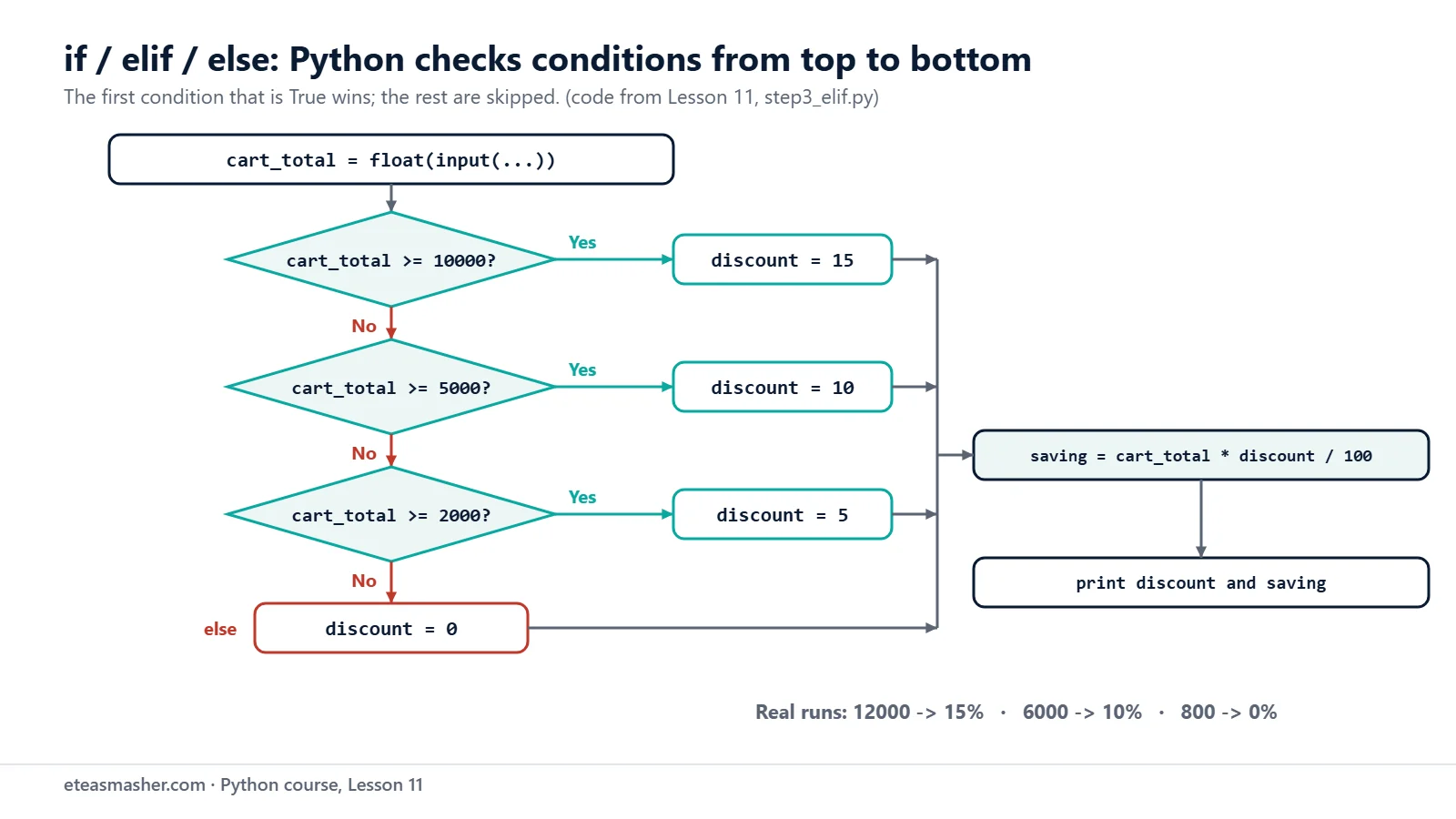
Often there are more than two cases. The shop gives 15% off from 10,000 rupees, 10% from 5,000 and 5% from 2,000. elif means “else if”: it is checked only when every condition above it was false.
$ python3 step3_elif.py
Cart total in rupees: 12000
Discount: 15% (you save 1,800.00)
$ python3 step3_elif.py
Cart total in rupees: 6000
Discount: 10% (you save 600.00)
$ python3 step3_elif.py
Cart total in rupees: 800
Discount: 0% (you save 0.00)
The language reference describes the rule exactly: Python evaluates the conditions “one by one until one is found to be true”, runs that block, and then “no other part of the if statement is executed or evaluated”. If all conditions are false, the else block runs. You can have as many elif parts as you need, and else is optional.
Python checks each condition in order and runs only the first branch that is true. If none is true, the else branch runs.
The order of conditions matters
Because Python stops at the first true condition, the order of an elif chain is part of the logic. Here the same tiers are written from smallest to largest:
12,000 is also >= 2000, so the first branch wins and the 15% branch is never checked. There is no error, just a wrong answer. Put the strictest condition first.
elif chain or separate if statements?
Sometimes you want every matching rule to run. Then use separate if statements, because each one is checked on its own:
cart_total = 12000
if cart_total >= 10000:
    print("Free gift: a tote bag")
if cart_total >= 5000:
    print("Free gift wrapping")
if cart_total >= 2000:
    print("Free delivery")
Free gift: a tote bag
Free gift wrapping
Free delivery
Use an elif chain to pick one answer (one discount), and separate ifs when several rules can apply at once (several free extras).
Nested if statements
An if block can contain another if. The inner one is indented one more level, as you saw in Lesson 4.
is_member = True
cart_total = 1500

if is_member:
    print("Welcome back, member!")
    if cart_total >= 1000:
        print("Members get free delivery from 1,000 rupees.")
    else:
        print("Add a little more for free delivery.")
else:
    print("Sign up to get member prices.")

if is_member and cart_total >= 1000:
    print("Free delivery: yes")
Welcome back, member!
Members get free delivery from 1,000 rupees.
Free delivery: yes
Each else belongs to the if at the same indentation. Nesting is useful when the outer case needs its own lines, like the welcome message. When you only need “both are true”, one condition with and is shorter, as the last if shows.
Truthiness: conditions that are not comparisons
A condition does not have to be a comparison. Python checks whether the value is “true” in the sense you learned in Lesson 8: 0, 0.0, the empty string "" and None count as false, and almost everything else counts as true.
coupon = ""
items_in_cart = 3
note = "Leave at the door"

if coupon:
    print("Coupon used:", coupon)
else:
    print("No coupon.")

if items_in_cart:
    print(items_in_cart, "items in the cart")

if note:
    print("Delivery note:", note)
No coupon.
3 items in the cart
Delivery note: Leave at the door
if coupon: reads as “if there is a coupon”. PEP 8, Python’s style guide, prefers this short form and says “Don’t compare boolean values to True or False using ==“, so write if is_member:, not if is_member == True:.
A trap: or with a bare value
This program should cancel the order, because the answer is "no":
answer = "no"
if answer == "yes" or "y":
    print("Order confirmed")
else:
    print("Order cancelled")
Order confirmed
Python reads this as (answer == "yes") or "y". The left side is False, so or returns "y", a non-empty string, which is true. So the condition is true for every answer. Repeat the comparison:
answer = "no"
if answer == "yes" or answer == "y":
    print("Order confirmed")
else:
    print("Order cancelled")
print(answer == "yes" or "y")
Order cancelled
y
The last line shows that the old condition really gives "y".
The conditional expression: x if condition else y
When an if/else only chooses a value for one variable, you can write it on one line. The expressions reference calls this a conditional expression (other languages call it a “ternary operator”).
cart_total = 1500
delivery = 0 if cart_total >= 2000 else 250
print("Delivery:", delivery)

items = 1
print(f"You have {items} {'item' if items == 1 else 'items'}.")
items = 4
print(f"You have {items} {'item' if items == 1 else 'items'}.")
Delivery: 250
You have 1 item.
You have 4 items.
Read it as “0 if the total is at least 2000, else 250”. Python checks the condition first, then works out only the value it needs. Keep it for short choices; for anything longer, a normal if/else is clearer.
match and case: choosing between fixed values
When you compare one value with many possible values, an elif chain gets repetitive. Since Python 3.10 (What’s New in 3.10) you can use match. Here a customer types a command:
command = input("Command (track, cancel, help, quit): ")
match command:
    case "track":
        print("Your order is on the way.")
    case "cancel":
        print("Your order has been cancelled.")
    case "help" | "?":
        print("Type track, cancel or quit.")
    case "quit" | "exit" | "q":
        print("Goodbye!")
    case _:
        print(f"Unknown command: {command}")
$ python3 step10_match.py
Command (track, cancel, help, quit): track
Your order is on the way.
$ python3 step10_match.py
Command (track, cancel, help, quit): q
Goodbye!
$ python3 step10_match.py
Command (track, cancel, help, quit): refund
Unknown command: refund
match command: names the value to check. Each indented case gives a value to compare it with.
Python tries the cases from top to bottom. case "track": succeeds when command == "track". Only the first matching case runs.
| means “or”: case "quit" | "exit" | "q": matches any of the three.
_ is the wildcard. The Python tutorial says it “acts as a wildcard and never fails to match”, so case _: works like else. It must be the last case.
If no case matches and there is no case _:, nothing happens and the program simply continues:
status_code = 3
match status_code:
    case 1:
        print("Order received")
    case 2:
        print("Packed")
    case 3 | 4:
        print("On the way")
    case 5:
        print("Delivered")
print("Status check finished.")

status_code = 9
match status_code:
    case 1:
        print("Order received")
    case 5:
        print("Delivered")
print("No case matched 9, so nothing was printed above.")
On the way
Status check finished.
No case matched 9, so nothing was printed above.
match can do much more (it can unpack lists and objects, see PEP 636), but literal values, | and _ are what you need for now. For ranges like “5,000 or more”, keep using if/elif.
Try it yourself
Exercise 1: Even or odd
Ask the user for a whole number and print whether it is even or odd. Hint: number % 2 is 0 for even numbers (Lesson 6).
Exercise 2: Ticket prices
Ask for the user’s age and print the ticket price: under 5 is free, under 18 pays 300 rupees, 60 or older pays 400, everyone else pays 600. Test it with 70 and 12.
Exercise 3: Weekend or weekday
Ask for a day name and use match to print whether it is a weekend (Saturday or Sunday) or a weekday. Any other text should print a “not a day name” message.
Solutions
Solution 1
number = int(input("Enter a whole number: "))
if number % 2 == 0:
    print(f"{number} is even.")
else:
    print(f"{number} is odd.")
$ python3 solution1_even_odd.py
Enter a whole number: 7
7 is odd.
$ python3 solution1_even_odd.py
Enter a whole number: 10
10 is even.
A whole number divided by 2 leaves a remainder of 0 or 1, so two branches cover every case.
Solution 2
age = int(input("Your age: "))
if age < 5:
    price = 0
elif age < 18:
    price = 300
elif age >= 60:
    price = 400
else:
    price = 600
print(f"Ticket price: {price} rupees")
$ python3 solution2_ticket.py
Your age: 70
Ticket price: 400 rupees
$ python3 solution2_ticket.py
Your age: 12
Ticket price: 300 rupees
age < 5 comes before age < 18, because a 3-year-old is also under 18 and must get the free ticket.
Solution 3
day = input("Day of the week: ")
match day:
    case "Saturday" | "Sunday":
        print("Weekend! The shop opens at 11 am.")
    case "Monday" | "Tuesday" | "Wednesday" | "Thursday" | "Friday":
        print("Weekday. The shop opens at 9 am.")
    case _:
        print(f"{day} is not a day name.")
$ python3 solution3_weekend.py
Day of the week: Sunday
Weekend! The shop opens at 11 am.
$ python3 solution3_weekend.py
Day of the week: Funday
Funday is not a day name.
| joins the day names, and case _: catches everything else. The match is case sensitive, so sunday would also go to case _.
Common mistakes
Forgetting the colon.if cart_total >= 2000 without : gives SyntaxError: expected ':'. Every if, elif, else, match and case line ends with a colon.
Writing else if instead of elif. Python has no else if. The line else if cart_total >= 2000: gives SyntaxError: expected ':', because Python expects a colon right after else.
Putting a wider condition first.if total >= 2000: before elif total >= 10000: means the second branch never runs, with no error message. Test each branch with a real value.
Writing x == "yes" or "y". The bare "y" is always true, so the condition is always true. Write x == "yes" or x == "y".
Putting case _: or a variable name before other cases.case _: first gives SyntaxError: wildcard makes remaining patterns unreachable. A name such as case FREE_CODE: does not compare with that variable; it matches everything, so you get SyntaxError: name capture 'FREE_CODE' makes remaining patterns unreachable. Use literal values and keep case _: last.
Frequently asked questions
Does Python have a switch statement?
Not with that name. The Python tutorial says an if … elif … elif sequence “is a substitute for the switch or case statements found in other languages”. Since Python 3.10 there is also match/case, which is the closest thing to a switch for comparing one value with fixed options.
What is the difference between if-elif and multiple if statements?
In an if/elif/else chain, Python runs only the first branch whose condition is true and skips the rest. With separate if statements, every condition is checked, so several blocks can run.
Can I write an if statement on one line in Python?
To choose a value, use the conditional expression: fee = 0 if total >= 2000 else 250. Python also accepts if total >= 2000: print("Free"); PEP 8 generally discourages this style but says it is sometimes okay for a short if.
Summary
if condition: runs its indented block only when the condition is true; else: runs when it is false.
elif adds more conditions; Python runs the first true branch only, so put the strictest condition first.
Any value can be a condition: 0, "" and None are false, and PEP 8 prefers if is_member: over == True.
x if condition else y picks one of two values in a single expression.
match/case compares one value with fixed options; | means “or”, and case _: catches everything else and must be last.