Quick answer: A Python string is text inside quotes, such as "Notebook" or 'Notebook'. An f-string is a string with an f before the opening quote; Python replaces each {expression} inside it with the value, so f"{quantity} x {item}" prints 3 x Notebook. After a colon you can add a format spec: f"{price:.2f}" shows two decimal places and f"{total:,}" adds thousands commas.
In this lesson you will learn:
how to write strings with single, double and triple quotes
how escape sequences like \n and \t work, and when to use raw strings
how to join strings, repeat them, count characters with len() and read one character by its index
how to build text with f-strings and format numbers with format specs
how to fix the string errors beginners meet first
Before you start: finish Lesson 6, Python Numbers, where you learned int, float and Decimal. All examples were run as scripts with Python 3.14.6, and Python 3.15.2, the newest release on python.org, gave exactly the same output. String methods such as .upper() and slicing come later, in Lesson 20.
Table of Contents
Creating strings: single, double and triple quotes
Our running example in this lesson is a receipt for a small shop, Ali’s Bookshop.
The Python tutorial says strings “can be enclosed in single quotes ('...') or double quotes ("...") with the same result”. So pick the one that makes your text easy:
Use double quotes when the text contains an apostrophe, like "Ali's Bookshop".
Use single quotes when the text contains double quotes, like 'Read more, "worry" less'.
Use triple quotes """...""" for text over several lines. The line breaks become part of the string.
The type of a string is str. print() shows the text without the quotes.
Escape sequences and raw strings
A backslash \ inside a string starts an escape sequence: two characters that mean one special character.
Item	Price
Pen	50
Line one
Line two
It's open
Folder: C:\books\new
Folder: C:\books\new
Escape
Meaning
\n
new line
\t
tab
\'
single quote
\"
double quote
\\
one backslash
The last line uses a raw string: an r before the quote. In a raw string the backslash is a normal character, so Windows paths are easier to write. The tutorial says raw strings are for when “you don’t want characters prefaced by \ to be interpreted as special characters”.
What happens with a wrong backslash
Here a Windows path is written without doubling the backslashes:
print("C:\data\new")
/home/learner/python-course/err6_invalid_escape.py:1: SyntaxWarning: "\d" is an invalid escape sequence. Such sequences will not work in the future. Did you mean "\\d"? A raw string is also an option.
  print("C:\data\new")
C:\data
ew
Two things went wrong. \d is not a known escape, so Python warns you (the language reference says this has been a SyntaxWarning since Python 3.12 and will become an error in a future version). Worse, \nis a known escape, so the path was cut into two lines and the n of new disappeared. Fix: write r"C:\data\new" or "C:\\data\\new".
Joining strings and counting characters
+ joins two strings (this is called concatenation), and * repeats a string. The built-in len() returns the number of characters.
+ adds nothing between the strings, so we join a space " " in the middle ourselves. len(title) is 14: the space and the apostrophe count as characters too. "-" * 14 makes a line exactly as long as the title.
+ only joins a string to another string. Joining a number fails:
quantity = 3
print("Quantity: " + quantity)
Traceback (most recent call last):
  File "/home/learner/python-course/err1_concat_int.py", line 2, in <module>
    print("Quantity: " + quantity)
          ~~~~~~~~~~~~~^~~~~~~~~~
TypeError: can only concatenate str (not "int") to str
Python does not turn 3 into text by itself. You can convert it with str(quantity) (Lesson 8 covers conversion), but an f-string, shown below, is the easier fix.
Indexing: one character at a time
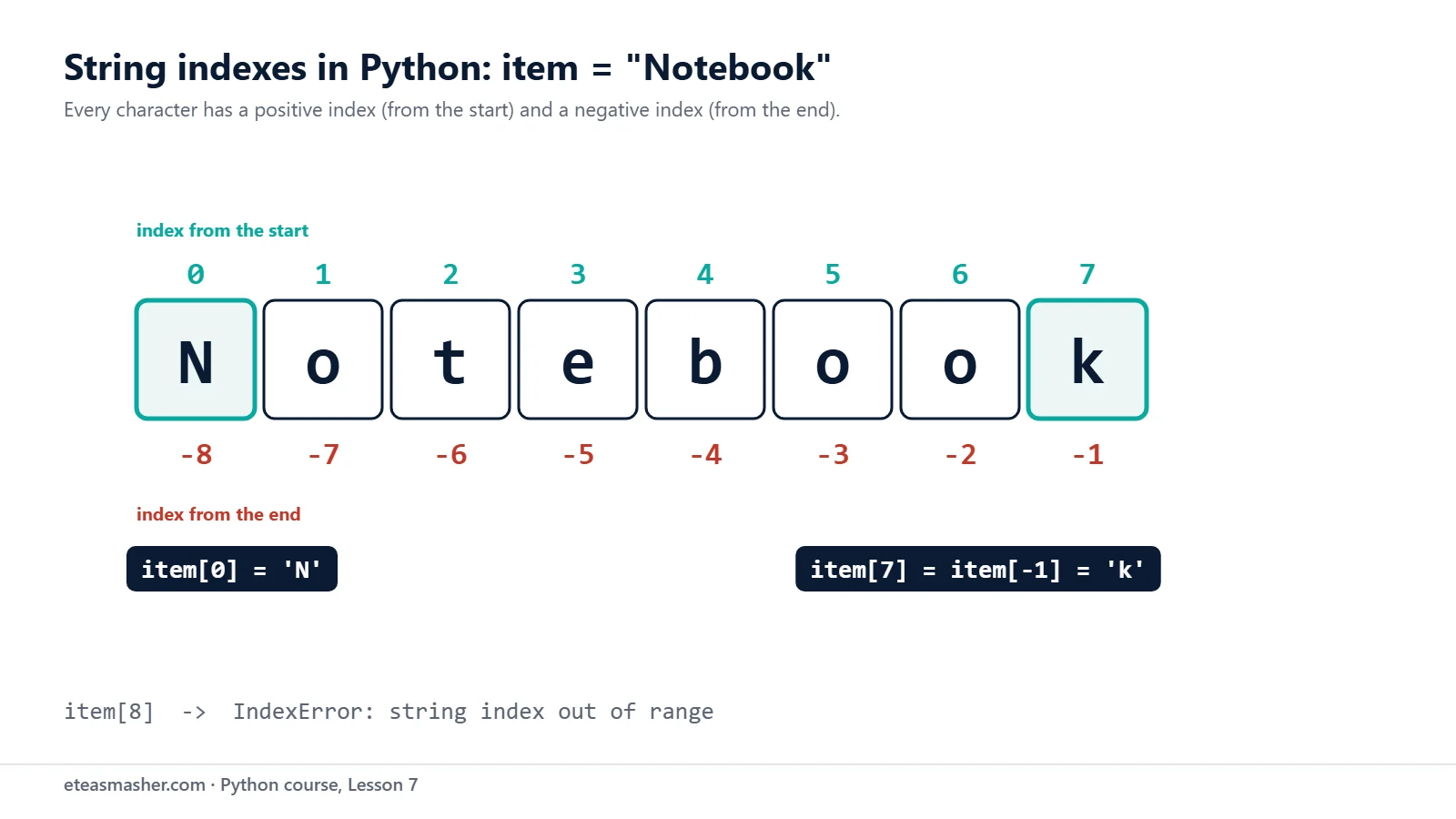
Each character in a string has a position number called an index. The first character has index 0. Negative indexes count from the end: -1 is the last character.
Each character has a positive index from the start and a negative index from the end. The last character of “Notebook” is item[7] or item[-1].
“Notebook” has 8 characters, so the indexes go from 0 to 7. item[7] and item[-1] are the same character, the last k. The tutorial explains why negative indexes start at -1: “since -0 is the same as 0”.
Asking for an index that does not exist stops the program:
item = "Notebook"
print(item[8])
Traceback (most recent call last):
  File "/home/learner/python-course/err2_index_range.py", line 2, in <module>
    print(item[8])
          ~~~~^^^
IndexError: string index out of range
You also cannot change one character, because strings are immutable (they cannot be changed after they are made):
item = "Notebook"
item[0] = "n"
Traceback (most recent call last):
  File "/home/learner/python-course/err3_immutable.py", line 2, in <module>
    item[0] = "n"
    ~~~~^^^
TypeError: 'str' object does not support item assignment
To get different text, you make a new string and assign it to the variable.
f-strings: putting values inside text
An f-string starts with f before the opening quote. The input and output tutorial explains that “you can write a Python expression between { and } characters”. Python runs the expression and puts the result into the text.
item = "Notebook"
price = 120
quantity = 3
print(f"{quantity} x {item} costs {price * quantity} rupees.")
print(f"The word {item} has {len(item)} letters.")
3 x Notebook costs 360 rupees.
The word Notebook has 8 letters.
Notice three things:
Numbers do not need str(). The f-string turns 3 and 360 into text for you.
Spaces and punctuation are written once, as normal text, so there are no " " + pieces.
Any expression works inside the braces: a calculation like price * quantity or a function call like len(item).
Format specs: decimals, commas, percent and alignment
After the expression you can add a colon and a format spec, which controls how the value looks. The rules are in the Format Specification Mini-Language.
The brackets [ ] in the code are normal text; they only show where the spaces are. Specs can be combined: ,.2f means commas and two decimals. The documentation notes that strings are left-aligned by default and numbers are right-aligned.
Putting it together: a receipt
Now the whole receipt. Each item name gets 20 characters on the left, and each price gets 10 characters on the right, so the columns line up.
        Ali's Bookshop
==============================
Notebook                120.00
Pen                      45.50
Python book           1,850.00
------------------------------
Total                 2,015.50
Every line is exactly 30 characters wide. {'Total':<20} uses single quotes inside a double-quoted f-string, so the quotes do not clash.
Two handy extras: = and double braces
price = 120
quantity = 3
print(f"{price=}, {quantity=}")
print(f"{price * quantity = }")
print(f"Use {{ and }} to show braces: {{price}} = {price}")
price=120, quantity=3
price * quantity = 360
Use { and } to show braces: {price} = 120
{price=} prints the expression, an equals sign and the value. The tutorial calls this the = specifier, and it is very useful for checking values while you debug.
To print a real brace, double it: {{ gives { and }} gives }.
Try it yourself
Exercise 1: A name tag
Make name = "Sara" and city = "Multan". Use f-strings to print Hello, my name is Sara and I live in Multan. and then My name has 4 letters and starts with S. Use len() and an index, not typed numbers.
Exercise 2: A price list
Print this list with f-strings so the prices line up on the right, with two decimals: Tea 80, Sandwich 350, Juice 199.5. Give names 10 characters and prices 8.
Exercise 3: Fix the error
This script stops with TypeError: can only concatenate str (not "int") to str. Fix it in two different ways.
age = 21
print("Age: " + age)
Solutions
Solution 1
name = "Sara"
city = "Multan"
print(f"Hello, my name is {name} and I live in {city}.")
print(f"My name has {len(name)} letters and starts with {name[0]}.")
Hello, my name is Sara and I live in Multan.
My name has 4 letters and starts with S.
len(name) and name[0] run inside the braces, so the line stays correct for any name.
<10 pads each name to 10 characters, and >8.2f right-aligns each price in 8 characters with two decimals.
Solution 3
age = 21
print("Age: " + str(age))
print(f"Age: {age}")
Age: 21
Age: 21
str(age) turns the number into text before joining; the f-string does the same conversion for you.
Common mistakes
Forgetting the f.print("Total: {total}") prints Total: {total} with the braces. There is no error, so this one is easy to miss. Write f"Total: {total}".
The same quote inside the text.shop = 'Ali's Bookshop' gives SyntaxError: unterminated string literal (detected at line 1), because the apostrophe ends the string. Use double quotes outside: "Ali's Bookshop".
Joining a number with +."Quantity: " + 3 gives TypeError: can only concatenate str (not "int") to str. Use an f-string or str().
Counting indexes from 1. In “Notebook” the last index is 7, not 8. item[8] gives IndexError: string index out of range. Use item[-1] for the last character.
Single backslashes in Windows paths."C:\data\new" gives a SyntaxWarning and a broken path. Use a raw string r"C:\data\new".
Frequently asked questions
What is an f-string in Python?
An f-string, or formatted string literal, is a string with f or F before the opening quote. Expressions inside {} are run and their values are put into the text, and a format spec after a colon, like {price:.2f}, controls how each value looks.
How do I format a number to 2 decimal places in Python?
Use an f-string with the .2f format spec: f"{price:.2f}" turns 1249.5 into 1249.50. Add a comma before it, f"{price:,.2f}", to also get thousands separators. This only changes how the number is shown; the value itself is not changed.
Should I use single or double quotes for strings in Python?
Both make exactly the same string. Choose the one that avoids escaping: double quotes when the text has an apostrophe, single quotes when it has double quotes. PEP 8 makes no recommendation between them; it says “Pick a rule and stick to it”, and use the other kind when the text contains a quote, to avoid backslashes.
Summary
A string is text in single, double or triple quotes; its type is str.
\n, \t and \\ are escape sequences; a raw string r"..." treats backslashes as normal characters.
+ joins strings, * repeats them, len() counts characters, and text[0] reads the first character; strings cannot be changed in place.
An f-string f"...{expression}..." puts values into text, with no need for str().
Format specs after a colon control the look: .2f, ,, %, <, >, ^ and widths.