
SQL course · Module 6: Subqueries and CTEs · Lesson 20 of 40
Quick answer: A SQL subquery is a SELECT inside another query, written in brackets. A scalar subquery returns one value, so you can compare with it: WHERE price > (SELECT avg(price) FROM products). IN (SELECT ...) checks a value against a list, EXISTS (SELECT ...) checks whether any row exists, and a subquery in FROM works like a temporary table. A correlated subquery uses a column from the outer query, so it is worked out again for each outer row.
In this lesson you will learn:
- how scalar subqueries work, and the “more than one row returned” error
- how to use
INandNOT INwith a subquery, and the NULL trap - how
EXISTSand correlated subqueries check each row - how to use a subquery in
FROMas a derived table
Before you start: Lesson 10, SQL GROUP BY and HAVING and Lesson 14, SQL Self Join, CROSS JOIN, Semi-Joins and Anti-Joins.
We ran every example on PostgreSQL 16.15 with the shop database and checked the current PostgreSQL 18 manual. This lesson only reads data. NULLs are shown as (null) with \pset null '(null)' from Lesson 6.
Table of Contents
What is a SQL subquery?
A subquery is a complete SELECT placed in brackets inside another statement. PostgreSQL runs the inner query and uses its result in the outer one. You met two already: in Lesson 11, to compare each product with the average price, and in Lesson 14, inside EXISTS. This lesson covers the four common kinds:
| kind | returns | typical place |
|---|---|---|
| scalar subquery | one value | WHERE, SELECT list |
IN / NOT IN subquery | one column, many rows | WHERE |
EXISTS subquery | true or false | WHERE |
subquery in FROM | a whole table | FROM |
Scalar subqueries: one value
A scalar subquery returns one row with one column. Which order is the newest?
SELECT id, customer_id, order_date, status
FROM orders
WHERE order_date = (SELECT max(order_date) FROM orders);
id | customer_id | order_date | status
----+-------------+------------+---------
22 | 3 | 2026-10-30 | pending
(1 row)The inner query finds the latest date, 2026-10-30, and the outer query keeps the orders on that date. You cannot write WHERE order_date = max(order_date): aggregates are not allowed in WHERE (Lesson 11). The subquery computes the value first.
A scalar subquery also works in the SELECT list. Here each product is compared with the average price:
SELECT name, price,
       round(price - (SELECT avg(price) FROM products), 2) AS diff_from_avg
FROM products
ORDER BY price DESC
LIMIT 4;
name | price | diff_from_avg
-----------------------------+--------+---------------
Ergonomic Chair | 259.00 | 187.74
Noise-Cancelling Headphones | 149.00 | 77.74
Mechanical Keyboard | 89.00 | 17.74
HD Webcam | 54.90 | -16.36
(4 rows)If a scalar subquery finds no row, the result is NULL, not an error:
SELECT (SELECT name FROM products WHERE price > 1000) AS expensive_product; expensive_product
-------------------
(null)
(1 row)The “more than one row” error
The manual says: “It is an error to use a query that returns more than one row or more than one column as a scalar subquery” (PostgreSQL docs: Scalar Subqueries). There are two Stationery products, so this fails:
SELECT name, price
FROM products
WHERE price = (SELECT price FROM products WHERE category = 'Stationery');
ERROR: more than one row returned by a subquery used as an expression= compares with one value, and the subquery gave two. Choose the fix that matches your question:
- You mean “equal to any of them”: use
INinstead of=. In our run, that returned the two Stationery products. - You mean one specific value: make the subquery return one row, with an aggregate such as
max(price)or withORDER BY price DESC LIMIT 1.
Whether this error appears depends on the data. A subquery that returns one row today can return two tomorrow, so filter it on a unique column or use an aggregate.
IN and NOT IN with a subquery
IN (SELECT ...) keeps rows whose value appears in the subquery’s single column. Which customers bought the noise-cancelling headphones (product 8)?
SELECT id, name
FROM customers
WHERE id IN (
    SELECT o.customer_id
    FROM orders o
    JOIN order_items oi ON oi.order_id = o.id
    WHERE oi.product_id = 8
)
ORDER BY id;
id | name
----+--------------
1 | Ayesha Malik
3 | Sofia Rossi
5 | Emma Clarke
(3 rows)Compare it with a JOIN that asks the same question:
SELECT c.id, c.name
FROM customers c
JOIN orders o       ON o.customer_id = c.id
JOIN order_items oi ON oi.order_id = o.id
WHERE oi.product_id = 8
ORDER BY c.id;
id | name
----+--------------
1 | Ayesha Malik
3 | Sofia Rossi
3 | Sofia Rossi
5 | Emma Clarke
(4 rows)Sofia bought the headphones in two orders, so the JOIN lists her twice. IN only asks “is this id in the list?”, so each customer appears once.
NOT IN keeps rows whose value is not in the list. Customers who never ordered:
SELECT id, name
FROM customers
WHERE id NOT IN (SELECT customer_id FROM orders);
id | name
----+-------------
10 | Omar Haddad
(1 row)This is safe only because orders.customer_id is NOT NULL. If the subquery returns even one NULL, NOT IN returns nothing. Emma, our UK customer, has no email:
SELECT email FROM customers WHERE country = 'UK'; email
--------
(null)
(1 row)SELECT count(*)
FROM customers
WHERE email NOT IN (SELECT email FROM customers WHERE country = 'UK'); count
-------
0
(1 row)Zero, although nine customers have an email that is clearly not NULL. The manual explains that with a NULL in the list “the result of the NOT IN construct will be null, not true” (PostgreSQL docs: Subquery Expressions). This is the NULL trap from Lesson 6 and Lesson 14. The fix is NOT EXISTS, or WHERE email IS NOT NULL inside the subquery.
EXISTS and correlated subqueries
EXISTS is true when its subquery returns at least one row. Customers with a shipped order:
SELECT c.id, c.name
FROM customers c
WHERE EXISTS (
    SELECT 1 FROM orders o
    WHERE o.customer_id = c.id AND o.status = 'shipped'
)
ORDER BY c.id;
id | name
----+---------------
2 | Lucas Martin
6 | Daniel Weber
7 | Hira Siddiqui
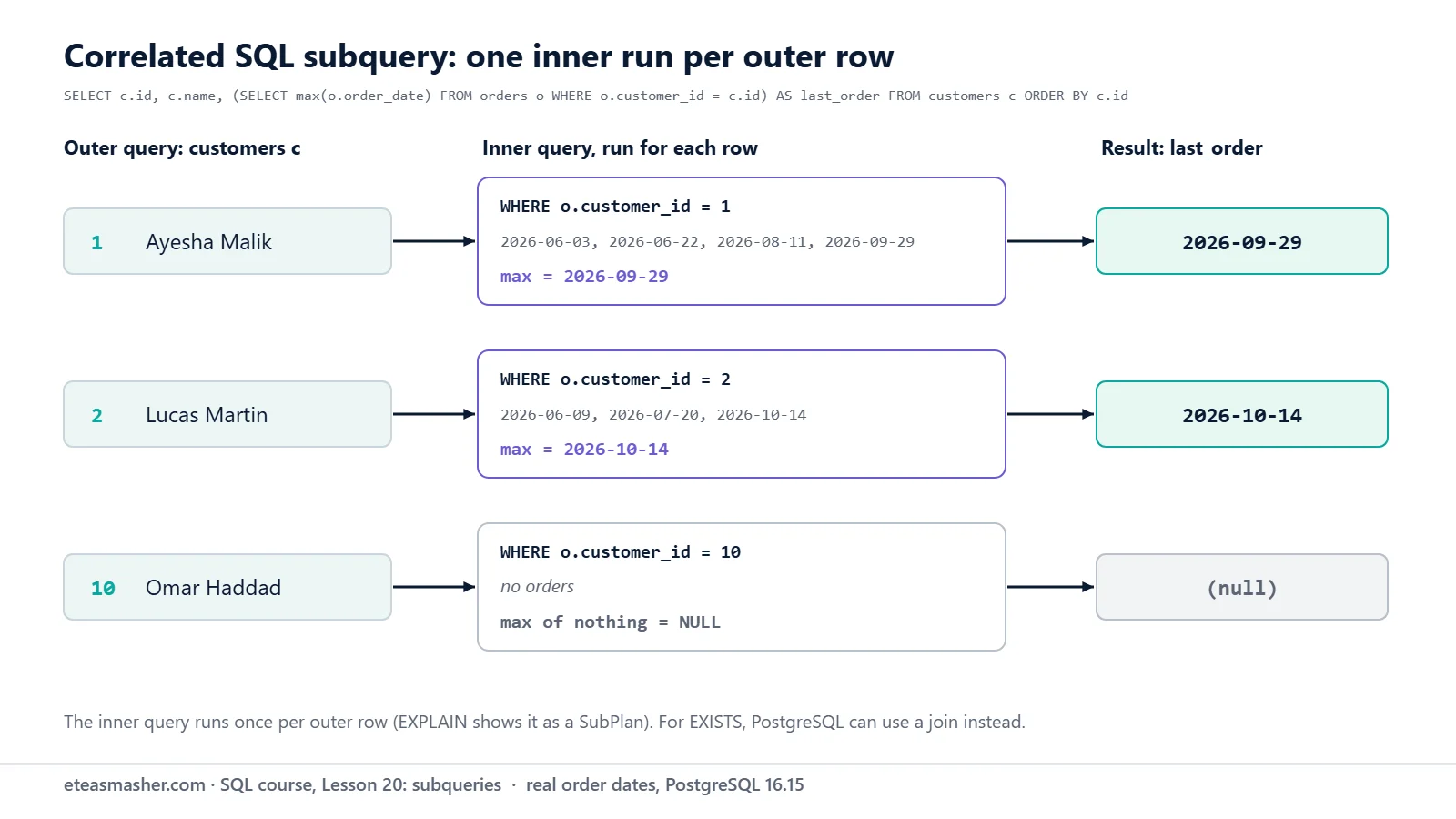
(3 rows)Look at o.customer_id = c.id. The subquery uses c.id from the outer query. That makes it a correlated subquery: its answer is different for each customer. The manual says such outer values “act as constants during any one evaluation of the subquery”. You can read it as “for each customer, run the inner query with that customer’s id”. SELECT 1 is a convention, because only “whether any rows are returned” matters.
Correlated subquery in the SELECT list
A correlated scalar subquery can add a value per row. Each customer’s last order date:
SELECT c.id, c.name,
       (SELECT max(o.order_date)
        FROM orders o
        WHERE o.customer_id = c.id) AS last_order
FROM customers c
ORDER BY c.id;
id | name | last_order
----+---------------+------------
1 | Ayesha Malik | 2026-09-29
2 | Lucas Martin | 2026-10-14
3 | Sofia Rossi | 2026-10-30
4 | bilal ahmed | 2026-09-02
5 | Emma Clarke | 2026-09-17
6 | Daniel Weber | 2026-10-21
7 | Hira Siddiqui | 2026-10-27
8 | NOAH WILSON | 2026-09-02
9 | Chloe Dubois | 2026-10-06
10 | Omar Haddad | (null)
(10 rows)Omar has no orders, so max() over zero rows gave NULL, and unlike an inner join, he stays in the list.
Correlated subquery in WHERE
Which products cost more than the average of their own category?
SELECT p.name, p.category, p.price
FROM products p
WHERE p.price > (
    SELECT avg(p2.price)
    FROM products p2
    WHERE p2.category = p.category
)
ORDER BY p.category, p.price;
name | category | price
-----------------------------+-------------+--------
Mechanical Keyboard | Electronics | 89.00
Noise-Cancelling Headphones | Electronics | 149.00
Ergonomic Chair | Home Office | 259.00
Notebook Pack | Stationery | 12.50
(4 rows)The two aliases matter: p is the outer row and p2 the rows inside the category. The category averages, from a normal GROUP BY, explain the result:
SELECT category, round(avg(price), 2) AS avg_price
FROM products
GROUP BY category
ORDER BY category;
category | avg_price
-------------+-----------
Accessories | 45.00
Electronics | 71.48
Home Office | 145.50
Stationery | 9.63
(4 rows)The Laptop Stand is the only Accessories product, so it equals its own average and is not greater.
Subqueries in FROM (derived tables)
A subquery in FROM acts as a table for the outer query. This is how you aggregate twice: first a total per order, then the average of those totals (Lesson 9 covers avg):
SELECT round(avg(order_total), 2) AS avg_order_value, count(*) AS orders
FROM (
    SELECT order_id, sum(quantity * unit_price) AS order_total
    FROM order_items
    GROUP BY order_id
) AS t;
avg_order_value | orders
-----------------+--------
100.50 | 22
(1 row)AS t names the derived table. The SQL standard requires that name, but PostgreSQL 16 made it optional (PostgreSQL 16 release notes). On our PostgreSQL 16 this works:
SELECT count(*) AS big_orders
FROM (
    SELECT order_id, sum(quantity * unit_price) AS order_total
    FROM order_items
    GROUP BY order_id
)
WHERE order_total > 100;
big_orders
------------
9
(1 row)The manual still calls an alias “good practice in SQL code that might be ported to another system” (PostgreSQL docs: Table Expressions). MySQL, for example, says the alias “is mandatory because every table in a FROM clause must have a name” (MySQL 8.4: Derived Tables). Keep writing AS t.
Notice that the outer WHERE uses order_total, an alias made inside the subquery. Lesson 11 showed that WHERE cannot see a SELECT alias of the same query; wrapping the query in a subquery solves that. The same trick filters window functions, as in the SQL window functions practice problems: “Wrap the window function in a subquery, then filter rn = 1.”
Try it yourself
Exercise 1: More expensive than the Laptop Stand
List the products that cost more than the Laptop Stand, using a scalar subquery, cheapest first.
Exercise 2: How often was each product ordered?
Show every product with the number of order lines it appears in, using a correlated subquery in the SELECT list.
Exercise 3: Big orders
List the orders whose total is more than 150, biggest first. Compute the totals in a subquery in FROM.
Solutions
Solution 1
SELECT name, price
FROM products
WHERE price > (SELECT price FROM products WHERE name = 'Laptop Stand')
ORDER BY price;
name | price
-----------------------------+--------
HD Webcam | 54.90
Mechanical Keyboard | 89.00
Noise-Cancelling Headphones | 149.00
Ergonomic Chair | 259.00
(4 rows)The subquery returns one value, 45.00, because only one product has that name.
Solution 2
SELECT p.id, p.name,
       (SELECT count(*)
        FROM order_items oi
        WHERE oi.product_id = p.id) AS times_ordered
FROM products p
ORDER BY p.id;
id | name | times_ordered
----+-----------------------------+---------------
1 | Wireless Mouse | 6
2 | Mechanical Keyboard | 4
3 | USB-C Hub | 4
4 | Laptop Stand | 4
5 | Desk Lamp | 4
6 | Notebook Pack | 6
7 | Gel Pens 10-Pack | 5
8 | Noise-Cancelling Headphones | 4
9 | Ergonomic Chair | 0
10 | HD Webcam | 3
(10 rows)count(*) over no rows is 0, so the Ergonomic Chair shows 0, not NULL.
Solution 3
SELECT order_id, order_total
FROM (
    SELECT order_id, sum(quantity * unit_price) AS order_total
    FROM order_items
    GROUP BY order_id
) AS t
WHERE order_total > 150
ORDER BY order_total DESC;
order_id | order_total
----------+-------------
11 | 181.00
22 | 174.00
14 | 158.99
(3 rows)The outer WHERE can use order_total because the subquery created it.
Common mistakes
- Using
=with a subquery that returns several rows. You getmore than one row returned by a subquery used as an expression. UseIN, or make the subquery return one row. - Returning two columns where one value is expected.
WHERE price > (SELECT avg(price), max(price) FROM products)fails withsubquery must return only one column. NOT INwith a subquery that can return NULL. The result is silently empty, as with Emma’s email. UseNOT EXISTS.- Forgetting the aliases in a correlated subquery. Inside
(SELECT avg(price) FROM products WHERE category = category), both names mean the inner row, so you get the overall average. Our run returned 3 products instead of 4, with no error. Usepoutside andp2inside.
Frequently asked questions
What is the difference between a subquery and a correlated subquery?
A plain subquery does not use any column of the outer query, so its result is the same for every row, like the average price. A correlated subquery uses an outer column, like c.id, so its result changes from row to row. EXISTS subqueries are usually correlated, as in this lesson.
Is a subquery slower than a JOIN?
Not by itself. PostgreSQL’s planner can rewrite a subquery. For the headphones IN query, EXPLAIN showed a join plan (a Nested Loop with a Hash Join inside), not a query run once per customer. Write the query that states your question clearly, then measure with EXPLAIN, which Lesson 32 teaches.
Can a subquery return more than one column?
Yes, in FROM (a derived table can have many columns) and inside EXISTS, where the columns do not matter. A subquery used as a single value, with =, > or in the SELECT list, must return exactly one column and at most one row.
Summary
- A SQL subquery is a
SELECTin brackets inside another query. - A scalar subquery returns one value; more than one row is an error, and no row gives NULL.
INchecks a value against a list without duplicating rows;NOT INreturns nothing if the list holds a NULL.EXISTSand correlated subqueries use outer columns and are checked per row.- A subquery in
FROMbuilds a derived table, so you can aggregate twice or filter on an alias.
Next lesson
Next: Lesson 21, SQL CTE: WITH Clause and CTE vs Subquery.
Sources
- PostgreSQL documentation: Scalar Subqueries
- PostgreSQL documentation: Subquery Expressions (EXISTS, IN, NOT IN, ANY, ALL)
- PostgreSQL documentation: Table Expressions (subqueries in FROM)
- PostgreSQL 16 release notes (subqueries in FROM may omit aliases)
- MySQL 8.4 Reference Manual: Derived Tables