
SQL course · Module 4: Joins · Lesson 15 of 40
Quick answer: SQL UNION stacks the rows of two queries into one result and removes duplicate rows; UNION ALL stacks them and keeps every row, so it is usually faster. INTERSECT keeps only the rows that are in both results, and EXCEPT keeps the rows of the first result that are not in the second. Both queries must return the same number of columns, with matching types, and one ORDER BY at the very end sorts the combined result.
In this lesson you will learn:
- the difference between SQL UNION and UNION ALL
- how INTERSECT and EXCEPT find rows in both lists, or in only one
- the column rules, and the real errors when you break them
- how to sort and limit a combined result
- what changes in MySQL and SQLite
Before you start: Lesson 4, SQL SELECT Statement: Columns, Aliases, DISTINCT and LIMIT and Lesson 14, SQL Self Join, CROSS JOIN, Semi-Joins and Anti-Joins.
We ran every example on PostgreSQL 16.15 with the shop database, and checked the current PostgreSQL 18 manual. The PostgreSQL 18 manual describes these operators the same way.
Table of Contents
Joins add columns, set operations add rows
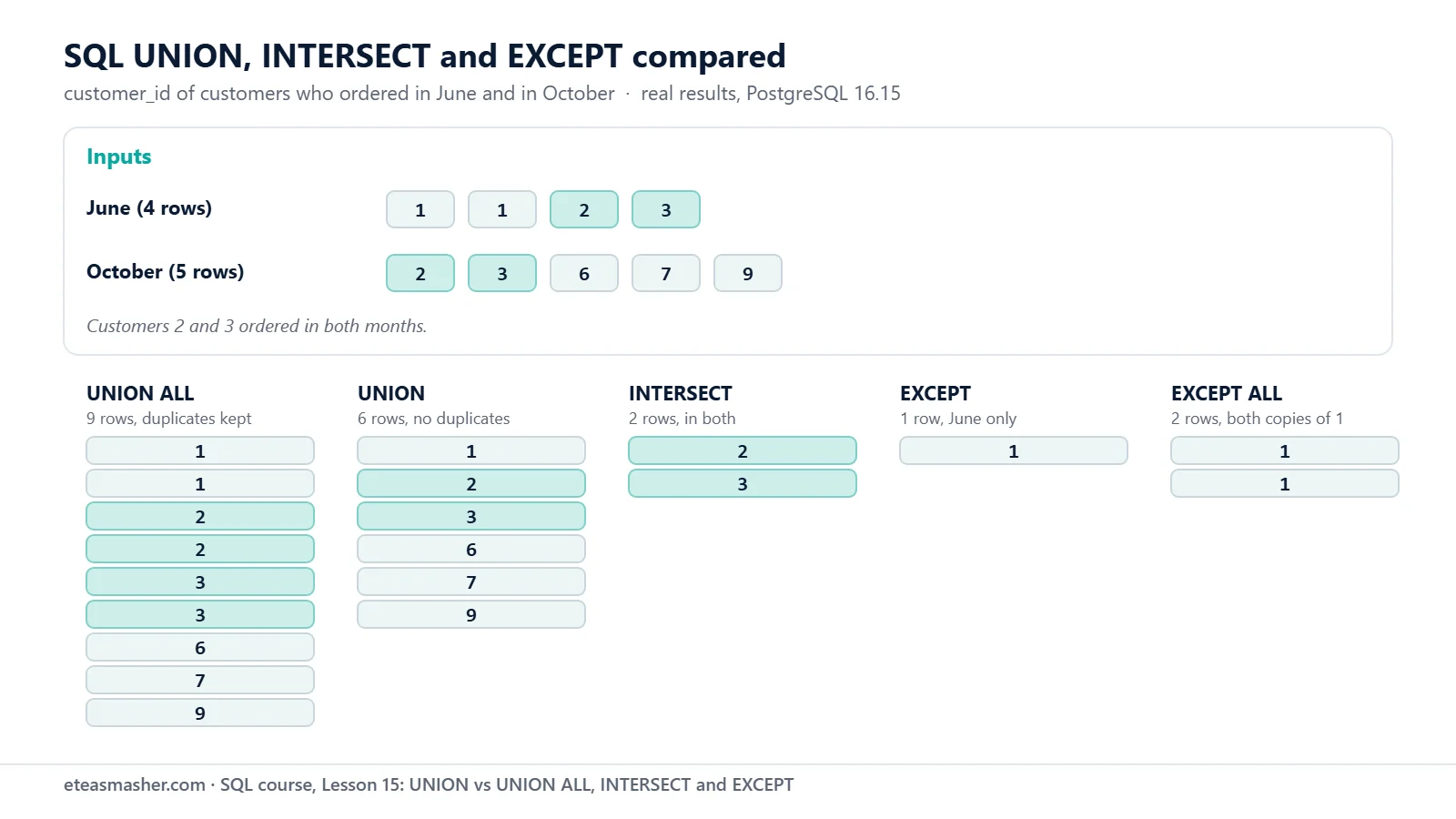
A join puts columns side by side. UNION, INTERSECT and EXCEPT instead combine the rows of two query results that have the same shape. Our running example is two lists: customers who ordered in June, and customers who ordered in October:
SELECT customer_id FROM orders
WHERE order_date BETWEEN '2026-06-01' AND '2026-06-30'
ORDER BY customer_id;
customer_id
-------------
1
1
2
3
(4 rows)SELECT customer_id FROM orders
WHERE order_date BETWEEN '2026-10-01' AND '2026-10-31'
ORDER BY customer_id; customer_id
-------------
2
3
6
7
9
(5 rows)Customer 1 (Ayesha Malik) appears twice in June because she placed two orders that month.
SQL UNION vs UNION ALL
UNION ALL returns every row of the first query followed by every row of the second:
SELECT customer_id FROM orders WHERE order_date BETWEEN '2026-06-01' AND '2026-06-30'
UNION ALL
SELECT customer_id FROM orders
WHERE order_date BETWEEN '2026-10-01' AND '2026-10-31'
ORDER BY customer_id;
customer_id
-------------
1
1
2
2
3
3
6
7
9
(9 rows)4 rows plus 5 rows gives 9 rows. Nothing is removed. Now plain UNION:
SELECT customer_id FROM orders WHERE order_date BETWEEN '2026-06-01' AND '2026-06-30'
UNION
SELECT customer_id FROM orders WHERE order_date BETWEEN '2026-10-01' AND '2026-10-31'
ORDER BY customer_id;
customer_id
-------------
1
2
3
6
7
9
(6 rows)Six different customers ordered in June or October. The manual says UNION “eliminates duplicate rows from its result, in the same way as DISTINCT, unless UNION ALL is used” (PostgreSQL docs: Combining Queries). Notice that it removed both kinds of duplicates: Ayesha’s repeat inside June, and customers 2 and 3, who are in both lists.
Removing duplicates costs work, because the database must compare rows. The SELECT reference says: “UNION ALL is usually significantly quicker than UNION; use ALL when you can” (PostgreSQL docs: SELECT). Use UNION ALL when the two parts cannot overlap or when you want the repeats, for example to count them. Use UNION when you need a list of different values.
INTERSECT: rows in both results
INTERSECT keeps only the rows that appear in both results. Which customers ordered in June and again in October?
SELECT customer_id FROM orders WHERE order_date BETWEEN '2026-06-01' AND '2026-06-30'
INTERSECT
SELECT customer_id FROM orders WHERE order_date BETWEEN '2026-10-01' AND '2026-10-31'
ORDER BY customer_id;
customer_id
-------------
2
3
(2 rows)Lucas Martin (2) and Sofia Rossi (3) came back.
EXCEPT: rows in the first result only
EXCEPT returns the rows of the first query that are not in the second. Who ordered in June but not in October?
SELECT customer_id FROM orders WHERE order_date BETWEEN '2026-06-01' AND '2026-06-30'
EXCEPT
SELECT customer_id FROM orders WHERE order_date BETWEEN '2026-10-01' AND '2026-10-31'
ORDER BY customer_id;
customer_id
-------------
1
(1 row)Only Ayesha. Here the order of the two queries matters. Swap them to get October customers who did not order in June:
SELECT customer_id FROM orders WHERE order_date BETWEEN '2026-10-01' AND '2026-10-31'
EXCEPT
SELECT customer_id FROM orders WHERE order_date BETWEEN '2026-06-01' AND '2026-06-30'
ORDER BY customer_id;
customer_id
-------------
6
7
9
(3 rows)EXCEPT answers the same kind of question as NOT EXISTS from Lesson 14: “rows with no match”.
INTERSECT ALL and EXCEPT ALL in PostgreSQL
Like UNION, INTERSECT and EXCEPT remove duplicates unless you add ALL. With EXCEPT ALL, both of Ayesha’s June rows stay:
SELECT customer_id FROM orders WHERE order_date BETWEEN '2026-06-01' AND '2026-06-30'
EXCEPT ALL
SELECT customer_id FROM orders WHERE order_date BETWEEN '2026-10-01' AND '2026-10-31'
ORDER BY customer_id;
customer_id
-------------
1
1
(2 rows)The ALL versions count copies. The manual gives the rule: with INTERSECT ALL, a row that appears m times on the left and n times on the right appears min(m, n) times; with EXCEPT ALL, it appears max(m – n, 0) times. September shows this well, because Ayesha ordered once that month:
SELECT customer_id FROM orders WHERE order_date BETWEEN '2026-09-01' AND '2026-09-30'
ORDER BY customer_id;
customer_id
-------------
1
4
5
8
(4 rows)SELECT customer_id FROM orders WHERE order_date BETWEEN '2026-06-01' AND '2026-06-30'
EXCEPT ALL
SELECT customer_id FROM orders WHERE order_date BETWEEN '2026-09-01' AND '2026-09-30'
ORDER BY customer_id; customer_id
-------------
1
2
3
(3 rows)Ayesha has 2 June rows and 1 September row, so 2 – 1 = 1 copy is left. A plain EXCEPT would drop her completely, because she appears in September at all.
The column rules for set operations
The manual says both queries must be “union compatible”: they “return the same number of columns and the corresponding columns have compatible data types”. Columns are matched by position, not by name.
Combining two different tables
Different tables are fine if the columns line up. A text label shows where each row came from:
SELECT name, 'customer' AS kind FROM customers WHERE country = 'Pakistan'
UNION ALL
SELECT name, 'product' FROM products WHERE category = 'Stationery'
ORDER BY kind, name;
name | kind
------------------+----------
Ayesha Malik | customer
Hira Siddiqui | customer
Omar Haddad | customer
bilal ahmed | customer
Gel Pens 10-Pack | product
Notebook Pack | product
(6 rows)(bilal ahmed sorts last among the customers because of the C collation from Lesson 7.)
Column names come from the first query
SELECT name AS customer FROM customers WHERE id <= 2
UNION ALL
SELECT name AS product FROM products WHERE id <= 2;
customer
---------------------
Ayesha Malik
Lucas Martin
Wireless Mouse
Mechanical Keyboard
(4 rows)The alias product in the second query is ignored.
Wrong number of columns
SELECT name, city FROM customers
UNION
SELECT name FROM products;
ERROR: each UNION query must have the same number of columns
LINE 3: SELECT name FROM products;
^Types that cannot be matched
The column count is right here, but the first column is an integer in one query and text in the other:
SELECT id FROM customers
UNION
SELECT name FROM products;
ERROR: UNION types integer and text cannot be matched
LINE 3: SELECT name FROM products;
^If you really want them in one column, cast the number to text, as in Lesson 8:
SELECT id::text AS value FROM customers WHERE id <= 2
UNION ALL
SELECT name FROM products WHERE id <= 2;
value
---------------------
1
2
Wireless Mouse
Mechanical Keyboard
(4 rows)Types that are close do match. An integer column and a numeric column give a numeric result:
SELECT quantity FROM order_items WHERE order_id = 1
UNION ALL
SELECT price FROM products WHERE id = 1;
quantity
----------
1
2
24.99
(3 rows)ORDER BY and LIMIT on the combined result
An ORDER BY at the end sorts the whole combined result, not just the last query. Without it, the manual gives “no guarantee” about row order. ORDER BY inside the first query is a syntax error:
SELECT name FROM customers WHERE country = 'Pakistan' ORDER BY name
UNION ALL
SELECT name FROM products WHERE category = 'Stationery';
ERROR: syntax error at or near "UNION"
LINE 2: UNION ALL
^The final ORDER BY has a limit too: it “is only permitted to sort by output column names or numbers, not by expressions” (PostgreSQL docs: Sorting Rows). So ORDER BY name or ORDER BY 1 works, but this fails:
SELECT name FROM customers WHERE country = 'Pakistan'
UNION ALL
SELECT name FROM products WHERE category = 'Stationery'
ORDER BY lower(name);
ERROR: invalid UNION/INTERSECT/EXCEPT ORDER BY clause
LINE 4: ORDER BY lower(name);
^
DETAIL: Only result column names can be used, not expressions or functions.
HINT: Add the expression/function to every SELECT, or move the UNION into a FROM clause.The hint gives the fix. Put the combined query inside FROM ( ... ), give it a name, and sort the outer query:
SELECT name
FROM (
    SELECT name FROM customers WHERE country = 'Pakistan'
    UNION ALL
    SELECT name FROM products WHERE category = 'Stationery'
) AS all_names
ORDER BY lower(name);
name
------------------
Ayesha Malik
bilal ahmed
Gel Pens 10-Pack
Hira Siddiqui
Notebook Pack
Omar Haddad
(6 rows)To sort or limit one part on its own, wrap that part in parentheses. Here are the two most expensive and the two cheapest products in one list:
(SELECT name, price FROM products ORDER BY price DESC LIMIT 2)
UNION ALL
(SELECT name, price FROM products ORDER BY price LIMIT 2)
ORDER BY price DESC;
name | price
-----------------------------+--------
Ergonomic Chair | 259.00
Noise-Cancelling Headphones | 149.00
Notebook Pack | 12.50
Gel Pens 10-Pack | 6.75
(4 rows)NULLs in UNION, INTERSECT and EXCEPT
When set operations look for duplicates, two NULLs count as the same value, as with DISTINCT (“Null values are considered equal in this comparison”, PostgreSQL docs: Select Lists). Which cities of our Pakistani customers have no shipped order?
SELECT city FROM customers WHERE country = 'Pakistan'
EXCEPT
SELECT c.city FROM orders o JOIN customers c ON c.id = o.customer_id WHERE o.status = 'shipped'
ORDER BY city;
city
---------
Karachi
Lahore
(2 rows)The shipped cities are Toronto, Berlin and NULL (Hira has no city), so Hira’s NULL matched and was removed. Compare this with Lesson 6 and Lesson 14, where NOT IN with that same NULL returned no rows at all.
UNION, INTERSECT and EXCEPT in MySQL and SQLite
Lesson 2 compared these databases. For set operations:
- MySQL: the MySQL 8.0 manual says INTERSECT and EXCEPT need “MySQL 8.0.31 and later” (MySQL docs: Set Operations). Both accept
ALLandDISTINCT, and the default isDISTINCT(MySQL docs: INTERSECT). The newer MySQL 8.4 manual lists all three operators too (MySQL 8.4 docs: Set Operations). We did not run MySQL for this lesson. - SQLite: UNION, UNION ALL, INTERSECT and EXCEPT work (SQLite docs: SELECT). In our SQLite 3.53.1 test,
INTERSECT ALLandEXCEPT ALLfailed withnear "ALL": syntax error. SQLite allowed an integer and a text value in the same column, and it rejected parentheses around one part, so the “top 2 plus bottom 2” query above does not work there.
Try it yourself
Exercise 1: Cancelled or shipped
List the ids of customers who have a cancelled order or a shipped order, each customer once.
Exercise 2: Products never ordered
Use EXCEPT to find the ids of products that are not in order_items.
Exercise 3: Bought in June and in August
Use INTERSECT to find the ids of products that were ordered in June and also in August.
Solutions
Solution 1
SELECT customer_id FROM orders WHERE status = 'cancelled'
UNION
SELECT customer_id FROM orders WHERE status = 'shipped'
ORDER BY customer_id;
customer_id
-------------
1
2
6
7
9
(5 rows)UNION (not UNION ALL) shows each customer once.
Solution 2
SELECT id FROM products
EXCEPT
SELECT product_id FROM order_items
ORDER BY id;
id
----
9
(1 row)Product 9 is the Ergonomic Chair, the same answer NOT EXISTS gave in Lesson 14.
Solution 3
SELECT oi.product_id FROM order_items oi JOIN orders o ON o.id = oi.order_id
WHERE o.order_date BETWEEN '2026-06-01' AND '2026-06-30'
INTERSECT
SELECT oi.product_id FROM order_items oi JOIN orders o ON o.id = oi.order_id
WHERE o.order_date BETWEEN '2026-08-01' AND '2026-08-31'
ORDER BY product_id;
product_id
------------
1
6
8
(3 rows)Each part is a normal query with a join; INTERSECT keeps the product ids found in both months.
Common mistakes
- Using UNION when you meant UNION ALL. UNION silently removes repeated rows, which changes counts and totals.
- Different column counts. You get
ERROR: each UNION query must have the same number of columns. Add or remove columns so both parts match, or useNULLas a placeholder column. - Mixing types in one column.
UNION types integer and text cannot be matchedmeans the columns are in the wrong order or need a cast. - Putting ORDER BY in the first query. That gives
syntax error at or near "UNION". Write oneORDER BYat the end, or wrap the part in parentheses with itsLIMIT. - Expecting EXCEPT to be symmetric.
A EXCEPT BandB EXCEPT Aare different questions: June minus October gave 1 row, October minus June gave 3.
Frequently asked questions
What is the difference between UNION and UNION ALL?
UNION removes duplicate rows from the combined result, and UNION ALL keeps every row. UNION ALL is usually faster because it does not have to compare rows. In our example, the same two queries gave 6 rows with UNION and 9 rows with UNION ALL.
What is the difference between UNION and JOIN?
A JOIN puts tables side by side, so each result row has columns from both. UNION stacks the rows of two queries, so the result has the same columns as each query. Use a join to add details about the same thing, and UNION to put similar lists together.
Does MySQL support INTERSECT and EXCEPT?
Yes, from MySQL 8.0.31, according to the MySQL 8.0 manual. On older versions you can get the same answers with IN or EXISTS instead of INTERSECT, and with NOT EXISTS or a LEFT JOIN ... IS NULL instead of EXCEPT, the patterns from Lesson 13 and Lesson 14.
Summary
- SQL UNION combines two results and removes duplicates; UNION ALL keeps every row and is usually faster.
- INTERSECT keeps rows found in both results; EXCEPT keeps rows of the first result that are not in the second, so the order matters.
- Both queries need the same number of columns with compatible types; column names come from the first query.
- One
ORDER BYat the end sorts the whole result and accepts only column names or numbers; use parentheses to sort or limit one part. - PostgreSQL supports INTERSECT ALL and EXCEPT ALL; MySQL needs 8.0.31 or later for INTERSECT and EXCEPT; SQLite has no ALL versions of them.
Set operations can stack tables with the same columns, such as one table per month, or compare two copies of a table. Try them on the datasets in the data engineering projects list. After Module 7, continue with the SQL window functions practice problems.
Next lesson
Next: Lesson 16, SQL CREATE TABLE: Data Types and Constraints.
Sources
- PostgreSQL documentation: Combining Queries (UNION, INTERSECT, EXCEPT)
- PostgreSQL documentation: SELECT (UNION, INTERSECT, EXCEPT and ORDER BY clauses)
- PostgreSQL documentation: Sorting Rows (ORDER BY)
- PostgreSQL documentation: Select Lists (DISTINCT)
- PostgreSQL documentation: UNION, CASE, and Related Constructs (type resolution)
- MySQL 8.0 Reference Manual: Set Operations with UNION, INTERSECT, and EXCEPT
- MySQL 8.0 Reference Manual: INTERSECT Clause
- MySQL 8.0 Reference Manual: EXCEPT Clause
- MySQL 8.4 Reference Manual: Set Operations with UNION, INTERSECT, and EXCEPT
- SQLite documentation: SELECT (compound select statements)