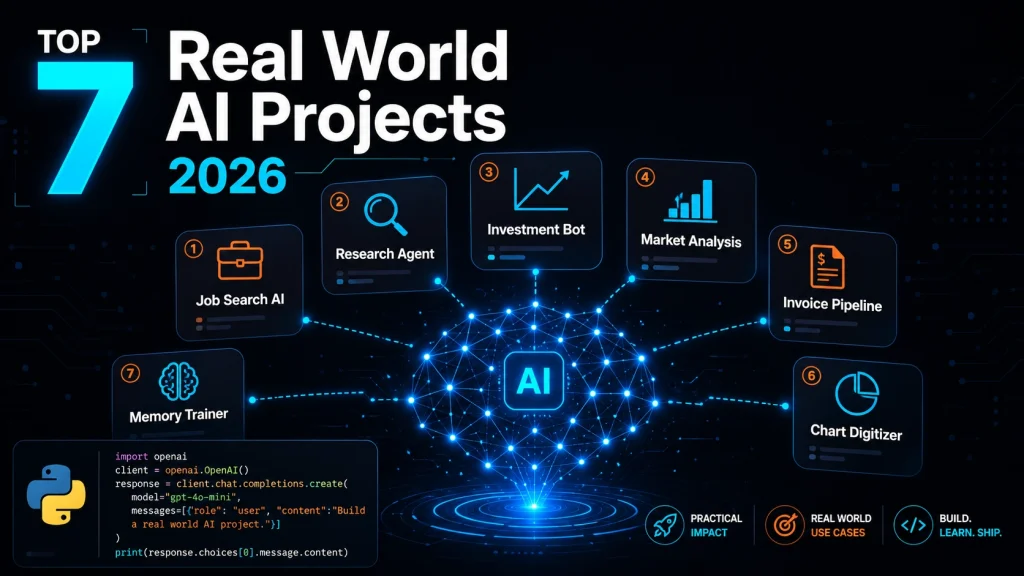
The most beneficial real-world AI projects to build in 2026 include an AI job search assistant, a multi-agent research system, an automated investment research workflow, an agentic market research app, an invoice processing pipeline, a chart digitizer using vision models, and a persistent memory exercise trainer. Individually, each one solves a real workflow problem, which is present with complete code and a GitHub repository, and can be built for under $5 in under an hour.
Key Takeaways
7 practical AI automation projects: Each targeting a specific real-world workflow problem
Tools covered: Kimi K2.6, Claude Opus 4.7, Qwen 3.6 Plus, OpenAI Agents SDK, Olostep, n8n, Supermemory, Gradio
Every project includes a full guide, working code, and GitHub repository
Most projects cost under $5 in API credits and take under one hour to complete
Projects span: job search, web research, investment analysis, market intelligence, invoice processing, data extraction, and personal fitness
You will learn how to design AI agents with tools, context, and goals — not just how to prompt them
All projects are portfolio-ready with public GitHub repos suitable for showcasing to employers
Table of Contents
Introduction
All Real World AI projects are most valuable when they solve actual workflow problems, not when they exist just to showcase the latest AI model or framework without any real-world use case.
The projects in this guide completely focus on practical automation for everyday work. You’ll see that how AI can help with tasks like job hunting, research, invoice processing, market analysis, chart digitization, and building personalized assistants, which are logically repetitive tasks. Instead of spending hours in searching, reading, comparing, copying, and summarizing information, all of these projects show that how AI can take care of much of the repetitive work for you.
Each Real World AI project in this article includes a detailed tutorial, source code, and step-by-step instructions and explanations, which makes it easy for you to build the projects from scratch and adapt them to your own needs.
Top 7 Real World AI Projects to Build in 2026 (With Code & Guides)
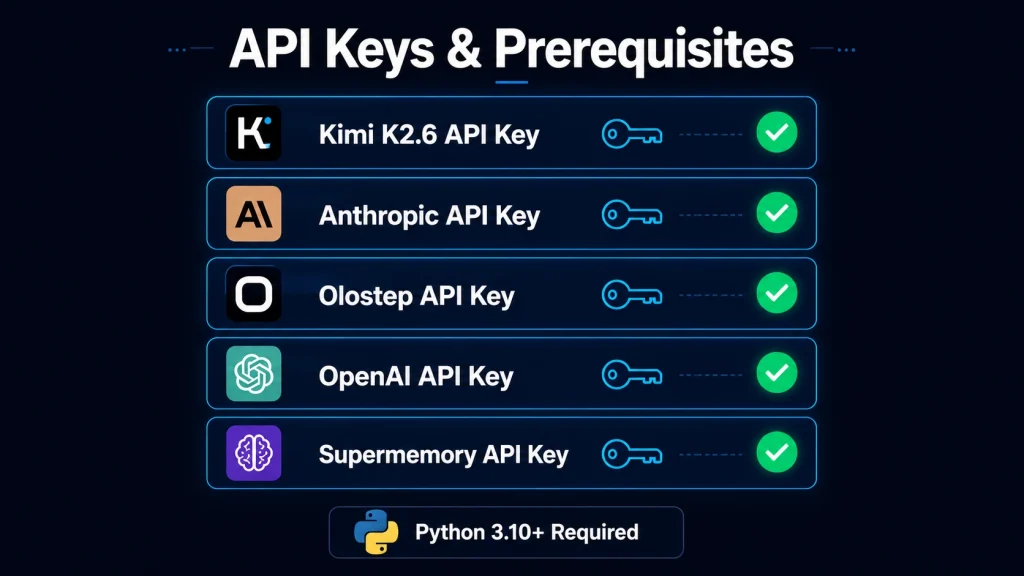
Before You Start: API Keys & Prerequisites for the Real World AI projects
API Keys & Prerequisites for the Real World AI projects
Every project in this list relies on at least one external API. Here is what you will need to set up before running any of the guides.
Basic Python: All projects use Python 3.10+; no ML background required
Familiarity with pip and virtual environments: Each guide lists its dependencies
Comfort calling REST APIs: All projects follow the OpenAI SDK pattern or similar
Skills You Do Not Need To Build AI Projects
Machine learning or model training knowledge
Cloud infrastructure experience (all projects run locally by default)
Any prior experience with AI agents — the guides explain concepts as you build
AI Project 1: To Build an AI Job Search Assistant for Job Hunting
Job searching can feel like a full-time job on its own because it is repetitive in nature. You browse job boards, read endless descriptions, compare them against your CV, and try to decide which opportunities are actually worth pursuing to easily grab them.
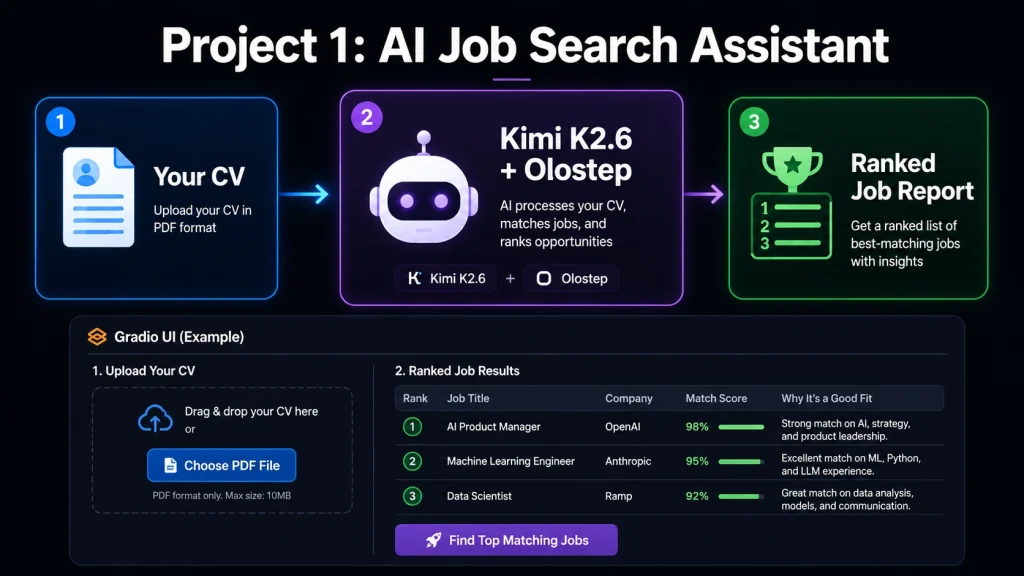
This project automates a process that you handle manually, which we discussed in the above paragraph. You will build JobFit AI, an assistant that reads a candidate’s CV, searches live job listings, reviews job pages, and creates a ranked report showing how well each role matches the candidate’s experience. The tutorial uses Kimi K2.6, Olostep, the OpenAI Agents SDK, and Gradio.
AI Project 1: To Build an AI Job Search Assistant for Job Hunting
Use Olostep to retrieve live job postings from public job boards
Use Kimi K2.6 to score each posting against the CV and return a ranked report via a Gradio web interface.
The OpenAI Agents SDK handles orchestration between the search and ranking steps.
AI Project 2: To Build a Multi-Agent Research Assistant for research
The process of research usually involves several steps, including finding sources, filtering useful information, pulling out key insights, and turning everything into a clear report. While a single AI prompt can help you to do tedious work, using a multi-agent system which gives you much more control and flexibility over this type of work.
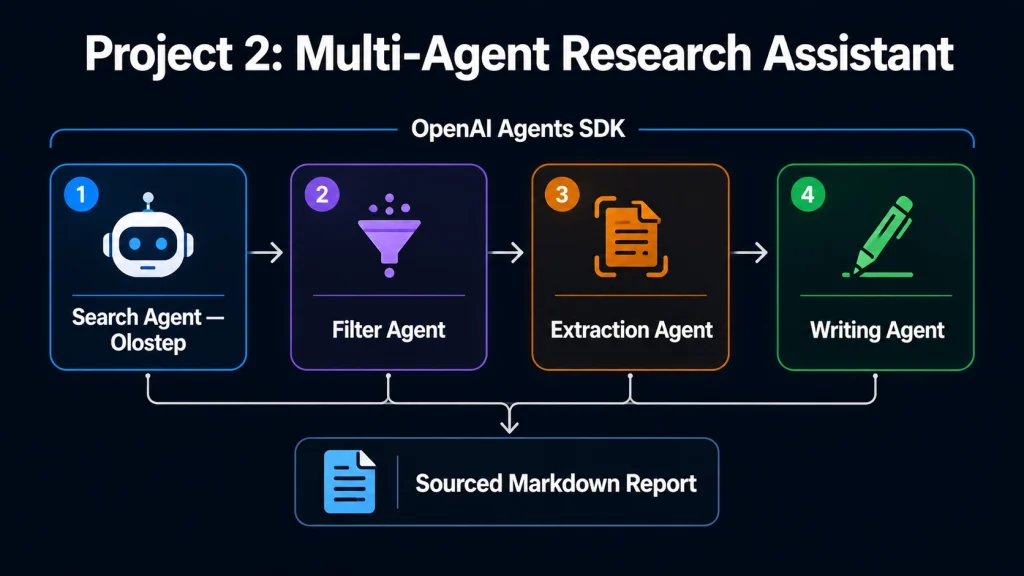
This project walks you through building a research assistant that uses the OpenAI Agents SDK and Olostep. The result is an open-source tool that produces well-structured, source-backed Markdown reports.
AI Project 2: To Build a Multi-Agent Research Assistant for research
The system splits research into different and discrete agents that are responsible for one specified task, such as a search agent that retrieves candidate sources via Olostep, a filter agent that scores relevance, an extraction agent that pulls key facts, and a writing agent that produces the final Markdown report with citations. This modularity means each agent can be upgraded or replaced independently, and every agent is responsible for their specific task, and due to this concept leads to building AI agent orchestration.
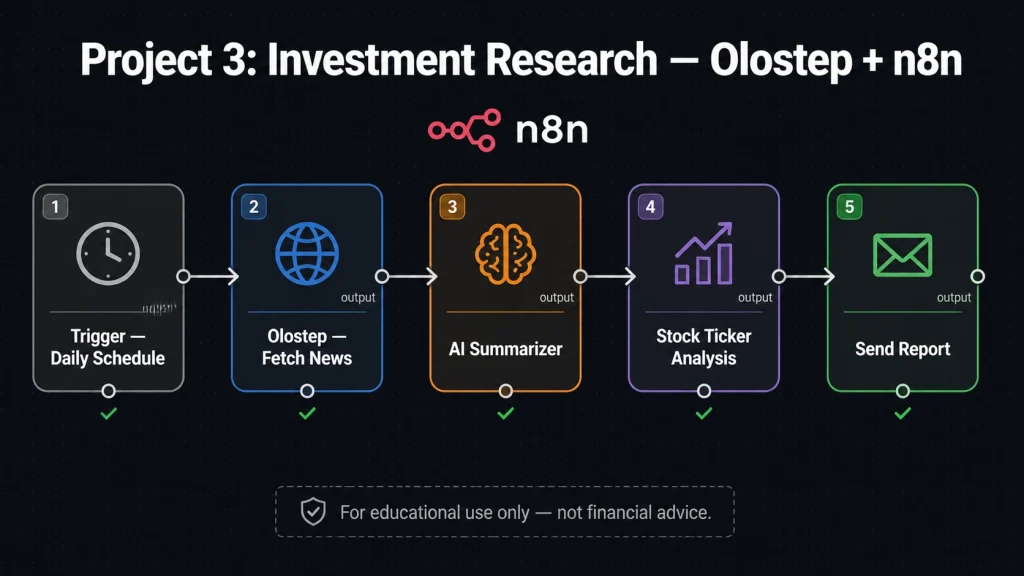
AI Project 3: To Automate Investment Research with Olostep and n8n
Investment research often requires checking company updates, financial news, market commentary, and other public information. Doing such tasks all need manually takes time.
This project shows how to automate the process using Olostep and n8n. You’ll build a workflow that gathers public information, analyzes stock tickers, and generates AI-powered research reports. It’s a great way to learn research automation, though it should be viewed as an educational project, not financial advice.
AI Project 3 To Automate Investment Research with Olostep and n8n
Important: This project is designed for educational and workflow automation learning purposes only. It does not constitute financial advice and should not be the sole basis for investment decisions. Public financial data used in this workflow may be incomplete or delayed. Always consult qualified financial professionals before making investment choices.
Data privacy note: If you adapt this workflow to process private financial data or personal account information, ensure you do not store sensitive data in n8n workflow logs. Review n8n’s data retention settings before deploying with any real credentials.
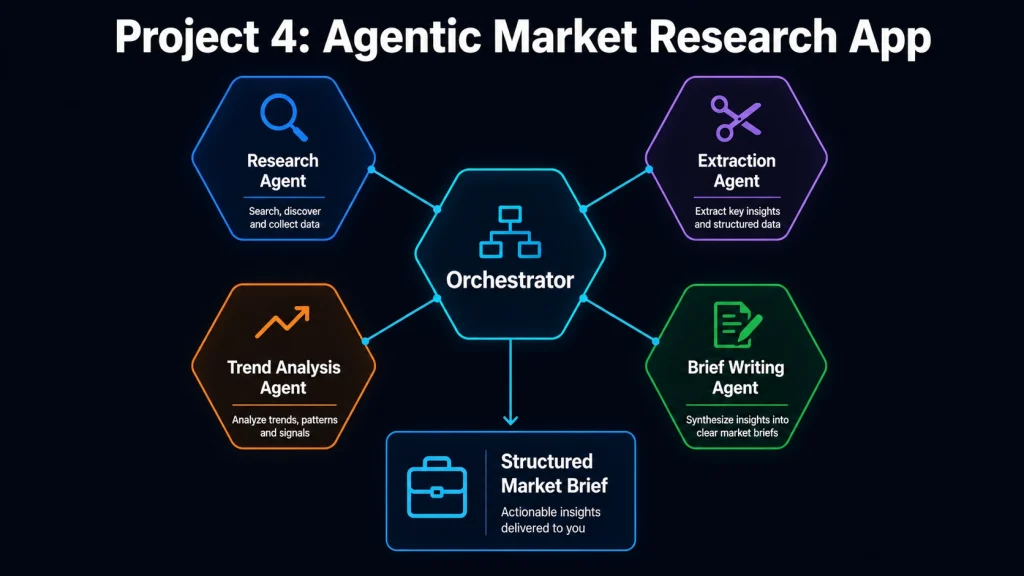
AI Project 4: To Build an Agentic Market Research and Trend Analysis App
The market research process involves gathering of competitor updates, tracking industry trends, and identifying emerging opportunities. The research process can be time-consuming when it is done manually because you will explore the market deeply and with full effort to take care of one task using multiple perspectives, such as user intent about the product, similarly, the intent of the organizations, production teams, and supply teams, etc.
AI Project 4: To Build an Agentic Market Research and Trend Analysis App
In this project, you’ll build an end-to-end market research system using the OpenAI Agents SDK and Olostep. The workflow of these types of tasks relies on specialized agents that handle research, information extraction, trend analysis, and report writing using multiple perspectives.
AI Project 5: To Build an AI Invoice Processing Pipeline
Invoice processing is one of the most practical business applications of AI because it combines document understanding, data extraction, and workflow automation.
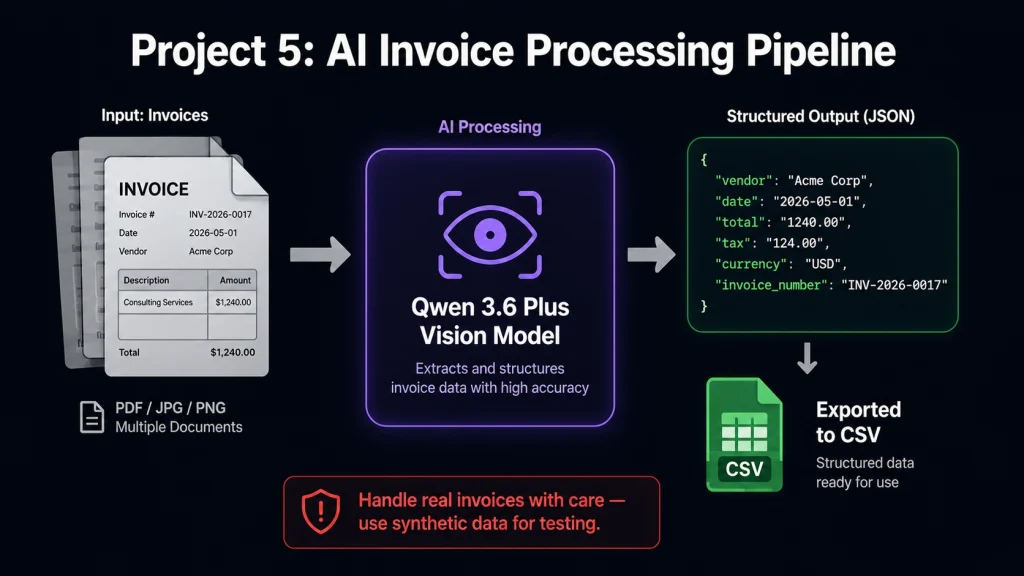
This tutorial uses Qwen 3.6 Plus, Python, and the OpenAI SDK to create an automated invoice processing system. Using built-in vision capabilities and tool calling, the system extracts important information from the invoices and converts it into useful structured data.
AI Project 5: To Build an AI Invoice Processing Pipeline
What You’ll Learn
How to work with vision-enabled AI models
How to process invoice documents automatically
How to extract structured information from files
How to build a real-world business automation workflow
Qwen 3.6 Plus receives invoice images or PDFs as multimodal input. Tool calling is used to define a strict output schema, vendor name, date, line items, totals, and tax, which ensuring the model returns structured JSON rather than free-form text. The pipeline can process batches of invoices and export results to CSV or a database.
Data privacy note: Invoice documents often contain sensitive business information such as vendor names, banking details, and contract amounts. When building this pipeline for real use, process documents locally where possible and avoid logging raw invoice content to external services. Do not send real customer or supplier invoices to any API during testing; use synthetic or anonymized documents instead.
AI Project 6: To Build a Chart Digitizer with Claude Opus 4.7
A useful and surprising amount of valuable data is locked inside the charts, screenshots, and PDF documents. Extracting that information manually can be tedious and error-prone, too.
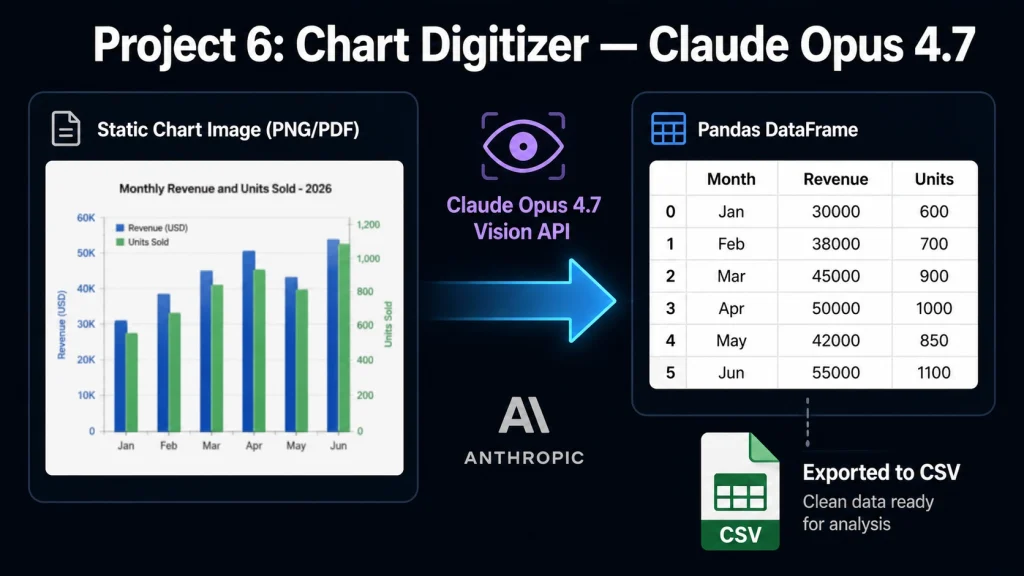
This DataCamp tutorial shows you how to build a Python-based chart digitizer using Claude Opus 4.7. The application reads chart images, identifies axes, extracts data points, and saves the results as a Pandas DataFrame or CSV file. Along the way, you’ll also learn about Claude’s advanced vision features, adaptive reasoning, and structured outputs.
AI Project 6: To Build a Chart Digitizer with Claude Opus 4.7
Claude Opus 4.7 is a multimodal AI model developed by Anthropic. It supports high-resolution image input, making it well-suited for tasks that require visual reasoning, such as reading charts, diagrams, scanned documents, and screenshots. Its adaptive thinking and high effort level features allow the model to allocate more reasoning capacity to complex extraction tasks.
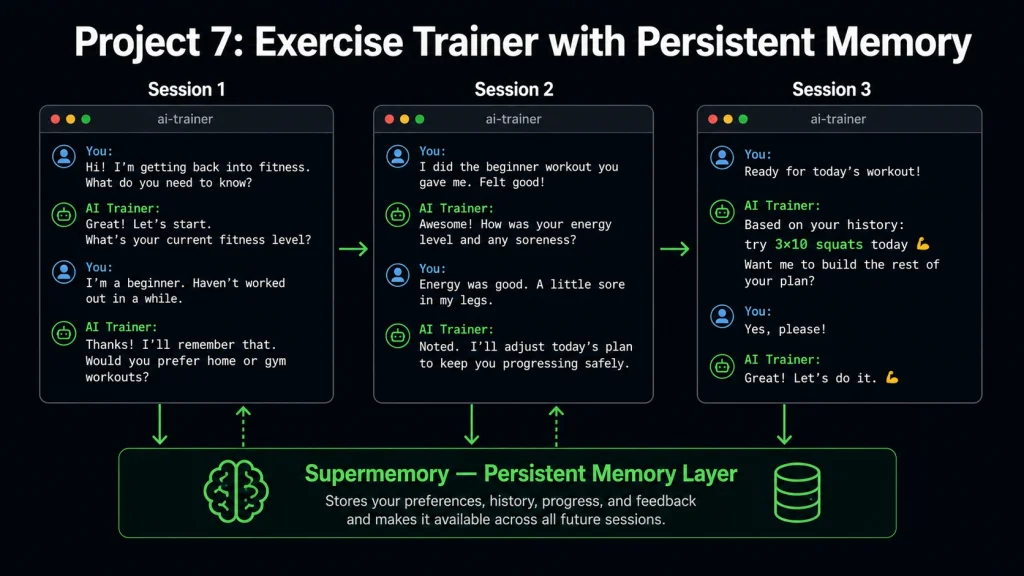
AI Project 7: To Build an Exercise Trainer with Persistent Memory
Most AI assistants start every conversation with a blank slate. Persistent memory changes that allow them to remember user preferences, past activity, and previous interactions.
In this project, you’ll use Supermemory to build a Python-based exercise trainer that tracks workouts, remembers user history, and recommends personalized training sessions over time.
AI Project 7: To Build an Exercise Trainer with Persistent Memory
What You’ll Learn
How persistent memory works in AI systems
How to store and retrieve user-specific information
How to build assistants that improve over multiple sessions
How to personalize experiences without repeatedly entering the same context
Supermemory is a persistent memory infrastructure tool for AI agents. It provides an API for storing and retrieving user-specific facts, conversation history, and preferences, which enabling AI agents to maintain continuity across separate sessions. This is distinct from in-context memory (which only lasts for a single session) and fine-tuning (which is permanent and costly to update).
Which Project Should You Build First?
Use this decision guide to pick the right starting point based on your experience and goals.
Directly solves your own problem; beginner-friendly
A Python developer new to multi-agent systems
Project 2 (Research Assistant)
Clean SDK pattern, well-documented
Interested in no-code / low-code automation
Project 3 (Investment Research)
Uses n8n visual workflow builder
Working in finance or business analytics
Project 4 (Market Research)
Specialist agents, structured brief output
Building business automation tools
Project 5 (Invoice Pipeline)
Vision + structured extraction — strong portfolio signal
Working with data locked in charts or PDFs
Project 6 (Chart Digitizer)
Claude Opus 4.7 vision API — unique skill to showcase
Full Project Comparison: Tools, Difficulty, Cost & Time
Project
Domain
Primary Tools
Difficulty
Est. API Cost
Est. Build Time
AI Job Search Assistant
Career / HR
Kimi K2.6, Olostep, OpenAI Agents SDK, Gradio
Beginner
<$2
~45 min
Multi-Agent Research Assistant
Research
OpenAI Agents SDK, Olostep
Intermediate
<$3
~1 hr
Investment Research Workflow
Finance
Olostep, n8n
Beginner–Intermediate
<$2
~1 hr
Agentic Market Research App
Business Intelligence
OpenAI Agents SDK, Olostep
Intermediate
<$3
~1 hr
AI Invoice Processing Pipeline
Business Automation
Qwen 3.6 Plus, Python, OpenAI SDK
Intermediate
<$2
~45 min
Chart Digitizer
Data Extraction
Claude Opus 4.7, Python, Pandas
Intermediate
<$3
~1 hr
Exercise Trainer w/ Persistent Memory
Personal Productivity
Supermemory, Python
Beginner
<$1
~30 min
Cost estimates are based on tutorial-scale API usage as described by the author. Actual costs depend on model usage and provider pricing at the time of build.
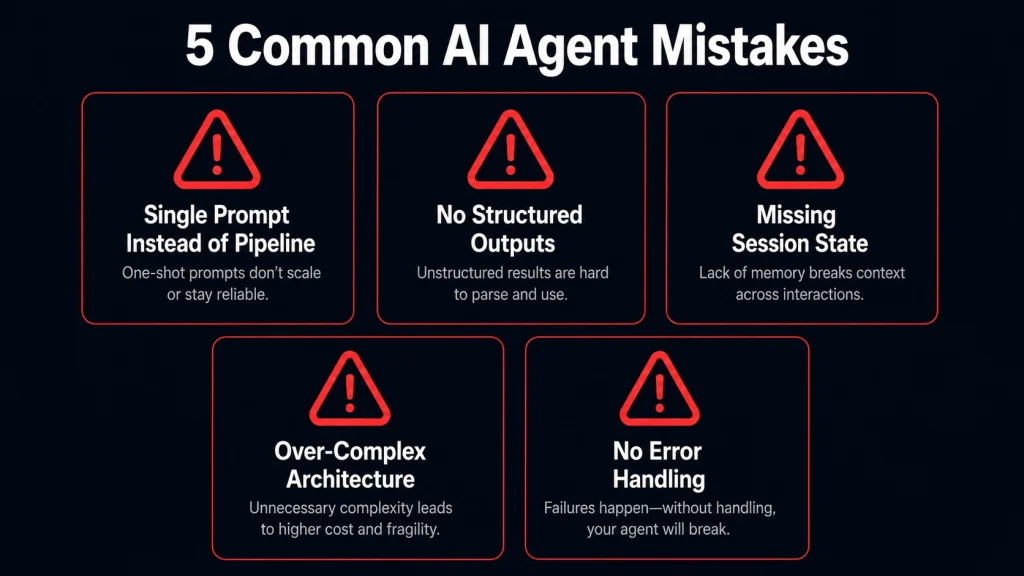
Common Mistakes to Avoid When Building AI Agents
Using a single prompt instead of a pipeline, complex workflows, research, invoice extraction, and market analysis break down when you try to handle them in one prompt. Break the task into discrete steps, and assign each step to an appropriate agent or function.
Ignoring structured outputs, free-form LLM responses are hard to process downstream. Always use tool calling, JSON schemas, or output parsers to enforce structure, especially for data extraction tasks like invoices and charts.
Not handling session state. If your agent forgets everything between runs, it cannot personalize or improve. Tools like Supermemory address this directly. Plan for persistence from the start, not as an afterthought.
Over-complicating the agent architecture.Multi-agent systems are powerful, but unnecessary complexity adds latency, cost, and debugging overhead. Start with the simplest architecture that solves the problem, and add agents only when a single-agent approach hits clear limitations.
Skipping error handling on API calls. Web research tools, vision models, and memory APIs can all fail or return unexpected results. Always include fallback logic, retry mechanisms, and output validation in production-adjacent projects.
Common Mistakes to Avoid When Building AI Agents
How to Deploy These Projects
All seven projects are designed to run locally on your machine by default. Once you have a working version, there are several options for sharing, extending, or running them continuously.
Running Locally (Default for All Projects)
Every guide in this list is designed to run with python script.py or via a local Gradio interface. This is the right starting point: get it working locally before thinking about deployment.
Sharing Your Project
Gradio Share Link (Projects 1, 4): Gradio has a built-in share=True flag that creates a temporary public URL for your interface. Run demo.launch(share=True) and share the link with collaborators for up to 72 hours — no infrastructure required.
GitHub + README: The simplest way to make any project accessible is a well-documented GitHub repo with a clear setup guide. All projects in this list already have repos you can fork and extend.
Light Cloud Deployment
Hugging Face Spaces works well for Gradio-based projects (Projects 1 and 4). Push your code and a requirements.txt, and the Space runs your app publicly for free.
Railway or Render are good options for Python scripts that need to run on a schedule (Projects 3 and 4). Both offer free tiers suitable for low-volume automation.
n8n Cloud (Project 3) offers a hosted version of n8n so you can run your investment research workflow without managing a server. The free tier supports basic automations.
A Note on Production Use
These projects are built as educational prototypes, not hardened production systems. Before running any of them on real business data, review the API key security, add input validation, and consider rate limiting. Projects that process sensitive documents (Projects 3 and 5) require additional care around data storage and logging.
Which Projects Are Best for Your Portfolio?
All seven projects include public GitHub repositories, which makes them directly shareable in a portfolio or referenced in technical interviews. That said, some signal more valuable skills than others depending on the role you are targeting.
Best for AI / ML Engineer Roles
Project 2 (Multi-Agent Research Assistant) and Project 4 (Market Research App) demonstrate multi-agent orchestration, the single most in-demand agentic AI skill in 2026 hiring. Being able to explain how you structured agent roles, managed state, and handled failure modes is a strong technical differentiator.
Project 6 (Chart Digitizer) demonstrates multimodal AI and structured output enforcement — two skills that appear frequently in job descriptions for AI engineers working on document intelligence.
Best for Data / Business Analyst Roles
Project 5 (Invoice Pipeline) and Project 3 (Investment Research) show that you can build end-to-end automation for real business processes, not just toy demos. Analysts who can ship automation tools are consistently more valuable than those who only consume them.
Best for Generalist Developers Entering AI
Project 1 (Job Search Assistant) is the strongest portfolio project for someone entering AI from a general software background. It is beginner-friendly, visually demonstrable via Gradio, and directly relevant to a problem anyone can relate to.
Strongest Overall Portfolio Signal
Building three or more of these projects and organizing them in a single GitHub profile with clear READMEs, screenshots, and documented design decisions consistently outperforms a portfolio of ten half-finished tutorials. Quality and explainability matter more than quantity.
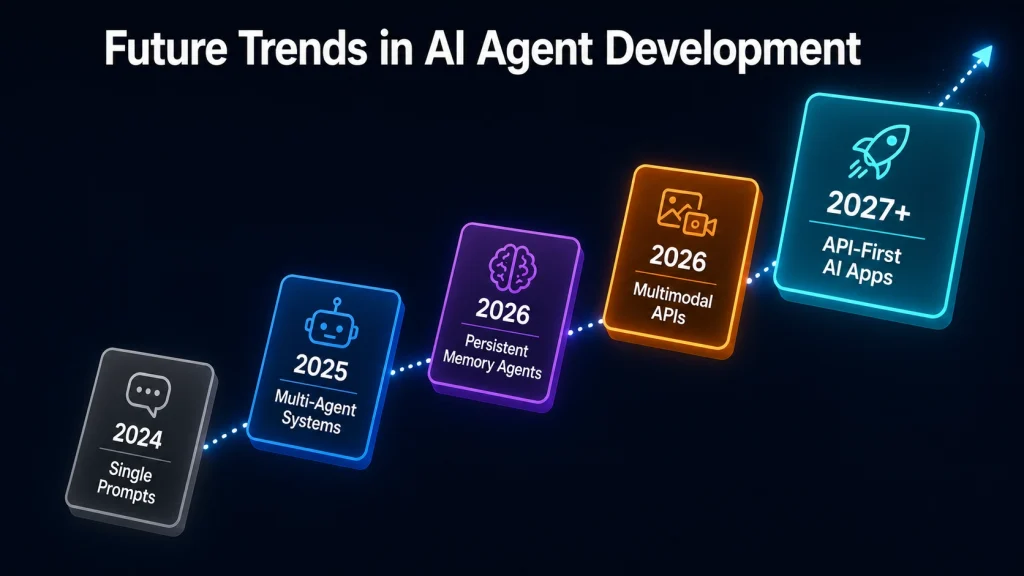
Future Trends in AI Agent Development
The projects in this article reflect several directions shaping AI development in 2026 and beyond.
Future Trends in AI Agent Development
Persistent, cross-session memory will become a standard feature of AI assistants, not an advanced add-on. Tools like Supermemory signal the broader trend toward agents that accumulate knowledge over time.
Multimodal inputs as standard — vision-capable models (Claude Opus 4.7, Qwen 3.6 Plus) are now accessible via API. Document processing, chart analysis, and image understanding are moving from specialist ML tasks to general developer tools.
Agentic pipelines replacing single-step automation — n8n, OpenAI Agents SDK, and similar orchestration tools are enabling non-ML developers to build sophisticated, multi-step AI workflows without writing model code.
Cost and accessibility — as this article demonstrates, production-adjacent AI projects can be built for under $5. The barrier to entry for applied AI has dropped dramatically, enabling developers, researchers, and analysts to automate high-value workflows with minimal upfront investment.
API-first AI development — the pattern used across all 7 projects (call an API, process the output, chain to the next step) is becoming the dominant model for AI application development, replacing the earlier era of fine-tuning and model hosting.
Final Thoughts
Most of the projects on this list were created by Abid Ali, with a strong focus on practicality, simplicity, and reproducibility. I wanted them to be easy to set up while still solving meaningful problems.
The other projects were chosen for the same reason. They’re not flashy demos built to impress for a few minutes. They tackle real-world challenges in areas like research, document processing, job searching, market analysis, and personal productivity.
Thanks to today’s AI models, memory systems, and web automation tools, many of these projects can be built for less than $5 and in under an hour if you follow the tutorials carefully.
More importantly, they help you understand how modern AI agents actually work. Instead of hard-coding every step, you learn how to give agents the right tools, context, and objectives so they can make decisions, adapt to tasks, and handle work more intelligently.
Frequently Asked Questions
What skills do I need to build these AI projects in 2026?
You need basic Python programming knowledge and familiarity with calling REST APIs. Most projects use the OpenAI SDK pattern, which is consistent across providers. No machine learning background is required; these are application-layer projects that use pre-trained models via APIs.
How much does it cost to build these AI projects?
Most of these projects can be built for less than $5 in API credits if you follow the guides properly. Costs vary by model. Claude Opus 4.7 and GPT-4-class models are more expensive per token than smaller models, but for tutorial-scale usage, costs remain minimal. The cheapest project (Exercise Trainer) costs under $1 in Supermemory API calls.
Can beginners build these AI projects?
Yes. Each project comes with a complete guide, working code, and a GitHub repository. Beginners with basic Python knowledge can follow the step-by-step explanations. More advanced concepts like multi-agent orchestration and persistent memory are explained progressively within each guide. Projects 1 and 7 are the most accessible starting points.
What is a multi-agent AI system, and why is it better than a single prompt?
A multi-agent system uses multiple specialized AI agents, each with a distinct role, to complete a workflow. Unlike a single prompt, a multi-agent approach gives you more control: each agent handles one task (searching, filtering, writing), making the system more reliable, debuggable, and extendable.
What is persistent memory in AI agents, and why does it matter?
Persistent memory allows an AI agent to remember information, such as user preferences, past interactions, or previous outputs, across separate sessions. Most AI agents forget everything when a session ends. Tools like Supermemory solve this by storing and retrieving user-specific facts, enabling agents to personalize their outputs without requiring users to re-enter context every time.
What is Olostep, and how is it different from a web scraper?
Olostep is an AI-native web research API designed to retrieve structured, clean content from live web pages for AI processing. Unlike traditional scrapers that return raw HTML, Olostep is optimized for feeding content directly into language model workflows, making it well-suited for research agents, investment monitors, and market analysis pipelines.
Are these AI projects suitable for a developer portfolio?
Yes. These projects demonstrate practical, production-adjacent skills: API integration, agentic workflow design, multimodal document processing, and memory-augmented AI systems. Each has a public GitHub repository, which makes them directly shareable in a portfolio or referenced during technical interviews. Projects 2, 4, and 6 carry the strongest signal for AI engineering roles specifically.
Can I deploy these projects beyond my local machine?
Yes. Projects using Gradio (1 and 4) can be shared instantly via Gradio’s built-in share=True flag, or deployed permanently to Hugging Face Spaces for free. Scheduled workflows (Project 3) can run on Railway, Render, or n8n Cloud.