Python course · Module 1: Getting started · Lesson 1 of 63
Quick answer: Python is a free, general-purpose programming language that is easy to read. People use Python for websites, data analysis, AI and machine learning, automating boring tasks, science, and teaching programming. It is a good first language because the code looks close to plain English, for example print("Hello, Python!"). It is not the best choice when a program must run as fast as possible, or for code that runs inside a web browser.
In this lesson you will learn:
what Python is, in simple words
what Python is used for in real work
why many beginners pick Python as their first language
what Python is not good at
what “interpreted” means, and how Python runs your code
Before you start: you do not need any previous lesson. This is the first lesson of the course.
Table of Contents
What is Python?
Python is a programming language. You write instructions in a text file, and a program called the Python interpreter reads them and carries them out.
The official Python FAQ describes Python as “an interpreted, interactive, object-oriented programming language” that “combines remarkable power with very clear syntax”. In beginner words:
Interpreted: you run your code directly. You do not build a separate program file first.
Interactive: you can type one line and see the result at once. You will try this in Lesson 3.
Object-oriented: a way to organise bigger programs, covered much later.
Python runs on Windows, macOS and Linux. It is free to use, also for commercial work, under its open source license (see the same FAQ). The name comes from the BBC comedy show “Monty Python’s Flying Circus”, not from the snake, as the official tutorial says.
At the time of writing (November 2026), the newest stable version is Python 3.15.2, released on 25 October 2026, according to the python.org downloads page. All examples in this lesson were tested on Python 3.14.6, and they work the same on newer Python 3 versions: we ran them again on Python 3.15.2 and got exactly the same output.
A first look at Python code
Here is the smallest useful Python program. It prints a message on the screen.
print("Hello, Python!")
Hello, Python!
print() is a built-in function that shows what you put inside the brackets. Text inside quotes is a string; the quotes are not printed.
Now a slightly bigger example. Imagine you bought three things and you want the total price.
prices = [120, 80, 45]
total = sum(prices)
print("Total:", total)
Total: 245
You can almost read this out loud: “prices is a list of three numbers; total is the sum of prices; print the total”. This is the main reason people like Python: the code is short and says what it does.
One more example shows a small “automation” job: counting words in a sentence.
text = "python is easy to read and python is fun"
words = text.split()
print("Words:", len(words))
print("Times 'python' appears:", words.count("python"))
Words: 9
Times 'python' appears: 2
split() cuts the sentence into words, len() counts them, and count() counts one word. Do not try to remember this now; each idea gets its own lesson later.
What is Python used for?
The python.org page Applications for Python lists the main areas. Here they are, with the tools it names:
Area
What people build
Example tools
Web and internet
websites and web APIs (the server side)
Django, Flask
Science and numbers
data analysis, maths, research
pandas, SciPy
Education
teaching programming
beginner books and courses
Desktop apps
windows, buttons and forms
Tk, wxWidgets
Software development
build tools, testing, automation
SCons, Buildbot
Business
company software such as ERP systems
Odoo, Tryton
Two more uses matter a lot for readers of this site:
Data science, AI and machine learning. Libraries such as pandas, scikit-learn and PyTorch are used from Python, so most data and AI courses start with Python. Our overview Python for data science shows which parts of Python matter most for that path. If AI is your goal, the machine learning roadmap shows where Python fits, and the data science roadmap covers the data path.
Automation and scripts. Small scripts can rename files or clean a spreadsheet. Python’s large standard library covers text, files, internet protocols and the operating system (official FAQ), so many jobs need no extra install.
Why do beginners pick Python?
The Python FAQ asks “Is Python a good language for beginning programmers?” and answers “Yes”. It gives these reasons: Python has “a very simple and consistent syntax and a large standard library”, so students can focus on solving problems instead of fighting the language.
The tutorial adds that Python programs “are typically much shorter than equivalent C, C++, or Java programs”. Shorter code means fewer places for mistakes.
You can also test ideas one line at a time, error messages often suggest a fix, and the same basics carry over to web, data and AI work.
What Python is not good at
Python is not the right tool for every job:
Raw speed. The official Python glossary says interpreted languages have a shorter development cycle, “though their programs generally also run more slowly”. For heavy number work, libraries such as NumPy run the slow part in “pre-compiled C code” (What is NumPy?), which is why Python is still popular for data work.
Code inside the web browser. Browsers run JavaScript. Python usually runs on the server side of a website, not in the page the visitor sees.
Phone apps. The Python on Android page explains that Python on Android “is unlike Python on desktop platforms”: you must package Python inside an app, often with extra tools such as BeeWare’s Briefcase or Kivy’s Buildozer. It works, but it is not the usual first choice for phone apps.
Interpreted vs compiled, in simple words
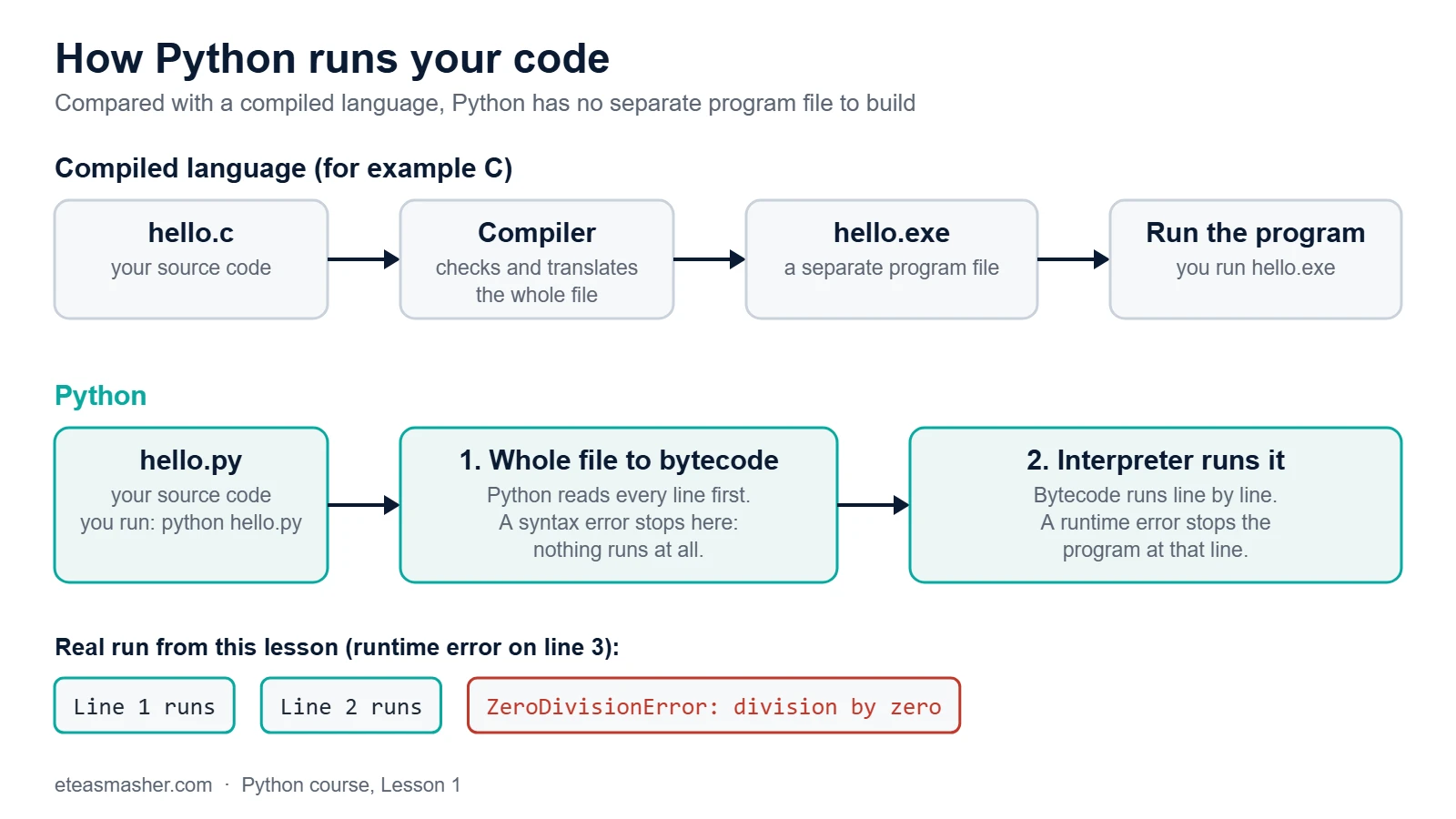
With a compiled language such as C, you first turn your whole program into a separate program file (for example an .exe on Windows). Then you run that file.
With Python, you just run your .py file. Behind the scenes, Python first turns your code into bytecode, a simpler internal form, and then the interpreter runs that bytecode step by step. The glossary says this clearly: Python is interpreted, “though the distinction can be blurry because of the presence of the bytecode compiler”.
Python checks the whole file first (bytecode), then runs it line by line. That is why a syntax error stops everything, but a runtime error stops at its line.
You can see both steps with two tiny scripts. In the first one, line 3 divides by zero, which is not allowed.
Line 1 runs
Line 2 runs
Traceback (most recent call last):
  File "/home/learner/python-course/step4_runtime_error.py", line 3, in <module>
    print(10 / 0)
          ~~~^~~
ZeroDivisionError: division by zero
Lines 1 and 2 ran. The program stopped at line 3, while running. The long message is a traceback: it shows the file, the line number and the error type. (On your computer, the path shows your own folder.)
In the second script, line 2 is missing its closing bracket.
  File "/home/learner/python-course/step5_syntax_error.py", line 2
    print("Line 2 runs"
         ^
SyntaxError: '(' was never closed
This time nothing was printed, not even line 1. Python turns the whole file into bytecode before running anything, and a broken bracket means it cannot do that. This is a syntax error: the code breaks Python’s grammar rules. A syntax error stops everything; a runtime error stops the program at its line.
Try it yourself
Do these after Lesson 3, when you can run a script.
Exercise 1: Say hello
Write a program with two print() lines: one with your name, one with why you want to learn Python.
Exercise 2: Change the shopping list
Change the prices example to use four prices: 250, 99, 30 and 15. Print the total and the number of items (hint: len()).
Exercise 3: Find which lines run
Predict the output of this program before you run it. Which lines print, and why does it stop?
Start
Middle
Traceback (most recent call last):
  File "/home/learner/python-course/solution3_find_the_error.py", line 3, in <module>
    print(total)
          ^^^^^
NameError: name 'total' is not defined
Line 3 uses the name total, which was never created, so the program stops there and “End” never prints.
Common mistakes
Following old Python 2 tutorials. Old code writes print "Hello" without brackets. Python 3 gives: SyntaxError: Missing parentheses in call to 'print'. Did you mean print(...)? Always use a tutorial for Python 3.
Using a capital letter.Print("Hello") fails with NameError: name 'Print' is not defined. Did you mean: 'print'? Python cares about upper and lower case.
Forgetting a closing quote.print("Hello) fails with SyntaxError: unterminated string literal (detected at line 1). Every string needs an opening and a closing quote.
Trying to learn every use at once. Web, data, AI and automation all use the same basics. Learn the basics first; pick a field later.
Frequently asked questions
Is Python free to use?
Yes. Python is open source and free, also for commercial work. The official FAQ says you may even sell products that include Python, as long as you keep its copyright notices.
Can I learn Python with no programming experience?
Yes. The Python FAQ says Python is a good first language because its syntax is simple and consistent. This course assumes no experience and moves in small steps.
Is Python a compiled or an interpreted language?
Python is called an interpreted language because you run your source files directly, without making a separate program file. Inside, Python first compiles your code to bytecode and then runs it, which is why the glossary says the difference is “blurry”.
Summary
Python is a free, easy-to-read, general-purpose programming language.
It is used for web servers, data analysis, AI and machine learning, automation, science, desktop apps and teaching.
Beginners pick it for its simple syntax, short code and large standard library.
It is not ideal for maximum speed, browser code or phone apps.
Python turns your file into bytecode first, so a syntax error stops everything, while a runtime error stops at its line.