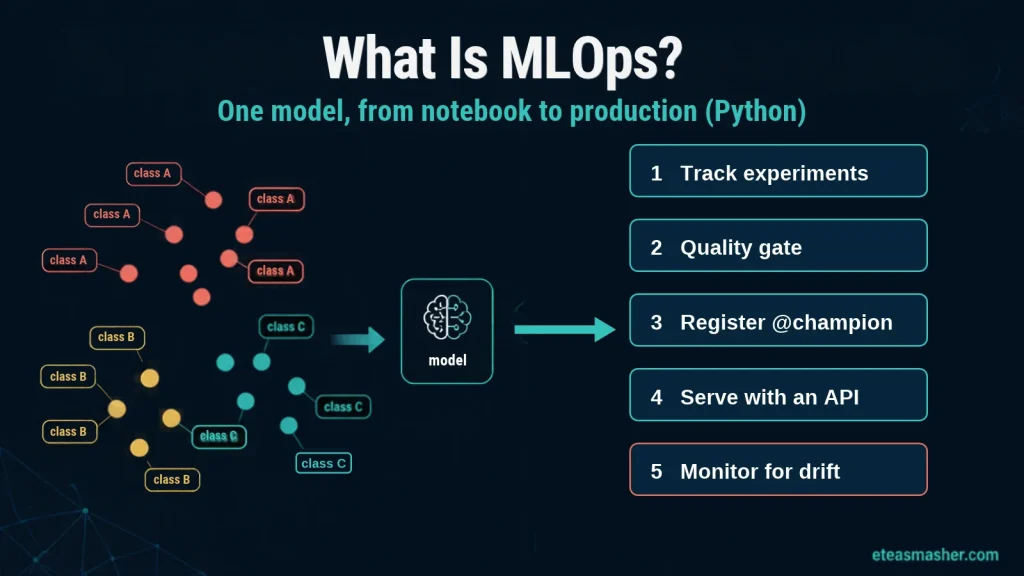
Quick answer: MLOps (machine learning operations) is the set of practices and tools that take a machine learning model out of a notebook and keep it working in production. It covers tracking experiments, testing models before release, versioning and registering them, deploying them behind an API, and monitoring them for data drift so you know when to retrain. Where DevOps manages code, MLOps also has to manage data and models, which change in ways ordinary software does not.
Ask “what is MLOps?” and most guides answer with the lifecycle stages and a long table of tools. This one takes a single model through those stages in Python. We will use the wine classifier from our supervised vs unsupervised learning guide: track two candidate models with MLflow, block any model below a quality bar, register the winner, serve it with FastAPI, and catch a data drift problem before the labels arrive. Every output shown below comes from running the code.
Table of Contents
What is MLOps?
MLOps is to machine learning what DevOps is to software: a way of working that makes releasing and running models repeatable instead of a one-off manual effort. Google Cloud describes it as practices for managing the full machine learning lifecycle, from development to deployment and monitoring.
The need comes from a simple fact. A model is not finished when it scores well in a notebook. Once it is live, the world it predicts keeps changing, new data arrives, someone retrains it, and a different version ends up in production. Without MLOps, nobody can answer basic questions such as “which model is running right now?”, “what data was it trained on?” or “is it still accurate?”
The problem was described well in Google’s 2015 paper Hidden Technical Debt in Machine Learning Systems. Its best-known figure shows that in real-world ML systems, the model code is only a small part; most of the work is the surrounding data collection, configuration, serving and monitoring. MLOps is the discipline for that surrounding work.
MLOps vs DevOps
MLOps borrows a lot from DevOps (version control, automated testing, CI/CD, monitoring) but adds problems that only appear when the behavior of a system is learned from data.
| DevOps | MLOps | |
|---|---|---|
| What changes | Code | Code, data and models |
| What can break silently | Less often: bad code usually throws errors | Often: a model keeps returning answers while its accuracy falls |
| Testing | Unit and integration tests on code | Code tests plus data validation and model quality checks |
| Versioning | Source code | Source code, datasets, model files and their metrics |
| Release cycle | Build and deploy the app | Retrain, evaluate, register and deploy the model, often on a schedule |
| Monitoring | Uptime, errors, latency | All of those, plus input drift and prediction quality |
Google’s architecture guide adds a third practice to CI and CD: continuous training (CT), meaning models are retrained and redeployed automatically when new data or a drop in quality calls for it.
The MLOps lifecycle
A model in production goes round a loop rather than a straight line:
- Prepare data: collect, clean and validate the training data.
- Train and track: run experiments and record the code, parameters, data and metrics of each one.
- Validate: test the best candidate against a quality bar before anyone can ship it.
- Register: store the approved model with a version number, so you always know which model is which.
- Deploy: serve the model, usually behind an API or inside a batch job.
- Monitor: watch the inputs and predictions for drift and errors, and feed problems back to step 1.
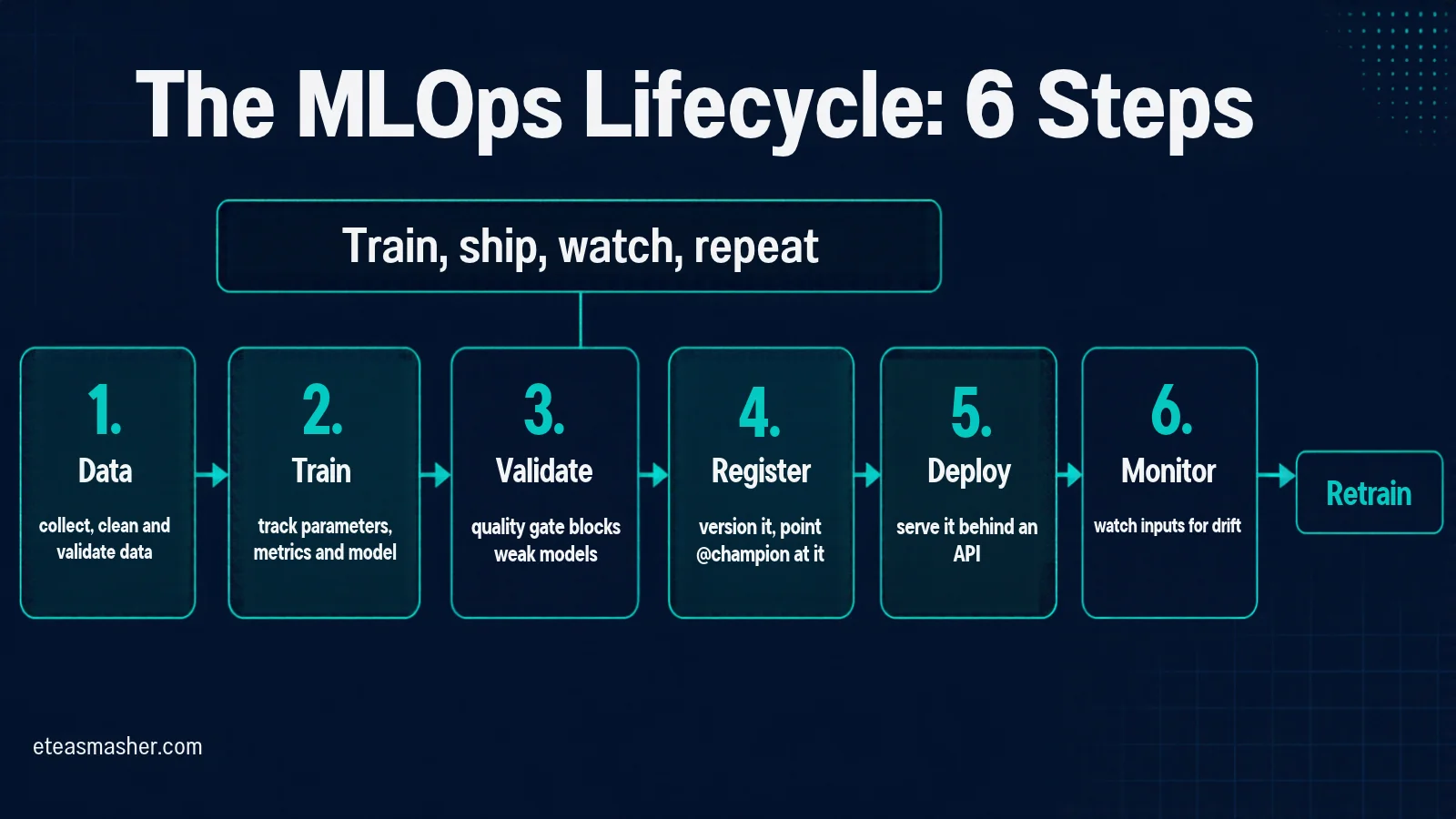
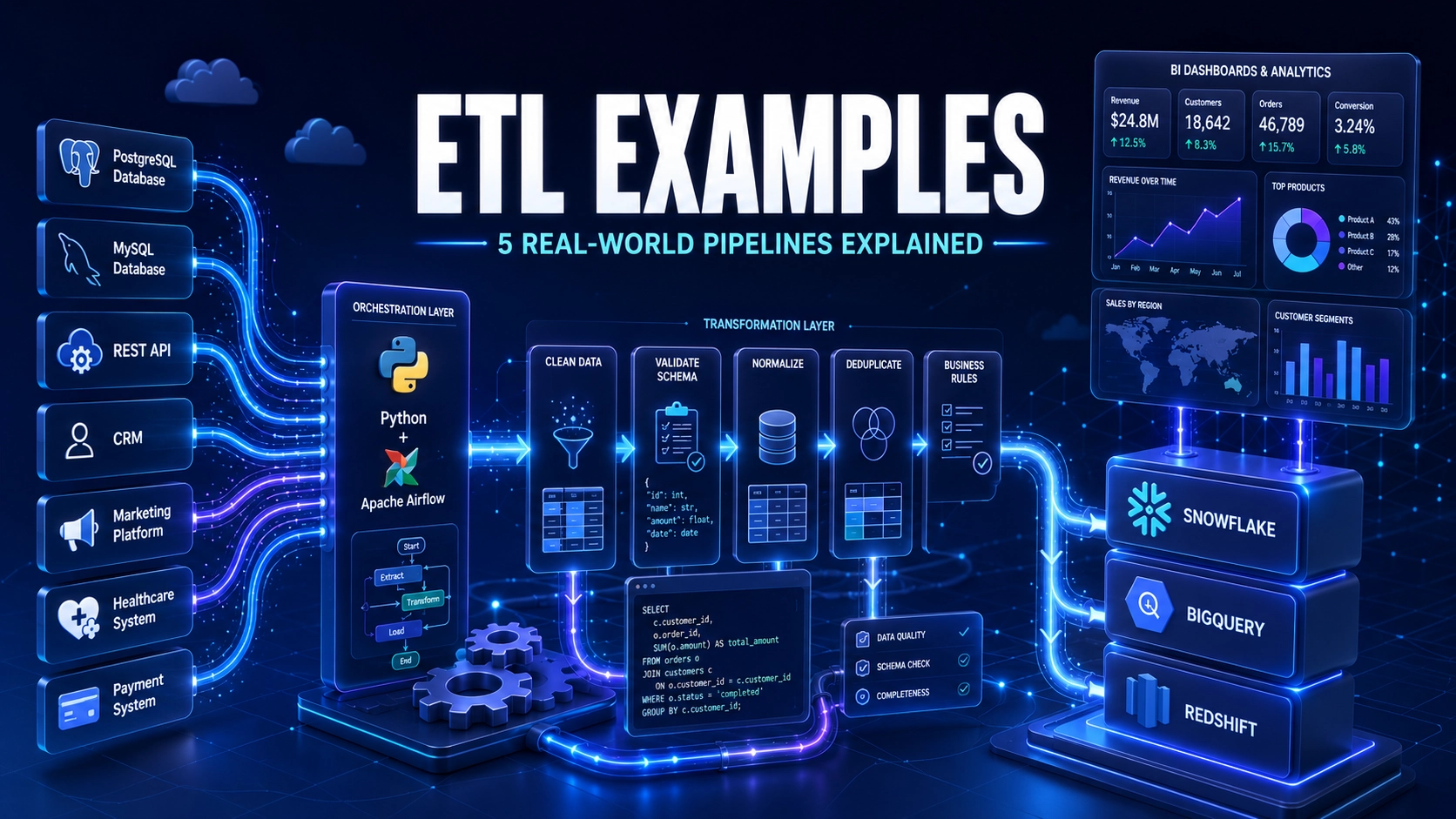
The worked example below follows steps 2 to 6. Step 1 is the subject of data engineering; our ETL examples show what that work looks like in practice.
One model from notebook to production, step by step
You need Python 3.11 or later and three packages (the standard extra adds the FastAPI command-line tool, the Uvicorn server and HTTPX for testing):
pip install scikit-learn mlflow "fastapi[standard]"The example uses the wine dataset built into scikit-learn (178 wines, 13 chemical measurements, 3 grape varieties), so nothing needs downloading. It was run with scikit-learn 1.9.1, MLflow 3.18.0 and FastAPI 0.162.0.
Step 1: Train candidates and track every run
In a notebook, results live in cell outputs and disappear. An experiment tracker records each run (its parameters, metrics and the trained model file) so you can compare runs and reproduce any of them later. MLflow is one of the most widely used open-source options.
# step1_train_track.py
import mlflow
from sklearn.datasets import load_wine
from sklearn.model_selection import train_test_split, cross_val_score
from sklearn.pipeline import make_pipeline
from sklearn.preprocessing import StandardScaler
from sklearn.linear_model import LogisticRegression
from sklearn.ensemble import RandomForestClassifier
from sklearn.metrics import accuracy_score

mlflow.set_tracking_uri("sqlite:///mlflow.db")   # every run is saved in this local file
mlflow.set_experiment("wine-classifier")

X, y = load_wine(return_X_y=True, as_frame=True)
X_train, X_test, y_train, y_test = train_test_split(
    X, y, test_size=0.25, random_state=42, stratify=y)

candidates = {
    "logreg": make_pipeline(StandardScaler(), LogisticRegression(C=1.0, max_iter=1000)),
    "forest": RandomForestClassifier(n_estimators=200, max_depth=5, random_state=42),
}

for name, model in candidates.items():
    with mlflow.start_run(run_name=name):
        cv_acc = cross_val_score(model, X_train, y_train, cv=5).mean()
        model.fit(X_train, y_train)
        test_acc = accuracy_score(y_test, model.predict(X_test))

        mlflow.log_param("model_type", name)
        mlflow.log_metrics({"cv_accuracy": cv_acc, "test_accuracy": test_acc})
        # MLflow saves scikit-learn models in the safer "skops" format by default.
        # Tree models need their tree type marked as trusted (we built it ourselves).
        mlflow.sklearn.log_model(
            model, name="model", input_example=X_train.head(3),
            skops_trusted_types=["sklearn.tree._tree.Tree"] if name == "forest" else None)
        print(f"{name:7s} cv_accuracy={cv_acc:.3f}  test_accuracy={test_acc:.3f}")
logreg cv_accuracy=0.985 test_accuracy=1.000
forest cv_accuracy=0.970 test_accuracy=1.000Both models score 100% on the 45-wine test set, so the test set alone cannot separate them. Cross-validated accuracy on the training data can: 98.5% for logistic regression against 97.0% for the random forest. Run mlflow ui --backend-store-uri sqlite:///mlflow.db and open the address it prints to compare the two runs side by side.
One current detail is worth knowing. Recent MLflow versions save scikit-learn models in the skops format by default (outside Databricks) because, unlike Python’s pickle, it is designed so that loading a model file does not run hidden code, as long as you only trust types you have checked. The catch is that skops refuses model types it has not been told to trust. When we first ran this script, logging the random forest failed with an “untrusted types” error naming sklearn.tree._tree.Tree. Because we built that model ourselves, listing that one type in skops_trusted_types is safe. Only trust types for model files you created or fully trust.
Step 2: Gate on quality, then register the winner
Before a model can be deployed, it should pass an automatic check. A quality gate is just code that refuses to continue when a model falls below the bar you set. Models that pass go into the model registry, which gives each approved model a version number. An alias such as champion points at whichever version should be live.
# step2_gate_register.py
import mlflow
from mlflow import MlflowClient

mlflow.set_tracking_uri("sqlite:///mlflow.db")
client = MlflowClient()

# Pick the best run by cross-validated accuracy
exp = client.get_experiment_by_name("wine-classifier")
best = client.search_runs([exp.experiment_id], order_by=["metrics.cv_accuracy DESC"], max_results=1)[0]
name, acc = best.data.params["model_type"], best.data.metrics["cv_accuracy"]
print(f"Best run: {name}  cv_accuracy={acc:.3f}")

# Quality gate: refuse to ship anything below the bar
MIN_ACCURACY = 0.95
if acc < MIN_ACCURACY:
    raise SystemExit(f"Blocked: {acc:.3f} is below {MIN_ACCURACY}")

# Register it and point the "champion" alias at this version
version = mlflow.register_model(f"runs:/{best.info.run_id}/model", "wine-classifier")
client.set_registered_model_alias("wine-classifier", "champion", version.version)
print(f"Registered wine-classifier version {version.version} as @champion")
Best run: logreg cv_accuracy=0.985
Successfully registered model 'wine-classifier'.
Created version '1' of model 'wine-classifier'.
Registered wine-classifier version 1 as @championTwo ideas here carry over to every real MLOps setup:
- The gate is automatic. In a team, this script runs in CI (for example a GitHub Actions job) every time someone changes the training code. Nobody can skip it on a busy Friday.
- Deployments point at an alias, not a file. To release a new model, you move
@championto the new version. To roll back, you move it back. The serving code never changes; a running API picks up the new version the next time it restarts or reloads the model.
Step 3: Serve the model behind an API
Other applications usually get predictions over HTTP. FastAPI turns a Python function into a web API, and checks that each request contains the right fields with the right types before your code runs.
# serve.py
import mlflow
import pandas as pd
from fastapi import FastAPI
from pydantic import BaseModel

mlflow.set_tracking_uri("sqlite:///mlflow.db")
model = mlflow.pyfunc.load_model("models:/wine-classifier@champion")  # whatever version is champion

class Wine(BaseModel):
    alcohol: float
    malic_acid: float
    ash: float
    alcalinity_of_ash: float
    magnesium: float
    total_phenols: float
    flavanoids: float
    nonflavanoid_phenols: float
    proanthocyanins: float
    color_intensity: float
    hue: float
    od280_od315_of_diluted_wines: float   # the dataset's name for this column has a slash
    proline: float

app = FastAPI(title="Wine classifier")

@app.post("/predict")
def predict(wine: Wine):
    row = wine.model_dump()
    row["od280/od315_of_diluted_wines"] = row.pop("od280_od315_of_diluted_wines")
    pred = model.predict(pd.DataFrame([row]))
    return {"variety": int(pred[0])}
Start it with fastapi dev serve.py and FastAPI also gives you interactive documentation at /docs. To test it without starting a server, use FastAPI’s test client:
# step3_test_api.py
from fastapi.testclient import TestClient
from sklearn.datasets import load_wine
from serve import app

X, y = load_wine(return_X_y=True, as_frame=True)
sample = X.iloc[0].to_dict()
sample["od280_od315_of_diluted_wines"] = sample.pop("od280/od315_of_diluted_wines")

client = TestClient(app)
response = client.post("/predict", json=sample)
print(response.status_code, response.json(), "| true variety:", int(y.iloc[0]))
200 {'variety': 0} | true variety: 0The awkward column name is a realistic detail. Real datasets often have names that are not valid in code or JSON, and the API layer is where you translate between the two. A test like this one belongs in CI next to the quality gate.
Step 4: Monitor for data drift
This is the step most beginner projects skip, and the one that matters most once a model is live. Data drift means the data arriving in production no longer looks like the training data. The model will still return confident answers; they will just be worse.
To show this, we simulate a new harvest: the same wines, but with 1.5 percentage points more alcohol and 40% stronger colour. A two-sample Kolmogorov-Smirnov (KS) test compares each feature’s distribution in the new batch with the training data, and flags features where the difference is too large to be chance.
# step4_drift.py
import pandas as pd
from scipy.stats import ks_2samp
from sklearn.datasets import load_wine
from sklearn.model_selection import train_test_split
import mlflow

X, y = load_wine(return_X_y=True, as_frame=True)
X_train, X_new, y_train, y_new = train_test_split(
    X, y, test_size=0.25, random_state=42, stratify=y)

# Simulate a new harvest: 1.5 points more alcohol and 40% stronger colour
X_drift = X_new.copy()
X_drift["alcohol"] += 1.5
X_drift["color_intensity"] *= 1.4

def drift_report(reference, current, alpha=0.01):
    """Two-sample Kolmogorov-Smirnov test on every feature."""
    rows = []
    for col in reference.columns:
        stat, p = ks_2samp(reference[col], current[col])
        rows.append((col, round(stat, 3), p, p < alpha))
    return pd.DataFrame(rows, columns=["feature", "ks_stat", "p_value", "drift"])

for label, batch in [("normal batch", X_new), ("new-harvest batch", X_drift)]:
    report = drift_report(X_train, batch)
    flagged = report.loc[report.drift, "feature"].tolist()
    print(f"{label}: {len(flagged)} drifted feature(s) {flagged}")

# Labels usually arrive later. When they do, check accuracy too.
mlflow.set_tracking_uri("sqlite:///mlflow.db")
model = mlflow.pyfunc.load_model("models:/wine-classifier@champion")
for label, batch in [("normal batch", X_new), ("new-harvest batch", X_drift)]:
    acc = (model.predict(batch) == y_new.values).mean()
    print(f"{label}: accuracy={acc:.3f}")
normal batch: 0 drifted feature(s) []
new-harvest batch: 2 drifted feature(s) ['alcohol', 'color_intensity']
normal batch: accuracy=1.000
new-harvest batch: accuracy=0.800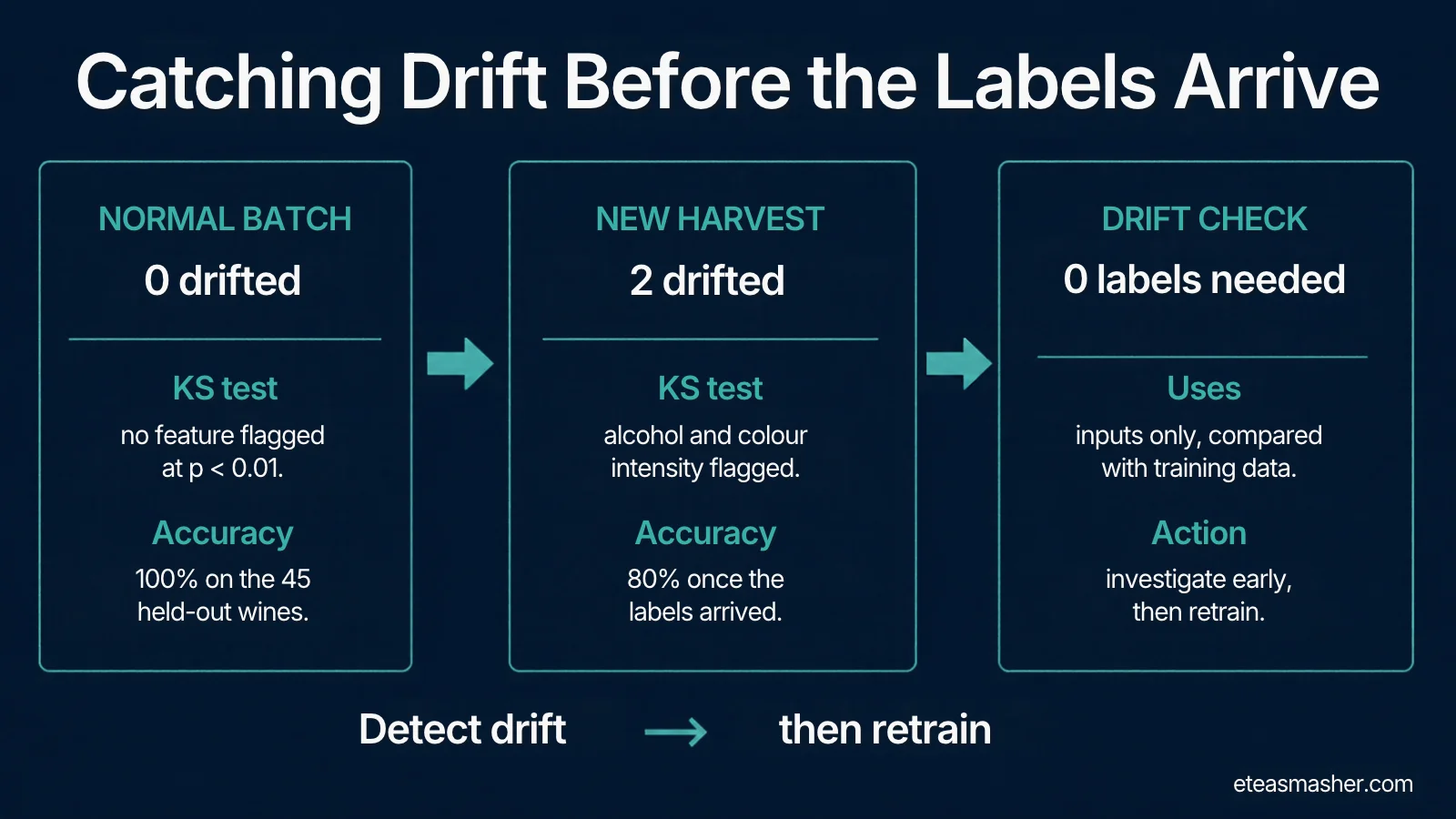
The drift check flagged exactly the two features we changed, and nothing on the normal batch. Accuracy on the drifted batch fell from 100% to 80%: one in five wines now gets the wrong variety.
The order matters. In real systems, the true answers (labels) often arrive days or weeks after the prediction, if at all. The drift check needs no labels, so it raises the alarm as soon as the strange batch arrives, long before anyone could measure the accuracy drop. That early warning is what lets a team investigate, collect new labels and retrain before the damage spreads.
Two cautions about this simple check. First, a KS test on large batches will flag tiny, harmless differences, so teams usually also look at how big the shift is (the KS statistic) rather than the p-value alone. Second, testing 13 features at once raises the chance of a false alarm, which is why we used a stricter threshold of 0.01 instead of the usual 0.05. A common, even stricter rule is to divide the threshold by the number of features tested (0.05 / 13 is about 0.004). Open-source monitoring tools such as Evidently package these checks with reports, dashboards and alerts.
What would make this production-grade
The four scripts show the core ideas, but they run by hand on one machine. A production setup automates the same steps:
- Version the data as well as the code, with a tool such as DVC or a data lake table format, so every model can be traced to its exact training data.
- Run training as a pipeline on a schedule or trigger, using an orchestrator such as Airflow, Prefect or Kubeflow Pipelines, instead of running scripts by hand.
- Run the quality gate and API tests in CI on every change, and deploy only from CI.
- Package the API in a container (Docker) so it runs the same way on a laptop, a server or Kubernetes.
- Schedule the drift check, log its results, and alert someone (or trigger retraining) when it fires.
- Use a shared MLflow server instead of a local SQLite file, so the whole team sees the same runs and registry.
MLOps maturity levels
Google’s widely cited guide, MLOps: Continuous delivery and automation pipelines in machine learning, describes three levels. They are a useful way to see where a team is and what to automate next.
| Level | What it looks like | Typical sign |
|---|---|---|
| 0: Manual process | Data scientists train models by hand in notebooks and hand a model file to engineers to deploy | Releases are rare and nobody monitors the model in production |
| 1: ML pipeline automation | Training runs as an automated pipeline with data and model validation, so models are retrained on new data (continuous training) | The pipeline, not just the model, is what gets deployed |
| 2: CI/CD pipeline automation | Changes to the pipeline code itself are built, tested and deployed automatically | The team can try new features and model ideas quickly and safely |
Our example sits between level 0 and level 1: experiments are tracked, a quality gate and registry are in place, and drift is checked, but nothing runs automatically yet. For a small team, that is a sensible place to start.
MLOps tools by stage
There are hundreds of MLOps tools. These are well-known open-source options for each stage; managed cloud platforms (Amazon SageMaker, Google Vertex AI, Azure Machine Learning) bundle many of them into one service.
| Stage | What it does | Open-source examples |
|---|---|---|
| Experiment tracking | Records parameters, metrics and model files for every run | MLflow (Weights & Biases is a popular commercial alternative) |
| Data versioning | Tracks which data each model was trained on | DVC, lakeFS |
| Pipeline orchestration | Runs training and data steps on a schedule or trigger | Airflow, Prefect, Kubeflow Pipelines |
| Model registry | Stores approved model versions and which one is live | MLflow Model Registry |
| Serving | Exposes models as an API or batch job | FastAPI, BentoML, KServe |
| Monitoring | Detects drift and quality problems in production | Evidently, Prometheus + Grafana |
| Feature store | Shares consistent features between training and serving | Feast |
Start with the first two rows and a simple API. Add the rest when the pain they solve actually appears. If you work in data engineering, many of these tools will look familiar; our guide to data engineering skills and Python libraries for data engineering cover the shared foundation.
Common MLOps mistakes
- Shipping the notebook. If a model can only be rebuilt by re-running a notebook in the right order, it cannot be reproduced. Move training into scripts and track every run.
- Trusting one test score. Both our models scored 100% on the test set. Cross-validation and a written quality bar are what actually separate good from lucky.
- Deploying files instead of versions. Copying
model.pklto a server makes rollback guesswork. Deploy from a registry using versions or aliases. - Monitoring only uptime. An API can be 100% available while its predictions get steadily worse. Monitor the inputs and, when labels arrive, the accuracy.
- Loading model files you did not create. Pickle-based model files can run code when loaded. Prefer safer formats such as skops, and only trust types you have checked.
- Over-tooling on day one. A Kubernetes cluster, a feature store and five dashboards will not help a team that cannot yet answer “which model is live?”. Fix the basics first.
Frequently asked questions
What is MLOps in simple words?
MLOps is the set of practices that get machine learning models into production and keep them working there. It covers tracking experiments, testing and versioning models, deploying them, and monitoring them so you know when they need retraining.
What is the difference between MLOps and DevOps?
DevOps automates building, testing and releasing software code. MLOps applies the same ideas to machine learning, but also has to manage data and trained models, test model quality, and watch for data drift, because a model can get worse without any code changing.
What is data drift?
Data drift happens when the data a model receives in production stops looking like the data it was trained on, for example when customer behaviour or a measurement process changes. The model keeps making predictions, but they become less accurate. Statistical tests such as the Kolmogorov-Smirnov test can detect it without needing labels.
Which tools should I learn first for MLOps?
Start with Python, Git and Docker, then an experiment tracker such as MLflow and a web framework such as FastAPI for serving. After that, learn one orchestrator (Airflow or Prefect) and one monitoring approach. Cloud platforms like SageMaker or Vertex AI are easier to pick up once these basics make sense.
Is MLOps a good career?
MLOps skills are in demand because many companies struggle to move models beyond the prototype stage. The role sits between data science, data engineering and DevOps, so people from any of those backgrounds can move into it by adding the missing pieces.
Key points
- MLOps is what turns a model in a notebook into a system you can reproduce, release safely and keep accurate.
- It differs from DevOps because data and models change too, and models can fail silently.
- In our worked example, MLflow tracked two models, a quality gate picked logistic regression (98.5% cross-validated accuracy), the registry made it
@champion, and FastAPI served it. - A simple drift check flagged the two shifted features on a new batch before labels were available; accuracy on that batch later turned out to be 80% instead of 100%.
- Start small: track experiments, gate on quality, register versions and monitor inputs. Automate the rest as your team grows.
Sources
- Google Cloud, What is MLOps?
- Google Cloud Architecture Center, MLOps: Continuous delivery and automation pipelines in machine learning
- Sculley et al., Hidden Technical Debt in Machine Learning Systems, NeurIPS 2015
- MLflow documentation, Model Registry
- FastAPI documentation, Testing
- SciPy documentation, scipy.stats.ks_2samp