SQL course · Module 5: Creating and changing data · Lesson 19 of 40
Quick answer: A transaction groups several SQL statements into one all-or-nothing unit. Start it with BEGIN, then COMMIT to save every change or ROLLBACK to undo them all. Without BEGIN, PostgreSQL commits each statement on its own (autocommit). If one statement fails inside a transaction, the whole transaction is aborted: PostgreSQL ignores further commands until you end it, and COMMIT then rolls back. SAVEPOINT lets you undo only part of a transaction.
In this lesson you will learn:
- what SQL transactions are, and how autocommit works in psql
- how to save changes with
BEGINandCOMMIT, or undo them withROLLBACK - what “current transaction is aborted” means and how to get out of it
- how
SAVEPOINTundoes part of a transaction - what ACID means, and what other sessions see while your transaction is open
Before you start: Lesson 17, SQL INSERT, UPDATE and DELETE: Change Data Safely with RETURNING and Lesson 18, SQL Upsert: INSERT … ON CONFLICT and MERGE.
We ran every example on PostgreSQL 16.15 with the shop database, in order, and checked the current PostgreSQL 18 manual. The lesson adds orders, so run \i shop.sql in psql before you begin, as in Lesson 3, to get the same ids.
Table of Contents
What is a transaction?
Placing an order in our shop takes two steps: one row in orders, then its lines in order_items. If the first step works and the second fails, you have an order with no items. A transaction prevents this. The PostgreSQL tutorial says a transaction “bundles multiple steps into a single, all-or-nothing operation” (PostgreSQL docs: Transactions).
You have used transactions all along without noticing. The same page says: “If you do not issue a BEGIN command, then each individual statement has an implicit BEGIN and (if successful) COMMIT wrapped around it.” This is called autocommit. psql has a variable for it:
\echo :AUTOCOMMITonon is the default: “each SQL command is automatically committed upon successful completion. To postpone commit in this mode, you must enter a BEGIN or START TRANSACTION SQL command” (PostgreSQL docs: psql). Every INSERT, UPDATE and DELETE in Lessons 17 and 18 was saved the moment it finished.
BEGIN and COMMIT: save several changes together
Omar (customer 10) has never ordered. Let us place his first order, with two products, as one transaction:
BEGIN;

INSERT INTO orders (customer_id, order_date, status)
VALUES (10, '2026-11-08', 'pending')
RETURNING id;

INSERT INTO order_items (order_id, product_id, quantity, unit_price)
VALUES (23, 2, 1, 89.00),
       (23, 1, 1, 24.99);

COMMIT;
BEGIN
id
----
23
(1 row)
INSERT 0 1
INSERT 0 2
COMMITRETURNING id gave us the new order id, 23, which we used for the lines. Until COMMIT, the changes existed only inside our transaction. COMMIT saved them together. The order is there with both lines (the join is from Lesson 12):
SELECT o.id, o.customer_id, o.status, oi.product_id, oi.quantity
FROM orders o
JOIN order_items oi ON oi.order_id = o.id
WHERE o.id = 23
ORDER BY oi.product_id;
id | customer_id | status | product_id | quantity
----+-------------+---------+------------+----------
23 | 10 | pending | 1 | 1
23 | 10 | pending | 2 | 1
(2 rows)ROLLBACK: undo everything since BEGIN
Now say we start to delete the order, then change our mind:
BEGIN;
DELETE FROM order_items WHERE order_id = 23;
DELETE FROM orders WHERE id = 23;
SELECT count(*) FROM orders WHERE id = 23;
BEGIN
DELETE 2
DELETE 1
count
-------
0
(1 row)Inside the transaction, the order is gone. ROLLBACK cancels both deletes:
ROLLBACK;
SELECT count(*) FROM orders WHERE id = 23;
ROLLBACK
count
-------
1
(1 row)Lesson 17 used this same trick as a safety net for UPDATE without WHERE.
What happens after an error in a transaction
This part is where beginners get stuck. We start a second order for Omar, but type quantity 0 by mistake. The CHECK (quantity > 0) rule from Lesson 16 rejects it. Then we send the corrected line. Here is the real psql session, prompts included:
shop=# BEGIN;
BEGIN
shop=*# INSERT INTO orders (customer_id, order_date, status)
shop-*# VALUES (10, '2026-11-08', 'pending')
shop-*# RETURNING id;
 id
----
 24
(1 row)

INSERT 0 1
shop=*# INSERT INTO order_items (order_id, product_id, quantity, unit_price)
shop-*# VALUES (24, 5, 0, 32.00);
ERROR:  new row for relation "order_items" violates check constraint "order_items_quantity_check"
DETAIL:  Failing row contains (24, 5, 0, 32.00).
shop=!# INSERT INTO order_items (order_id, product_id, quantity, unit_price)
shop-!# VALUES (24, 5, 1, 32.00);
ERROR:  current transaction is aborted, commands ignored until end of transaction block
shop=!# COMMIT;
ROLLBACK
Three things happened:
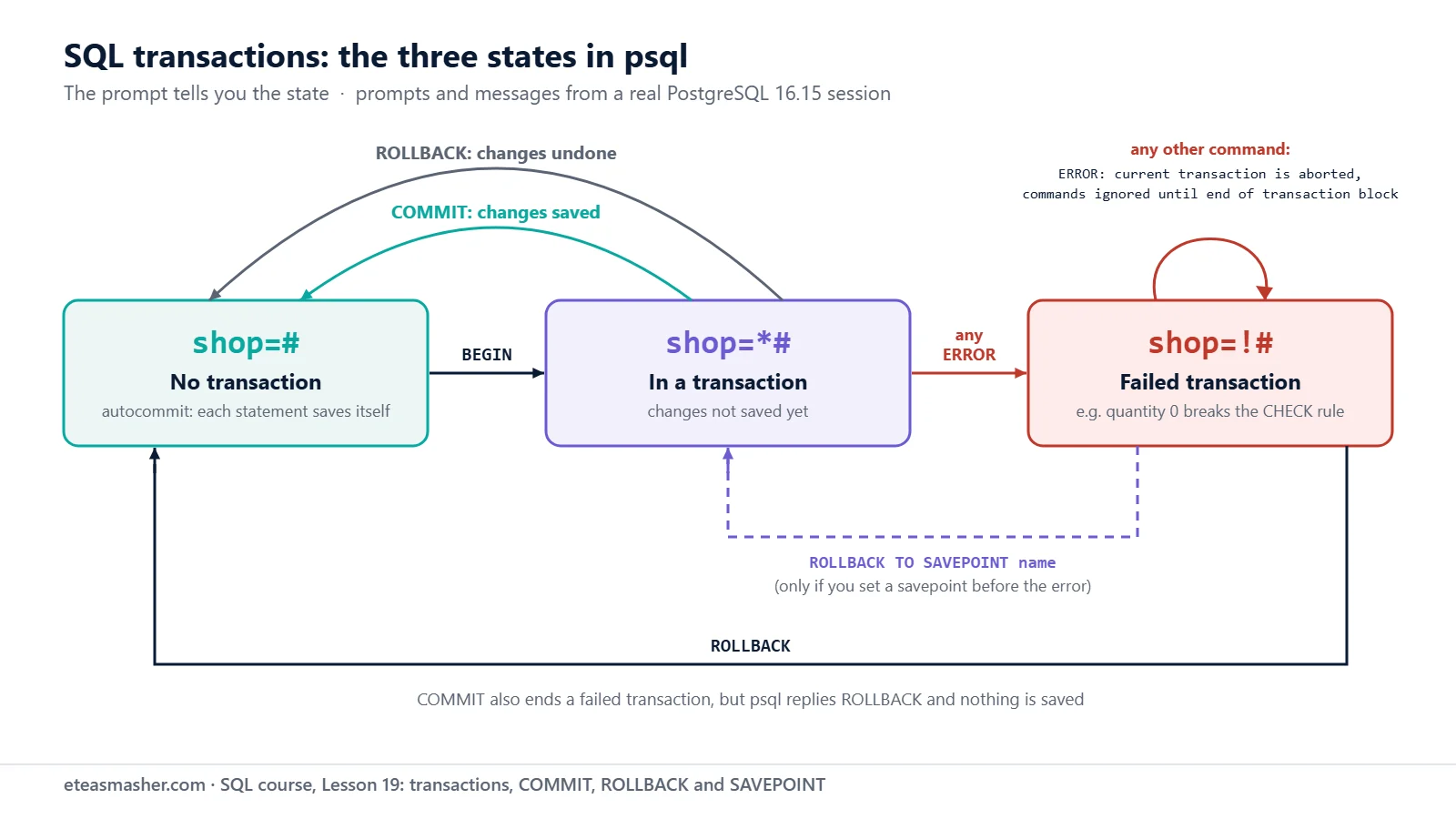
- After the error, the correct INSERT was refused with
current transaction is aborted, commands ignored until end of transaction block. One error spoils the whole transaction. PostgreSQL will not run anything else in it. - We typed
COMMIT, but psql answeredROLLBACK. Nothing was saved, not even the order row.SELECT count(*) FROM orders WHERE id = 24;returned 0. - Watch the prompt. psql shows the transaction state after the database name:
shop=#means no transaction,*means “in a transaction block” and!means “in a failed transaction block” (PostgreSQL docs: psql prompting).
So when you see current transaction is aborted, scroll up and find the first error. That is the real problem. Fix it, run ROLLBACK, and start again from BEGIN.
psql also has a helper: after \set ON_ERROR_ROLLBACK on, psql places a hidden savepoint before each statement, so a failed statement is undone and “the transaction continues”. In our test, the corrected INSERT then worked. It is off by default.
SAVEPOINT: undo only part of a transaction
A savepoint is a marker inside a transaction. ROLLBACK TO SAVEPOINT undoes the work done after the marker and keeps the work before it. The tutorial notes that it “is the only way to regain control of a transaction block that was put in aborted state by the system due to an error, short of rolling it back completely”.
BEGIN;

INSERT INTO orders (customer_id, order_date, status)
VALUES (10, '2026-11-08', 'pending')
RETURNING id;

SAVEPOINT before_items;

INSERT INTO order_items (order_id, product_id, quantity, unit_price)
VALUES (25, 5, 0, 32.00);

ROLLBACK TO SAVEPOINT before_items;

INSERT INTO order_items (order_id, product_id, quantity, unit_price)
VALUES (25, 5, 1, 32.00);

COMMIT;
BEGIN
id
----
25
(1 row)
INSERT 0 1
SAVEPOINT
ERROR: new row for relation "order_items" violates check constraint "order_items_quantity_check"
DETAIL: Failing row contains (25, 5, 0, 32.00).
ROLLBACK
INSERT 0 1
COMMITThe bad line failed, ROLLBACK TO SAVEPOINT (shown as ROLLBACK) went back to the marker, the order row survived, and this time COMMIT really committed:
SELECT o.id, o.status, oi.product_id, oi.quantity
FROM orders o
JOIN order_items oi ON oi.order_id = o.id
WHERE o.id = 25;
id | status | product_id | quantity
----+---------+------------+----------
25 | pending | 5 | 1
(1 row)Notice the id: 25, not 24. The rolled-back order used 24, and as in Lesson 18, ids are not given back.
ACID in simple words
Database books describe transactions with four letters. The PostgreSQL glossary defines each one (PostgreSQL docs: Glossary):
| letter | glossary meaning (short) | in this lesson |
|---|---|---|
| Atomicity | “either all its operations complete as a single unit or none do” | order 24 and its line: neither was saved |
| Consistency | data always follows the integrity constraints | the CHECK rule stopped quantity 0 |
| Isolation | changes are “not visible to concurrent transactions before it commits” | the two-session test below |
| Durability | after commit, “the changes remain even after a system failure or crash” | orders 23 and 25 stay saved |
We did not crash the server to test durability. The manual says the changes are “logged in permanent storage (i.e., on disk) before the transaction is reported complete”.
What other sessions see
To see isolation, we ran two psql sessions on the same database at the same time. You can do the same in two terminal windows. Session A changes a price and does not commit yet:
--- Session A
BEGIN;
BEGIN
UPDATE products SET price = 99.00 WHERE id = 2;
UPDATE 1
SELECT name, price FROM products WHERE id = 2;
        name         | price
---------------------+-------
 Mechanical Keyboard | 99.00
(1 row)
Session B looks at the same row, then tries to change it:
--- Session B
SELECT name, price FROM products WHERE id = 2;
        name         | price
---------------------+-------
 Mechanical Keyboard | 89.00
(1 row)

UPDATE products SET price = 79.00 WHERE id = 2;
Session B still sees 89.00: A’s change is not committed, so others cannot see it. And B’s UPDATE did not finish. It waited. From session A, pg_stat_activity showed why:
SELECT wait_event_type, wait_event, query FROM pg_stat_activity WHERE query LIKE 'UPDATE products SET price = 79%';
 wait_event_type |  wait_event   |                      query
-----------------+---------------+-------------------------------------------------
 Lock            | transactionid | UPDATE products SET price = 79.00 WHERE id = 2;
(1 row)
When A ran COMMIT, B’s UPDATE then finished with UPDATE 1, and the final price was 79.00. This matches the manual: in the default Read Committed level, a query “never sees” uncommitted data, and a second updater of the same row “will wait for the first updating transaction to commit or roll back” (PostgreSQL docs: Transaction Isolation). Lesson 34 covers isolation levels, locks and deadlocks.
One more test: session B ran BEGIN, inserted a customer, and quit psql without COMMIT. Session A then counted that customer and got 0. An unfinished transaction is rolled back when its session ends; the psql manual warns that “if you exit the session without committing, your work will be lost”.
Try it yourself
Exercise 1: Try a price change, then undo it
In a transaction, set the price of Gel Pens 10-Pack (product 7) to 7.00 and show the new price. Then undo the change and check the price again.
Exercise 2: Keep the good part
In one transaction, mark order 22 as shipped, set a savepoint, then try to set its status to lost (not an allowed status). Go back to the savepoint, commit, and check the status.
Exercise 3: COMMIT after an error
Start a transaction, insert a product with price -5.00, and then run COMMIT. What does psql print, and was the product saved?
Solutions
Solution 1
BEGIN;
UPDATE products SET price = 7.00 WHERE id = 7 RETURNING name, price;
ROLLBACK;
SELECT name, price FROM products WHERE id = 7;
BEGIN
name | price
------------------+-------
Gel Pens 10-Pack | 7.00
(1 row)
UPDATE 1
ROLLBACK
name | price
------------------+-------
Gel Pens 10-Pack | 6.75
(1 row)ROLLBACK brought back the old price, 6.75.
Solution 2
BEGIN;
UPDATE orders SET status = 'shipped' WHERE id = 22;
SAVEPOINT shipped;
UPDATE orders SET status = 'lost' WHERE id = 22;
ROLLBACK TO SAVEPOINT shipped;
COMMIT;
SELECT id, status FROM orders WHERE id = 22;
BEGIN
UPDATE 1
SAVEPOINT
ERROR: new row for relation "orders" violates check constraint "orders_status_check"
DETAIL: Failing row contains (22, 3, 2026-10-30, lost).
ROLLBACK
COMMIT
id | status
----+---------
22 | shipped
(1 row)The savepoint kept the shipped update and threw away only the failed one.
Solution 3
BEGIN;
INSERT INTO products (name, category, price) VALUES ('Desk Mat', 'Accessories', -5.00);
COMMIT;
SELECT count(*) FROM products WHERE name = 'Desk Mat';
BEGIN
ERROR: new row for relation "products" violates check constraint "products_price_check"
DETAIL: Failing row contains (11, Desk Mat, Accessories, -5.00).
ROLLBACK
count
-------
0
(1 row)psql answered the COMMIT with ROLLBACK, and the count is 0: nothing was saved.
When you finish, run \i shop.sql to remove the extra orders.
Common mistakes
- Forgetting COMMIT. Your changes are visible only to you, and they are lost when the session ends. Meanwhile other sessions that update the same rows wait, as session B did (Transaction Isolation).
- Typing more commands after an error. Each one fails with
current transaction is aborted, commands ignored until end of transaction block. RunROLLBACKand start again. - Thinking COMMIT saved a failed transaction. psql answers
ROLLBACK. Read the reply, not your command. - COMMIT or ROLLBACK with no open transaction. It is harmless, but you get
WARNING: there is no transaction in progress. A secondBEGINgivesWARNING: there is already a transaction in progress. - SAVEPOINT outside a transaction. It fails with
SAVEPOINT can only be used in transaction blocks. RunBEGINfirst.
Frequently asked questions
What happens if I close psql without COMMIT?
The open transaction is rolled back, and its changes are lost (PostgreSQL docs: psql). In our two-session test, a customer inserted after BEGIN was gone once that session quit. Changes made in autocommit mode (without BEGIN) were already saved, so they stay.
Can I roll back CREATE TABLE?
In PostgreSQL, yes. In our test, BEGIN; CREATE TABLE demo_tx (x integer); ROLLBACK; left no table behind: a later SELECT gave relation "demo_tx" does not exist. MySQL is different: statements like CREATE TABLE cause an implicit commit, “as if you had done a COMMIT before executing the statement” (MySQL 8.4: Statements That Cause an Implicit Commit).
Do MySQL and SQLite use BEGIN too?
Yes. In MySQL, “autocommit mode” is on by default, and BEGIN is an alias of START TRANSACTION (MySQL 8.4: START TRANSACTION, COMMIT, and ROLLBACK). SQLite’s statement list also includes BEGIN TRANSACTION, COMMIT, ROLLBACK and SAVEPOINT (SQLite docs: SQL language). We ran only PostgreSQL for this lesson.
Summary
- A transaction is all or nothing:
BEGIN, your statements, thenCOMMITorROLLBACK. - Without
BEGIN, autocommit saves each statement on its own. - After any error, the transaction is aborted;
COMMITturns intoROLLBACK. Fix the first error and start again. SAVEPOINTandROLLBACK TO SAVEPOINTundo only part of a transaction.- Other sessions do not see your changes until you commit, and they wait if they update the same rows.
Transactions also make data loads safe: shop.sql wraps its whole load in BEGIN and COMMIT, so a failed load leaves nothing half done. Project 1 in our data engineering projects list loads processed data into PostgreSQL, a good place to use the same habit.
Next lesson
Next: Lesson 20, SQL Subqueries: Scalar, IN, EXISTS and Correlated Subqueries.
Sources
- PostgreSQL documentation: Transactions (tutorial)
- PostgreSQL documentation: BEGIN
- PostgreSQL documentation: COMMIT
- PostgreSQL documentation: SAVEPOINT
- PostgreSQL documentation: psql (AUTOCOMMIT, ON_ERROR_ROLLBACK, prompts)
- PostgreSQL documentation: Transaction Isolation
- PostgreSQL documentation: Glossary (ACID)
- MySQL 8.4 Reference Manual: START TRANSACTION, COMMIT, and ROLLBACK
- MySQL 8.4 Reference Manual: Statements That Cause an Implicit Commit
- SQLite documentation: SQL As Understood By SQLite