Python course · Module 3: Control flow · Lesson 13 of 63
Quick answer: A Python while loop repeats its block as long as its condition is true, and checks the condition again before every pass: while count <= 5:. Something inside the loop must change, or the condition stays true forever and you get an infinite loop; press Ctrl+C to stop it. break leaves the loop at once, and continue skips the rest of the current pass and goes back to the condition.
In this lesson you will learn:
- how a
whileloop with a counter works, step by step - why infinite loops happen and how to stop one with Ctrl+C
- how to keep asking until the user types a valid answer
- how
break,continueandwhile Truework together - what the
elsepart of awhileloop does
Before you start: finish Lesson 12, Python for Loops and range(), and Lesson 11, where you learned if. Several examples ask for input, so you need input() and int() from Lesson 10. All examples were tested on Python 3.14.6 and behave the same on Python 3.15.2, the newest release on python.org.
Table of Contents
A while loop with a counter
A for loop runs once per item. A while loop is different: it runs while a condition is true, and it does not know in advance how many times that will be.
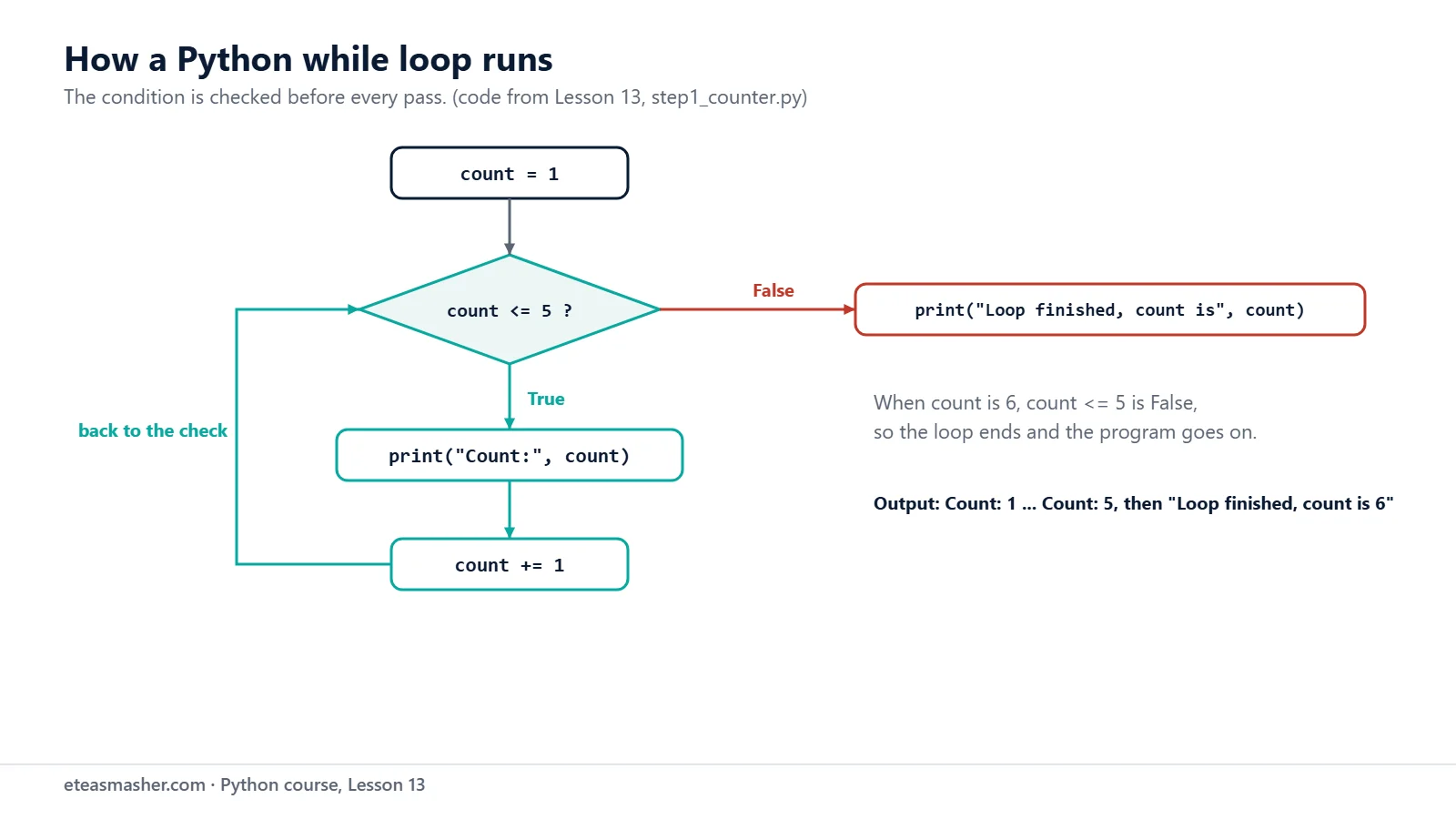
count = 1
while count <= 5:
    print("Count:", count)
    count += 1
print("Loop finished, count is", count)
Count: 1
Count: 2
Count: 3
Count: 4
Count: 5
Loop finished, count is 6Step by step:
countstarts at 1. Python checkscount <= 5: it isTrue, so the block runs.- The block prints the count and adds 1 with
count += 1(from Lesson 9). - Python goes back to the
whileline and checks the condition again. - When
countbecomes 6,6 <= 5isFalse, so the loop ends and the program continues after the block.
The language reference describes it the same way: the while statement “repeatedly tests the expression and, if it is true, executes the first suite”. If the condition is false the very first time, the block never runs at all.
When you do not know how many passes you need
This is where while is better than for. A customer saves 7,500 rupees a month for a 50,000-rupee laptop. How many months will it take?
goal = 50000
saved = 0
months = 0
while saved < goal:
    saved += 7500
    months += 1
print(f"After {months} months you have saved {saved:,} rupees.")
After 7 months you have saved 52,500 rupees.We did not tell Python to loop 7 times. It kept adding money until saved < goal became false, and the months counter recorded how many passes that took.
Infinite loops and how to stop them
If nothing inside the loop changes the condition, the condition stays true forever. This program forgot count += 1:
count = 1
total = 0
while count <= 3:
    total += count
print("Total:", total)
When we ran it, nothing was printed and the program seemed frozen. The last line is never reached, because the loop keeps adding to total again and again. To stop a running program, press Ctrl+C in the terminal where it runs (the terminal from Lesson 3). Here is the real terminal after we pressed Ctrl+C (the terminal shows it as ^C; on Windows, type python or py instead of python3):
$ python3 err1_forgot_update.py
^CTraceback (most recent call last):
  File "/home/learner/python-course/err1_forgot_update.py", line 4, in <module>
    total += count
    ^^^^^
KeyboardInterrupt
Ctrl+C raises a KeyboardInterrupt. The exceptions page says it is “Raised when the user hits the interrupt key (normally Control-C or Delete)”. The traceback shows the line Python was running at that moment, so it may show a different line of the loop if you try it yourself. The fix is to add count += 1 inside the loop.
A quick check for every while loop you write: which line inside the loop moves it towards the end?
Input validation: ask until the answer is valid
In Lesson 10, the program read each answer once and had to use it. A while loop can keep asking until the answer is acceptable. Our shop sells 1 to 10 notebooks per order:
quantity = int(input("How many notebooks (1 to 10)? "))
while quantity < 1 or quantity > 10:
    print("Please type a number from 1 to 10.")
    quantity = int(input("How many notebooks (1 to 10)? "))
print(f"Added {quantity} notebooks to your cart.")
$ python3 step3_validation.py
How many notebooks (1 to 10)? 0
Please type a number from 1 to 10.
How many notebooks (1 to 10)? 25
Please type a number from 1 to 10.
How many notebooks (1 to 10)? 3
Added 3 notebooks to your cart.The condition describes a bad answer: below 1 or above 10. While the answer is bad, the loop asks again; the new answer replaces the old one, and the condition is checked again. This handles numbers that are out of range. Typing a word such as ten still stops the program with a ValueError from int(), as in Lesson 8; Lesson 35 shows how to catch that with try and except.
break: leave the loop now
break ends the loop immediately, even if the condition is still true. It is often used with while True:, a loop whose condition is always true, so the only way out is a break. This cashier program adds prices until the user types done:
total = 0
print("Type each price, or 'done' to finish.")
while True:
    entry = input("Price: ")
    if entry == "done":
        break
    total += float(entry)
print(f"Total to pay: {total:,.2f}")
$ python3 step4_break.py
Type each price, or 'done' to finish.
Price: 450
Price: 1200
Price: 85.5
Price: done
Total to pay: 1,735.50When the user types done, break jumps straight to the first line after the loop. Notice that the check comes before float(entry), so the program never tries to turn "done" into a number. while True with break is the natural choice when the stop test belongs in the middle of the loop, right after the input.
continue: skip to the next pass
continue stops the current pass and goes back to the top of the loop. The rest of the block is skipped this time only. Here an empty answer (just Enter) is ignored:
total = 0
print("Type each price, or 'done' to finish.")
while True:
    entry = input("Price: ")
    if entry == "done":
        break
    if entry == "":
        print("Nothing typed, try again.")
        continue
    total += float(entry)
    print(f"Running total: {total:,.2f}")
print(f"Total to pay: {total:,.2f}")
$ python3 step5_continue.py
Type each price, or 'done' to finish.
Price: 450
Running total: 450.00
Price:
Nothing typed, try again.
Price: 1200
Running total: 1,650.00
Price: done
Total to pay: 1,650.00On the empty answer, continue skipped float(entry), which would have failed on an empty string, and went straight back to Price:.
break and continue in for loops
Both also work in for loops, exactly the same way:
for number in range(1, 11):
    if number % 3 == 0:
        continue
    print(number, end=" ")
print()

for number in range(1, 11):
    if number == 4:
        break
    print(number, end=" ")
print()
1 2 4 5 7 8 10
1 2 3 The first loop skips 3, 6 and 9. The second loop stops completely when it reaches 4. In nested loops, break and continue affect only the innermost loop they are in.
while … else, briefly
Like for, a while loop can have an else block. It runs when the condition becomes false, but not when the loop ends with break. That fits a “three tries” rule:
correct_pin = "4321"
attempts = 0
while attempts < 3:
    pin = input("Enter your PIN: ")
    attempts += 1
    if pin == correct_pin:
        print("PIN accepted. Welcome!")
        break
    print("Wrong PIN.")
else:
    print("Too many wrong tries. Your card is blocked.")
$ python3 step7_while_else.py
Enter your PIN: 1111
Wrong PIN.
Enter your PIN: 4321
PIN accepted. Welcome!
$ python3 step7_while_else.py
Enter your PIN: 1111
Wrong PIN.
Enter your PIN: 2222
Wrong PIN.
Enter your PIN: 3333
Wrong PIN.
Too many wrong tries. Your card is blocked.In the first run, break ended the loop, so the else block was skipped. In the second run, attempts < 3 became false after three wrong tries, so the else block ran. The PIN is compared as text, so a typed word cannot crash the program.
Try it yourself
Exercise 1: Countdown
Use a while loop to print 10 9 8 7 6 5 4 3 2 1 on one line, followed by Lift off!.
Exercise 2: Add numbers until 0
Keep asking the user for whole numbers until they type 0, then print the sum of the numbers.
Exercise 3: Doubling your money
You have 1,000 rupees, and it grows by 10% every year. Use a while loop to find how many years it takes to reach at least 2,000 rupees.
Solutions
Solution 1
seconds = 10
while seconds > 0:
    print(seconds, end=" ")
    seconds -= 1
print("Lift off!")
10 9 8 7 6 5 4 3 2 1 Lift off!seconds -= 1 moves the loop towards its end; without it, the loop would never stop.
Solution 2
total = 0
while True:
    number = int(input("Number (0 to stop): "))
    if number == 0:
        break
    total += number
print("Sum:", total)
$ python3 solution2_sum_until_zero.py
Number (0 to stop): 5
Number (0 to stop): 10
Number (0 to stop): 7
Number (0 to stop): 0
Sum: 22The stop test comes right after the input, so 0 ends the loop before it is added.
Solution 3
money = 1000
years = 0
while money < 2000:
    money = money * 1.10
    years += 1
print(f"After {years} years you have {money:,.2f} rupees.")
After 8 years you have 2,143.59 rupees.We cannot know the number of years in advance, so while fits better than for.
Common mistakes
- Forgetting to update the counter. Without
count += 1, the condition never changes and the loop runs forever. Press Ctrl+C; you will seeKeyboardInterrupt. - Putting
continuebefore the update. Inwhile number < 10:withif number % 3 == 0: continuebeforenumber += 1, the number stays 0 and the loop never ends. Update the counter before anycontinue, or use aforloop withrange(). - Using
orwhere you needand.while answer != "yes" or answer != "no":is always true, because every answer is different from at least one of the two words. In our test, the program kept asking after bothyesandnountil we pressed Ctrl+C. Writewhile answer != "yes" and answer != "no":. - Using
breakoutside a loop.breakinside anifthat is not in a loop givesSyntaxError: 'break' outside loop(forcontinue:SyntaxError: 'continue' not properly in loop). - Using
<when you mean<=.while count < 5:stops after 4. Check the last value your loop should reach.
Frequently asked questions
How do I stop an infinite while loop in Python?
Press Ctrl+C in the terminal where the program is running. Python stops with a KeyboardInterrupt and shows the line it was running. Then fix the loop so that something inside it changes the condition, or add a break.
What is the difference between break and continue in Python?
break ends the whole loop and the program moves to the first line after it. continue ends only the current pass: the rest of the block is skipped and the loop goes back to its condition (in a for loop, to the next item). Both work in for and while loops.
Is while True bad practice in Python?
No, it is a common pattern when the stop test belongs in the middle of the loop, for example right after input(). The loop must contain a break that will really be reached, otherwise it runs forever. Keep the break condition easy to see.
Summary
while condition:repeats its block as long as the condition is true and checks it before every pass.- Something inside the loop must move it towards the end; otherwise press Ctrl+C to stop it (
KeyboardInterrupt). - A validation loop keeps asking while the answer is bad.
breakleaves the loop at once;continueskips to the next pass;while Trueneeds abreak.- A loop’s
elseblock runs only if the loop ended withoutbreak.
Next lesson
Next: Lesson 14, Python Exercises for Beginners: Level 1 Practice Set and Number Guessing Game.
Sources
- Compound statements: the while statement (Python language reference)
- More Control Flow Tools: break, continue and else clauses on loops (Python tutorial)
- Built-in Exceptions: KeyboardInterrupt (Python docs)
- Python downloads page (python.org)