Python course · Module 1: Getting started · Lesson 4 of 63
Quick answer: Python indentation is the space at the start of a line, and it decides which lines belong together in a block. A line that ends with a colon, such as if score >= 50:, must be followed by lines indented by the same amount, usually 4 spaces. If the spaces are wrong, Python stops with an IndentationError before running anything. Comments start with # and Python ignores them.
In this lesson you will learn:
- what a statement is and how Python reads lines
- how indentation creates blocks, and the 4-space rule
- how to read and fix
IndentationErrorandTabError - how to write comments and short docstrings
- how to split long lines and why upper and lower case matter
Before you start: finish Lesson 3, How to Run a Python Script, so you can save a .py file and run it from the terminal. Every example here is a script tested on Python 3.14.6. The examples work the same on newer 3.x versions: Python 3.15.2, the newest release in November 2026, gave exactly the same outputs and error messages.
Table of Contents
Statements: one instruction per line
A statement is one complete instruction. In Python, each statement normally sits on its own line, and Python runs the lines from top to bottom. We will use one small example in this lesson: a program that checks an exam score.
score = 72
passing = 50
print("Score:", score)
print("Pass mark:", passing)
Score: 72
Pass mark: 50There is no semicolon at the end of the lines, unlike in C or Java. The end of the line ends the statement. Python does allow several statements on one line with semicolons, but the official style guide, PEP 8, says such compound statements “are generally discouraged”:
score = 72; passing = 50; print(score >= passing)TrueIndentation: how Python groups lines into blocks
Many languages use curly brackets { } to group lines. Python uses indentation instead. The language reference says leading whitespace “is used to compute the indentation level of the line, which in turn is used to determine the grouping of statements”.
Look at this example. You will learn if properly in a later lesson; for now, read it as “only do the indented lines when the condition is true”.
score = 72

if score >= 50:
    print("You passed!")
    print("Well done.")
print("Result checked.")
You passed!
Well done.
Result checked.The two indented lines form a block that belongs to the if line. The last line is not indented, so it is outside the block and always runs. Now change the score to 35 and run again:
Result checked.Both indented lines were skipped together, because they are one block. Only the unindented line ran.
Three rules to remember:
- A line that starts a block ends with a colon
:. - Every line in the block is indented by the same amount.
- The block ends when a line goes back to the old indentation.
How many spaces?
PEP 8 says: “Use 4 spaces per indentation level” and “Spaces are the preferred indentation method.” Python itself accepts any number of spaces as long as you are consistent inside a block, but use 4. Set your code editor to insert 4 spaces when you press the Tab key.
Blocks inside blocks
A block can contain another block. Each level adds 4 more spaces.
score = 72

if score >= 50:
    print("You passed!")
    if score >= 80:
        print("Grade: A")
    else:
        print("Grade: B or C")
else:
    print("Try again next time.")
print("Result checked.")
You passed!
Grade: B or C
Result checked.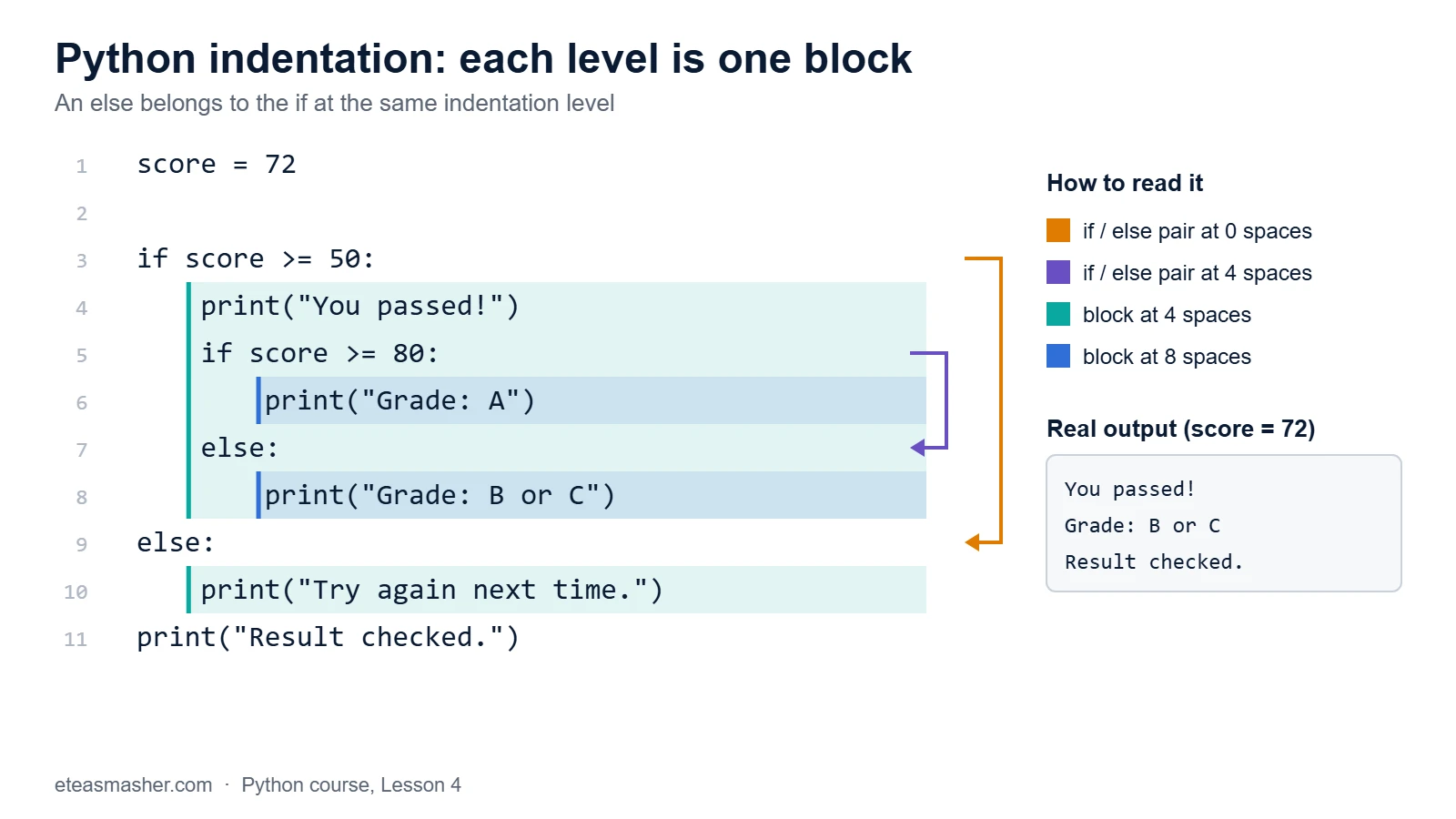
The else: at 4 spaces pairs with if score >= 80: at 4 spaces. The else: at 0 spaces pairs with the first if. The indentation alone tells Python which else belongs to which if.
IndentationError: real messages and fixes
Python checks indentation before it runs anything, so these errors stop the whole file. Here are the messages Python 3.14 really shows (Python 3.15 shows the same ones).
“expected an indented block”
score = 72
if score >= 50:
print("You passed!")
File "/home/learner/python-course/err1_expected_indent.py", line 3
print("You passed!")
^^^^^
IndentationError: expected an indented block after 'if' statement on line 2A colon promises a block, but line 3 is not indented. Fix: add 4 spaces before print.
“unexpected indent”
score = 72
    print("Score:", score)
File "/home/learner/python-course/err2_unexpected_indent.py", line 2
print("Score:", score)
IndentationError: unexpected indentLine 2 is indented, but no colon opened a block. Fix: remove the spaces. This often happens when you paste code from a web page.
“unindent does not match any outer indentation level”
score = 72
if score >= 50:
    print("You passed!")
  print("Well done.")
File "/home/learner/python-course/err3_unindent_mismatch.py", line 4
print("Well done.")
^
IndentationError: unindent does not match any outer indentation levelLine 4 has 2 spaces. That is less than the block (4) but more than the outer level (0), so Python cannot tell where it belongs. Fix: use exactly 4 spaces (inside the block) or 0 (outside).
TabError: mixing tabs and spaces
In this file, line 3 starts with 4 spaces and line 4 starts with a tab character. They look the same in many editors.
  File "/home/learner/python-course/err4_tabs_and_spaces.py", line 4
    	print("Well done.")
    ^
TabError: inconsistent use of tabs and spaces in indentation
The language reference says mixing them in a way that depends on the width of a tab raises a TabError. Fix: delete the indentation on that line and type 4 spaces. Use spaces only.
Comments: notes for humans
A comment starts with #. Python ignores everything from # to the end of the line.
# Exam result checker
# Tells a student if they passed.

score = 72  # the student's score out of 100
passing = 50  # the pass mark

# print("debug: checking the score")
if score >= passing:
    print("You passed!")
You passed!There are three uses here: a full-line comment that explains the program, an inline comment after code, and a commented-out line, which is a quick way to switch off code without deleting it. PEP 8 asks for # followed by one space, and at least two spaces before an inline comment.
Good comments explain why, not what. score = 72 # set score to 72 adds nothing; the code already says that.
Docstrings, briefly
A docstring is a string in triple quotes that is the first statement inside a function, class or file. You will write functions in a later module; here is a quick look.
def check(score):
    """Return 'pass' or 'fail' for one exam score."""
    if score >= 50:
        return "pass"
    return "fail"


print(check(72))
print(check.__doc__)
pass
Return 'pass' or 'fail' for one exam score.Unlike a comment, a docstring is kept: Python stores it in __doc__, and help() shows it. PEP 257 says to “always use """triple double quotes"""” for docstrings.
Long lines: two ways to continue
PEP 8 suggests lines of at most 79 characters. To split a long statement, the preferred way is to put it inside brackets. Python joins the lines automatically until the bracket closes.
total = (72 + 65 + 88
         + 91 + 54)
print("Total marks:", total)

subjects = [
    "Maths",
    "Physics",
    "English",
]
print(subjects)

average = total / \
    5
print("Average:", average)
Total marks: 370
['Maths', 'Physics', 'English']
Average: 74.0The last statement uses a backslash \ at the end of the line instead. It works, but it is easy to break: one invisible space after the \ gives SyntaxError: unexpected character after line continuation character. PEP 8 prefers brackets. Inside brackets, the indentation of the extra lines does not matter to Python; it is only for readability.
Case sensitivity: score, Score and SCORE are different
The language reference says about names: “Case is significant.”
score = 72
Score = 90
print(score, Score)
print(SCORE)
72 90
Traceback (most recent call last):
File "/home/learner/python-course/err7_case.py", line 4, in <module>
print(SCORE)
^^^^^
NameError: name 'SCORE' is not defined. Did you mean: 'Score'?score and Score are two different names with two different values, and SCORE does not exist at all. Python even suggests a close match. Keywords and built-in names have fixed spelling too: True, False, if and print must be written exactly like this.
Try it yourself
Exercise 1: Fix the indentation
This script fails with IndentationError: expected an indented block after 'if' statement on line 2. Fix it so both messages print only on hot days, and “Done” always prints.
temperature = 31
if temperature > 30:
print("Hot day")
    print("Drink water")
print("Done")
Exercise 2: Comment your code
Write a script with rain_chance = 70. If it is above 50, print “Take an umbrella”. Always print “Have a nice day” at the end. Add one full-line comment and one inline comment.
Exercise 3: Split a long line
Rewrite this line so the string is split over two lines using brackets, without changing the output.
message = "Python reads your code from top to bottom, " + "and indentation shows which lines belong together."
print(message)
Solutions
Solution 1
temperature = 31
if temperature > 30:
    print("Hot day")
    print("Drink water")
print("Done")
Hot day
Drink water
DoneBoth lines under if now have exactly 4 spaces; print("Done") has none, so it is outside the block.
Solution 2
# Decide what to take outside
rain_chance = 70  # percent

if rain_chance > 50:
    print("Take an umbrella")  # only when rain is likely
print("Have a nice day")
Take an umbrella
Have a nice dayThe comments do not change the output; Python skips them.
Solution 3
message = ("Python reads your code from top to bottom, "
           "and indentation shows which lines belong together.")
print(message)
Python reads your code from top to bottom, and indentation shows which lines belong together.Inside brackets, two strings next to each other are joined into one, so no + is needed.
Common mistakes
- Forgetting the colon.
if score >= 50without:givesSyntaxError: expected ':'. - Mixing tabs and spaces. Copying code from different places can mix them and give
TabError: inconsistent use of tabs and spaces in indentation. Set your editor to insert spaces. - Uneven indentation inside one block. 4 spaces on one line and 2 on the next gives
IndentationError: unindent does not match any outer indentation level. - Using comment symbols from other languages.
score = 72 // the score out of 100givesSyntaxError: invalid syntax. Python comments use#. - Wrong capital letters.
passed = truegivesNameError: name 'true' is not defined. Did you mean: 'True'?
Frequently asked questions
Why does Python use indentation instead of curly brackets?
The official Design and History FAQ explains that without begin/end brackets “there cannot be a disagreement between grouping perceived by the parser and the human reader”. In other words, what you see is what Python runs. It also makes programs shorter, because no lines are spent on brackets alone.
Should I use tabs or spaces in Python?
Use spaces, 4 per level. PEP 8 says “Spaces are the preferred indentation method”, and tabs only to stay consistent with old code that already uses tabs. Never mix both in one file.
How do I write a multi-line comment in Python?
Put # at the start of each line. Python has no special block-comment symbol. Triple-quoted strings are sometimes used for this, but they are strings, not comments, so keep them for docstrings.
Summary
- Each statement normally goes on its own line; no semicolons needed.
- A colon starts a block, and the block is the lines indented under it, 4 spaces per level.
- Wrong indentation stops the file with
IndentationErrororTabError; read the line number and fix the spaces. #starts a comment; triple-quoted docstrings document functions and are kept in__doc__.- Split long lines inside brackets, and remember that Python names are case sensitive.
Next lesson
Next: Lesson 5, Python Variables: Naming Rules and Examples.
Sources
- Lexical analysis: line structure, indentation and comments (Python language reference)
- PEP 8: Style Guide for Python Code
- PEP 257: Docstring Conventions
- Design and History FAQ: why indentation (Python docs)
- Python Glossary: docstring