If you’ve spent any time in the fields of data engineering or analytics recently, probably you’ve seen a word or term of dbt which come up, in job postings, in team conversations, in the modern data stack diagrams that seem to be appear on every data blog.
This dbt tutorial for beginners exists because most introductions to the tool either assume too much background knowledge or get lost in the setup details before the explaining of dbt that what its, what it actually does and why it matters most in the fields of data.
Before dbt, the transformation layer of a data pipeline was often a collection of SQL scripts which saved in the miscellaneous folders, that run manually or via cron jobs, with no tests, no documentation, and no clear record of which table depended on which other table. When something broke, you listen and found out from one of the confused analysts that whose dashboard are responsible and showed the wrong numbers or result.
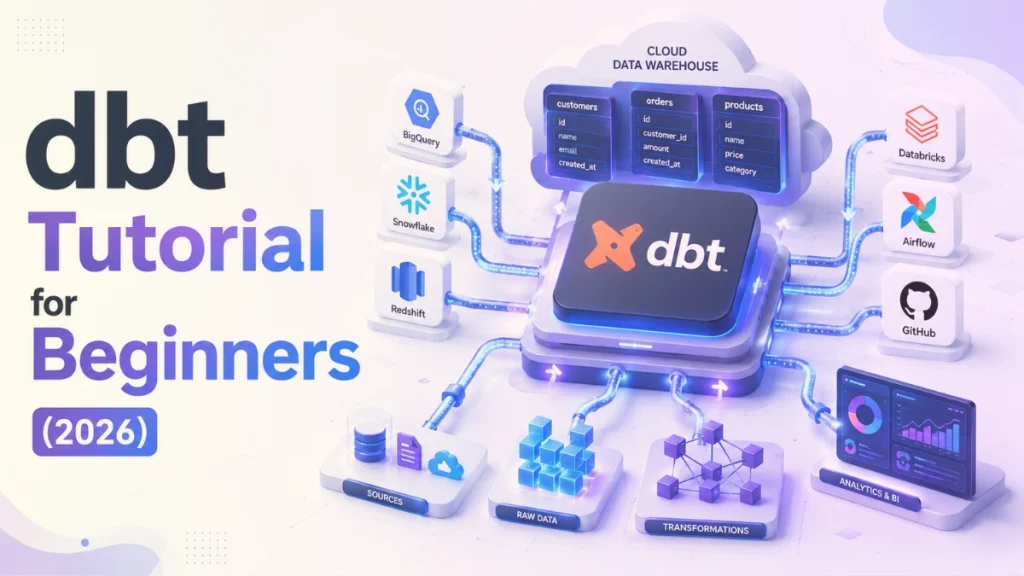
dbt Tutorial for Beginners (2026)
dbt replaced that mess conception with a disciplined, software-engineering approach to SQL transformation, and the data industry adopted it at very fast rate in this growing age of data. All data companies, including GitLab, JetBlue, Shopify, and HubSpot run dbt as a core part of their data infrastructure.
In 2026, following the merger of dbt Labs and Fivetran, dbt became the part of a combined data infrastructure platform that signals its permanent place at the center of the modern data stack.
This guide covers everything for a beginner level needs to understand the basic of dbt that:
What it is?
How it fits into your data pipeline?
What are the main core concepts that make it work?
How to think about your first project as dbt expert?
Table of Contents
Quick Answer of dbt Tutorial for Beginners
dbt (Data Build Tool) is an open-source transformation tool that help professionals of data such as data engineers and analysts to transform raw data inside their data warehouse using only SQL. It occupies the T in ELT (Extract, Load, Transform) which refers to that “once your data is already loaded into a warehouse like BigQuery, Snowflake, or Redshift, dbt takes over and turns that raw data into clean, tested, documented, analytics-ready tables.
You write just SQL SELECT statements so dbt automatically handles building the tables, running data quality tests, generating documentation, and managing the order in which everything gets built.
1. The Problem for which dbt Was Built to Solve it
Every data team that’s been around long enough has a folder called something like “sql_scripts_final_v3_USE_THIS_ONE.” Inside it: dozens of transformation scripts are exists, some are scheduled, some are run manually, none of them tested, few of them are documented. No one is quite sure that which ones are still in use. No one remembers why that one CASE WHEN statement exists. When a column gets renamed upstream, then there are three downstream reports quietly break.
dbt was created by dbt Labs (formerly Fishtown Analytics) to solve exactly the problem which we have discuses above, so this tool bringing the same engineering discipline that software teams apply to the application code (version control, testing, documentation, modular design) into the world around of the SQL-based data transformation.
The result is a transformation framework which helps to treats your SQL logic as a proper code which is:
trackable in Git,
testable before it reaches production,
documented automatically, and
structured so that the relationships between tables are explicit rather than tribal knowledge.
2. What Is dbt?
dbt (Data Build Tool) is an open-source command-line tool which is specifically designed to help in the transformation of data inside your data warehouse by running just SQL SELECT statements and that automatically materializing their output in the form of tables or views. So, you write the logic; dbt handles the execution.
The key detail that surprises most beginners: you only write SELECT statements in dbt. You never write CREATE TABLE, INSERT INTO, or DROP TABLE. dbt generates all of that infrastructure code by itself, based on the configuration that you control. Your job is to define what data you want; dbt’s job is to make it exist in your warehouse.
dbt comes in two forms:
dbt Core is free, open-source version that runs from your command line and it has no built-in scheduling or web interface, so simply you just run commands manually, or wire it into an external scheduler like Apache Airflow.
dbt Cloud is properly managed, web-based version built on top of dbt Core. It adds a browser-based IDE, a built-in job scheduler, team collaboration features, and the dbt Analytics Engineering Certification exam pathway. It has a free tier that’s sufficient for learning and small projects.
One thing dbt is definitely not: an ingestion tool.
dbt does not extract data from source systems and it does not load data into your warehouse. It is only responsible to transforms data that’s already there. This distinction mostly matters because dbt sits at a specific, well-defined position in your data pipeline, after the data arrives, before it reaches your analysts and dashboards.
3. Where dbt Fits in the Modern Data Stack
To understand that where the dbt tool lives, so you need to understand the difference between main terms in the data engineering fields which are ETL and ELT, these two approaches for moving and the transformation of data.
ETL stands for (Extract, Transform, Load) and it is the traditional approach which extract data from the source systems, transform it somewhere in the middle (typically in a dedicated tool or custom code), then load the cleaned result into a database. The process of this transformation happens before the data reaches to its final destination.
ELT stands for (Extract, Load, Transform) which applies reverses on the last two steps: extract data from source systems, load it as-is into a cloud data warehouse, then transform it there. Modern cloud warehouses like BigQuery, Snowflake, and Redshift are powerful enough to handle heavy transformation workloads natively, so there’s no longer a strong reason to transform data before loading it.
dbt is an ELT tool. It assumes your raw data is already sitting in your warehouse means loaded there by a tool like Fivetran, Airbyte, or Stitch, and it transforms that raw data in place, inside the warehouse itself.
dbt and Medallion Architecture
Many modern data teams use Medallion Architecture to organize their data transformation workflows. Popularized by Databricks, this layered design pattern structures data into three stages: Bronze, Silver, and Gold.See our complete guidefor the full picture.
dbt doesn’t run alongside your warehouse as a separate compute engine; it runs queries against your warehouse using the warehouse’s own processing power.
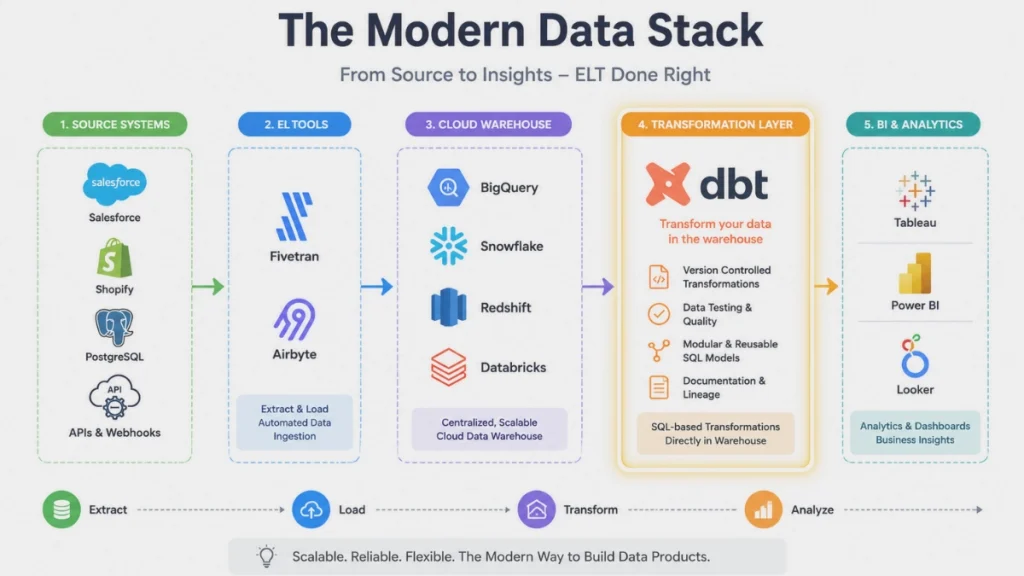
The modern data stack, diagrammed simply:
Source systems → Extract & Load (Fivetran / Airbyte / Stitch) → Data Warehouse (BigQuery / Snowflake / Redshift / Databricks) → Transform (dbt) → Analytics & BI (Tableau / Power BI / Looker)
dbt works with all of the major cloud data warehouses:
BigQuery, Snowflake, Redshift, Databricks, and DuckDB, among others.
The same dbt project structure and the same SQL patterns work across all of them, though some warehouse-specific configuration is required.
dbt Modern Data Stack
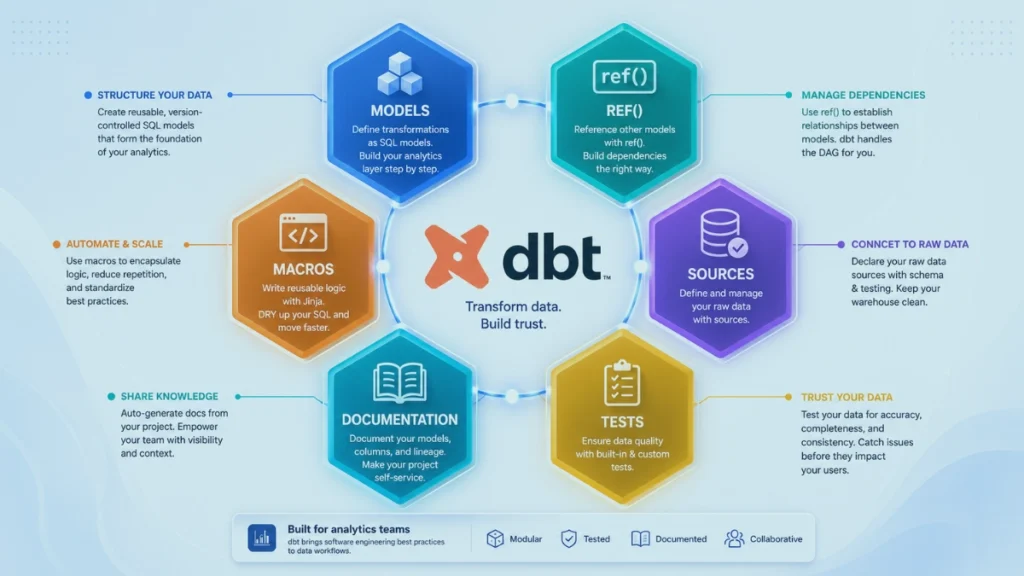
4. The 6 Core dbt Concepts Every Beginner Needs to Know
6 Core dbt Concepts Every Beginner Needs to Know
A: dbt Models
A dbt model is a single SQL file which containing exactly one SELECT statement, whose output dbt materializes in the form of a table or view in your warehouse. The file name becomes the name of the table or view which dbt creates.
For example: a file called clean_orders.sql containing SELECT order_id, customer_id, amount FROM raw_orders WHERE status = 'complete' tells dbt to create a table called clean_orders containing only the completed orders from your raw data. You write the SELECT; dbt generates and runs the CREATE TABLE statement.
dbt models support four materialization types:
View (the default): dbt creates a database view, meaning the SELECT runs fresh each time someone queries it. Fast to build, no storage cost, but slower to query on large datasets.
Table: dbt creates a physical table by running the SELECT and storing the result. Faster to query, but rebuilds the entire table on each dbt run.
Incremental: dbt only processes new or changed rows instead of rebuilding the full table. The right choice for large tables where full rebuilds would be too slow or expensive.
Ephemeral: the model isn’t materialized at all; it’s injected as a subquery wherever it’s referenced. Useful for intermediate logic you don’t need to store.
B: The ref() Function
The ref() function is the most important concept in dbt, and understanding it early will save you significant confusion later.
In a standard SQL script, if one query depends on another table, you hardcode that table name: FROM my_schema.raw_orders. The problem with hardcoding is that dbt needs to know the relationships between your models to build them in the right order, it can’t infer that relationship from a raw string.
The ref() function solves this. Instead ofFROM my_schema.raw_orders, you write FROM {{ ref('raw_orders') }}. That double-curly-brace syntax is Jinja templating (covered in concept F), and dbt replaces it at build time with the correct fully qualified table name for your environment.
More importantly, dbt reads every ref() call in your project to build a dependency graph, a map of which model must be built before which other model. If clean_orders references {{ ref('raw_orders') }}, dbt automatically builds raw_orders first, every time, without you having to specify the order manually.
The rule for dbt beginners: never hardcode a table name when you mean to reference another dbt model. Always use ref().
C: dbt Sources
dbt sources are the raw tables that your ingestion tool (Fivetran, Airbyte, etc.) has loaded into your warehouse before dbt does anything. Sources are not dbt models, they’re the starting point that dbt models build on top of.
You define sources in a YAML configuration file rather than a SQL file. That definition tells dbt where your raw data lives: which database schema it’s in, what the tables are called, and optionally, how fresh the data should be. That last point is where sources become genuinely useful for production environments, dbt can run freshness checks against your sources and alert you if data from a source hasn’t been updated within the expected window. Catching a stale source table before it propagates stale results to your dashboards is substantially better than catching it after.
To reference a source in a model, you use {{ source('source_name', 'table_name') }} instead of {{ ref() }}. The distinction keeps dbt’s dependency graph clean: ref() for dbt-managed models, source() for raw ingested data.
D: dbt Tests
dbt tests are automated data quality checks that run against your models and sources to catch problems before they reach your analysts. dbt includes four generic tests out of the box:
unique: verifies that every value in a column appears only once. If order_id is supposed to be a primary key, this test confirms no duplicates exist.
not_null: verifies that no values in a column are NULL. Useful for any field that must always have a value.
accepted_values: verifies that every value in a column belongs to a defined list. For a status column that should only contain ‘pending’, ‘complete’, or ‘cancelled’, this test catches anything that doesn’t fit.
Relationships: verifies referential integrity between tables, confirming that every foreign key value in one table exists as a primary key in another.
Tests are defined in YAML alongside your model files, not in separate testing infrastructure. When you rundbt test, dbt executes all defined tests against your warehouse and reports which pass and which fail. A failed test means bad data was caught before it reached a dashboard, which is precisely the point.
E: dbt Documentation
dbt auto-generates a documentation website directly from your project where no separate documentation tool, no manual write-up required. The generated site includes descriptions for every model and column (pulled from your YAML files), a searchable table catalog, and a data lineage graph that visually shows that how every table in your project connects to every other table.
Two commands handle the full documentation workflow: dbt docs generate builds the documentation site from your project, and dbt docs serve opens it in your browser locally. In dbt Cloud, the documentation site is hosted and shareable with your team automatically.
The lineage graph is particularly valuable for onboarding new team members and for debugging, when something breaks, you can trace exactly which upstream model introduced the problem.
F: Macros and Jinja Templating
dbt models are not plain SQL files, they’re Jinja templates that happen to contain SQL. Jinja is a Python-based templating language that dbt uses to add programmability to SQL: variables, conditional logic, loops, and reusable functions called macros.
A dbt macro is a reusable block of SQL logic, defined once in a .sql file inside your project’s macros/ folder and callable from any model. If you find yourself writing the same date truncation logic, the same fiscal year calculation, or the same CASE WHEN pattern in multiple models, that’s a candidate for a macro.
dbt also has a package ecosystem, dbt-utils is the most widely used package, and it ships pre-built macros for common data patterns including surrogate key generation, date spine creation, and pivot operations. Adding a dbt package is a single line in your project’s packages.yml file.
5. dbt Core vs dbt Cloud: Which to Use as a Beginner?
Description
dbt Core
dbt Cloud
Cost
Free
Free tier + paid plans
Interface
Command line only
Web IDE + CLI
Setup
Local installation required
Browser-based, no local setup
Scheduling
Manual or external (Airflow)
Built-in job scheduler
Best for
Developers comfortable with CLI
Beginners, teams, production
The recommendation for beginners is to start with dbt Cloud’s free tier. Local setup of dbt Core requires configuring Python environments, connection profiles, and warehouse credentials before you run a single query, that’s a lot of friction before you’ve learned anything about dbt itself. dbt Cloud’s browser-based interface removes all of that, letting you to connect with a warehouse and write your first model within minutes of signing up.
Once you understand dbt’s core concepts and want finer control over your development environment, moving to dbt Core is straightforward since both run the same underlying logic.
6. Your First dbt Project: Step by Step
This walkthrough describes the logical flow of setting up and running your first dbt project. BigQuery’s free tier is the recommended to starting warehouse for beginners levels, it requires no credit card for basic usage and pairs with dbt Cloud without any local setup.
Step 1: Connect dbt to your warehouse. In dbt Cloud, this means providing your warehouse credentials and connection details through the setup wizard. dbt stores these as a “profile” and uses them for every command you run.
Step 2: Initialize your project. Running dbt init project_name creates the standard dbt folder structure: models/ for your SQL files, tests/ for custom tests, macros/ for reusable logic, and dbt_project.yml for project-level configuration.
Step 3: Define your sources. Create a sources.yml file in your models/ directory. Declare the raw tables your ingestion tool has loaded into your warehouse, the schema they’re in, and what they’re called. This registers them in dbt’s awareness without creating any new tables.
Step 4: Write your first model. Create a .sql file in your models/ folder containing a SELECT statement that reads from your source using {{ source() }}. Something as simple as selecting a few columns and filtering out null rows is a valid first model.
Step 5: Run dbt run dbt compiles your SQL, generates the CREATE TABLE or CREATE VIEW statement, and executes it in your warehouse. When it completes, your first dbt-managed table exists.
Step 6: Add a test. In a YAML file alongside your model, add a unique test on your primary key column and a not_null test on a required field.
Step 7: Run dbt test. dbt executes the tests you defined against the table it just built. Each test either passes or fails with a specific explanation.
Step 8: Generate documentation. Run dbt docs generate followed by dbt docs serve. A browser tab opens showing your model’s columns, your test definitions, and a lineage graph, for a project with one model, it’s simple, but the pattern scales to projects with hundreds of models.
7. Why dbt Has Become Essential for Data Engineers in 2026
dbt’s adoption has been driven by a straightforward value proposition: it applies software engineering best practices, version control via Git, automated testing, modular design, and documentation, to the SQL-based transformation work that data teams do every day.
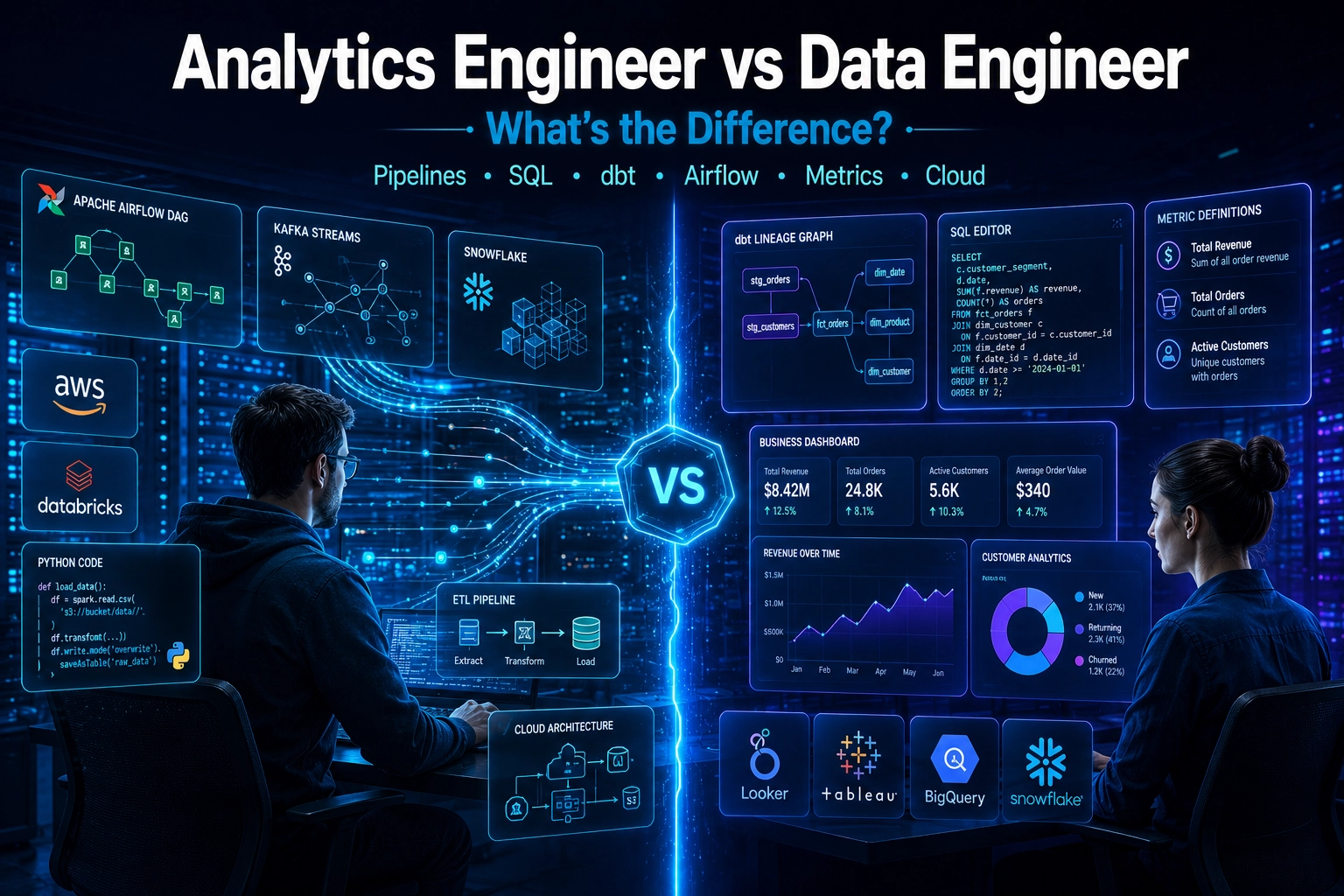
The impact has been significant enough to create an entirely new job category. The “analytics engineer” role, a practitioner who bridges the gap between data engineering and data analysis, building trustworthy, well-documented data models rather than raw pipelines, exists largely because dbt made that kind of structured, disciplined SQL work practical at scale.
The dbt Analytics Engineering Certification, offered by dbt Labs, is a recognized credential that signals proficiency in dbt’s core patterns. It appears on job descriptions with increasing frequency and is covered by the bestselling dbt courses on platforms like Udemy.
The Fivetran and dbt Labs merger in 2026 accelerated dbt’s consolidation as standard infrastructure rather than a tool choice teams debate. With dbt now embedded in a combined platform that also handles data ingestion, the transformation layer of the modern data stack has effectively standardized.
8. Common Mistakes Beginners Make with dbt
Hardcoding table names instead of using {{ ref() }}. This breaks dbt’s dependency graph and means dbt can’t guarantee build order. Any time you reference another dbt model inside a model, use ref().
Skipping tests. dbt’s testing framework is one of its most valuable features, and ignoring it means shipping untested data to analysts, exactly the problem dbt exists to prevent. Even one unique and one not_null test per model is better than none.
Building one giant model instead of many small ones. The correct dbt pattern is one model per logical transformation step, with each model doing one thing clearly. A single model that ingests raw data, cleans it, joins three tables, calculates business metrics, and adds fiscal year flags is hard to test, hard to debug, and hard for teammates to understand.
Confusing dbt Core with dbt Cloud. They’re different products. Beginners often install dbt Core expecting the web interface and scheduling features that only exist in dbt Cloud, then assume dbt is broken when those features don’t appear.
Not reading the compiled SQL. Running dbt compile generates the actual SQL that dbt will execute, with all Jinja resolved and all ref() calls replaced with real table names. Reading this output is the fastest way to understand what dbt is doing on your behalf and to catch logic errors before they hit production.
9. Frequently Asked Questions
What does dbt stand for?
dbt stands for Data Build Tool. The name reflects its core function: building data assets (tables and views) in your warehouse from SQL model definitions. It’s always written in lowercase, which is “dbt”, not “DBT”.
Do I need to know Python to use dbt?
No. dbt’s primary language is SQL, and beginners can build fully functional dbt projects without writing any Python. dbt uses Jinja templating syntax inside SQL files for macros and variables, but basic Jinja is straightforward to learn and not required for your first several projects. Python knowledge becomes relevant if you want to contribute to dbt’s open-source codebase or build advanced custom integrations.
What databases does dbt work with?
dbt works with all major cloud data warehouses and modern analytical databases: BigQuery, Snowflake, Redshift, Databricks, DuckDB, PostgreSQL, and several others. Each warehouse requires its own dbt adapter (a small configuration package), but your dbt models, tests, and documentation work identically across all of them.
Is dbt free to use?
dbt Core is completely free and open-source. dbt Cloud has a free tier that supports individual users and small projects without requiring a paid plan. dbt Cloud’s paid plans add features like team collaboration, more scheduled jobs, single sign-on, and enterprise support. For learning dbt and for small-scale use, the free tier is sufficient.
What is the difference between dbt Core and dbt Cloud?
dbt Core is the open-source, command-line version of dbt which is free to use, runs locally, requires manual scheduling via an external tool like Airflow. While, dbt Cloud is a managed web platform built on top of dbt Core, it adds a browser-based IDE, a built-in job scheduler, hosted documentation, and team features. Both run the same underlying dbt logic; the difference is in the interface and operational tooling around it.
How long does it take to learn dbt?
A data analyst or junior data engineer with solid SQL knowledge can build a working dbt project within a day using dbt Cloud’s free tier. Understanding all six core concepts (models, ref(), sources, tests, documentation, macros) well enough to use them confidently typically takes one to two weeks of hands-on practice. Reaching the level required for the dbt Analytics Engineering Certification takes most candidates one to three months of consistent learning.
Is dbt replacing SQL?
No. dbt is a framework for organizing and executing SQL, not a replacement for it. Every dbt model is a SQL SELECT statement. dbt adds structure, testing, documentation, and dependency management around SQL but it doesn’t replace the language itself. If anything, dbt has made SQL more valuable as a career skill by giving it the engineering infrastructure that makes SQL-based work more maintainable at scale.
What is an analytics engineer?
An analytics engineer is a data practitioner who sits between traditional data engineering and data analysis and responsible for building clean, tested, well-documented data models that analysts and business teams can trust and use directly. The analytics engineering role was formalized largely as a result of dbt’s adoption, which created a new set of skills and practices (SQL modeling, data testing, lineage documentation) that didn’t have a job title before dbt made them mainstream. Companies including dbt Labs, Fishtown Analytics alumni, and a growing list of enterprises now hire analytics engineers as a distinct role.
10. Conclusion
dbt changed data engineering by treating SQL transformation as code that deserves the same discipline as any other software: tested, documented, version-controlled, and modular. That shift has made data teams faster, their outputs more trustworthy, and the transformation layer of the modern data stack substantially easier to reason about and maintain.
For anyone building a data engineering or analytics engineering career in 2026, dbt knowledge is effectively table stakes. The Fivetran merger has made it core infrastructure, its adoption at companies like GitLab, JetBlue, Shopify, and HubSpot has proved it at scale, and the dbt Analytics Engineering Certification gives learners a recognized credential to show for their work.
The best way to start is small:
One source, one model, one test. Rundbt run, thendbt test, then dbt docs generate
Understand that loop completely before building anything more complex. Once those three commands make sense, the rest of dbt’s feature set unfolds logically from the same foundation.
dbt doesn’t replace the cloud ETL tools covered in our AWS Glue vs Azure Data Factory guide; it works alongside them. Glue or ADF handles getting data into your warehouse; dbt handles what happens to that data after it arrives.








1 comment