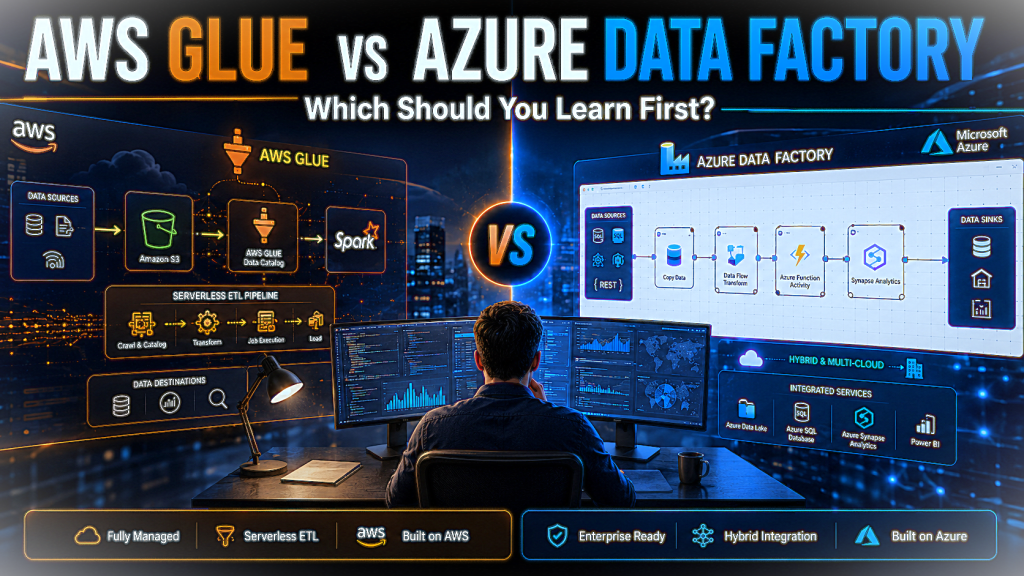
Every data engineer eventually has the responsibility to answer the same question: “AWS Glue or Azure Data Factory?” Both tools handle the fundamental job of moving and transforming data between systems, but they take genuinely different approaches to that job, serve different ecosystems, and attract different kinds of teams. Picking the wrong one to learn first and add to your portfolio doesn’t ruin your career, but it can cost you months of effort that would have been better spent elsewhere.
The AWS Glue vs Azure Data Factory question matters enough because these are the most popular tools used for moving and processing data in the cloud (this is called ETL), and the following data shows it.
A TDWI survey found these two tools sitting at the top of the cloud ETL market, with 69% of respondents reporting they had used AWS Glue and 67% reporting they had used Azure Data Factory.
This means that’s not a niche debate; these are the two dominant tools in the cloud ETL space, and the choice between them is one that data engineering teams at tens of thousands of companies have already made.
This guide explains that what each tool is, how they compare across the factors which matter most among other factors, and how to decide which one to learn first based on your actual situation and needs.
AWS Glue vs Azure Data Factory: Which Should You Learn First
Quick Answer
AWS Glue is Amazon’s fully serverless, code-first ETL service best suited for teams already working within the AWS ecosystem who need scalable data transformation with Spark and Python. Azure Data Factory is Microsoft’s visual, low-code data orchestration platform that excels in hybrid environments mixing cloud and on-premises systems.
For most beginners:
Learn Azure Data Factory first if you’re in a Microsoft-heavy organization, or AWS Glue first if your company runs on AWS, and if you’re genuinely unsure which applies to you, ADF’s visual interface makes it the gentler starting point.
1. Why This Comparison Matters for Data Engineers in 2026
The cloud data engineering environment has largely settled around these two tools as the default choices in their respective ecosystems. AWS holds roughly 32% of the global cloud market, and AWS Glue is the default ETL layer for teams building on S3, Redshift, and Lake Formation. Microsoft Azure dominates in enterprise and financial services organizations, and Azure Data Factory is the go-to pipeline tool across Azure Synapse, SQL Server, and Power BI environments.
Learning the wrong tool for your market doesn’t just slow you down technically, it can mean spending six months mastering a skill that the employers you’re targeting rarely use. The goal of this guide is to help you make that choice with clarity rather than guesswork.
2. What Is AWS Glue?
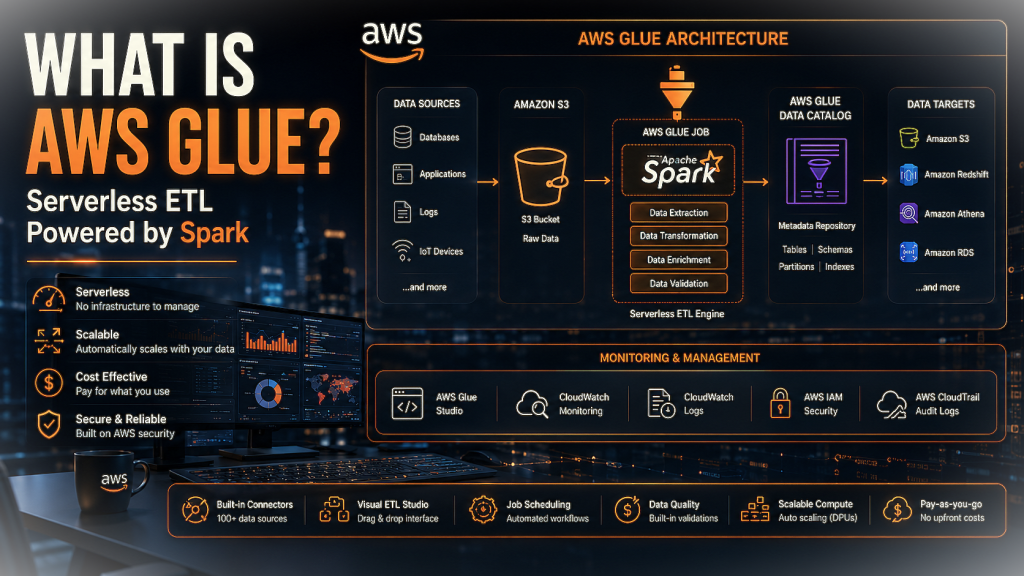
AWS Glue is Amazon’s fully managed, serverless data integration service. “Serverless” means that there’s no infrastructure to provision or maintain; you define your transformation logic, and AWS handles the compute. Under the hood, this means that Glue runs on Apache Spark, the distributed computing engine that powers large-scale data processing across the industry.
What Is AWS Glue?
The service bundles several distinct capabilities into one package:
AWS Glue Data Catalog: A centralized metadata repository that tracks the structureand location of your data across S3, RDS, Redshift, and other sources. Think of it as a searchable index of everything in your data lake.
AWS Glue Studio: A visual job authoring interface that lets you to design transformation workflows without writing raw Spark code, though the generated code is fully editable.
Glue Crawlers: Automated agents that scan data sources, detect schemas, and populate the Data Catalog without manual schema definition.
ETL scripting in Python or Scala: For teams that prefer to write transformation logic directly, Glue supports PySpark and Scala Spark scripts with access to the full Spark API.
The team that benefits most from AWS Glue is one that already thinks in Python and Spark, works primarily in the AWS ecosystem, and wants the control of code-first ETL without the overhead of managing Spark clusters themselves.
3. What Is Azure Data Factory?
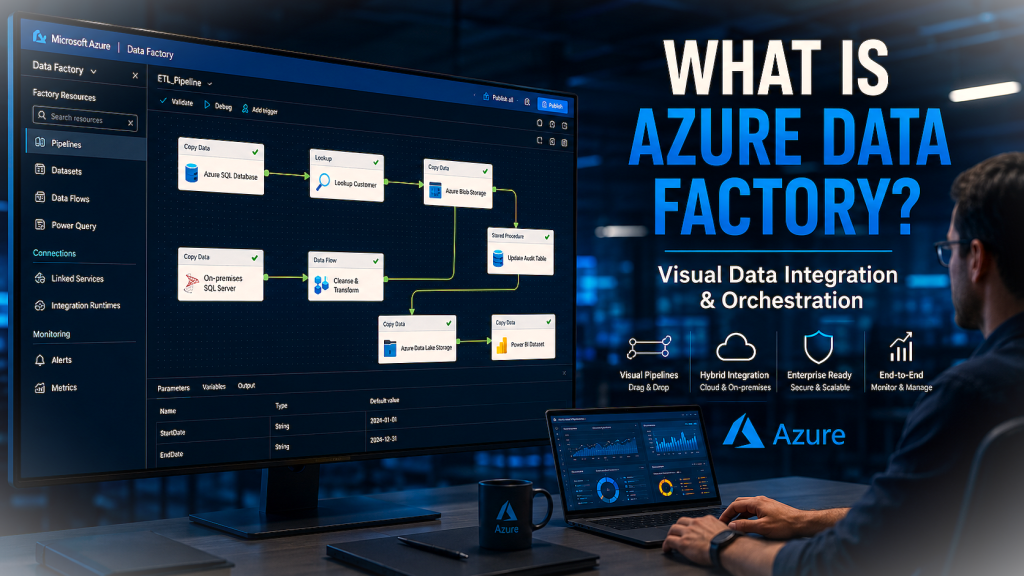
Azure Data Factory (ADF) is the Microsoft’s cloud data integration and orchestration platform. Where AWS Glue is primarily a transformation tool built on Spark, ADF is better understood as a coordination layer; it orchestrates data movement and transformation across a wide range of systems, often delegating the actual compute work to other services like Azure Databricks, Azure HDInsight, or Azure Synapse.
What Is Azure Data Factory?
The platform’s core capabilities include:
Visual drag-and-drop pipeline builder: A canvas-based interface where you connect activities (copy data, transform, run a stored procedure, trigger a notebook) without writing pipeline definition code manually.
90+ built-in data connectors: Pre-built connections to cloud storage, SaaS platforms, on-premises databases, file systems, and enterprise applications. This is meaningfully more than AWS Glue’s native connector library.
Mapping Data Flows: A visual interface for designing data transformations without writing code. Useful for data engineers who want control without the full learning curve of Spark.
Integration Runtimes: The compute infrastructure that executes ADF pipelines. Crucially, Integration Runtimes can run in your on-premises network, enabling genuine hybrid data pipelines that connect legacy systems to the cloud.
Native SSIS support: SQL Server Integration Services is the on-premises ETL tool that many enterprises ran for years before moving to the cloud. ADF can lift and run existing SSIS packages with minimal modification, which has made it the default choice for enterprises migrating legacy Microsoft data infrastructure to Azure.
The team that gets the most from ADF is one working in a mixed environment, some Azure, some on-premises, possibly some SQL Server, where visual pipeline authoring lets a broader range of contributors work on data workflows without requiring deep Spark knowledge from everyone.
4. AWS Glue vs Azure Data Factory: Head-to-Head Comparison
Feature
AWS Glue
Azure Data Factory
Architecture
Fully serverless, Spark-based
Orchestration-first, hybrid-capable
Interface
Code-first (Python/Scala) + Visual Studio
Visual drag-and-drop + code option
Learning curve
Steeper (requires Spark/coding knowledge)
Gentler (low-code friendly)
Hybrid/on-prem support
Limited
Strong (Integration Runtimes)
Connectors
AWS ecosystem + select external
90+ built-in including SaaS, on-prem
SSIS migration
Requires conversion work
Native support: direct lift-and-shift
Pricing model
DPU-hours based ($0.44/DPU-hour, US East)
Activity-based (pipeline runs + DIU hours)
Best ecosystem fit
AWS-first organizations
Azure/Microsoft-first organizations
Gartner rating (2026)
4.4/5 (552 reviews)
4.4/5 (106 reviews)
Both tools hold an identical 4.4/5 rating on Gartner Peer Insights, which is genuinely informative, because it rules out the possibility that one is simply a better product than the other. What it tells you instead is that both tools satisfy the teams that actually use them, but those teams have different profiles and different needs.
5. Key Differences Explained
Architecture: Serverless vs Orchestration-First
AWS Glue handles compute directly. When you run a Glue job, AWS spins up a Spark cluster, executes your transformation, and shuts it back down. You never see the cluster; you just see the output. This is what “serverless” means in actuality: the abstraction layer is thick enough that you interact with the transformation logic, not the infrastructure running it.
Azure Data Factory takes a different structural approach. ADF is an orchestration engine; its native role is to coordinate when and where data work happens, not to do the heavy transformation work itself. A complex ADF pipeline might copy raw data from an on-premises SQL Server into Azure Blob Storage, trigger an Azure Databricks notebook to transform it, write the result to Azure Synapse, and then notify a Power BI dataset to refresh, all without ADF doing any of the compute itself. This makes ADF extremely flexible about what systems it works with, but it also means understanding ADF well requires some familiarity with the broader Azure service catalog.
Interface: Code-First vs Visual-First
AWS Glue Studiooffers a visual interface, but the underlying reality of Glue is code. When pipelines get complex, you’ll be reading and editing PySpark. Debugging a Glue job means understanding Spark’s execution model, partitioning behavior, and error logs. None of that is inaccessible, but it has a learning curve that assumes programming fluency.
Azure Data Factory leads with the visual builder. You can design, test, and deploy a fully functional data pipeline in ADF without writing a single line of code, using Mapping Data Flows for transformations and the drag-and-drop canvas for orchestration. Code options exist, you can drop into ARM templates or use the JSON pipeline definitions directly, but they’re optional rather than required for day-to-day use.
Hybrid Support: Cloud-Only vs Cloud + On-Premises
For teams that live entirely in the cloud, this difference is invisible. For teams that don’t, and many enterprise teams don’t, it’s often the deciding factor.
AWS Glue is optimized for AWS-native environments. Its connections to non-AWS systems exist but are secondary to its core design. Building a pipeline that reaches into an on-premises Oracle database or a legacy file server from AWS Glue involves meaningful additional setup.
Azure Data Factory was designed with hybrid environments as a first-class use case. Integration Runtimes can be deployed inside your corporate network, sitting behind your firewall, and ADF pipelines can reach them from the cloud as if the on-premises system were just another connected service. For enterprises with significant on-premises infrastructure, this is a practical capability that ADF provides and Glue doesn’t match.
Connectors
AWS Glue integrates deeply with the AWS ecosystem such as S3, RDS, DynamoDB, Redshift, and other AWS-native services are all natively supported. Its library of pre-built connectors to third-party SaaS platforms is more limited.
ADF’s 90+ built-in connectors cover a broader range of external systems out of the box:Salesforce, SAP, ServiceNow, SharePoint, Snowflake, and dozens of others, in addition to on-premises databases and file systems. If your data pipeline touches multiple external vendors, ADF’s connector library reduces the setup work considerably.
Pricing
AWS Glue charges based on Data Processing Units (DPUs) and time. In the US East region, the standard rate is $0.44 per DPU-hour. A DPU represents a unit of compute capacity (4 vCPUs, 16 GB memory), and most Glue jobs run with a minimum of 2 DPUs. For teams running predictable, steady workloads, the cost model is straightforward. For teams with variable or exploratory workloads that spin up and run jobs unpredictably, costs can be harder to forecast.
Azure Data Factory uses an activity-based pricing model:you pay per pipeline run, per data integration unit (DIU) hour for data movement activities, and per vCore-hour for Mapping Data Flows. The multiple billing dimensions make ADF pricing more complex to calculate upfront, but for scheduled batch workloads with predictable run patterns, the total cost often comes out comparable to or below Glue for similar data volumes.
In practice, pricing comparisons between the two tools are sensitive to workload patterns. Running sample workloads in both environments before committing to one is worth doing if cost is a primary constraint.
6. Which One Should You Learn First?
Learn AWS Glue first if:
Your company or target employer runs primarily on AWS, meaning your data already lives in S3, your warehouse is Redshift, and your compute environment is built around IAM roles and VPCs. AWS Glue is the native ETL layer in that environment, and learning it means learning the tool your team already uses.
You should also lean toward Glue if you’re comfortable with Python and want code-first control over your transformations, if your work involves ML pipelines that feed into SageMaker or data lake architectures on S3, or if you specifically want to develop Apache Spark skills alongside your ETL knowledge.
Learn Azure Data Factory first if:
Your organization runs on Microsoft Azure, integrates with SQL Server or Azure Synapse, or produces reports in Power BI. ADF is the pipeline tool that connects those systems, and learning it means learning the orchestration layer your team depends on.
Also, lean toward ADF if your organization has on-premises systems or legacy SSIS pipelines that need to move to the cloud. ADF’s native SSIS support and Integration Runtimes make that migration substantially less painful than attempting it with Glue. And if your team includes BI analysts, operations staff, or others who aren’t full-time engineers, ADF’s visual interface makes it more practical for cross-functional collaboration.
If you’re genuinely new and unsure where to start:
Start with Azure Data Factory. The visual pipeline builder gives you a clearer mental model of what data pipelines actually do: copy data from here to there, transform it, move it somewhere else, before you have to grapple with Spark’s distributed execution model. Once you understand the pipeline conceptually, picking up AWS Glue becomes significantly easier.
7. Career Angle: Which One Gets You Hired Faster?
Both tools appear heavily in data engineering job postings, but the distribution follows the cloud market fairly closely. AWS Glue shows up more often in US tech companies, startups, and data platform roles built on AWS infrastructure. Azure Data Factory is more prevalent in enterprise job descriptions, particularly in financial services, healthcare, and any organization with significant Microsoft infrastructure investments.
The most actionable career advice here is simple: search 15–20 data engineering job postings in your target market and role level, and count how many list each tool. Whichever appears more frequently in the roles you actually want is the one to prioritize.
Having both on your resume is a genuine differentiator, they’re complementary skills that signal you can work across cloud environments rather than being locked into one vendor’s toolset. But trying to learn both from scratch simultaneously tends to produce shallow knowledge of each. Go deep on one first, get to a level where you could build and debug a real pipeline, and then add the other.
8. Common Mistakes Beginners Make
1) Trying to learn both at once. The temptation to cover all bases is understandable, but the practical result is usually a surface-level understanding of both tools rather than real proficiency in either. Pick one, build something real with it, and then expand.
2) Choosing based on personal preference rather than market fit. The better-looking interface or the more YouTube tutorials available isn’t the right selection criterion. The right criterion is which tool the employers in your target market actually use.
3) Ignoring the surrounding ecosystem. AWS Glue without S3 and Redshift knowledge is like knowing how to drive without knowing how roads work. ADF without Azure basics, resource groups, storage accounts, Azure Active Directory, is similarly disorienting. Budget time to learn the surrounding cloud environment, not just the ETL tool itself.
4) Underestimating SSIS migration complexity for Glue. If your organization has on-premises SSIS packages to migrate, attempting that in AWS Glue requires converting those packages to Spark-based logic, not a simple lift-and-shift. ADF’s native SSIS support is genuinely easier for that specific scenario, and choosing Glue in that context means taking on additional migration work.
9. Frequently Asked Questions
Is AWS Glue easier than Azure Data Factory?
For developers comfortable with Python and Apache Spark, AWS Glue’s code-first model is intuitive, you write transformation logic in PySpark and the serverless infrastructure handles the rest. For everyone else, Azure Data Factory is easier to start with because its visual drag-and-drop pipeline builder doesn’t require coding knowledge to build functional pipelines. Absolute beginner with no Spark background? ADF’s learning curve is gentler. Experienced Python developer? Glue may feel more natural.
Can I learn both AWS Glue and Azure Data Factory?
Yes, and knowing both makes you a stronger candidate in the job market. The more practical approach is to learn one well first, meaning you can build, test, and debug a real pipeline from scratch, and then add the other. Most developers find that the conceptual overlap between the two tools makes learning the second one meaningfully faster than the first.
Which is cheaper, AWS Glue or Azure Data Factory?
Neither is universally cheaper. AWS Glue charges $0.44 per DPU-hour in the US East region, which is predictable for stable, repeating workloads. Azure Data Factory uses an activity-based model charging per pipeline run plus data integration unit hours, which can be more cost-effective for scheduled batch workloads but more variable for ad-hoc processing. The honest answer is that total cost depends heavily on workload patterns, data volume, and region, running a representative workload in both environments is the only reliable way to compare costs for your specific use case.
Do I need to know Python to use AWS Glue?
Not absolutely. AWS Glue Studio’s visual interface can generate PySpark code for you and handle simple transformations without manual coding. In practice, however, AWS Glue’s full capabilities require Python comfort. Debugging failed jobs, optimizing performance, writing complex custom transformations, and understanding what the visual tool generates all depend on being able to read and write PySpark. Python knowledge isn’t optional if you want to use Glue seriously.
Is Azure Data Factory good for beginners?
Yes, particularly for beginners coming from a data analyst, BI, or operations background rather than a software engineering background. The visual pipeline canvas, Mapping Data Flows, and the 90+ pre-built connectors mean you can build real, working data pipelines before you’ve written a single line of code. ADF is also well-documented, and its integration with the broader Microsoft ecosystem (Azure Portal, Power BI, Synapse) means that knowledge compounds quickly if you’re already working in that environment.
Which tool is more in demand in 2026?
Both tools appear in high volumes of data engineering job postings. AWS Glue tends to dominate in tech companies and AWS-native startups. Azure Data Factory is more prevalent in enterprises, financial services, and organizations with significant Microsoft infrastructure. Neither is “more in demand” universally, demand depends entirely on your target industry and employer type. Checking current job postings in your specific market is more useful than any general claim about overall demand.
10. Conclusion
There’s no universal winner in the AWS Glue vs Azure Data Factory debate, and that’s actually useful information. Both tools earned a 4.4/5 on Gartner Peer Insights because both tools genuinely satisfy the teams that use them. The difference is that those teams have different ecosystems, different technical profiles, and different priorities.
The simplest decision rule: match the tool to the cloud your target employer uses. AWS-heavy organization, learn Glue. Azure-heavy organization, learn ADF. Genuinely uncertain about your target market, start with Azure Data Factory’s visual interface to build a solid conceptual foundation, then add Glue.
Both tools are worth knowing over the course of a data engineering career. They show up in different markets, handle different kinds of environments, and complement each other meaningfully. The only mistake is trying to learn both from scratch at the same time before you’ve gone deep enough on either to be genuinely useful with it.
For readers building toward a full data engineering skillset, our Data Engineer Roadmap covers the broader sequence of skills to develop alongside cloud ETL tools, and our guide to Python ETL Tools for Data Engineering covers the code-first transformation options that sit alongside and sometimes inside these platforms. For transforming data once it’s loaded into your warehouse, our complete dbt tutorial for beginners covers the SQL-based transformation layer that works alongside both Glue and ADF.