SQL course · Module 4: Joins · Lesson 12 of 40
Quick answer: A SQL INNER JOIN combines rows from two tables when a join condition is true, usually when a foreign key in one table equals the primary key in the other: SELECT o.id, c.name FROM orders o INNER JOIN customers c ON c.id = o.customer_id;. Each order gets the name of its customer. Rows that have no match in the other table are left out of the result. JOIN on its own means INNER JOIN.
In this lesson you will learn:
- how SQL INNER JOIN matches rows with
ON, and why unmatched rows disappear - how to use table aliases and fix the “column reference is ambiguous” error
- how to join three or four tables in one query
- how to combine joins with
WHEREandGROUP BYto get revenue per customer and per month - why a join can multiply rows, and how that breaks counts
Before you start: Lesson 10, SQL GROUP BY and HAVING.
We ran every example on PostgreSQL 16.15 with the shop database from Lesson 3. Joins work the same way in newer versions; we checked the current PostgreSQL 18 manual.
Table of Contents
Why you need a join
In Lesson 1 we split the shop into four tables. The orders table does not store the customer’s name. It stores only a number, customer_id, that points to a row in customers:
SELECT id, customer_id, order_date
FROM orders
ORDER BY id
LIMIT 3;
id | customer_id | order_date
----+-------------+------------
1 | 1 | 2026-06-03
2 | 2 | 2026-06-09
3 | 3 | 2026-06-15
(3 rows)To answer “who placed order 1?”, we need data from both tables in one result. That is what a join does. The PostgreSQL tutorial says join queries “combine rows from one table with rows from a second table, with an expression specifying which rows are to be paired” (PostgreSQL tutorial: Joins Between Tables).
SQL INNER JOIN syntax
Write the first table after FROM, the second after INNER JOIN, and the matching rule after ON:
SELECT orders.id, orders.order_date, customers.name, customers.city
FROM orders
INNER JOIN customers ON customers.id = orders.customer_id
ORDER BY orders.id
LIMIT 5;
id | order_date | name | city
----+------------+--------------+---------
1 | 2026-06-03 | Ayesha Malik | Lahore
2 | 2026-06-09 | Lucas Martin | Toronto
3 | 2026-06-15 | Sofia Rossi | Milan
4 | 2026-06-22 | Ayesha Malik | Lahore
5 | 2026-07-01 | bilal ahmed | Karachi
(5 rows)Read the ON line as “pair each order with the customer whose id equals the order’s customer_id“. Orders 1 and 4 both belong to customer 1, so Ayesha Malik appears twice. The table name in front of each column (orders.id) shows where it comes from.
The word INNER is optional: “INNER is the default” (PostgreSQL docs: Joined Tables). From here on we write just JOIN.
How INNER JOIN matches rows
The manual’s rule: “For each row R1 of T1, the joined table has a row for each row in T2 that satisfies the join condition with R1.” Let us watch it on customers 8, 9 and 10:
SELECT id, name FROM customers WHERE id >= 8 ORDER BY id; id | name
----+--------------
8 | NOAH WILSON
9 | Chloe Dubois
10 | Omar Haddad
(3 rows)Now join them to their orders:
SELECT customers.id, customers.name, orders.id AS order_id, orders.order_date
FROM customers
INNER JOIN orders ON orders.customer_id = customers.id
WHERE customers.id >= 8
ORDER BY customers.id, orders.id;
id | name | order_id | order_date
----+--------------+----------+------------
8 | NOAH WILSON | 7 | 2026-07-14
8 | NOAH WILSON | 15 | 2026-09-02
9 | Chloe Dubois | 12 | 2026-08-18
9 | Chloe Dubois | 18 | 2026-10-06
(4 rows)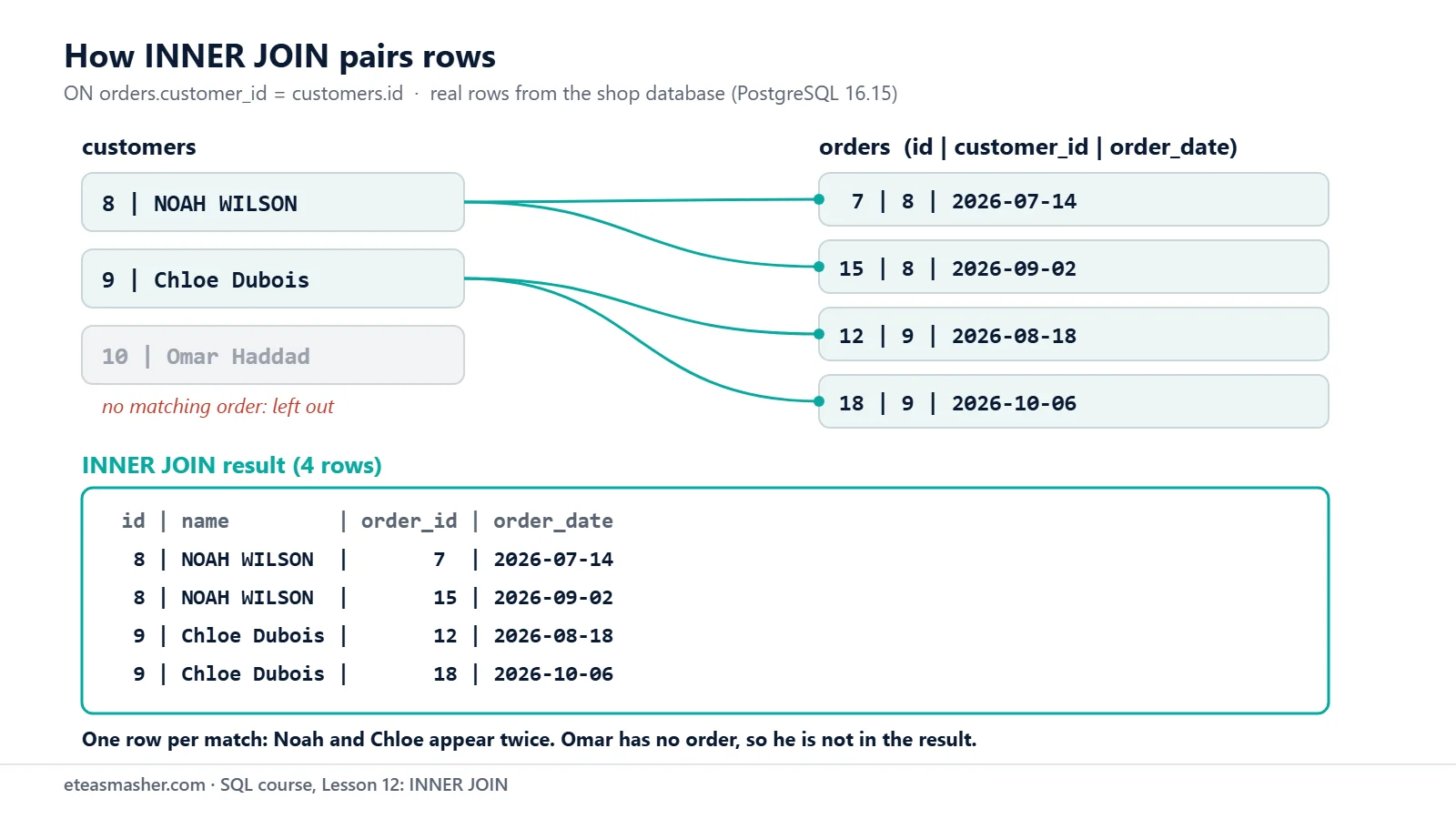
Noah and Chloe have two orders each, so each of them appears in two rows: a customer row is repeated once for every match. Omar Haddad (customer 10) has no orders. Nothing in orders matches him, so he is not in the result at all. This is the key rule of an inner join: “the join ignores the unmatched rows”, in the words of the PostgreSQL tutorial. Across the whole database, the join gives 22 rows (one per order), but only 9 of the 10 customers:
SELECT count(*) AS joined_rows, count(DISTINCT customers.id) AS customers
FROM orders
INNER JOIN customers ON customers.id = orders.customer_id;
joined_rows | customers
-------------+-----------
22 | 9
(1 row)If you need Omar in the result too, with empty order columns, you need a LEFT JOIN. That is the topic of the next lesson.
Table aliases and the “ambiguous” error
Both tables have a column called id, and both customers and products have a column called name. If you do not say which table you mean, PostgreSQL refuses to guess:
SELECT id, name, order_date FROM orders JOIN customers ON customers.id = orders.customer_id;ERROR: column reference "id" is ambiguous
LINE 1: SELECT id, name, order_date FROM orders JOIN customers ON cu...
^Writing the full table name every time is long. A table alias gives a table a short name for one query. You write it after the table name, like the column aliases from Lesson 4:
SELECT o.id AS order_id, o.order_date, c.name
FROM orders AS o
JOIN customers AS c ON c.id = o.customer_id
WHERE o.id <= 3
ORDER BY o.id;
order_id | order_date | name
----------+------------+--------------
1 | 2026-06-03 | Ayesha Malik
2 | 2026-06-09 | Lucas Martin
3 | 2026-06-15 | Sofia Rossi
(3 rows)For table aliases, “The AS key word is optional noise” (PostgreSQL manual), so the rest of this lesson writes FROM orders o. The tutorial adds that it is “widely considered good style to qualify all column names in a join query”, so the query keeps working if a table later gets a column with the same name.
Joining three or four tables
A query can have many joins. Each JOIN ... ON adds one more table to the rows you already have. Here are the lines of order 7, with the customer’s name:
SELECT o.id AS order_id, c.name, oi.product_id, oi.quantity, oi.unit_price
FROM orders o
JOIN customers c    ON c.id = o.customer_id
JOIN order_items oi ON oi.order_id = o.id
WHERE o.id = 7
ORDER BY oi.product_id;
order_id | name | product_id | quantity | unit_price
----------+-------------+------------+----------+------------
7 | NOAH WILSON | 1 | 1 | 22.99
7 | NOAH WILSON | 7 | 2 | 6.75
7 | NOAH WILSON | 10 | 1 | 54.90
(3 rows)Product numbers are not very readable. One more join brings in the product names:
SELECT o.id AS order_id, c.name AS customer, p.name AS product, oi.quantity, oi.unit_price
FROM orders o
JOIN customers c    ON c.id = o.customer_id
JOIN order_items oi ON oi.order_id = o.id
JOIN products p     ON p.id = oi.product_id
WHERE o.id = 7
ORDER BY p.name;
order_id | customer | product | quantity | unit_price
----------+-------------+------------------+----------+------------
7 | NOAH WILSON | Gel Pens 10-Pack | 2 | 6.75
7 | NOAH WILSON | HD Webcam | 1 | 54.90
7 | NOAH WILSON | Wireless Mouse | 1 | 22.99
(3 rows)Each ON follows one foreign key from Lesson 1: orders to customers, order_items to orders, order_items to products. The column aliases customer and product tell the two name columns apart.
INNER JOIN with WHERE and GROUP BY
In Lesson 9 the total revenue was 2211.01, but that included the two cancelled orders, because the status lives in orders and the money lives in order_items. Now we can join them:
SELECT sum(oi.quantity * oi.unit_price) AS revenue
FROM orders o
JOIN order_items oi ON oi.order_id = o.id
WHERE o.status <> 'cancelled';
revenue
---------
2056.21
(1 row)The two cancelled orders (45.00 and 109.80) are gone. As Lesson 11 explained, FROM is processed first, and the joins are part of FROM. So WHERE sees the joined rows and can filter on a column from either table.
Putting o.status <> 'cancelled' in ON instead of WHERE also gave 2056.21. The manual says this choice “does not matter with inner joins, but it matters a lot with outer joins”, so keep the matching rule in ON and filters in WHERE.
Revenue per customer
Add GROUP BY from Lesson 10 and you get a real report:
SELECT c.name, sum(oi.quantity * oi.unit_price) AS revenue
FROM customers c
JOIN orders o       ON o.customer_id = c.id
JOIN order_items oi ON oi.order_id = o.id
WHERE o.status <> 'cancelled'
GROUP BY c.id, c.name
ORDER BY revenue DESC;
name | revenue
---------------+---------
Sofia Rossi | 412.48
Ayesha Malik | 319.99
bilal ahmed | 258.24
Lucas Martin | 244.46
Emma Clarke | 231.00
Daniel Weber | 205.50
Hira Siddiqui | 173.75
NOAH WILSON | 116.39
Chloe Dubois | 94.40
(9 rows)We group by c.id as well, because two customers could share a name. Omar is missing again: the inner join drops him.
Revenue per month
The same join, grouped by month with date_trunc from Lesson 8:
SELECT date_trunc('month', o.order_date)::date AS month,
       sum(oi.quantity * oi.unit_price) AS revenue
FROM orders o
JOIN order_items oi ON oi.order_id = o.id
WHERE o.status <> 'cancelled'
GROUP BY date_trunc('month', o.order_date)::date
ORDER BY month;
month | revenue
------------+---------
2026-06-01 | 308.98
2026-07-01 | 446.14
2026-08-01 | 341.73
2026-09-01 | 423.99
2026-10-01 | 535.37
(5 rows)The five months add up to 2056.21, the same total as before.
A join can multiply rows
An order with three lines becomes three rows after joining order_items. That is correct, but it changes what count(*) counts. This query tries to count orders per customer:
SELECT c.name, count(*) AS order_count
FROM customers c
JOIN orders o       ON o.customer_id = c.id
JOIN order_items oi ON oi.order_id = o.id
WHERE c.id <= 3
GROUP BY c.id, c.name
ORDER BY c.id;
name | order_count
--------------+-------------
Ayesha Malik | 7
Lucas Martin | 5
Sofia Rossi | 5
(3 rows)Ayesha has 4 orders, not 7. The 7 is her number of order lines. Count each order once with count(DISTINCT o.id), or leave out the order_items join when you do not need it:
SELECT c.name, count(DISTINCT o.id) AS order_count
FROM customers c
JOIN orders o       ON o.customer_id = c.id
JOIN order_items oi ON oi.order_id = o.id
WHERE c.id <= 3
GROUP BY c.id, c.name
ORDER BY c.id;
name | order_count
--------------+-------------
Ayesha Malik | 4
Lucas Martin | 3
Sofia Rossi | 3
(3 rows)Before you aggregate, ask what one row of the joined result stands for.
INNER JOIN in other databases
INNER JOIN ... ON is standard SQL and works the same in MySQL, SQLite and SQL Server. SQL Server’s docs say an inner join “Discards unmatched rows from both tables. When no join type is specified, this is the default” (Microsoft Learn: FROM clause).
One difference: PostgreSQL requires a join condition (here ON) after INNER JOIN, MySQL does not. Its manual says “In MySQL, JOIN, CROSS JOIN, and INNER JOIN are syntactic equivalents”, while “In standard SQL, they are not equivalent” (MySQL 9.7 manual: JOIN Clause). In our SQLite 3.53.1 test, orders JOIN customers with no ON also ran and paired every row with every row. Always write ON.
Try it yourself
Exercise 1: The products in order 5
Show the product name, quantity and unit price of every line in order 5, sorted by product name.
Exercise 2: Delivered orders from Pakistan
Show the order id, customer name and order date of every delivered order placed by a customer from Pakistan, oldest first.
Exercise 3: Units sold per category
Show the total quantity sold in each product category, without cancelled orders, largest first. You need three tables.
Solutions
Solution 1
SELECT p.name, oi.quantity, oi.unit_price
FROM order_items oi
JOIN products p ON p.id = oi.product_id
WHERE oi.order_id = 5
ORDER BY p.name;
name | quantity | unit_price
------------------+----------+------------
Gel Pens 10-Pack | 3 | 6.75
USB-C Hub | 2 | 39.50
(2 rows)order_items already has order_id, so you only need to join products for the name.
Solution 2
SELECT o.id AS order_id, c.name, o.order_date
FROM orders o
JOIN customers c ON c.id = o.customer_id
WHERE c.country = 'Pakistan' AND o.status = 'delivered'
ORDER BY o.order_date;
order_id | name | order_date
----------+---------------+------------
1 | Ayesha Malik | 2026-06-03
5 | bilal ahmed | 2026-07-01
10 | Hira Siddiqui | 2026-08-04
11 | Ayesha Malik | 2026-08-11
14 | bilal ahmed | 2026-09-02
17 | Ayesha Malik | 2026-09-29
(6 rows)WHERE filters on one column from each table.
Solution 3
SELECT p.category, sum(oi.quantity) AS units_sold
FROM order_items oi
JOIN products p ON p.id = oi.product_id
JOIN orders o   ON o.id = oi.order_id
WHERE o.status <> 'cancelled'
GROUP BY p.category
ORDER BY units_sold DESC;
category | units_sold
-------------+------------
Stationery | 30
Electronics | 24
Home Office | 5
Accessories | 3
(4 rows)products gives the category and orders gives the status; order_items connects them.
Common mistakes
- Not qualifying a shared column name. You get
ERROR: column reference "id" is ambiguous. Writeo.idorc.id. - Forgetting ON.
SELECT * FROM orders JOIN customers;fails withERROR: syntax error at or near ";". The old comma style,FROM orders, customerswithout aWHEREcondition, gives no error but 220 rows (22 × 10): every order paired with every customer. - Using the table name after giving it an alias.
SELECT orders.id, c.name FROM orders o JOIN ...fails withERROR: invalid reference to FROM-clause entry for table "orders"and the hintPerhaps you meant to reference the table alias "o".Once a table has an alias, use only the alias. - Joining on the wrong column.
ON c.id = o.idgives no error, but it pairs order 4 with customer 4 (bilal ahmed) instead of Ayesha. Join a foreign key to the key it points to.NATURAL JOINmakes the same mistake for you: it matches every column with the same name, hereid, and returned 10 rows instead of 22. The manual callsNATURAL“considerably more risky”. - Counting after a join.
count(*)counts joined rows, not orders. Usecount(DISTINCT o.id).
Frequently asked questions
What is the difference between JOIN and INNER JOIN?
There is none. INNER is the default join type in PostgreSQL, MySQL, SQLite and SQL Server, so JOIN and INNER JOIN give the same result.
Is an INNER JOIN the same as joining in the WHERE clause?
For inner joins, yes: FROM orders o, customers c WHERE c.id = o.customer_id returned the same 22 rows as the JOIN ... ON version. JOIN ... ON keeps the matching rule next to the table, so it is easier to read and harder to forget.
Does the order of tables matter in an INNER JOIN?
Not for the result. customers JOIN orders and orders JOIN customers return the same 22 rows; only the default column order changes. Order does matter for outer joins, which come next.
Summary
- A SQL INNER JOIN pairs rows from two tables when the
ONcondition is true, usually foreign key = primary key. - Rows with no match, such as a customer with no orders, are left out.
- Use table aliases (
orders o) and qualify every column (o.id) to avoid ambiguous names. - Chain several
JOIN ... ONclauses to follow foreign keys across three or four tables, then filter withWHEREand summarise withGROUP BY. - A join can repeat rows, so check what you count:
count(DISTINCT o.id)counts orders,count(*)counts joined rows.
Most real questions need more than one table. Keep that in mind when you plan a project with the data analyst portfolio guide or pick one from the data engineering projects list.
Next lesson
Next: Lesson 13, SQL LEFT JOIN, RIGHT JOIN and FULL OUTER JOIN.
Sources
- PostgreSQL tutorial: Joins Between Tables
- PostgreSQL documentation: Table Expressions (Joined Tables, Table and Column Aliases)
- MySQL 9.7 Reference Manual: JOIN Clause
- Microsoft Learn: FROM clause plus JOIN, APPLY, PIVOT (Transact-SQL)
- SQLite: SELECT