
SQL course · Module 1: Databases and setup · Lesson 1 of 40
Quick answer: A relational database stores data in tables. Each table has named columns, and each row holds one thing, such as one customer or one order. A primary key gives every row a unique id, and a foreign key links a row to a row in another table, for example an order points to the customer who placed it. PostgreSQL, MySQL, SQLite and SQL Server are all relational databases, and you talk to them with SQL.
In this lesson you will learn:
- what a relational database is, and what tables, rows and columns are
- what a primary key does and why every table should have one
- how a foreign key links two tables and protects your data
- how the four tables of our practice
shopdatabase fit together
Before you start: nothing. This is the first lesson of the course.
Table of Contents
What is a relational database?
A relational database keeps its data in tables. The PostgreSQL documentation calls PostgreSQL a “relational database management system” and explains that “relation is essentially a mathematical term for table” (PostgreSQL docs: Concepts).
Three words to keep apart:
- Database: a named group of tables. Our course database is called
shop. - Database management system: the software that stores the tables and answers questions. Here, PostgreSQL.
- SQL: the language you use to ask those questions.
You do not need to install anything for this lesson; just read the queries and results. Lesson 3 installs PostgreSQL and loads the same database. All examples were run on PostgreSQL 16.15 and also work on newer versions.
The shop database we use in this course
Every SQL lesson uses one small practice database: an online shop. It has four tables.
| Table | One row is | Some columns |
|---|---|---|
| customers | one person who signed up | id, name, email, city, country, signup_date |
| products | one thing the shop sells | id, name, category, price |
| orders | one order placed by a customer | id, customer_id, order_date, status |
| order_items | one line inside an order | order_id, product_id, quantity, unit_price |
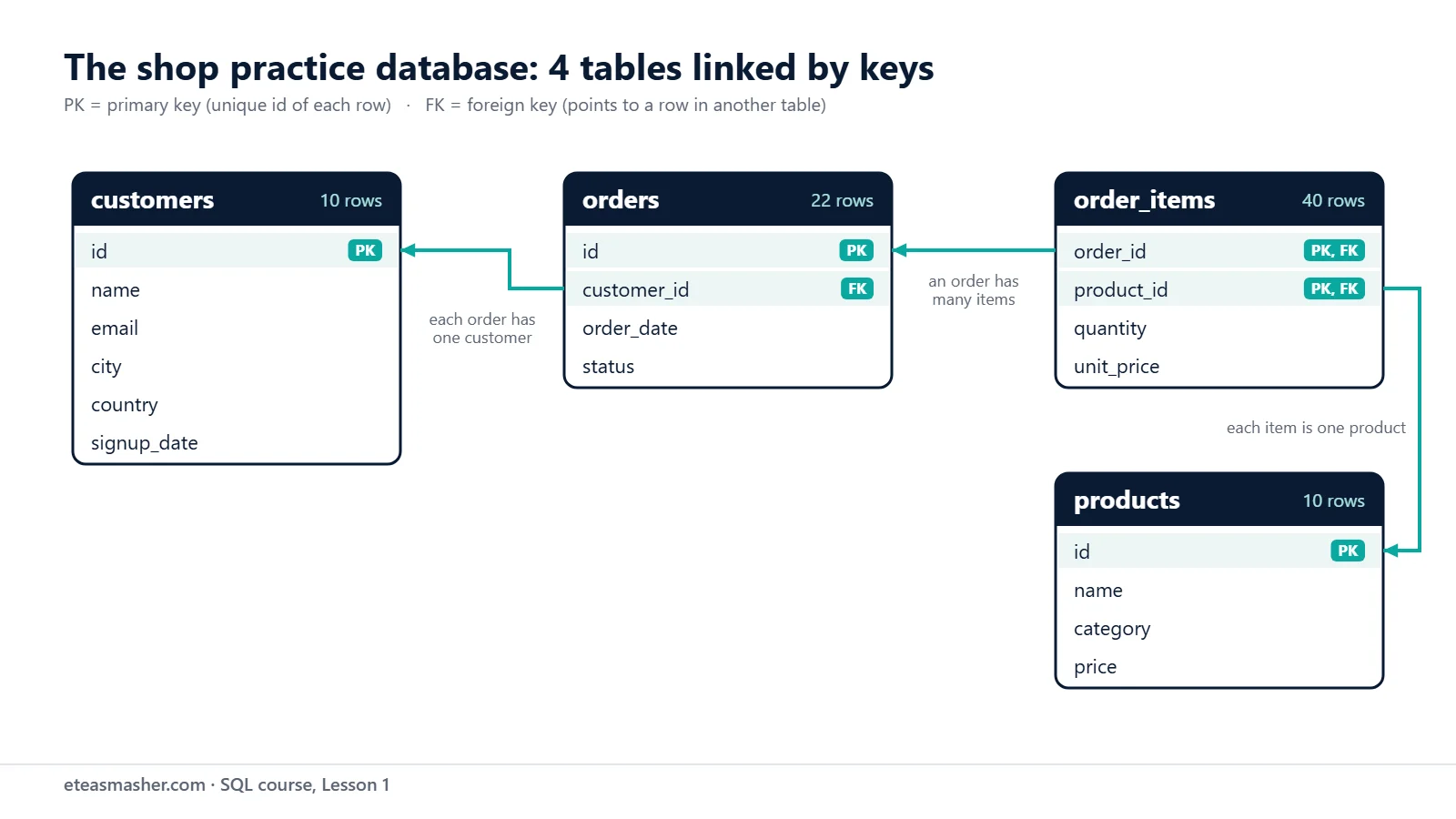
The database holds 10 customers, 10 products, 22 orders and 40 order lines. The names and emails are invented. Lesson 3 gives you the script that builds this database.
Tables, rows and columns
Here are the first three rows of the customers table. Do not worry about the query itself yet. Lesson 4 teaches SELECT step by step.
SELECT * FROM customers ORDER BY id LIMIT 3; id | name | email | city | country | signup_date
----+--------------+--------------------------+---------+----------+-------------
1 | Ayesha Malik | ayesha.malik@example.com | Lahore | Pakistan | 2025-11-03
2 | Lucas Martin | lucas.martin@example.com | Toronto | Canada | 2025-12-14
3 | Sofia Rossi | sofia.rossi@example.com | Milan | Italy | 2026-01-05
(3 rows)This output shows the three building blocks:
- Columns go across the top. Every row has the same columns.
- Rows go down. Each row is one customer (a row is also called a record).
- Values sit where a row meets a column. Row 2 has
Torontoin thecitycolumn.
Each column has a data type: name holds text, signup_date a date, id a whole number. The products table stores price as numeric(10,2): up to 10 digits, 2 of them after the decimal point. The docs recommend numeric for money because it is exact (PostgreSQL docs: Numeric Types).
One rule surprises many beginners: a table has no fixed row order. The docs say “SQL does not guarantee the order of the rows within the table in any way” (PostgreSQL docs: Concepts). That is why the query above says ORDER BY id.
Empty values: NULL
Sometimes a value is missing. Two of our customers did not give all their details:
SELECT id, name, email, city FROM customers WHERE id IN (5, 7); id | name | email | city
----+---------------+---------------------------+--------
5 | Emma Clarke | | London
7 | Hira Siddiqui | hira.siddiqui@example.com |
(2 rows)The empty cells are NULL, which means “no value here”: Emma has no email and Hira has no city. NULL needs special care in queries, and Lesson 6 is all about it.
Primary key: one unique id for every row
A primary key is a column (or a group of columns) that identifies each row. In our shop, every table except order_items uses an id column as its primary key.
The PostgreSQL docs say a primary key requires “that the values be both unique and not null”, and that “a table can have at most one primary key” (PostgreSQL docs: Constraints). PostgreSQL does not force you to add one, but the same page says it is “usually best” to give every table a primary key. Let us test both rules. First, we try to add a second customer with id 1:
INSERT INTO customers (id, name, country, signup_date)
VALUES (1, 'Test Person', 'Pakistan', '2026-11-01');
ERROR: duplicate key value violates unique constraint "customers_pkey"
DETAIL: Key (id)=(1) already exists.Refused: id 1 already belongs to Ayesha Malik. customers_pkey is the name of the primary key rule. Now a row with no id:
INSERT INTO customers (id, name, country, signup_date)
VALUES (NULL, 'Test Person', 'Pakistan', '2026-11-01');
ERROR: null value in column "id" of relation "customers" violates not-null constraint
DETAIL: Failing row contains (null, Test Person, null, null, Pakistan, 2026-11-01).Refused again (“relation” is PostgreSQL’s formal word for a table).
Why a number and not the customer’s name? Two people can share a name, people change names, and emails can be missing. A plain number that never changes is the safest key, and PostgreSQL creates the next one automatically when you add a row (Lesson 16 shows how).
A primary key with two columns
The order_items table stores the lines of each order. Here is order 7:
SELECT * FROM order_items WHERE order_id = 7 ORDER BY product_id; order_id | product_id | quantity | unit_price
----------+------------+----------+------------
7 | 1 | 1 | 22.99
7 | 7 | 2 | 6.75
7 | 10 | 1 | 54.90
(3 rows)This table has no id column. Its primary key is the pair (order_id, product_id). Each number repeats on its own, but the pair is unique: a product appears once per order, and quantity says how many. The docs confirm that “primary keys can span more than one column”.
Foreign key: how tables link to each other
Look at the orders table. It does not store the customer’s name. It stores customer_id, the primary key value of a row in customers. A column that points to a primary key in another table is a foreign key.
Customer 3 is Sofia Rossi:
SELECT id, name, city FROM customers WHERE id = 3;
SELECT * FROM orders WHERE customer_id = 3;
id | name | city
----+-------------+-------
3 | Sofia Rossi | Milan
(1 row)
id | customer_id | order_date | status
----+-------------+------------+-----------
3 | 3 | 2026-06-15 | delivered
13 | 3 | 2026-08-25 | delivered
22 | 3 | 2026-10-30 | pending
(3 rows)One customer, three orders. This is a one-to-many relationship: a customer can have many orders, but each order belongs to one customer. Sofia’s city is stored once, so if she moves, we change one row, not three.
Foreign keys protect your data
A foreign key is also a rule. The docs say it keeps “referential integrity between two related tables”: every customer_id in orders must match a real customer. Watch what happens if we add an order for customer 99, who does not exist:
INSERT INTO orders (customer_id, order_date, status)
VALUES (99, '2026-11-01', 'pending');
ERROR: insert or update on table "orders" violates foreign key constraint "orders_customer_id_fkey"
DETAIL: Key (customer_id)=(99) is not present in table "customers".The rule also works in the other direction. We cannot delete Sofia while her orders still point to her:
DELETE FROM customers WHERE id = 3;ERROR: update or delete on table "customers" violates foreign key constraint "orders_customer_id_fkey" on table "orders"
DETAIL: Key (id)=(3) is still referenced from table "orders".Following the link: a first look at JOIN
Because orders.customer_id matches customers.id, SQL can combine both tables in one result. This is a join, taught in Lesson 12. For now, just see what it does:
SELECT orders.id AS order_id, orders.order_date, customers.name
FROM orders
JOIN customers ON customers.id = orders.customer_id
WHERE orders.id <= 4
ORDER BY orders.id;
order_id | order_date | name
----------+------------+--------------
1 | 2026-06-03 | Ayesha Malik
2 | 2026-06-09 | Lucas Martin
3 | 2026-06-15 | Sofia Rossi
4 | 2026-06-22 | Ayesha Malik
(4 rows)Each order now shows the customer’s name, taken from the customers table through the foreign key.
How the four shop tables connect
orders.customer_idpoints tocustomers.id. One customer has many orders.order_items.order_idpoints toorders.id. One order has many lines.order_items.product_idpoints toproducts.id. One product appears in many order lines.
The last two links let one order contain many products and one product appear in many orders. This is a many-to-many relationship, and order_items is the table in the middle. It also stores unit_price, the price actually paid, because product prices change over time.
Some rows are unusual on purpose: a customer with no orders, a product nobody has bought, and the missing values above. Later lessons use them.
Where this fits
Relational databases sit at the centre of most data jobs. The data analyst roadmap and the data engineer roadmap both start with SQL, and the data science roadmap uses it for getting data out of databases. If you also want to work with data in code, the free Python course pairs well with this one.
Try it yourself
Exercise 1: Who placed order 12?
Look at order 12 in the orders table, then find the customer it points to. What is the customer’s name and country?
Exercise 2: A customer with no orders
Customer 10 is Omar Haddad. List his orders with SELECT * FROM orders WHERE customer_id = 10;. What do you get, and is it an error?
Exercise 3: The same product twice in one order
Order 1 already contains product 1 (Wireless Mouse). Try to add product 1 to order 1 again. Which rule stops you?
Solutions
Solution 1
SELECT * FROM orders WHERE id = 12;
SELECT id, name, country FROM customers WHERE id = 9;
id | customer_id | order_date | status
----+-------------+------------+-----------
12 | 9 | 2026-08-18 | cancelled
(1 row)
id | name | country
----+--------------+---------
9 | Chloe Dubois | France
(1 row)The foreign key value customer_id = 9 leads to Chloe Dubois from France.
Solution 2
SELECT * FROM orders WHERE customer_id = 10; id | customer_id | order_date | status
----+-------------+------------+--------
(0 rows)No error, just zero rows: “one-to-many” also allows zero, so a customer can exist without any orders.
Solution 3
INSERT INTO order_items (order_id, product_id, quantity, unit_price)
VALUES (1, 1, 1, 22.99);
ERROR: duplicate key value violates unique constraint "order_items_pkey"
DETAIL: Key (order_id, product_id)=(1, 1) already exists.The two-column primary key (order_id, product_id) allows each product only once per order.
Common mistakes
- Expecting rows in a fixed order. Add
ORDER BYwhen order matters. - Using a name or email as the primary key. Names repeat and change, and emails can be missing. Use an id column.
- Adding a child row before its parent row. An order for a customer who does not exist fails with
ERROR: insert or update on table "orders" violates foreign key constraint "orders_customer_id_fkey". Add the customer first. - Deleting a parent row that still has children. Deleting a customer with orders fails with
ERROR: update or delete on table "customers" violates foreign key constraint "orders_customer_id_fkey" on table "orders". Deal with the orders first. - Putting a list into one column. Storing several product ids in one
orderscolumn (like1,6) breaks the design. Use one row per product, asorder_itemsdoes.
Frequently asked questions
What is the difference between a primary key and a foreign key?
A primary key identifies each row in its own table, so its values must be unique and not empty. A foreign key is a column in another table that stores a primary key value to point at that row. In our shop, customers.id is a primary key, and orders.customer_id is a foreign key that points to it.
Can a table have more than one primary key?
No. The PostgreSQL docs say a table can have at most one primary key, but that key can span more than one column, like (order_id, product_id) in order_items. A table can have any number of UNIQUE rules on other columns, such as the email column in customers.
Is SQL the same thing as a relational database?
No. The relational database (for example PostgreSQL) is the software that stores your tables. SQL is the language you use to create those tables, add data and ask questions. Most relational databases use SQL, with small differences between them, which the next lesson covers.
Summary
- A relational database stores data in tables made of columns (fixed, each with a data type) and rows (one per thing).
- A primary key identifies each row. Its values must be unique and not NULL, and a table has at most one.
- A foreign key stores another table’s primary key value. It links rows and stops orphan data.
- Our
shopdatabase has four tables: customers, products, orders and order_items.order_itemsconnects orders and products. - Tables have no guaranteed row order, so use
ORDER BYwhen order matters.
Next lesson
Next: Lesson 2, PostgreSQL vs MySQL vs SQLite vs SQL Server: Which SQL to Learn First.
Sources
- PostgreSQL documentation: 2.2 Concepts
- PostgreSQL documentation: 5.5 Constraints (primary keys and foreign keys)
- PostgreSQL documentation: 8.1 Numeric Types
- PostgreSQL documentation: 5.3 Identity Columns