If you’ve spent time in designing and building AI agents in the past year, you’ve probably run into a frustrating reality: getting an AI to actually do things such as read your files, check your database, post a Slack message, open a browser tab, etc., but it requires a surprising amount of custom plumbing to deal with tedious types of tasks. Among all the tools, every tool needs its own integration. Every AI platform speaks its own dialect. The result is a sprawling mess of glue code that breaks every time something changes.
Model Context Protocol (MCP) was created specifically for the purpose of fixing that problem. It’s one of the most important infrastructure shifts in the development of the AI field right now, and if you’re building anything agent-related in 2026, you need to understand what it is and how it works.
Table of Contents
Quick Answer of Model Context Protocol
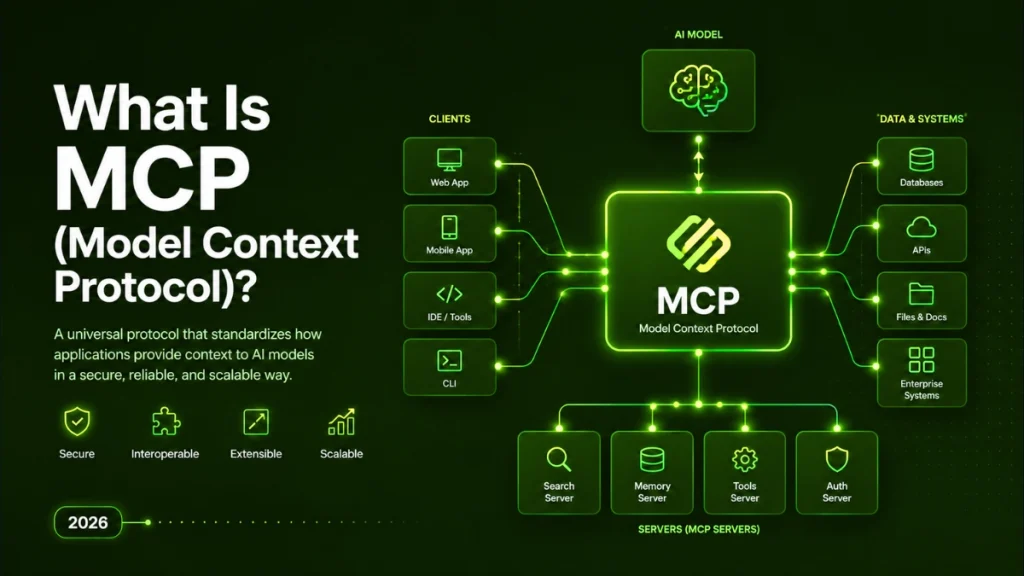
MCP (Model Context Protocol) is an open standard, originally created by Anthropic in November 2024, that provides AI agents a single, consistent interface for connecting to external tools, databases, and data sources etc. Instead of building a custom integration for every tool an AI needs to access, developers expose each tool once as an MCP server, and any MCP-compatible AI, including Claude, ChatGPT, and Gemini, can use it immediately. Think of it as USB-C for AI agents: one universal port that works with everything.
1. Why MCP was created?
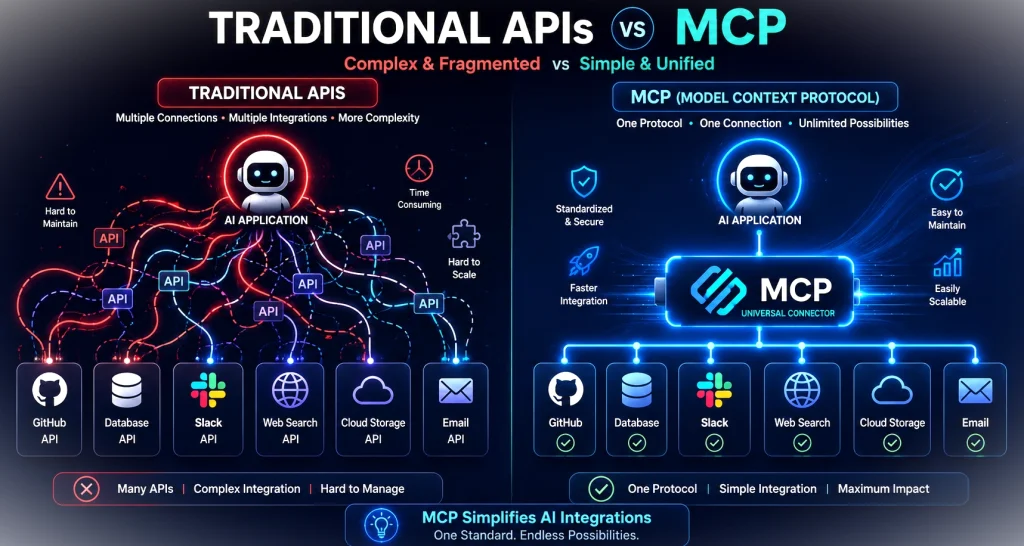
- Before MCP, the process of connecting an AI to external tools worked like this: if you wanted your AI assistant to read files, you wrote a file-access integration.
- If you wanted it to query a database, you would write a database integration.
- If you wanted to check GitHub, you wrote a GitHub integration.
Multiply that by the number of AI platforms you wanted to support, Claude, GPT-4, Gemini, your own custom model, and you get an N × M problem. Ten tools, five AI platforms, fifty custom connectors. Each one fragile, each one needing maintenance.
MCP collapses that grid into a single column. You build one MCP server for your database, and every MCP-compatible AI can use it. You don’t rewrite the integration for each platform. The AI doesn’t need to know anything specific about your database schema ahead of time. The server handles the translation.
Anthropic engineers David Soria Parra and Justin Spahr-Summers created MCP and announced it in November 2024. In December 2025, Anthropic donated the protocol to the Linux Foundation’s Agentic AI Foundation (AAIF), meaning MCP is now an industry-owned standard, not controlled by any single company. The AAIF’s current members and supporters include Anthropic, OpenAI, Google DeepMind, Microsoft, Atlassian, Salesforce, and SAP, making MCP the closest thing the AI industry has to a genuine cross-platform standard for agent connectivity.
2. The USB-C Analogy: The Simplest Way to Understand MCP
If you want to explain MCP to a non-technical colleague in thirty seconds, this is the analogy to use.
Before USB-C existed, every device manufacturer used its own cable standard.
- Your laptop charger didn’t fit your phone.
- Your phone cable didn’t fit your camera.
- Every device had its own port, its own plug, its own rules.
- The result: a drawer full of cables and constant frustration.
USB-C changed that by creating one universal connector. One cable, one port standard, works with everything: laptops, phones, monitors, cameras, and drives. You don’t need to know which manufacturer made a device; if it has a USB-C port, your cable works.
MCP does the same thing for AI agents and the tools they need to use. Before MCP, every AI-tool connection needed its own custom “cable”, its own integration code, authentication logic, and data formatting rules. After MCP, you expose a tool as an MCP server once, and any AI that speaks MCP can use it. The standard handles the connection. Your code handles the capability.
3. How MCP Works: The 3 Core Components
MCP has a simple three-part architecture:
- a Host,
- a Client,
- a Server.
Understanding these three pieces explains everything about how the protocol works in practice.
A) MCP Host
The Host is the AI application with which the end user actually interacts.
- Claude Desktop is a Host.
- Cursor (the AI code editor) is a Host.
- ChatGPT, once MCP support is enabled, acts as a Host.
- If you’re building your own AI-powered application, your app is the Host.
The Host contains the AI model and is responsible for managing connections to MCP servers. It’s the orchestrator, it knows what the user wants, it figures out which tools are available, and it decides which MCP servers to call.
B) MCP Client
The Client is embedded inside the Host and handles the actual protocol-level of communication. Think of it as the “translator”, that it speaks MCP language fluently so the Host doesn’t have to. Each Client manages one connection to one MCP Server, but a single Host can run multiple Clients simultaneously, giving the AI access to many different tools at once.
The Client/Host split is a design decision that keeps things clean:
- The AI model (Host) focuses on reasoning and decision-making, while the Client focuses purely on the mechanics of MCP communication.
C) MCP Server
The Server is a lightweight process that exposes specific capabilities, file access, database queries, API calls, messaging, browser control, to any connected Client. Each Server enforces its own access controls, so a filesystem Server can be configured to allow reads but block writes, or restricted to a specific folder. Servers are intentionally narrow and focused; a GitHub Server knows about GitHub; a Slack Server knows about Slack.
A Simple Real-World Workflow
Here’s how these three components work together in practice:
- A user opens Claude Desktop (the Host) and types: “Summarize my open GitHub issues.” Claude recognizes it needs GitHub data, and triggers its MCP Client to connect to the GitHub MCP Server.
- The Server authenticates with GitHub, fetches the user’s current open issues, and returns them through the Client back to Claude.
- Claude reads the live data and delivers a summary, all without the user writing a single line of integration code, and without Anthropic having built a custom GitHub connector into Claude itself.
4. What MCP Servers Can Connect To, Real Examples
The MCP ecosystem already covers most of the tools developers and knowledge workers interact with daily. Here are the most widely used server types as of 2026:
- Filesystem: read and write local files, with configurable permission controls so agents can only access what they’re explicitly allowed to
- GitHub: repository reads, pull request management, issue tracking, code search
- PostgreSQL / SQLite: structured database queries, typically configured as read-only to prevent agents from accidentally modifying records
- Slack: reading channel messages, drafting and sending messages, summarizing threads
- Google Drive / Notion: knowledge base retrieval, document lookup, content search
- Puppeteer / Playwright: browser automation, web scraping, form filling, screenshot capture
- Memory: persistent storage that survives across sessions, giving long-running agents a consistent knowledge base
On the enterprise side, Atlassian (Jira, Confluence), Salesforce, and SAP have all shipped official MCP connectors, which means agents can now interact with the core systems that run most large organizations, without custom API integration work for each deployment.
5. MCP vs API: What’s the Difference?
This is one of the most commonly searched questions about MCP, and it’s worth being precise about the answer.
| Description | Traditional API | MCP |
| Who uses it | Developers writing integration code | AI agents discovering and using tools dynamically |
| Discovery | For the manual, the developer must know the API exists and how it works | Automatic, the agent discovers what tools are available at runtime |
| Integration effort | High, custom code required for each tool and platform combination | Low, one MCP server works with any MCP-compatible client |
| Best for | Human-built software integrations | AI agent tool connections |
The critical thing to understand here:
- MCP does not replace APIs.
- It operates at a different layer entirely.
- Under the hood, an MCP server for GitHub is still making GitHub API calls.
- MCP is the translation layer that sits between the AI agent and the API, it handles the discovery, the formatting, and the protocol-level communication so the agent doesn’t need to understand GitHub’s specific API design.
A useful way to think about it:
- APIs are how software talks to software.
- MCP is how AI agents talk to software.
- They solve different problems, and they work together rather than competing.
6. Why MCP Matters for AI Agents Specifically
The hard limit of AI agents before MCP wasn’t intelligence; it was isolation. A language model can reason extraordinarily well, but if it can’t read your actual project files, query your live database, or check the current state of your Jira board, it’s giving you answers based on what you’ve told it rather than what’s actually true. It’s like asking a brilliant analyst to work from memory instead of the data.
MCP is what closes that gap. It’s the infrastructure that turns a sophisticated chatbot into an agent that can actually act on real systems, reading live data, taking actions with real consequences, and feeding results back into its reasoning loop.
That shift is already visible in adoption numbers. Salesforce research found a 282% jump in AI adoption, with 35% of organizations already reporting broad usage of AI agents across their operations. MCP is a core part of the infrastructure, making that adoption possible at scale, because it allows enterprises to connect their existing tools and data systems to AI agents without rebuilding their entire integration layer.
MCP’s security model also addresses a genuine enterprise concern: each MCP server enforces its own access controls, independently. An agent using five different MCP servers has five separate permission boundaries to respect, it can only access what each server has explicitly been configured to allow. That makes it meaningfully easier to apply least-privilege principles to AI agents, which is essential for any production deployment that touches sensitive data.
7. MCP Security: What to Know
MCP’s security architecture is solid by design, but no protocol eliminates all risk, and there are two concerns worth understanding before you deploy.
The first is tool poisoning:
- A malicious MCP server could theoretically impersonate a legitimate one, calling itself a “GitHub server” while doing something different under the hood.
- Security researchers identified this class of attack in April 2025, and the November 2025 MCP specification update addressed it directly with improved server identity verification requirements.
The second is write-action risk:
- Because MCP servers can expose write operations (sending messages, modifying records, deleting files), agents with broad permissions can cause real damage if they make a mistake or are manipulated into taking a bad action.
- The practical response is approval gates, requiring human confirmation before any write action executes, combined with scoped permissions that limit each server to only the operations it genuinely needs to expose, and audit logging so you have a record of what each agent did.
The right framing is this:
- The protocol carries the connection, but your governance carries the safety.
- MCP gives you the tools to build secure agent deployments; it doesn’t automate the judgment calls about what agents should and shouldn’t be allowed to do.
8. MCP and LangGraph / CrewAI: Does It Work With These Frameworks?
If you’re already building with LangGraph or CrewAI (covered in depth in our LangGraph vs CrewAI vs AutoGen comparison), you’ll want to know where MCP fits.
The short answer:
- Community integrations exist for both frameworks, and they work.
The slightly longer answer:
- Native, built-in MCP support is still maturing across the ecosystem, so the integration experience varies depending on which server you’re connecting to and which version of the framework you’re running.
Before building MCP connectivity into a production system on either LangGraph or CrewAI, it’s worth checking the current documentation rather than assuming a particular integration is fully stable.
The direction of travel is clear, MCP is becoming the default connectivity layer for AI agents across the ecosystem, and both frameworks are moving toward deeper native support. But as of mid-2026, expect some configuration work rather than plug-and-play simplicity.
9. FAQ
What does MCP stand for?
MCP stands for Model Context Protocol. The name reflects its purpose: it’s a protocol (a set of rules for communication) that gives AI models context, access to external tools, data sources, and systems they wouldn’t otherwise be able to reach.
Who created MCP?
MCP was created by Anthropic, specifically by engineers David Soria Parra and Justin Spahr-Summers, and announced in November 2024. In December 2025, Anthropic donated MCP to the Linux Foundation’s Agentic AI Foundation (AAIF), making it an industry-owned open standard rather than a proprietary Anthropic protocol.
Is MCP the same as an API?
No. MCP and APIs operate at different layers and solve different problems. A traditional API is built for developers writing integration code, you need to know the API exists, read its documentation, and write custom code to use it. MCP is built for AI agents to discover and use tools dynamically at runtime, without pre-written integration code for each tool. MCP uses APIs under the hood; it’s the translation layer that sits between the AI agent and the API.
Which AI tools support MCP in 2026?
MCP support is now broad across the major AI platforms. Claude (via Claude Desktop and the API), ChatGPT, and Gemini all support MCP connections. On the enterprise software side, Atlassian, Salesforce, and SAP have all shipped official MCP server implementations. Development tools including Cursor, Windsurf, and VS Code Copilot also support MCP, making it the closest thing the industry has to a universal standard for AI-tool connectivity.
Is MCP secure to use in production?
Yes, with appropriate configuration. MCP’s architecture includes per-server access controls, and the November 2025 specification update added stronger server identity verification to address tool-poisoning risks identified earlier that year. For production deployments, best practices include scoped permissions (each server exposes only what it needs to), approval gates on write actions, and audit logging. The protocol is designed for security, but governance decisions about what agents are permitted to do remain the responsibility of the teams deploying them.
Do I need to be a developer to use MCP?
It depends on what you’re trying to do. Using an MCP-enabled tool like Claude Desktop with existing, pre-built MCP servers (for GitHub, Google Drive, Slack, etc.) requires little to no coding, it’s mostly configuration. Building a custom MCP server for your own internal tool or database does require development work, though the protocol is well-documented and the barrier is lower than building traditional API integrations. The MCP community has also published open-source server templates that reduce the from-scratch effort significantly.
What is an MCP server?
An MCP server is a lightweight software process that exposes a specific capability, file access, database queries, API calls, browser automation, and so on, to any AI agent that speaks MCP. Each server enforces its own access controls and is intentionally focused on one domain (a GitHub server handles GitHub, a Slack server handles Slack). Once a server is built and running, any MCP-compatible AI can connect to it and use its capabilities without additional integration work.
10. Conclusion
MCP has moved quickly from an interesting Anthropic proposal to the de facto connectivity standard for AI agents. With adoption from every major AI provider, enterprise vendors shipping production-grade server implementations, and governance now sitting with the Linux Foundation rather than any single company, MCP is no longer a bet on a niche tool; it’s infrastructure.
The practical implication is simple:
- if you’re building anything with AI agents that needs to connect to real-world tools or data, whether that’s a company knowledge base, a live database, a communication platform, or a code repository, MCP is the layer that makes those connections reliable, consistent, and reusable across whatever AI models you’re working with today and tomorrow.
For a deeper look at how MCP fits into the broader picture of how AI agents are structured and orchestrated, see our articles on AI Agent Orchestration and AI Agent System Architecture.