Python course · Module 6: Modules and environments · Lesson 27 of 63
Quick answer: A module is a .py file full of ready-made code that you can reuse. The basic Python import module statement is import math: write it at the top of your file, then use the module’s contents with a dot, like math.sqrt(144). from math import sqrt loads only the names you list, and import statistics as stats gives the module a short name. Python searches for modules in the folders listed in sys.path, starting with your script’s own folder, so never name your own file random.py.
In this lesson you will learn:
the three ways to import a module: import, from ... import and import ... as
why from module import * causes problems
how to look inside a module with dir() and help()
how Python finds modules with sys.path
useful standard library modules, and how to fix ModuleNotFoundError and the random.py mistake
Before you start: finish Lesson 26, Python Recursion: Base Case, Call Stack and RecursionError. You need functions from Lesson 22. All examples were tested on Python 3.14.6 and gave the same output on Python 3.15.2, the newest release on python.org, apart from the install folders and version numbers they print.
The Python tutorial says: “A module is a file containing Python definitions and statements. The file name is the module name with the suffix .py appended.” So random is really a file called random.py.
Python comes with hundreds of modules, called the standard library, so you can use them with no download. Code that does not come with Python, like requests or pandas, is a third-party package; Lesson 29 installs those with pip.
Python import module basics: the import statement
Write import and the module name at the top of your file. After that, use the module name, a dot and the name of what you want:
import math

items = 37
per_box = 12
print("Boxes needed:", math.ceil(items / per_box))
print("Square root of 144:", math.sqrt(144))
print("Pi:", math.pi)
Boxes needed: 4
Square root of 144: 12.0
Pi: 3.141592653589793
math.ceil() rounds up: 37 / 12 is about 3.08, so you need 4 boxes. math.sqrt() is a function and math.pi is a variable; both live inside the module, so you reach them through math.. The dot form is longer, but anyone reading math.sqrt knows where sqrt comes from.
from … import: take only some names
If you use a few names many times, you can import them directly. Then you write ceil() instead of math.ceil():
from math import ceil, sqrt

print("Boxes needed:", ceil(37 / 12))
print("Square root of 144:", sqrt(144))
print("Pi:", math.pi)
Boxes needed: 4
Square root of 144: 12.0
Traceback (most recent call last):
  File "/home/learner/python-course/step2_from_import.py", line 5, in <module>
    print("Pi:", math.pi)
                 ^^^^
NameError: name 'math' is not defined. Did you forget to import 'math'?
The third print() fails: from math import ceil, sqrt gives you only ceil and sqrt, not the name math. The tutorial says this form “does not introduce the module name from which the imports are taken”. Add pi to the list (from math import ceil, sqrt, pi) or use import math instead.
import … as: give a module a short name
as gives a module another name in your file, which helps with long names:
stats is now another name for statistics. The mean is the average, 3750 / 4 = 937.5, and the median is the middle of the sorted prices. Data science code often uses well-known short names like import pandas as pd; a made-up short name only makes code harder to read.
Why to avoid from module import *
from math import * imports every public name from math at once. It looks handy, but it can silently replace your own variables:
e = "Easy level"
from math import *

print(e)
print(floor(4.7))
2.718281828459045
4
We set e to "Easy level", but math also has a name e (the number 2.718…). The star import replaced our variable without any warning, and in a long file you cannot see which names came from where. The tutorial says this “is frowned upon, since it often causes poorly readable code”, and the Python FAQ says: “In general, don’t use from modulename import *.”
Look inside a module with dir() and help()
How do you know what a module contains? dir() returns a sorted list of the names inside it. Names that start with _ are for internal use, so we filter them out with a list comprehension:
import math

names = [name for name in dir(math) if not name.startswith("_")]
print(names[:8])
print("sqrt" in names, "square_root" in names)
help(math.sqrt)
['acos', 'acosh', 'asin', 'asinh', 'atan', 'atan2', 'atanh', 'cbrt']
True False
Help on built-in function sqrt in module math:

sqrt(x, /)
    Return the square root of x.
We print only the first 8 names; the full list is longer. help() shows how to call a function and its docstring, like the docstrings you wrote in Lesson 22.
How Python finds a module: sys.path
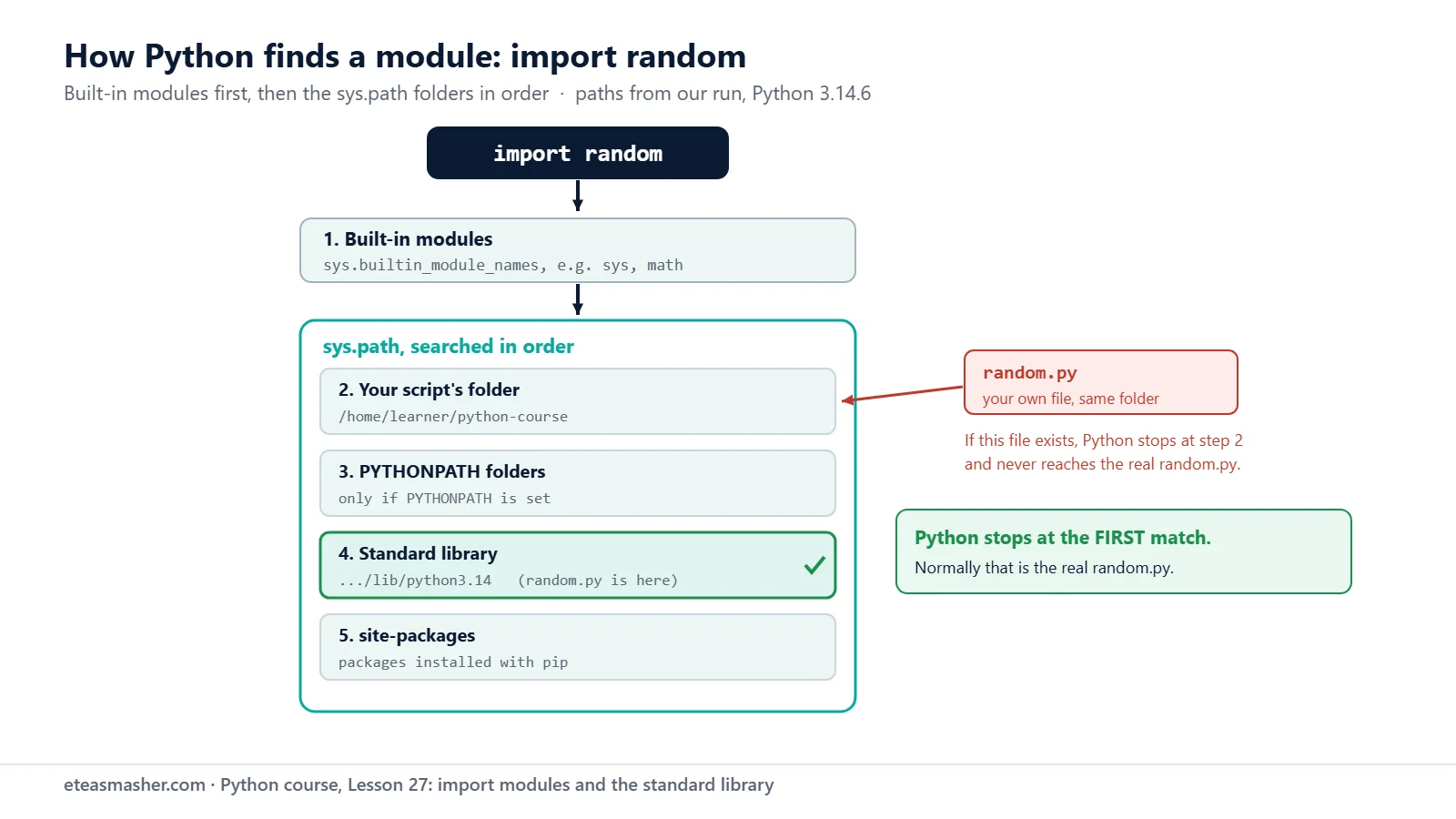
For import random, Python must find a file called random.py. The tutorial explains the order. First, Python checks the modules compiled into Python itself, listed in sys.builtin_module_names (sys is one). If the name is not there, it looks through the folders in sys.path, in order, and uses the first match:
import sys
import random

for folder in sys.path:
    print(folder)

print(random.__file__)
print("sys" in sys.builtin_module_names)
Your folders will be different, but the order of the groups is the same:
Your script’s folder, here /home/learner/python-course.
Then folders from the PYTHONPATH environment variable, if you set one (we did not).
Then the standard library folders, where random.py lives, as random.__file__ shows.
Last, site-packages, the folder where pip puts the packages you install.
Python uses the first module it finds. Your script’s folder comes before the standard library, so a file named random.py there hides the real random module.
So a file in your folder can hide a standard library module, as we will see below.
A short tour of the standard library
Here are six modules you will use often; the standard library docs describe the rest.
random.seed(42) makes the results repeat on every run, which helps when testing; without it, they change each time. The random docs warn that this module “should not be used for security purposes”; use secrets for passwords.
datetime: dates and times
from datetime import date, timedelta

order_day = date(2026, 11, 8)
delivery = order_day + timedelta(days=5)
print("Delivery:", delivery)
print(delivery.strftime("%A, %d %B %Y"))
print((date(2026, 12, 31) - order_day).days, "days left in the year")
Delivery: 2026-11-13
Friday, 13 November 2026
53 days left in the year
A timedelta is a length of time. Adding it to a date gives a new date, and subtracting two dates gives a timedelta whose .days you can read. strftime() formats a date as text: %A is the day name and %B the month name.
os and sys: your computer and your Python
import os
import sys

print(os.getcwd())
print(os.path.join("reports", "november.txt"))
print(sys.version.split()[0])
os.getcwd() shows the folder you are working in. os.path.join() builds a path with the right separator for your system: on Windows the same call gives reports\november.txt. sys.version tells you which Python is running. Lesson 33 shows pathlib, a newer way to work with paths.
collections and itertools: smarter counting and looping
from collections import Counter
from itertools import combinations

orders = ["Pen", "Notebook", "Pen", "Ruler", "Pen", "Notebook"]
counts = Counter(orders)
print(counts)
print(counts.most_common(1))

for pair in combinations(["Pen", "Notebook", "Ruler"], 2):
    print(pair)
The collections docs call a Counter “a dict subclass for counting hashable objects”: it is a dictionary of item and count, built in one line. most_common(1) gives the top item. combinations() from itertools gives every pair of items as a tuple, with no repeats.
ModuleNotFoundError: No module named …
This error means Python looked in every sys.path folder and found no file with that name. The most common cause is a typo:
import maths

print(maths.sqrt(16))
Traceback (most recent call last):
  File "/home/learner/python-course/err1_module_typo.py", line 1, in <module>
    import maths
ModuleNotFoundError: No module named 'maths'
The module is math, not maths. Module names are also case sensitive: import Math fails in the same way. The second common cause is a third-party package that is not installed yet:
import requests

print(requests.__version__)
Traceback (most recent call last):
  File "/home/learner/python-course/err2_not_installed.py", line 1, in <module>
    import requests
ModuleNotFoundError: No module named 'requests'
requests is not in the standard library, so you must install it with pip first (Lesson 29). A third case: the module exists, but the name you ask for does not. from math import square_root stops with ImportError: cannot import name 'square_root' from 'math' (unknown location). Check the real name with dir(). The exceptions docs explain that ModuleNotFoundError is a subclass of ImportError, raised “when a module could not be located”.
The “my file is named random.py” mistake
Beginners often name a practice file after what they are learning. Say you save this as random.py in a folder called dice_game:
import random

print("Random number:", random.randint(1, 6))
$ python3 random.py
Traceback (most recent call last):
  File "/home/learner/python-course/dice_game/random.py", line 1, in <module>
    import random
  File "/home/learner/python-course/dice_game/random.py", line 3, in <module>
    print("Random number:", random.randint(1, 6))
                            ^^^^^^^^^^^^^^
AttributeError: module 'random' has no attribute 'randint' (consider renaming '/home/learner/python-course/dice_game/random.py' since it has the same name as the standard library module named 'random' and prevents importing that standard library module)
Your script’s folder comes first in the search order, so import random found yourrandom.py, not the real one, and your file has no randint. Since Python 3.13, the message even tells you what to do; What’s New in Python 3.13 shows the same example. Python 3.12 instead says partially initialized module 'random', blaming a circular import.
The fix: rename your file, for example to dice.py, and run it again:
$ python3 dice.py
Random number: 2
Your number will differ, because there is no seed. Never name your files random.py, statistics.py, datetime.py, email.py or any other standard library name. (In our test, a math.py file did not hide the real math, because this Python has math built in and finds it before any folder. Do not rely on that; avoid those names too.)
Try it yourself
Exercise 1: Sheets of labels
A shop must print 250 labels, and one sheet holds 24 labels. Use from math import ceil, floor to print how many sheets are needed and how many sheets will be completely full.
Exercise 2: Pick three winners
Use the random module to pick 3 different winners from ["Ali", "Sara", "Bilal", "Ayesha", "Hamza", "Zara"]. Call random.seed(10) first so you get the same answer as the solution. Hint: look for sample in dir(random).
Exercise 3: Days to the exam
With the datetime module, print how many days there are from 8 November 2026 to an exam on 15 January 2027, and on which day of the week the exam falls.
Solutions
Solution 1
from math import ceil, floor

labels = 250
per_sheet = 24
print("Sheets to print:", ceil(labels / per_sheet))
print("Full sheets:", floor(labels / per_sheet))
Sheets to print: 11
Full sheets: 10
250 / 24 is about 10.4, so 10 sheets are full and an 11th sheet holds the rest.
Solution 2
import random

students = ["Ali", "Sara", "Bilal", "Ayesha", "Hamza", "Zara"]
random.seed(10)
print(random.sample(students, 3))
['Hamza', 'Ali', 'Ayesha']
random.sample() returns a list of unique items, so nobody can win twice.
Solution 3
from datetime import date

start = date(2026, 11, 8)
exam = date(2027, 1, 15)
print((exam - start).days, "days to the exam")
print("Exam day:", exam.strftime("%A"))
68 days to the exam
Exam day: Friday
Subtracting two dates gives a timedelta, and %A prints the full day name.
Common mistakes
Using the module name after from ... import.from math import ceil does not define math, so math.pi gives NameError: name 'math' is not defined.
Naming your file like a standard library module.random.py hides the real module: AttributeError: module 'random' has no attribute 'randint'. Rename the file.
Typos and wrong capital letters.import maths and import Math both give ModuleNotFoundError.
Forgetting to install a third-party package.import requests fails with ModuleNotFoundError until you install it (Lesson 29).
**Using from module import * in scripts.** It silently replaced our e. Import the names you need instead.
Frequently asked questions
What is the difference between import and from import in Python?
import math gives you one name, math, and you write math.sqrt(). from math import sqrt gives you sqrt directly, but not math. Both forms load the whole module, so speed is not a reason to choose one; choose the clearest.
Where does Python look for modules?
First among the modules compiled into Python, then in the sys.path folders, in order: your script’s folder, PYTHONPATH, the standard library and site-packages. Print sys.path to see your own list.
How do I see all the modules in the Python standard library?
The Python Standard Library page in the docs lists them all by topic. Inside Python, sys.stdlib_module_names holds the names of all standard library modules; in our Python 3.14.6 it had 297 names.
Summary
A module is a .py file you can reuse; the standard library is the large set of modules that comes with Python.
import math gives you math.name, from math import name gives you name directly, and as sets a short name.
Avoid from module import * in scripts; it can silently replace your own names.
Python looks first at built-in modules, then in the sys.path folders, starting with your script’s folder.
ModuleNotFoundError means a typo or a missing package; a file named like a standard module, such as random.py, hides the real one.