SQL course · Module 5: Creating and changing data · Lesson 18 of 40
Quick answer: An SQL upsert inserts a row, or updates it if it already exists. In PostgreSQL, write INSERT ... ON CONFLICT (column) DO NOTHING to skip duplicates, or ON CONFLICT (column) DO UPDATE SET col = EXCLUDED.col to update the existing row. ON CONFLICT only works on columns with a unique constraint or primary key. MERGE (PostgreSQL 15 and newer) compares a whole source table with a target table and can insert, update or delete in one statement.
In this lesson you will learn:
- how
ON CONFLICT DO NOTHINGskips rows that already exist - how
ON CONFLICT DO UPDATEand theEXCLUDEDrow update an existing row - why the conflict columns need a unique constraint, and the error you get without one
- how
MERGEapplies a whole list of changes at once - how MySQL and SQLite write an upsert
Before you start: Lesson 16, SQL CREATE TABLE: Data Types and Constraints and Lesson 17, SQL INSERT, UPDATE and DELETE: Change Data Safely with RETURNING.
We ran every example on PostgreSQL 16.15 with the shop database, in order, and checked the current PostgreSQL 18 manual. This lesson changes the shop data, and new ids depend on it. Start psql in the folder that holds shop.sql from Lesson 3 and run \i shop.sql before you begin, so your ids match ours.
Table of Contents
The problem an upsert solves
A new sign-up arrives with an email that is already in the table. email has a UNIQUE constraint, so a plain INSERT fails:
INSERT INTO customers (name, email, city, country, signup_date)
VALUES ('Ayesha M.', 'ayesha.malik@example.com', 'Lahore', 'Pakistan', '2026-11-05');
ERROR: duplicate key value violates unique constraint "customers_email_key"
DETAIL: Key (email)=(ayesha.malik@example.com) already exists.Often you want “add it if it is new, otherwise skip or update it” instead. That is an upsert (update + insert). A SELECT and then an INSERT is two statements, and another session could insert the same row in between (PostgreSQL docs: Transaction Isolation). An upsert is one.
ON CONFLICT DO NOTHING: skip existing rows
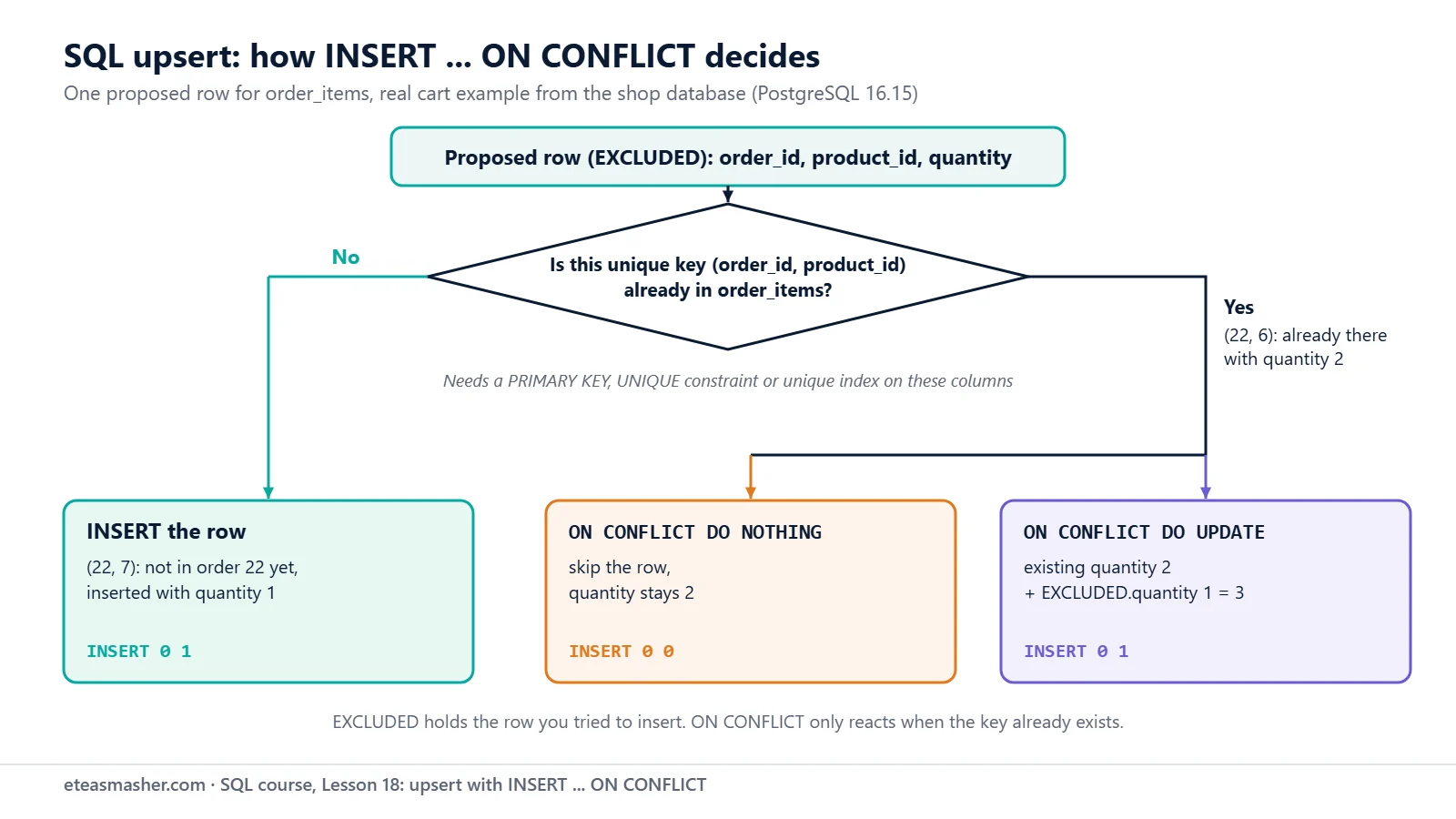
Add ON CONFLICT (email) DO NOTHING. The part in brackets is the conflict target: the columns whose unique constraint may clash.
INSERT INTO customers (name, email, city, country, signup_date)
VALUES ('Ayesha M.', 'ayesha.malik@example.com', 'Lahore', 'Pakistan', '2026-11-05')
ON CONFLICT (email) DO NOTHING;
INSERT 0 0INSERT 0 0: no error, no row inserted. A new email goes in as usual:
INSERT INTO customers (name, email, city, country, signup_date)
VALUES ('Sara Khan', 'sara.khan@example.com', 'Islamabad', 'Pakistan', '2026-11-01')
ON CONFLICT (email) DO NOTHING
RETURNING id, name;
id | name
----+-----------
13 | Sara Khan
(1 row)
INSERT 0 1Why 13 and not 11? The failed INSERT used 11 and the skipped one used 12. The manual explains that an INSERT with ON CONFLICT makes “any required nextval calls, before detecting any conflict” (PostgreSQL docs: Sequence Functions). Gaps in ids are normal; never rely on ids having no gaps.
ON CONFLICT DO UPDATE with EXCLUDED
Now a shopping cart. Order 22 is still pending:
SELECT * FROM order_items WHERE order_id = 22 ORDER BY product_id; order_id | product_id | quantity | unit_price
----------+------------+----------+------------
22 | 6 | 2 | 12.50
22 | 8 | 1 | 149.00
(2 rows)The customer adds one more Notebook Pack (product 6). The primary key allows one line per product, so we add to the quantity:
INSERT INTO order_items (order_id, product_id, quantity, unit_price)
VALUES (22, 6, 1, 12.50)
ON CONFLICT (order_id, product_id)
DO UPDATE SET quantity = order_items.quantity + EXCLUDED.quantity
RETURNING *;
order_id | product_id | quantity | unit_price
----------+------------+----------+------------
22 | 6 | 3 | 12.50
(1 row)
INSERT 0 1Inside DO UPDATE you can see two rows:
order_items.quantityis the row already in the table (2).EXCLUDED.quantityis the row you tried to insert (1). The manual calls it “the row proposed for insertion” (PostgreSQL docs: INSERT).
So 2 + 1 = 3. The same statement for a product that is not in the order yet simply inserts it:
INSERT INTO order_items (order_id, product_id, quantity, unit_price)
VALUES (22, 7, 1, 6.75)
ON CONFLICT (order_id, product_id)
DO UPDATE SET quantity = order_items.quantity + EXCLUDED.quantity
RETURNING *;
order_id | product_id | quantity | unit_price
----------+------------+----------+------------
22 | 7 | 1 | 6.75
(1 row)
INSERT 0 1Both runs printed INSERT 0 1: the number counts rows “inserted or updated”, so RETURNING is how you see the result. The manual promises “an atomic INSERT or UPDATE outcome”, even with many sessions at once.
Update only when something changed
Add a WHERE to DO UPDATE to skip updates that change nothing. Ayesha moved to Islamabad:
INSERT INTO customers (name, email, city, country, signup_date)
VALUES ('Ayesha Malik', 'ayesha.malik@example.com', 'Islamabad', 'Pakistan', '2025-11-03')
ON CONFLICT (email) DO UPDATE
SET city = EXCLUDED.city
WHERE customers.city IS DISTINCT FROM EXCLUDED.city
RETURNING id, name, city;
id | name | city
----+--------------+-----------
1 | Ayesha Malik | Islamabad
(1 row)
INSERT 0 1We ran exactly the same statement a second time:
 id | name | city
----+------+------
(0 rows)

INSERT 0 0
The city was already Islamabad, so nothing was written. IS DISTINCT FROM treats two NULLs as equal (Lesson 6).
ON CONFLICT needs a unique constraint
Try to upsert a product by its name:
INSERT INTO products (name, category, price)
VALUES ('Desk Lamp', 'Home Office', 29.00)
ON CONFLICT (name) DO UPDATE SET price = EXCLUDED.price;
ERROR: there is no unique or exclusion constraint matching the ON CONFLICT specificationON CONFLICT does not search for an equal value. It reacts only when a unique index or constraint (an “arbiter index” in the manual) rejects the row, and products.name has none. Add one with ALTER TABLE (mentioned in Lesson 16):
ALTER TABLE products ADD CONSTRAINT products_name_key UNIQUE (name);ALTER TABLENow the same upsert works:
INSERT INTO products (name, category, price)
VALUES ('Desk Lamp', 'Home Office', 29.00)
ON CONFLICT (name) DO UPDATE SET price = EXCLUDED.price
RETURNING id, name, price;
id | name | price
----+-----------+-------
5 | Desk Lamp | 29.00
(1 row)
INSERT 0 1The Desk Lamp kept id 5; its price went from 32.00 to 29.00.
SQL MERGE: apply a whole list of changes
A supplier sends a new price list. We load it into a small table:
CREATE TABLE price_list (
    name     text,
    category text,
    price    numeric(10,2)
);

INSERT INTO price_list (name, category, price) VALUES
    ('USB-C Hub',     'Electronics', 36.00),
    ('Notebook Pack', 'Stationery',  12.50),
    ('Monitor Arm',   'Accessories', 64.00);
CREATE TABLE
INSERT 0 3MERGE joins the source (price_list) to the target (products) and runs a WHEN clause for each row; it “can conditionally INSERT, UPDATE or DELETE rows” (PostgreSQL docs: MERGE). It arrived in PostgreSQL 15 (PostgreSQL 15 release notes).
MERGE INTO products p
USING price_list s
ON p.name = s.name
WHEN MATCHED AND p.price <> s.price THEN
    UPDATE SET price = s.price
WHEN NOT MATCHED THEN
    INSERT (name, category, price) VALUES (s.name, s.category, s.price);
MERGE 2Read it like this:
ON p.name = s.namedecides which rows match.WHEN MATCHED AND p.price <> s.priceupdates products whose price changed.WHEN NOT MATCHEDinserts products that are new.- A matched row with the same price fits no
WHENclause and is left alone.
MERGE 2 is the number of rows changed:
SELECT id, name, category, price
FROM products
WHERE name IN ('USB-C Hub', 'Notebook Pack', 'Monitor Arm')
ORDER BY id;
id | name | category | price
----+---------------+-------------+-------
3 | USB-C Hub | Electronics | 36.00
6 | Notebook Pack | Stationery | 12.50
12 | Monitor Arm | Accessories | 64.00
(3 rows)USB-C Hub went from 39.50 to 36.00, Monitor Arm is new (id 12; the Desk Lamp upsert used 11), and Notebook Pack did not change. Running the same MERGE again printed MERGE 0.
MERGE or ON CONFLICT?
MERGE matches rows with ON, so it needs no unique constraint (our test without one worked), and it can also delete. But for rows other sessions may insert at the same moment, the manual points to INSERT ... ON CONFLICT, which can “run an UPDATE if a concurrent INSERT occurs”. Use ON CONFLICT for single rows and live traffic, MERGE for syncing tables.
PostgreSQL 17 added RETURNING and WHEN NOT MATCHED BY SOURCE to MERGE (PostgreSQL 17 release notes). On PostgreSQL 16 they are syntax errors:
MERGE INTO products p
USING price_list s
ON p.name = s.name
WHEN MATCHED THEN UPDATE SET price = s.price
RETURNING p.id, p.name;
ERROR: syntax error at or near "RETURNING"
LINE 5: RETURNING p.id, p.name;
^Upsert in MySQL and SQLite
MySQL has no MERGE statement (MySQL 8.4: Data Manipulation Statements), and its INSERT syntax has no ON CONFLICT. It uses INSERT ... ON DUPLICATE KEY UPDATE c=c+1, with no conflict target: any UNIQUE index or PRIMARY KEY triggers it, so avoid it “on tables with multiple unique indexes”. For the new values, alias the row (VALUES (...) AS new ... c = new.a+new.b); the old VALUES() function “is deprecated” (MySQL 8.4: INSERT … ON DUPLICATE KEY UPDATE). INSERT IGNORE skips duplicates. We did not run MySQL; this comes from the MySQL 8.4 manual.
SQLite UPSERT “follows the syntax established by PostgreSQL” and arrived in version 3.24.0 (SQLite docs: UPSERT). In our SQLite 3.53.1 test, the cart upsert above worked unchanged. SQLite also accepted quantity without the table name and DO UPDATE without a conflict target; MERGE gave near "MERGE": syntax error. Lesson 2 compares these databases.
Try it yourself
Do the exercises right after the examples, before you reset the data; the ids in the solutions assume that order.
Exercise 1: Skip existing customers
In one INSERT, add Lucas Martin (lucas.martin@example.com, Toronto, Canada, 2025-12-14) and Zara Ali (zara.ali@example.com, Peshawar, Pakistan, 2026-11-06). Skip anyone whose email exists, and return the id and name of the rows really inserted.
Exercise 2: Add to the cart twice
Add 2 USB-C Hubs (product 3) at 36.00 to order 22 with an upsert that adds to the quantity. Run the statement twice. What is the quantity after each run?
Exercise 3: A bigger price list
Add Gel Pens 10-Pack (Stationery, 7.25) and Desk Mat (Accessories, 19.99) to price_list, run the same MERGE again, and check both products.
Solutions
Solution 1
INSERT INTO customers (name, email, city, country, signup_date)
VALUES ('Lucas Martin', 'lucas.martin@example.com', 'Toronto',  'Canada',   '2025-12-14'),
       ('Zara Ali',     'zara.ali@example.com',     'Peshawar', 'Pakistan', '2026-11-06')
ON CONFLICT (email) DO NOTHING
RETURNING id, name;
id | name
----+----------
17 | Zara Ali
(1 row)
INSERT 0 1Lucas was skipped, so RETURNING lists only Zara. Her id is 17 because skipped and failed inserts also used ids.
Solution 2
INSERT INTO order_items (order_id, product_id, quantity, unit_price)
VALUES (22, 3, 2, 36.00)
ON CONFLICT (order_id, product_id)
DO UPDATE SET quantity = order_items.quantity + EXCLUDED.quantity
RETURNING *;
order_id | product_id | quantity | unit_price
----------+------------+----------+------------
22 | 3 | 2 | 36.00
(1 row)
INSERT 0 1The second run of the same statement:
 order_id | product_id | quantity | unit_price
----------+------------+----------+------------
       22 |          3 |        4 |      36.00
(1 row)

INSERT 0 1
The first run inserted the line; the second found it and added 2 + 2.
Solution 3
INSERT INTO price_list (name, category, price) VALUES
    ('Gel Pens 10-Pack', 'Stationery',  7.25),
    ('Desk Mat',         'Accessories', 19.99);

MERGE INTO products p
USING price_list s
ON p.name = s.name
WHEN MATCHED AND p.price <> s.price THEN
    UPDATE SET price = s.price
WHEN NOT MATCHED THEN
    INSERT (name, category, price) VALUES (s.name, s.category, s.price);

SELECT id, name, price FROM products WHERE name IN ('Gel Pens 10-Pack', 'Desk Mat') ORDER BY id;
INSERT 0 2
MERGE 2
id | name | price
----+------------------+-------
7 | Gel Pens 10-Pack | 7.25
13 | Desk Mat | 19.99
(2 rows)The Gel Pens price changed from 6.75 and the Desk Mat was added; the three older rows needed no change.
When you finish, run DROP TABLE price_list; and then \i shop.sql in psql. The reset also removes products_name_key, because shop.sql builds the tables fresh.
Common mistakes
- No unique constraint on the conflict columns. You get
there is no unique or exclusion constraint matching the ON CONFLICT specification. Worse,ON CONFLICT DO NOTHINGwith no target just inserts: without the constraint, our test added a second Desk Lamp. - Leaving out the conflict target with DO UPDATE.
ON CONFLICT DO UPDATEfails withON CONFLICT DO UPDATE requires inference specification or constraint name, with the hintFor example, ON CONFLICT (column_name). - Writing the column name alone in DO UPDATE.
SET quantity = quantity + EXCLUDED.quantityfails withcolumn reference "quantity" is ambiguous. Writeorder_items.quantity. - The same key twice in one statement.
VALUES (22, 7, 1, 6.75), (22, 7, 2, 6.75)failed withON CONFLICT DO UPDATE command cannot affect row a second time. Combine the rows first. In MERGE, two price-list rows for USB-C Hub gaveMERGE command cannot affect row a second time.
Frequently asked questions
What is the difference between UPSERT and MERGE?
“Upsert” is a name for insert-or-update, not a command: INSERT ... ON CONFLICT in PostgreSQL and SQLite, INSERT ... ON DUPLICATE KEY UPDATE in MySQL. MERGE is a standard SQL command that compares a source with a target and can insert, update and delete in one pass; PostgreSQL has it since version 15.
Does ON CONFLICT work without a primary key?
It needs a primary key, UNIQUE constraint or unique index on exactly the columns in the conflict target. Without one, you get the “no unique or exclusion constraint” error shown above. Remove any duplicates, then add the constraint.
Why do my ids have gaps after an upsert?
The next id is taken before PostgreSQL detects the conflict, and it is not given back. That is why Sara got id 13.
Summary
- An SQL upsert inserts a new row or handles the existing one in one statement.
ON CONFLICT (cols) DO NOTHINGskips rows that already exist;DO UPDATE SET ... EXCLUDED.colupdates them with the new values.- The conflict columns need a primary key, UNIQUE constraint or unique index.
MERGE(PostgreSQL 15+) syncs a target table with a source table;RETURNINGon MERGE needs PostgreSQL 17.- MySQL uses
ON DUPLICATE KEY UPDATE; SQLite uses the sameON CONFLICTsyntax as PostgreSQL.
Upserts make data loads safe to repeat: a record loaded twice stays one row. Try ON CONFLICT in Project 2 of our data engineering projects, which stores scheduled results in PostgreSQL.
Next lesson
Next: Lesson 19, SQL Transactions: BEGIN, COMMIT, ROLLBACK and SAVEPOINT.
Sources
- PostgreSQL documentation: INSERT (ON CONFLICT)
- PostgreSQL documentation: MERGE
- PostgreSQL documentation: Sequence Manipulation Functions
- PostgreSQL documentation: Transaction Isolation
- PostgreSQL 15 release notes (MERGE added)
- PostgreSQL 17 release notes (MERGE RETURNING and WHEN NOT MATCHED BY SOURCE)
- MySQL 8.4 Reference Manual: INSERT … ON DUPLICATE KEY UPDATE
- MySQL 8.4 Reference Manual: INSERT Statement (IGNORE)
- MySQL 8.4 Reference Manual: Data Manipulation Statements
- SQLite documentation: UPSERT