Python course · Module 4: Data structures · Lesson 18 of 63
Quick answer: A Python set is an unordered collection with no duplicate items, written in curly brackets: sold = {"Pen", "Notebook", "Pen"} keeps only one "Pen". Create an empty set with set(), because {} makes an empty dictionary. Add items with add(), remove them with remove() or discard(), and check membership with in. Sets also do maths-style operations: a | b (union), a & b (intersection), a - b (difference) and a ^ b (symmetric difference).
In this lesson you will learn:
how to create a Python set, and why {} is not an empty set
how to remove duplicates from a list with set()
how to add and remove items with add(), update(), remove() and discard()
how to compare two sets with union, intersection, difference and symmetric difference
No duplicates. We wrote five items, but the set keeps 3.
No fixed order. Run 1 printed a different order from runs 2 and 3. Two runs can match by chance, but yours may differ again.
The Python tutorial defines a set as “an unordered collection with no duplicate elements” and says its basic uses “include membership testing and eliminating duplicate entries”. Because the order is not fixed, the rest of this lesson prints sets of strings with sorted(). You met sorted() in Lesson 15: it returns a sorted list, so the output is the same every time.
The empty set trap: set() vs {}
Dictionaries also use curly brackets. Empty brackets make a dictionary, not a set:
The tutorial says it directly: “to create an empty set you have to use set(), not {}”. Python even prints an empty set as set(). If you forget, adding an item fails, because a dictionary has no add() method:
basket = {}
basket.add("Pen")
Traceback (most recent call last):
  File "/home/learner/python-course/err1_add_to_dict.py", line 2, in <module>
    basket.add("Pen")
    ^^^^^^^^^^
AttributeError: 'dict' object has no attribute 'add'
This error usually means a {} should be set().
Remove duplicates with set()
set() can also turn a list (or any other collection) into a set. This is the quickest way to remove duplicates from a list:
len(set(orders)) counts the different products in one line. A string is a collection of characters, so set("banana") gives its three different letters.
Keep the original order
A set forgets the order of the list. If the order matters, use the dictionary trick from Lesson 17: keys are unique and keep insertion order.
dict.fromkeys(orders) creates “a new dictionary with keys from iterable” (from the Built-in Types page), and list() takes the keys back out in the order they were first seen.
With no order, there are no positions either, so sold[0] fails:
sold = {"Pen", "Notebook", "Ruler"}
print(sold[0])
Traceback (most recent call last):
  File "/home/learner/python-course/err2_set_index.py", line 2, in <module>
    print(sold[0])
          ~~~~^^^
TypeError: 'set' object is not subscriptable
The Built-in Types page explains: sets “do not record element position or order of insertion. Accordingly, sets do not support indexing, slicing, or other sequence-like behavior.” If you need positions, use a list, or make one with sorted(sold).
Add and remove items
A set can change after you create it. add() adds one item, and update() adds every item from a list:
Adding "Pen" again did nothing and raised no error. update() added "Eraser" and "Backpack" and skipped the extra "Pen".
remove() and discard() both delete an item. The difference is what happens when the item is not in the set. discard("Laptop") quietly did nothing. remove() raises an error:
cart = {"Pen", "Ruler"}
cart.remove("Laptop")
Traceback (most recent call last):
  File "/home/learner/python-course/err3_remove_missing.py", line 2, in <module>
    cart.remove("Laptop")
    ~~~~~~~~~~~^^^^^^^^^^
KeyError: 'Laptop'
Use remove() when the item must be there, and discard() when a missing item is normal.
in_stock = {"Pen", "Notebook", "Ruler"}
print("Pen" in in_stock)
print("Laptop" in in_stock)
print("Laptop" not in in_stock)

order = ["Pen", "Laptop", "Ruler"]
for item in order:
    if item in in_stock:
        print(item, "- in stock")
    else:
        print(item, "- not available")
True
False
True
Pen - in stock
Laptop - not available
Ruler - in stock
A comment in the tutorial’s set example calls this “fast membership testing”. With thousands of items, in on a set is much faster than in on a list; Lesson 19 measures the difference.
Python set operations: union, intersection and difference
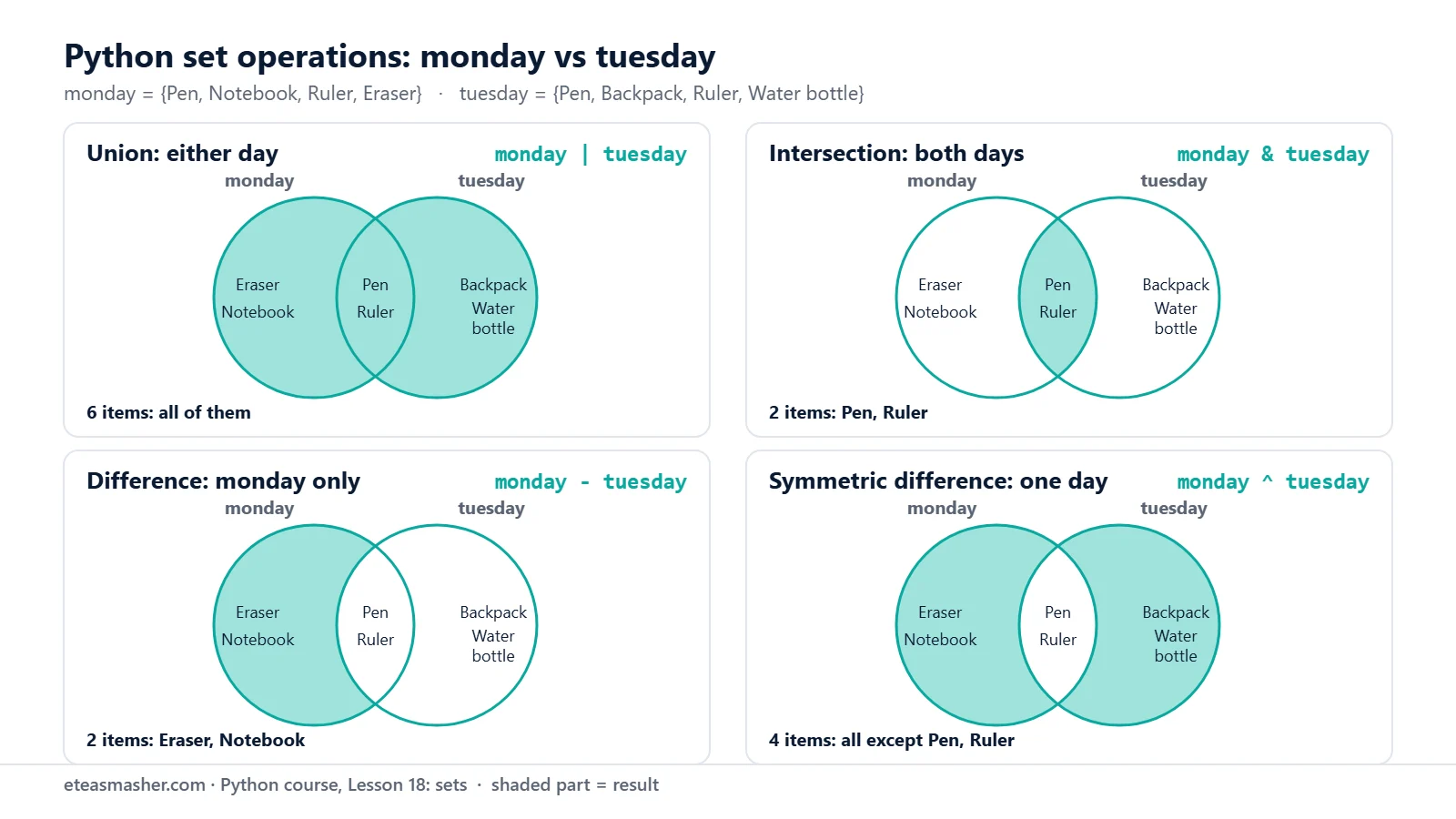
Sets really help when you compare two groups, such as the products sold on Monday and on Tuesday:
The four set operations on the monday and tuesday sets. The shaded part is the result: union (|) keeps every item, intersection (&) only the overlap, difference (-) only monday’s own items, and symmetric difference (^) everything except the overlap.
Union, a | b or a.union(b): items in a, in b, or in both.
Intersection, a & b or a.intersection(b): items in both a and b.
Difference, a - b or a.difference(b): items in a but not in b.
Symmetric difference, a ^ b or a.symmetric_difference(b): items in a or b, but not in both.
monday - tuesday and tuesday - monday give different answers, so the order matters for difference. Each operation makes a new set: monday and tuesday still have 4 items each.
Methods accept a list, operators do not
The methods accept any collection, such as a list of orders:
Traceback (most recent call last):
  File "/home/learner/python-course/err4_operator_list.py", line 3, in <module>
    print(monday | tuesday_orders)
          ~~~~~~~^~~~~~~~~~~~~~~~
TypeError: unsupported operand type(s) for |: 'set' and 'list'
The Built-in Types page describes this on purpose: the method versions “will accept any iterable as an argument”, while “their operator based counterparts require their arguments to be sets”. Fix it with monday | set(tuesday_orders) or with the method.
What can go inside a set?
Set items must be hashable. In practice that means items that cannot change: numbers, strings and tuples. The glossary says hashability “makes an object usable as a dictionary key and a set member”, so this is the same rule as for dictionary keys in Lesson 17. A tuple works:
Traceback (most recent call last):
  File "/home/learner/python-course/err5_list_in_set.py", line 1, in <module>
    variants = {["Pen", "Blue"], ["Pen", "Red"]}
               ^^^^^^^^^^^^^^^^^^^^^^^^^^^^^^^^^
TypeError: cannot use 'list' as a set element (unhashable type: 'list')
Traceback (most recent call last):
  File "/home/learner/python-course/err6_frozenset_add.py", line 2, in <module>
    weekend.add(5)
    ^^^^^^^^^^^
AttributeError: 'frozenset' object has no attribute 'add'
On Python 3.15.2 the message ends with a hint, Did you mean to use a 'set' object?, one of the improved error messages in Python 3.15. weekend | {5} worked because it makes a new frozenset and leaves weekend alone. The docs say a frozenset “is immutable and hashable”, so it “can be used as a dictionary key or as an element of another set”.
Try it yourself
Exercise 1: Unique visitors
A shop logged these visitors: ["Ali", "Sara", "Ali", "Hina", "Omar", "Sara", "Ali"]. Print how many visits there were, how many different people visited, and their names in alphabetical order.
Exercise 2: Two clubs
The chess club is {"Ali", "Sara", "Hina", "Bilal"} and the cricket club is {"Sara", "Omar", "Bilal", "Zara"}. Print who is in both clubs, who is only in the chess club, and how many people are in at least one club.
Exercise 3: What is still missing?
A student needs {"Pen", "Notebook", "Ruler", "Eraser"} and has packed ["Pen", "Ruler", "Pen", "Water bottle"]. Print the items still missing, or All packed! if nothing is missing.
set(packed) turns the list into a set so - works, and an empty set counts as false in if, like the empty values in Lesson 8.
Common mistakes
Using {} for an empty set.{} is an empty dictionary, so basket.add("Pen") gives AttributeError: 'dict' object has no attribute 'add'. Write basket = set().
Expecting a fixed order or using an index. The printed order can change between runs, and sold[0] gives TypeError: 'set' object is not subscriptable. Use sorted(sold) when you need order.
Using remove() for an item that may be missing.cart.remove("Laptop") gives KeyError: 'Laptop'. Use cart.discard("Laptop").
Mixing a set and a list with an operator.monday | tuesday_orders gives TypeError: unsupported operand type(s) for |: 'set' and 'list'. Use monday.union(tuesday_orders) or convert with set().
Putting lists inside a set. It gives TypeError: cannot use 'list' as a set element (unhashable type: 'list'). Use tuples.
Frequently asked questions
How do I remove duplicates from a list in Python?
Convert it to a set and back: list(set(orders)). This loses the original order. To keep the order in which items first appeared, use list(dict.fromkeys(orders)).
What is the difference between a list and a set in Python?
A list keeps its items in order, allows duplicates and lets you read items by index. A set has no order, keeps each item once, has no indexes, and is built for fast in checks and for comparing groups.
What is the difference between remove() and discard() in a Python set?
Both delete an item from the set. If the item is not in the set, remove() raises KeyError, while discard() does nothing. The Built-in Types page describes remove() as raising KeyError “if elem is not contained in the set”, and discard() as removing the item “if it is present”.
Summary
A set is an unordered collection with no duplicates: {"Pen", "Ruler"}; an empty set is set(), never {}.
set(a_list) removes duplicates; list(dict.fromkeys(a_list)) does it and keeps the order.
add() and update() add items; remove() raises KeyError for a missing item, discard() does not.
|, &, - and ^ give union, intersection, difference and symmetric difference; the method versions also accept lists.
Set items must be hashable (numbers, strings, tuples), and a frozenset is a set that cannot change.