Python course · Module 4: Data structures · Lesson 15 of 63
Quick answer: A Python list keeps several values in order inside square brackets: cart = ["Notebook", "Pen"]. You read an item by its index (cart[0] is the first, cart[-1] the last), take a part with a slice (cart[1:3]), and change an item with cart[1] = "Blue pen". The main Python list methods are append(), extend(), insert(), remove(), pop(), sort() and copy(). Watch out for one trap: backup = cart does not copy the list, it gives the same list a second name.
In this lesson you will learn:
- how to create a list, read items by index and take slices
- how to change, add and remove items with the main list methods
- the difference between
sort()andsorted() - why
backup = cartis not a copy, and three ways to make a real copy
Before you start: finish Lesson 14, Python Exercises for Beginners: Level 1 Practice Set and Number Guessing Game. You will also use string indexes from Lesson 7, Python Strings and f-Strings: Quotes, Escapes and Formatting and for loops from Lesson 12, Python for Loops and range(): Lists, Strings and enumerate(). All examples were tested on Python 3.14.6 and behave the same on Python 3.15.2, the newest release on python.org.
Table of Contents
Create a list
A list is written as values separated by commas, inside square brackets. Our running example is the shopping cart of a small online shop.
cart = ["Notebook", "Pen", "Backpack", "Water bottle"]
prices = [450, 60, 3200, 900]
empty = []
mixed = ["Pen", 60, True]
print(cart)
print(prices)
print(len(cart), len(empty))
print(type(cart))
print(mixed)
['Notebook', 'Pen', 'Backpack', 'Water bottle']
[450, 60, 3200, 900]
4 0
<class 'list'>
['Pen', 60, True]len() counts the items, just as it counts characters in a string. [] is an empty list with 0 items. A list can hold different types, but the Python tutorial notes that “usually the items all have the same type”.
Indexing: read one item
Every item has a position number called an index. Lists count from 0, exactly like strings, and negative indexes count from the end.
cart = ["Notebook", "Pen", "Backpack", "Water bottle", "Lunch box"]
print(cart[0])
print(cart[2])
print(cart[-1])
print(cart[-2])
print(cart[len(cart) - 1])
Notebook
Backpack
Lunch box
Water bottle
Lunch boxThe cart has 5 items, so the indexes go from 0 to 4. cart[-1] and cart[len(cart) - 1] both give the last item, but -1 is shorter. Asking for index 5 stops the program:
cart = ["Notebook", "Pen", "Backpack", "Water bottle", "Lunch box"]
print(cart[5])
Traceback (most recent call last):
File "/home/learner/python-course/err1_index_range.py", line 2, in <module>
print(cart[5])
~~~~^^^
IndexError: list index out of rangeSlicing: take a part of the list
A slice list[start:stop] gives a new list with the items from start up to, but not including, stop. It follows the same rule as range() from Lesson 12.
cart = ["Notebook", "Pen", "Backpack", "Water bottle", "Lunch box"]
print(cart[1:3])
print(cart[:2])
print(cart[3:])
print(cart[-2:])
print(cart[::2])
print(cart[1:100])
print(cart[10:])
['Pen', 'Backpack']
['Notebook', 'Pen']
['Water bottle', 'Lunch box']
['Water bottle', 'Lunch box']
['Notebook', 'Backpack', 'Lunch box']
['Pen', 'Backpack', 'Water bottle', 'Lunch box']
[]cart[1:3]gives indexes 1 and 2. Index 3 is the stop, so it is left out.- Leave out
startto begin at the first item, and leave outstopto go to the end.cart[-2:]means “the last two items”. - A third number is the step, as in
range():cart[::2]takes every second item. - Slices never raise
IndexError. A stop that is too big stops at the end, and a start past the end gives an empty list.
The tutorial says “All slice operations return a new list”. Keep that in mind for the copying section below.
Change items and check membership
Strings cannot be changed in place (Lesson 7 showed the TypeError). Lists can: they are mutable. Assign to an index to replace an item.
cart = ["Notebook", "Pen", "Backpack"]
cart[1] = "Blue pen"
print(cart)
print("Backpack" in cart)
print("Laptop" in cart)
print("Laptop" not in cart)
['Notebook', 'Blue pen', 'Backpack']
True
False
Truein and not in from Lesson 9, Python Operators: Comparison, Logical, is vs == and Precedence check whether a value is one of the items. With a list, in compares whole items, so "Pen" in cart would now be False: the item is "Blue pen".
Python list methods for adding items
A method is a function that belongs to a value; you call it with a dot: cart.append("Backpack").
cart = ["Notebook", "Pen"]
cart.append("Backpack")
print(cart)
cart.insert(0, "Pencil box")
print(cart)
cart.extend(["Ruler", "Eraser"])
print(cart)
print(len(cart))
['Notebook', 'Pen', 'Backpack']
['Pencil box', 'Notebook', 'Pen', 'Backpack']
['Pencil box', 'Notebook', 'Pen', 'Backpack', 'Ruler', 'Eraser']
6append(x)adds one item at the end.insert(i, x)putsxbefore the item at indexi, soinsert(0, ...)adds at the front.extend(other)adds every item from another list at the end.
These methods change the list itself, so we never write cart = cart.append(...).
append() vs extend()
Both take one value, but they do different things with it:
a = ["Notebook", "Pen"]
b = ["Notebook", "Pen"]
a.append(["Ruler", "Eraser"])
b.extend(["Ruler", "Eraser"])
print(a, len(a))
print(b, len(b))

c = ["Notebook", "Pen"]
c.extend("Ink")
print(c)
['Notebook', 'Pen', ['Ruler', 'Eraser']] 3
['Notebook', 'Pen', 'Ruler', 'Eraser'] 4
['Notebook', 'Pen', 'I', 'n', 'k']append() added the whole list as one item, so a now has a list inside it and only 3 items. extend() added the two items one by one. The last line surprises many people: extend() walks through whatever you give it, and walking through a string gives single characters. To add one string, use append("Ink").
Remove items: remove(), pop(), del and clear()
cart = ["Notebook", "Pen", "Backpack", "Pen", "Ruler"]
cart.remove("Pen")
print(cart)
last = cart.pop()
print("Popped:", last)
print(cart)
first = cart.pop(0)
print("Popped:", first)
print(cart)
del cart[0]
print(cart)
cart.clear()
print(cart)
['Notebook', 'Backpack', 'Pen', 'Ruler']
Popped: Ruler
['Notebook', 'Backpack', 'Pen']
Popped: Notebook
['Backpack', 'Pen']
['Pen']
[]remove(x)removes the first item equal tox. The second"Pen"stayed.pop()removes the last item and gives it back, so you can store it.pop(0)does the same for index 0.del cart[0]removes by index without giving the item back.clear()empties the list.
remove() and pop() fail when there is nothing to remove. The tutorial says remove() “raises a ValueError if there is no such item”, and pop() raises an IndexError “if the list is empty or the index is outside the list range”:
cart = ["Notebook", "Pen"]
cart.remove("Laptop")
Traceback (most recent call last):
File "/home/learner/python-course/err2_remove_missing.py", line 2, in <module>
cart.remove("Laptop")
~~~~~~~~~~~^^^^^^^^^^
ValueError: list.remove(x): x not in listcart = []
cart.pop()Traceback (most recent call last):
File "/home/learner/python-course/err3_pop_empty.py", line 2, in <module>
cart.pop()
~~~~~~~~^^
IndexError: pop from empty listTo be safe, check first: if "Laptop" in cart: cart.remove("Laptop").
Count and find: count() and index()
orders = ["Pen", "Notebook", "Pen", "Ruler", "Pen"]
print(orders.count("Pen"))
print(orders.index("Notebook"))
print(orders.index("Pen"))
3
1
0count(x) tells you how many times x appears. index(x) gives the position of the first match and, like remove(), raises ValueError when the value is missing.
sort() vs sorted()
Python has two ways to sort, and the difference matters:
prices = [450, 60, 3200, 900, 120]
print(sorted(prices))
print(prices)
prices.sort()
print(prices)
prices.sort(reverse=True)
print(prices)
print(sorted(["pen", "Notebook", "backpack", "Ruler"]))
[60, 120, 450, 900, 3200]
[450, 60, 3200, 900, 120]
[60, 120, 450, 900, 3200]
[3200, 900, 450, 120, 60]
['Notebook', 'Ruler', 'backpack', 'pen']sorted(prices)is a built-in function. It returns a new sorted list and leavespricesunchanged, as the second line shows.prices.sort()is a list method. It sorts the list in place, so the original order is gone.reverse=Truesorts from largest to smallest, and works with both.
The Sorting HOW TO says list.sort() “modifies the list in-place (and returns None to avoid confusion)”, and that sorted() “accepts any iterable”, not only lists. Use sorted() when you still need the original order. The last line shows that text is sorted with capital letters before small letters; Lesson 25 covers sorted(key=...), which can sort without caring about case.
The aliasing trap: = does not copy a list
This trap catches many beginners:
cart = ["Notebook", "Pen"]
saved_cart = cart
saved_cart.append("Backpack")
print("cart:      ", cart)
print("saved_cart:", saved_cart)
print(saved_cart is cart)
cart: ['Notebook', 'Pen', 'Backpack']
saved_cart: ['Notebook', 'Pen', 'Backpack']
TrueWe added an item to saved_cart, and cart changed too. The tutorial explains why: “Simple assignment in Python never copies data.” saved_cart = cart puts a second name on the same list, which is called an alias. is (from Lesson 9) confirms that both names point to one object. As in Lesson 5, Python Variables: Naming Rules and Examples, a variable is only a name; here two names share one list.
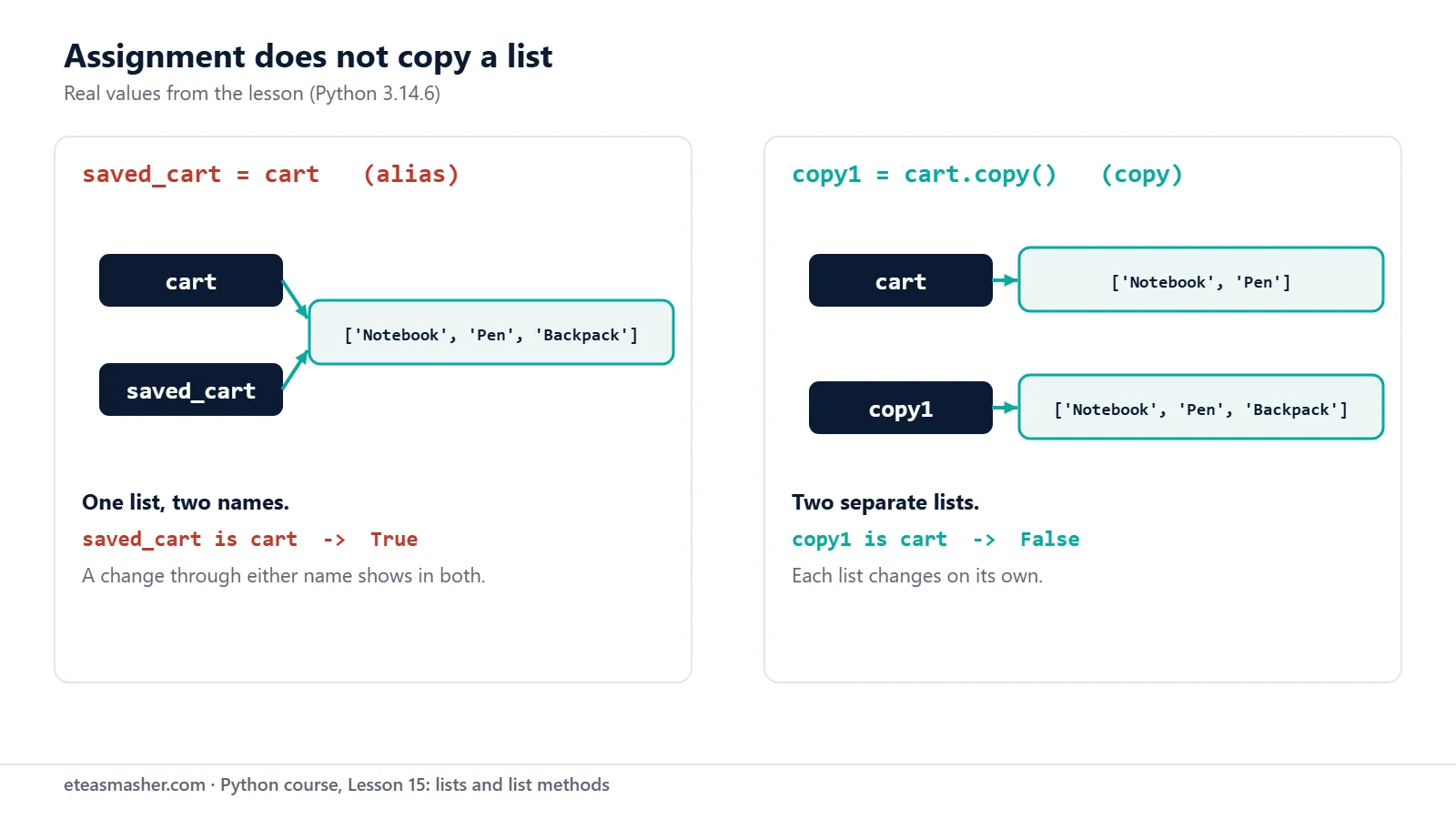
To get an independent list, make a copy. These three ways all work:
cart = ["Notebook", "Pen"]
copy1 = cart.copy()
copy2 = cart[:]
copy3 = list(cart)
copy1.append("Backpack")
print("cart: ", cart)
print("copy1:", copy1)
print(copy1 is cart, copy2 is cart, copy3 is cart)
print(copy2 == cart)
cart: ['Notebook', 'Pen']
copy1: ['Notebook', 'Pen', 'Backpack']
False False False
TrueNow cart stays the same. Each copy is a separate list (is gives False) with equal items (== gives True). cart.copy() is the easiest to read.
Shallow and deep copies
These copies are shallow. The copy module docs say a shallow copy “inserts references into it to the objects found in the original”. That only matters when a list holds other lists:
import copy

orders = [["Pen", "Notebook"], ["Ruler"]]
shallow = orders.copy()
deep = copy.deepcopy(orders)
orders[0].append("Eraser")
print("orders: ", orders)
print("shallow:", shallow)
print("deep:   ", deep)
orders: [['Pen', 'Notebook', 'Eraser'], ['Ruler']]
shallow: [['Pen', 'Notebook', 'Eraser'], ['Ruler']]
deep: [['Pen', 'Notebook'], ['Ruler']]The shallow copy is a new outer list, but its inner lists are the same ones as in orders, so "Eraser" shows up in both. copy.deepcopy() copies the inner lists too. For a flat list of strings or numbers, copy() is all you need.
List methods at a glance
| Method | What it does | What it gives back |
|---|---|---|
append(x) | adds x at the end | None |
extend(items) | adds each item of items at the end | None |
insert(i, x) | puts x before index i | None |
remove(x) | removes the first x, ValueError if missing | None |
pop(i) | removes the item at i (last if no i) | the removed item |
clear() | removes every item | None |
count(x) | counts how often x appears | a number |
index(x) | finds the first position of x | a number |
sort() | sorts the list in place | None |
copy() | makes a shallow copy | a new list |
Try it yourself
Exercise 1: Exam marks
Make marks = [72, 85, 64, 91, 58]. Print the first mark, the last mark, the middle three marks (with a slice) and the number of marks.
Exercise 2: Shopping list
Start with ["Milk", "Bread", "Eggs"]. Add "Rice" at the end, put "Tea" at the front, remove "Bread", then take out the last item with pop(), print it, and print the list.
Exercise 3: Top three prices
Make prices = [450, 60, 3200, 900, 120, 1500]. Print the three highest prices, from highest to lowest, without changing the original list.
Solutions
Solution 1
marks = [72, 85, 64, 91, 58]
print("First:", marks[0])
print("Last:", marks[-1])
print("Middle three:", marks[1:4])
print("Number of marks:", len(marks))
First: 72
Last: 58
Middle three: [85, 64, 91]
Number of marks: 5marks[1:4] takes indexes 1, 2 and 3; the stop index 4 is left out.
Solution 2
shopping = ["Milk", "Bread", "Eggs"]
shopping.append("Rice")
shopping.insert(0, "Tea")
shopping.remove("Bread")
taken = shopping.pop()
print("Taken out:", taken)
print(shopping)
Taken out: Rice
['Tea', 'Milk', 'Eggs']pop() gives back the item it removes, so we can store it in taken and print it.
Solution 3
prices = [450, 60, 3200, 900, 120, 1500]
top_three = sorted(prices, reverse=True)[:3]
print("Top three:", top_three)
print("Original: ", prices)
Top three: [3200, 1500, 900]
Original: [450, 60, 3200, 900, 120, 1500]sorted() makes a new list, so prices keeps its order, and the slice [:3] keeps the first three items.
Common mistakes
- Counting indexes from 1. A list with 5 items has indexes 0 to 4.
cart[5]givesIndexError: list index out of range. Usecart[-1]for the last item. - Writing
prices = prices.sort().sort()returnsNone, sopricesbecomesNone, andprices[0]then givesTypeError: 'NoneType' object is not subscriptable. Writeprices.sort()on its own line, ornew_list = sorted(prices). - Removing something that is not there.
cart.remove("Laptop")givesValueError: list.remove(x): x not in list. Check withinfirst. - Thinking
=makes a copy. Afterbackup = cart, changing one changes the other. Usebackup = cart.copy(). - Sorting numbers mixed with text. With
prices = [450, "60", 3200],prices.sort()givesTypeError: '<' not supported between instances of 'str' and 'int'. Convert the text withint()first (Lesson 8).
Frequently asked questions
What is the difference between append and extend in Python?
append(x) adds x as a single new item at the end, even when x is a list. extend(items) adds each item of items one by one. With ["Ruler", "Eraser"], append() adds 1 item and extend() adds 2.
What is the difference between sort() and sorted() in Python?
list.sort() changes the list itself and returns None. sorted(list) returns a new sorted list and leaves the original as it was. Both accept reverse=True, and sorted() also works on other collections, such as strings and tuples.
How do I copy a list in Python?
Use new_list = old_list.copy(), or the slice old_list[:], or list(old_list). Writing new_list = old_list does not copy; it gives the same list a second name. If your list contains other lists, use copy.deepcopy() so the inner lists are copied too.
Summary
- A list keeps items in order in square brackets; indexes start at 0, and
-1is the last item. list[start:stop:step]makes a new list; the stop index is never included, and slices never raiseIndexError.append(),extend()andinsert()add items;remove(),pop(),delandclear()remove them.sort()changes the list and returnsNone;sorted()returns a new list.b = amakes an alias, not a copy; usea.copy(),a[:]orlist(a), andcopy.deepcopy()for lists inside lists.
Next lesson
Next: Lesson 16, Python Tuples and Unpacking: One-Item Tuples, Star Unpacking and Swapping.
Sources
- An Informal Introduction to Python: Lists (Python tutorial)
- Data Structures: More on Lists and the del statement (Python tutorial)
- Sorting Techniques (Python HOW TO)
- Built-in Types: Lists and mutable sequence operations (Python docs)
- copy: Shallow and deep copy operations (Python docs)
- Programming FAQ: Why did changing list ‘y’ also change list ‘x’? (Python docs)
- Python downloads page (python.org)