
SQL course · Module 2: Querying one table · Lesson 7 of 40
Quick answer: SQL ORDER BY sorts the rows of a result: ORDER BY price sorts from low to high (ascending is the default), ORDER BY price DESC from high to low, and ORDER BY category, price DESC sorts by category first and by price inside each category. PostgreSQL puts NULLs last in ascending order and first in descending order; NULLS FIRST and NULLS LAST change that. For pages of results, use LIMIT and OFFSET, and always end the ORDER BY with a unique column such as id, or rows can repeat or go missing between pages.
In this lesson you will learn:
- how to sort ascending, descending and by several columns
- how to sort by an alias, an expression or a column position
- why text order depends on the collation, and where NULLs go
- how to page through results with
LIMITandOFFSETwithout losing rows - what to use instead in SQL Server, MySQL and SQLite
Before you start: Lesson 6, SQL NULL Values: IS NULL, COALESCE and Three-Valued Logic.
We ran every example on PostgreSQL 16.15 with the shop database from Lesson 3. ORDER BY, NULLS FIRST/LAST, LIMIT and OFFSET are described the same way in the current PostgreSQL 18 manual, so they work the same on PostgreSQL 17 and 18.
Table of Contents
Sort with ORDER BY
ORDER BY comes after WHERE, near the end of the query. “ASC order is the default” (PostgreSQL docs: Sorting Rows):
SELECT name, price FROM products ORDER BY price; name | price
-----------------------------+--------
Gel Pens 10-Pack | 6.75
Notebook Pack | 12.50
Wireless Mouse | 24.99
Desk Lamp | 32.00
USB-C Hub | 39.50
Laptop Stand | 45.00
HD Webcam | 54.90
Mechanical Keyboard | 89.00
Noise-Cancelling Headphones | 149.00
Ergonomic Chair | 259.00
(10 rows)Without ORDER BY, the row order “must not be relied on” (same page).
DESC sorts from high to low. With LIMIT, it gives a top-N list:
SELECT name, price FROM products ORDER BY price DESC LIMIT 4; name | price
-----------------------------+--------
Ergonomic Chair | 259.00
Noise-Cancelling Headphones | 149.00
Mechanical Keyboard | 89.00
HD Webcam | 54.90
(4 rows)Sort by several columns
List the columns separated by commas. The second column only decides the order between rows that are equal in the first one:
SELECT category, name, price FROM products ORDER BY category, price DESC; category | name | price
-------------+-----------------------------+--------
Accessories | Laptop Stand | 45.00
Electronics | Noise-Cancelling Headphones | 149.00
Electronics | Mechanical Keyboard | 89.00
Electronics | HD Webcam | 54.90
Electronics | USB-C Hub | 39.50
Electronics | Wireless Mouse | 24.99
Home Office | Ergonomic Chair | 259.00
Home Office | Desk Lamp | 32.00
Stationery | Notebook Pack | 12.50
Stationery | Gel Pens 10-Pack | 6.75
(10 rows)Inside each category, the most expensive product comes first. Each column gets its own direction: DESC here applies only to price, and category uses the default ASC.
Sort by an alias, an expression or a position
You can sort by a column alias from the select list:
SELECT order_id, product_id, quantity * unit_price AS line_total
FROM order_items
ORDER BY line_total DESC, order_id
LIMIT 6;
order_id | product_id | line_total
----------+------------+------------
3 | 8 | 149.00
11 | 8 | 149.00
16 | 8 | 149.00
22 | 8 | 149.00
12 | 10 | 109.80
2 | 2 | 89.00
(6 rows)Four lines tie at 149.00 (one pair of headphones each), so order_id decides their order. The docs add one limit: “an output column name has to stand alone”, so ORDER BY line_total * -1 fails (see Common mistakes).
You can also sort by position: ORDER BY 2 DESC sorts by the second column of the select list. It works, but it breaks silently when someone changes the select list, so prefer names.
Sorting text: case and collation
Text order depends on the collation. Our test database uses C.UTF-8; type \l shop in psql to see yours in the Collate column (this is the PostgreSQL 16 psql layout; other versions may show slightly different columns):
                                               List of databases
 Name |  Owner   | Encoding | Locale Provider | Collate |  Ctype  | ICU Locale | ICU Rules | Access privileges
------+----------+----------+-----------------+---------+---------+------------+-----------+-------------------
 shop | postgres | UTF8     | libc            | C.UTF-8 | C.UTF-8 |            |           |
(1 row)
With this collation, sorting by name puts the lower-case bilal ahmed last:
SELECT id, name FROM customers ORDER BY name; id | name
----+---------------
1 | Ayesha Malik
9 | Chloe Dubois
6 | Daniel Weber
5 | Emma Clarke
7 | Hira Siddiqui
2 | Lucas Martin
8 | NOAH WILSON
10 | Omar Haddad
3 | Sofia Rossi
4 | bilal ahmed
(10 rows)The C collation sorts “by byte values rather than natural language order” (PostgreSQL docs: Collation Support), and every capital letter has a smaller byte value than every small letter. The SELECT reference says “character-string data is sorted according to the collation that applies to the column being sorted”, and you can choose another one with COLLATE (PostgreSQL docs: SELECT). The ICU collation und-x-icu gives “a reasonable language-agnostic sort order”:
SELECT id, name FROM customers ORDER BY name COLLATE "und-x-icu"; id | name
----+---------------
1 | Ayesha Malik
4 | bilal ahmed
9 | Chloe Dubois
6 | Daniel Weber
5 | Emma Clarke
7 | Hira Siddiqui
2 | Lucas Martin
8 | NOAH WILSON
10 | Omar Haddad
3 | Sofia Rossi
(10 rows)With a language collation such as en_US.UTF-8, plain ORDER BY name may already give this order. ICU collations need a PostgreSQL built with ICU support, and asking for a collation your server does not have gives an error. Our test server has no en_US locale, so this query failed there (if your system has that locale, it works):
SELECT id, name FROM customers ORDER BY name COLLATE "en_US";ERROR: collation "en_US" for encoding "UTF8" does not exist
LINE 1: SELECT id, name FROM customers ORDER BY name COLLATE "en_US"...
^A method that works in every database is to sort by the lower-case value:
SELECT id, name FROM customers ORDER BY lower(name); id | name
----+---------------
1 | Ayesha Malik
4 | bilal ahmed
9 | Chloe Dubois
6 | Daniel Weber
5 | Emma Clarke
7 | Hira Siddiqui
2 | Lucas Martin
8 | NOAH WILSON
10 | Omar Haddad
3 | Sofia Rossi
(10 rows)Where NULLs go: NULLS FIRST and NULLS LAST
“By default, null values sort as if larger than any non-null value; that is, NULLS FIRST is the default for DESC order, and NULLS LAST otherwise” (PostgreSQL docs: Sorting Rows). We turned on \pset null '(null)' from Lesson 6 so the NULL is visible:
SELECT id, name, city FROM customers ORDER BY city; id | name | city
----+---------------+---------
6 | Daniel Weber | Berlin
8 | NOAH WILSON | Chicago
4 | bilal ahmed | Karachi
10 | Omar Haddad | Lahore
1 | Ayesha Malik | Lahore
5 | Emma Clarke | London
3 | Sofia Rossi | Milan
9 | Chloe Dubois | Paris
2 | Lucas Martin | Toronto
7 | Hira Siddiqui | (null)
(10 rows)Look at the two Lahore customers: 10 came before 1. When rows tie on every sort key, PostgreSQL may return them in any order. Keep that in mind for paging below.
With DESC, the NULL moves to the top:
SELECT id, name, city FROM customers ORDER BY city DESC LIMIT 3; id | name | city
----+---------------+---------
7 | Hira Siddiqui | (null)
2 | Lucas Martin | Toronto
9 | Chloe Dubois | Paris
(3 rows)NULLS FIRST and NULLS LAST let you choose:
SELECT id, name, city FROM customers ORDER BY city NULLS FIRST LIMIT 3; id | name | city
----+---------------+---------
7 | Hira Siddiqui | (null)
6 | Daniel Weber | Berlin
8 | NOAH WILSON | Chicago
(3 rows)SELECT id, name, city FROM customers ORDER BY city DESC NULLS LAST; id | name | city
----+---------------+---------
2 | Lucas Martin | Toronto
9 | Chloe Dubois | Paris
3 | Sofia Rossi | Milan
5 | Emma Clarke | London
1 | Ayesha Malik | Lahore
10 | Omar Haddad | Lahore
4 | bilal ahmed | Karachi
8 | NOAH WILSON | Chicago
6 | Daniel Weber | Berlin
7 | Hira Siddiqui | (null)
(10 rows)Dialect note. Other databases treat NULL as the smallest value, the opposite of PostgreSQL. In MySQL, “NULL values are presented first if you do ORDER BY ... ASC” (MySQL 9.7 manual: Working with NULL Values), and the MySQL ORDER BY syntax has no NULLS FIRST (MySQL 9.7 manual: SELECT). SQLite “considers NULL values to be smaller than any other values” but accepts NULLS FIRST and NULLS LAST (SQLite: SELECT); our SQLite 3.53.1 test confirmed both. In SQL Server, “NULL values are treated as the lowest possible values”, and its ORDER BY syntax has no NULLS FIRST either (Microsoft Learn: ORDER BY). Lesson 8 shows a portable CASE trick for this.
Paging with LIMIT and OFFSET
LIMIT sets the page size, and OFFSET skips the rows of earlier pages: page n starts at OFFSET (n - 1) * page_size.
SELECT id, order_date, status FROM orders ORDER BY order_date, id LIMIT 5; id | order_date | status
----+------------+-----------
1 | 2026-06-03 | delivered
2 | 2026-06-09 | delivered
3 | 2026-06-15 | delivered
4 | 2026-06-22 | cancelled
5 | 2026-07-01 | delivered
(5 rows)SELECT id, order_date, status FROM orders ORDER BY order_date, id LIMIT 5 OFFSET 5; id | order_date | status
----+------------+-----------
6 | 2026-07-08 | delivered
7 | 2026-07-14 | delivered
8 | 2026-07-20 | delivered
9 | 2026-07-29 | delivered
10 | 2026-08-04 | delivered
(5 rows)The SQL-standard form gives the same page:
SELECT id, order_date, status FROM orders ORDER BY order_date, id OFFSET 5 ROWS FETCH NEXT 5 ROWS ONLY; id | order_date | status
----+------------+-----------
6 | 2026-07-08 | delivered
7 | 2026-07-14 | delivered
8 | 2026-07-20 | delivered
9 | 2026-07-29 | delivered
10 | 2026-08-04 | delivered
(5 rows)One cost to know: “the rows skipped by an OFFSET clause still have to be computed inside the server; therefore a large OFFSET might be inefficient” (PostgreSQL docs: LIMIT and OFFSET). Lesson 33 returns to fast queries, a core skill on the data engineer roadmap.
Ties break paging
Why ORDER BY order_date, id and not just order_date? Look at what happens when we page by status, a column where 16 of the 22 orders have the same value:
SELECT id, status FROM orders ORDER BY status LIMIT 5; id | status
----+-----------
12 | cancelled
4 | cancelled
3 | delivered
5 | delivered
2 | delivered
(5 rows)SELECT id, status FROM orders ORDER BY status LIMIT 5 OFFSET 5; id | status
----+-----------
7 | delivered
9 | delivered
8 | delivered
10 | delivered
2 | delivered
(5 rows)Order 2 is on page 1 and again on page 2. When we fetched all five pages this way, order 2 appeared three times, and orders 6 and 11 never appeared at all. This is not a bug. ORDER BY status is not a predictable order, because 16 rows tie on delivered, and tied rows can come back in any order. The PostgreSQL docs say different LIMIT and OFFSET values can produce different plans, so they “will give inconsistent results unless you enforce a predictable result ordering with ORDER BY“. Which ids repeat or go missing depends on the plan, so your computer may show other ids, or the pages may even look correct by luck. That is exactly the problem: you cannot rely on the result.
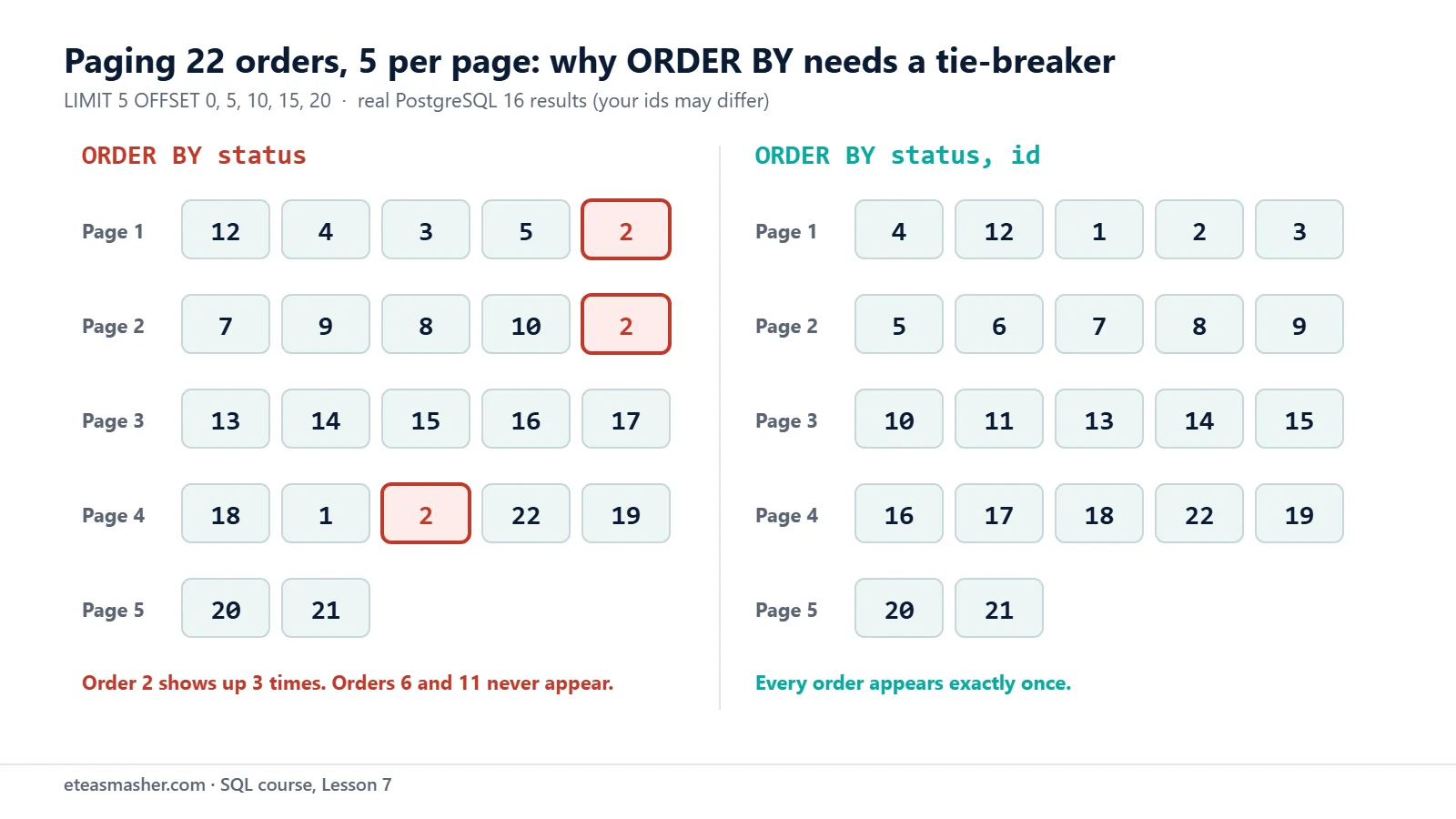
The fix is to add a unique column as the last sort key, so that no two rows tie:
SELECT id, status FROM orders ORDER BY status, id LIMIT 5; id | status
----+-----------
4 | cancelled
12 | cancelled
1 | delivered
2 | delivered
3 | delivered
(5 rows)SELECT id, status FROM orders ORDER BY status, id LIMIT 5 OFFSET 5; id | status
----+-----------
5 | delivered
6 | delivered
7 | delivered
8 | delivered
9 | delivered
(5 rows)Now every order appears on exactly one page. The same idea, breaking ties on purpose, matters again when you rank rows with window functions (see these SQL window functions practice problems).
Dialect note. MySQL accepts LIMIT 5 OFFSET 5 “for compatibility with PostgreSQL” and also LIMIT 5, 5, where the first number is the offset (MySQL 9.7 manual: SELECT). SQLite supports both forms too, but “strongly” encourages the OFFSET keyword to avoid confusion (SQLite: SELECT). SQL Server has no LIMIT. Use SELECT TOP (5) ... for the first rows, and ORDER BY ... OFFSET 5 ROWS FETCH NEXT 5 ROWS ONLY for later pages; you “can’t combine TOP with OFFSET and FETCH in the same query” (Microsoft Learn: ORDER BY, Microsoft Learn: TOP). Lesson 2 has more on these databases.
Try it yourself
Exercise 1: Cheaper products by category
List the name, category and price of products under 50. Sort by category A to Z, and inside each category from the most expensive to the cheapest.
Exercise 2: Unknown city first
List all customers (id, name, city), sorted by city, with the customer who has no city at the top. Sort customers in the same city by name.
Exercise 3: Page 2, newest first
Show page 2 of the orders, 5 orders per page, newest first. Make sure the paging is stable.
Solutions
Solution 1
SELECT name, category, price FROM products WHERE price < 50 ORDER BY category, price DESC; name | category | price
------------------+-------------+-------
Laptop Stand | Accessories | 45.00
USB-C Hub | Electronics | 39.50
Wireless Mouse | Electronics | 24.99
Desk Lamp | Home Office | 32.00
Notebook Pack | Stationery | 12.50
Gel Pens 10-Pack | Stationery | 6.75
(6 rows)WHERE filters first, then ORDER BY sorts what is left.
Solution 2
SELECT id, name, city FROM customers ORDER BY city NULLS FIRST, name; id | name | city
----+---------------+---------
7 | Hira Siddiqui | (null)
6 | Daniel Weber | Berlin
8 | NOAH WILSON | Chicago
4 | bilal ahmed | Karachi
1 | Ayesha Malik | Lahore
10 | Omar Haddad | Lahore
5 | Emma Clarke | London
3 | Sofia Rossi | Milan
9 | Chloe Dubois | Paris
2 | Lucas Martin | Toronto
(10 rows)name breaks the Lahore tie, so Ayesha now always comes before Omar.
Solution 3
SELECT id, order_date, status FROM orders ORDER BY order_date DESC, id DESC LIMIT 5 OFFSET 5; id | order_date | status
----+------------+-----------
17 | 2026-09-29 | delivered
16 | 2026-09-17 | delivered
15 | 2026-09-02 | delivered
14 | 2026-09-02 | delivered
13 | 2026-08-25 | delivered
(5 rows)Orders 14 and 15 share a date; id DESC fixes their order, so neither can slip onto another page.
Common mistakes
- ORDER BY before WHERE.
SELECT name, price FROM products ORDER BY price WHERE price > 50;fails withERROR: syntax error at or near "WHERE". The order is SELECT, FROM, WHERE, ORDER BY, LIMIT. - Single quotes around the column name.
ORDER BY 'price'fails withERROR: non-integer constant in ORDER BY, because'price'is a text value, not a column. - Using an alias inside an expression.
ORDER BY line_total * -1fails withERROR: column "line_total" does not exist. Use the alias alone, or repeat the full expression. - Expecting DESC to apply to every column.
ORDER BY category, price DESCstill sorts category A to Z. WriteORDER BY category DESC, price DESCto reverse both. - Paging without a unique last sort key. Tied rows can repeat or vanish between pages, as order 2 did above. End the ORDER BY with
id.
Frequently asked questions
What is the default sort order in SQL ORDER BY?
Ascending (ASC): smallest numbers, earliest dates and A-to-Z text first. Write DESC for the reverse. Text order depends on the collation.
Does ORDER BY put NULL first or last?
It depends on the database. PostgreSQL puts NULL last for ASC and first for DESC. MySQL, SQLite and SQL Server treat NULL as the smallest value, so it comes first for ASC. In PostgreSQL and SQLite, write NULLS FIRST or NULLS LAST to choose.
How do I select the first 10 rows in SQL Server?
Use SELECT TOP (10) name, price FROM products ORDER BY price DESC;. For later pages, use ORDER BY ... OFFSET 10 ROWS FETCH NEXT 10 ROWS ONLY, which PostgreSQL also understands.
Summary
ORDER BY colsorts ascending; addDESCper column; extra columns break ties.- You can sort by an alias or a position, but an alias cannot be used inside an expression.
- Text order follows the collation;
lower(name)gives a case-insensitive order everywhere. - PostgreSQL sorts NULL last in
ASCand first inDESC;NULLS FIRSTandNULLS LASToverride this. LIMIT n OFFSET mmakes pages; end the ORDER BY with a unique column, and useTOPorOFFSET ... FETCHin SQL Server.
Next lesson
Next: Lesson 8, SQL CASE WHEN, CAST and Common String and Date Functions.
Sources
- PostgreSQL documentation: Sorting Rows (ORDER BY)
- PostgreSQL documentation: LIMIT and OFFSET
- PostgreSQL documentation: SELECT
- PostgreSQL documentation: Collation Support
- MySQL 9.7 Reference Manual: Working with NULL Values
- MySQL 9.7 Reference Manual: SELECT Statement
- SQLite: SELECT
- Microsoft Learn: SELECT – ORDER BY Clause
- Microsoft Learn: TOP (Transact-SQL)