
SQL course · Module 7: Window functions · Lesson 26 of 40
Quick answer: A SQL running total is SUM(amount) OVER (ORDER BY day): each row adds up all rows from the first one up to itself. LAG(revenue) OVER (ORDER BY month) reads the value from the previous row and LEAD from the next one, so revenue - LAG(revenue) OVER (...) gives the month-over-month change. The window frame decides which rows a function adds up. The default frame includes tied rows, so two orders on the same day get the same running total; add a unique tie-breaker when you want one step per row.
In this lesson you will learn:
LAGandLEAD, with an offset and a default value- how to compute month-over-month change
- running totals and moving averages
- the default window frame, the ties surprise, and
ROWSvsRANGEvsGROUPS FIRST_VALUE,LAST_VALUEand theLAST_VALUEframe trap
Before you start: Lesson 24, SQL Window Functions: OVER and PARTITION BY and Lesson 25, SQL ROW_NUMBER, RANK and DENSE_RANK: Top N per Group.
We ran every example on PostgreSQL 16.15 with the shop database from Lesson 3 and checked the current PostgreSQL 18 manual. Everything here works on newer versions too. The lesson creates two views and drops them at the end; the shop tables do not change. As in earlier lessons, \pset null '(null)' makes NULL visible.
Table of Contents
Two views for this lesson
We use two views (Lesson 23), both without cancelled orders: revenue per month (date_trunc and ::date as in Lesson 8), and one row per order with its total.
CREATE VIEW monthly_revenue AS
SELECT date_trunc('month', o.order_date)::date AS month,
       SUM(oi.quantity * oi.unit_price) AS revenue
FROM orders o
JOIN order_items oi ON oi.order_id = o.id
WHERE o.status <> 'cancelled'
GROUP BY 1;

CREATE VIEW order_totals AS
SELECT o.id, o.customer_id, o.order_date,
       SUM(oi.quantity * oi.unit_price) AS total
FROM orders o
JOIN order_items oi ON oi.order_id = o.id
WHERE o.status <> 'cancelled'
GROUP BY o.id;
CREATE VIEW
CREATE VIEWLAG and LEAD: the previous and the next row
LAG(value) returns the value “at the row that is offset rows before the current row within the partition”; LEAD looks after it. The order comes from ORDER BY inside OVER (PostgreSQL docs: Window Functions).
SELECT month, revenue,
       LAG(revenue)  OVER (ORDER BY month) AS prev_month,
       LEAD(revenue) OVER (ORDER BY month) AS next_month
FROM monthly_revenue
ORDER BY month;
month | revenue | prev_month | next_month
------------+---------+------------+------------
2026-06-01 | 308.98 | (null) | 446.14
2026-07-01 | 446.14 | 308.98 | 341.73
2026-08-01 | 341.73 | 446.14 | 423.99
2026-09-01 | 423.99 | 341.73 | 535.37
2026-10-01 | 535.37 | 423.99 | (null)
(5 rows)June has no month before it, so prev_month is NULL; October has no next month. In Lesson 14 you compared rows of one table with a self join; LAG and LEAD do it without a join.
Offset and default
Both functions take two more arguments: how many rows to move (the offset, default 1) and what to return when there is no such row (default NULL):
SELECT month, revenue,
       LAG(revenue, 2)    OVER (ORDER BY month) AS two_months_ago,
       LAG(revenue, 1, 0) OVER (ORDER BY month) AS prev_or_zero
FROM monthly_revenue
ORDER BY month;
month | revenue | two_months_ago | prev_or_zero
------------+---------+----------------+--------------
2026-06-01 | 308.98 | (null) | 0
2026-07-01 | 446.14 | (null) | 308.98
2026-08-01 | 341.73 | 308.98 | 446.14
2026-09-01 | 423.99 | 446.14 | 341.73
2026-10-01 | 535.37 | 341.73 | 423.99
(5 rows)The default “must be of a type compatible with value”, so 0 works for a numeric column, but text such as 'none' does not.
Month-over-month change
Subtract the previous month, then divide by it for the percentage:
SELECT month, revenue,
       revenue - LAG(revenue) OVER (ORDER BY month) AS change,
       ROUND(100 * (revenue - LAG(revenue) OVER (ORDER BY month))
             / LAG(revenue) OVER (ORDER BY month), 1) AS pct_change
FROM monthly_revenue
ORDER BY month;
month | revenue | change | pct_change
------------+---------+---------+------------
2026-06-01 | 308.98 | (null) | (null)
2026-07-01 | 446.14 | 137.16 | 44.4
2026-08-01 | 341.73 | -104.41 | -23.4
2026-09-01 | 423.99 | 82.26 | 24.1
2026-10-01 | 535.37 | 111.38 | 26.3
(5 rows)July grew 44.4% over June; August fell 23.4%. June stays NULL: there is nothing to compare it with.
SQL running total and moving average
In Lesson 24 you saw that ORDER BY inside OVER turns SUM into a running sum. A moving average needs an explicit frame: ROWS BETWEEN 2 PRECEDING AND CURRENT ROW means “this row and the two before it”.
SELECT month, revenue,
       SUM(revenue) OVER (ORDER BY month) AS running_total,
       ROUND(AVG(revenue) OVER (ORDER BY month
                                ROWS BETWEEN 2 PRECEDING AND CURRENT ROW), 2) AS moving_avg_3
FROM monthly_revenue
ORDER BY month;
month | revenue | running_total | moving_avg_3
------------+---------+---------------+--------------
2026-06-01 | 308.98 | 308.98 | 308.98
2026-07-01 | 446.14 | 755.12 | 377.56
2026-08-01 | 341.73 | 1096.85 | 365.62
2026-09-01 | 423.99 | 1520.84 | 403.95
2026-10-01 | 535.37 | 2056.21 | 433.70
(5 rows)The running total ends at 2,056.21, the revenue of all five months. June and July have fewer than three months to use, so the average uses what exists.
The default frame and the ties surprise
The frame is the set of rows the function sees for the current row. If you write no frame, PostgreSQL uses this one: “The default framing option is RANGE UNBOUNDED PRECEDING, which is the same as RANGE BETWEEN UNBOUNDED PRECEDING AND CURRENT ROW. With ORDER BY, this sets the frame to be all rows from the partition start up through the current row’s last ORDER BY peer” (PostgreSQL docs: Window Function Calls).
“Peer” is the important word: rows with the same ORDER BY value. Months never tie. Orders do: orders 14 and 15 were both placed on 2 September. Here are September’s running totals with the default frame and a ROWS frame:
SELECT id, order_date, total,
       SUM(total) OVER (ORDER BY order_date) AS default_frame,
       SUM(total) OVER (ORDER BY order_date ROWS UNBOUNDED PRECEDING) AS rows_frame
FROM order_totals
WHERE order_date >= '2026-09-01' AND order_date < '2026-10-01'
ORDER BY order_date, id;
id | order_date | total | default_frame | rows_frame
----+------------+--------+---------------+------------
14 | 2026-09-02 | 158.99 | 183.99 | 158.99
15 | 2026-09-02 | 25.00 | 183.99 | 183.99
16 | 2026-09-17 | 149.00 | 332.99 | 332.99
17 | 2026-09-29 | 91.00 | 423.99 | 423.99
(4 rows)With the default frame, order 14 already shows 183.99: its frame runs to its last peer, order 15. That is right for “revenue up to the end of each day”, but surprising if you expect one step per row.
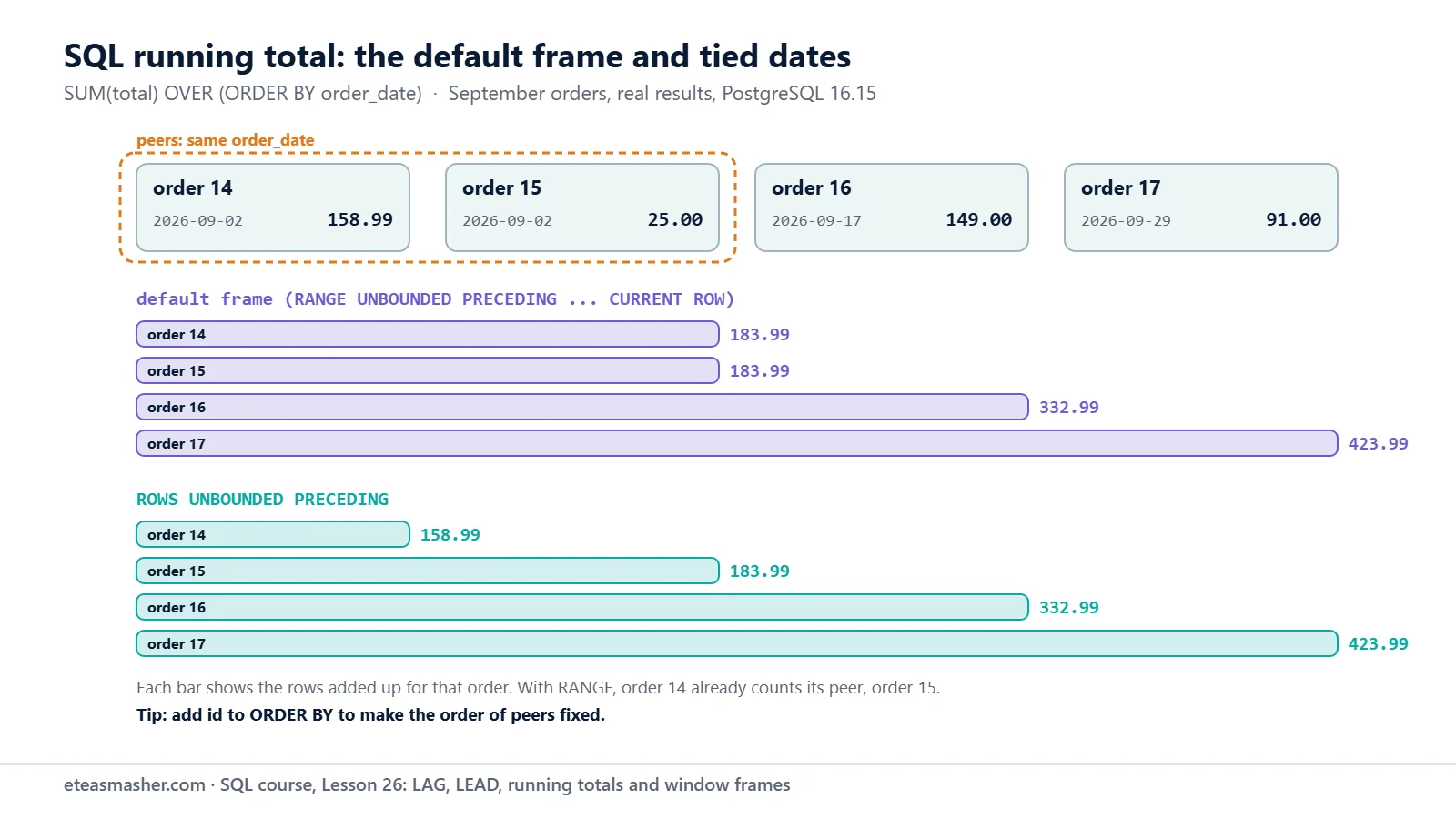
The ROWS frame stops at the current row, so the total grows one order at a time. But which of 14 and 15 comes first is still not fixed, because they are peers. Add a unique tie-breaker, as you did for ROW_NUMBER in Lesson 25:
SELECT id, order_date, total,
       SUM(total) OVER (ORDER BY order_date, id) AS running_total
FROM order_totals
WHERE order_date >= '2026-09-01' AND order_date < '2026-10-01'
ORDER BY order_date, id;
id | order_date | total | running_total
----+------------+--------+---------------
14 | 2026-09-02 | 158.99 | 158.99
15 | 2026-09-02 | 25.00 | 183.99
16 | 2026-09-17 | 149.00 | 332.99
17 | 2026-09-29 | 91.00 | 423.99
(4 rows)With id in the window’s ORDER BY, no two rows are peers, so even the default frame steps one row at a time.
ROWS vs RANGE vs GROUPS
The frame mode decides what “1 PRECEDING” counts:
- ROWS counts rows: “the specified number of rows before or after the current row”.
- GROUPS counts peer groups: “the specified number of peer groups before or after the current row’s peer group”.
- RANGE counts values: the offset is “the maximum difference between the value of that column in the current row and its value in preceding or following rows”. For a date column, the offset is an interval such as
'7 days'.
string_agg lists the order ids in each frame:
SELECT id, order_date,
       string_agg(id::text, ',') OVER (ORDER BY order_date ROWS   BETWEEN 1 PRECEDING AND CURRENT ROW) AS rows_1,
       string_agg(id::text, ',') OVER (ORDER BY order_date GROUPS BETWEEN 1 PRECEDING AND CURRENT ROW) AS groups_1,
       string_agg(id::text, ',') OVER (ORDER BY order_date RANGE  BETWEEN '7 days' PRECEDING AND CURRENT ROW) AS range_7_days
FROM order_totals
WHERE order_date >= '2026-08-20' AND order_date < '2026-10-01'
ORDER BY order_date, id;
id | order_date | rows_1 | groups_1 | range_7_days
----+------------+--------+----------+--------------
13 | 2026-08-25 | 13 | 13 | 13
14 | 2026-09-02 | 13,14 | 13,14,15 | 14,15
15 | 2026-09-02 | 14,15 | 13,14,15 | 14,15
16 | 2026-09-17 | 15,16 | 14,15,16 | 16
17 | 2026-09-29 | 16,17 | 16,17 | 17
(5 rows)For order 16, ROWS takes one row back (15). GROUPS takes one date back, which holds two orders (14 and 15). RANGE '7 days' takes nothing back, because the previous order was 15 days earlier. Order 13 is 8 days before 2 September, so it is outside the 7-day range of orders 14 and 15.
GROUPS and RANGE with an offset arrived in PostgreSQL 11 (PostgreSQL 11 release notes). SQLite has had them since 3.28.0 (SQLite: Window Functions). MySQL’s frame units are only ROWS and RANGE (MySQL 8.4 manual: Window Function Frame Specification). SQL Server has ROWS and RANGE, but “You can’t use RANGE with <unsigned value specification> PRECEDING or <unsigned value specification> FOLLOWING” (Microsoft Learn: OVER clause).
FIRST_VALUE, LAST_VALUE and the LAST_VALUE trap
FIRST_VALUE and LAST_VALUE return a value from the first or last row of the frame. Here are the first and last order dates of customers 1 and 2:
SELECT customer_id, id, order_date,
       FIRST_VALUE(order_date) OVER w AS first_order,
       LAST_VALUE(order_date)  OVER w AS last_order
FROM order_totals
WHERE customer_id IN (1, 2)
WINDOW w AS (PARTITION BY customer_id ORDER BY order_date)
ORDER BY customer_id, order_date;
customer_id | id | order_date | first_order | last_order
-------------+----+------------+-------------+------------
1 | 1 | 2026-06-03 | 2026-06-03 | 2026-06-03
1 | 11 | 2026-08-11 | 2026-06-03 | 2026-08-11
1 | 17 | 2026-09-29 | 2026-06-03 | 2026-09-29
2 | 2 | 2026-06-09 | 2026-06-09 | 2026-06-09
2 | 8 | 2026-07-20 | 2026-06-09 | 2026-07-20
2 | 19 | 2026-10-14 | 2026-06-09 | 2026-10-14
(6 rows)first_order is right. last_order just copies each row’s own date. The default frame ends at the current row, so the last row of the frame is the current row. The manual warns that this default “is likely to give unhelpful results for last_value“. The fix is a frame that covers the whole partition:
SELECT customer_id, id, order_date,
       FIRST_VALUE(order_date) OVER w AS first_order,
       LAST_VALUE(order_date)  OVER w AS last_order
FROM order_totals
WHERE customer_id IN (1, 2)
WINDOW w AS (PARTITION BY customer_id ORDER BY order_date
             ROWS BETWEEN UNBOUNDED PRECEDING AND UNBOUNDED FOLLOWING)
ORDER BY customer_id, order_date;
customer_id | id | order_date | first_order | last_order
-------------+----+------------+-------------+------------
1 | 1 | 2026-06-03 | 2026-06-03 | 2026-09-29
1 | 11 | 2026-08-11 | 2026-06-03 | 2026-09-29
1 | 17 | 2026-09-29 | 2026-06-03 | 2026-09-29
2 | 2 | 2026-06-09 | 2026-06-09 | 2026-10-14
2 | 8 | 2026-07-20 | 2026-06-09 | 2026-10-14
2 | 19 | 2026-10-14 | 2026-06-09 | 2026-10-14
(6 rows)Now every row shows the customer’s real last order. (LAG and LEAD ignore the frame; they count rows in the partition.)
Finally, drop the two views:
DROP VIEW monthly_revenue;
DROP VIEW order_totals;
DROP VIEW
DROP VIEWTry it yourself
Create the two views again for the exercises, and drop them when you finish.
Exercise 1: Days between orders
Using order_totals, show each order of customers 1, 2 and 3 with the number of days since that customer’s previous order.
Exercise 2: Customers so far
From customers, show each customer’s signup date and how many customers had signed up by then.
Exercise 3: The best month so far
Show each month’s revenue and the highest monthly revenue up to that month.
Solutions
Solution 1
SELECT customer_id, id, order_date,
       order_date - LAG(order_date) OVER (PARTITION BY customer_id ORDER BY order_date) AS days_since_prev
FROM order_totals
WHERE customer_id IN (1, 2, 3)
ORDER BY customer_id, order_date;
customer_id | id | order_date | days_since_prev
-------------+----+------------+-----------------
1 | 1 | 2026-06-03 | (null)
1 | 11 | 2026-08-11 | 69
1 | 17 | 2026-09-29 | 49
2 | 2 | 2026-06-09 | (null)
2 | 8 | 2026-07-20 | 41
2 | 19 | 2026-10-14 | 86
3 | 3 | 2026-06-15 | (null)
3 | 13 | 2026-08-25 | 71
3 | 22 | 2026-10-30 | 66
(9 rows)PARTITION BY customer_id makes LAG start fresh for each customer; subtracting two dates gives whole days.
Solution 2
SELECT name, signup_date,
       COUNT(*) OVER (ORDER BY signup_date) AS customers_so_far
FROM customers
ORDER BY signup_date;
name | signup_date | customers_so_far
---------------+-------------+------------------
Ayesha Malik | 2025-11-03 | 1
Lucas Martin | 2025-12-14 | 2
Sofia Rossi | 2026-01-05 | 3
bilal ahmed | 2026-02-20 | 4
Emma Clarke | 2026-03-02 | 5
Daniel Weber | 2026-04-11 | 6
Hira Siddiqui | 2026-05-25 | 7
NOAH WILSON | 2026-06-08 | 8
Chloe Dubois | 2026-07-19 | 9
Omar Haddad | 2026-09-02 | 10
(10 rows)A running count is a running total of COUNT(*). No two signup dates tie, so the default frame is fine.
Solution 3
SELECT month, revenue,
       MAX(revenue) OVER (ORDER BY month) AS best_so_far
FROM monthly_revenue
ORDER BY month;
month | revenue | best_so_far
------------+---------+-------------
2026-06-01 | 308.98 | 308.98
2026-07-01 | 446.14 | 446.14
2026-08-01 | 341.73 | 446.14
2026-09-01 | 423.99 | 446.14
2026-10-01 | 535.37 | 535.37
(5 rows)MAX (Lesson 9) with the default frame is a running maximum.
Common mistakes
- A running total that repeats on ties. The default
RANGEframe includes all peers. Add a unique column to the window’sORDER BY, or useROWS. - LAST_VALUE with the default frame. It returns the current row’s value. Use
ROWS BETWEEN UNBOUNDED PRECEDING AND UNBOUNDED FOLLOWING. - A number as a RANGE offset on a date.
RANGE with offset PRECEDING/FOLLOWING is not supported for column type date and offset type integer. Use an interval:'7 days' PRECEDING. With twoORDER BYcolumns:RANGE with offset PRECEDING/FOLLOWING requires exactly one ORDER BY column. - A LAG default of the wrong type.
LAG(revenue, 1, 'none')givesinvalid input syntax for type numeric: "none". - A frame that ends before it starts.
ROWS BETWEEN CURRENT ROW AND 1 PRECEDINGgivesframe starting from current row cannot have preceding rows. Write the earlier bound first.
Frequently asked questions
How do I calculate a running total in SQL?
Use SUM(column) OVER (ORDER BY date_column). Add PARTITION BY to restart the total for each group, for example per customer. If the order column can tie, add a unique column such as id to the window’s ORDER BY, or tied rows will share one total.
What is the difference between ROWS and RANGE?
ROWS counts physical rows, so 1 PRECEDING is exactly one row back. RANGE works with values: tied rows are treated the same, and an offset like '7 days' PRECEDING means “values up to 7 days smaller”. The default frame uses RANGE.
Why does LAST_VALUE return the current row?
The default frame ends at the current row (and its peers), so that row is the last one the function can see. Give LAST_VALUE the frame ROWS BETWEEN UNBOUNDED PRECEDING AND UNBOUNDED FOLLOWING, or use FIRST_VALUE with the opposite ORDER BY.
Summary
LAGandLEADread a value from an earlier or later row; the offset defaults to 1 and the default value to NULL.- A SQL running total is
SUM(...) OVER (ORDER BY ...); a moving average needsROWS BETWEEN n PRECEDING AND CURRENT ROW. - The default frame is
RANGE BETWEEN UNBOUNDED PRECEDING AND CURRENT ROW, so tied rows share a running total; add a tie-breaker. ROWScounts rows,GROUPScounts peer groups, andRANGEcounts values.LAST_VALUEneeds a frame that reachesUNBOUNDED FOLLOWING.
Practise these functions on a new table in the SQL window functions practice problems, which include a running total per region, a 2-row moving average and LAG comparisons.
Next lesson
Next: Lesson 27, SQL Window Functions: 15 Practice Problems with Answers.
Sources
- PostgreSQL documentation: Window Functions (lag, lead, first_value, last_value)
- PostgreSQL documentation: Window Function Calls (frame clause)
- PostgreSQL 11 release notes
- MySQL 8.4 manual: Window Function Frame Specification
- SQLite: Window Functions
- Microsoft Learn: SELECT – OVER clause