
SQL course · Module 3: Aggregation · Lesson 11 of 40
Quick answer: The SQL order of execution is the order in which the database logically processes the clauses of a query: FROM, WHERE, GROUP BY, HAVING, SELECT, DISTINCT, ORDER BY, then LIMIT. You write SELECT first, but it is processed fifth. That is why a column alias or an aggregate such as avg(price) cannot be used in WHERE (they do not exist yet), while an alias works in ORDER BY (it comes after SELECT).
In this lesson you will learn:
- the logical order in which a
SELECTquery is processed - why aliases fail in
WHERE, and why they work inORDER BY - why “aggregate functions are not allowed in WHERE”, and what to use instead
- the dialect difference: aliases in
HAVINGfail in PostgreSQL but work in MySQL - where window functions fit, as a preview of Module 7
Before you start: Lesson 10, SQL GROUP BY and HAVING.
We ran every example on PostgreSQL 16.15 with the shop database from Lesson 3. The processing order below is taken from the current PostgreSQL 18 manual.
Table of Contents
Written order vs logical order
You write the clauses of a query in this order: SELECT, FROM, WHERE, GROUP BY, HAVING, ORDER BY, LIMIT. PostgreSQL does not process them in that order. The PostgreSQL docs: SELECT describe the steps, which come down to this:
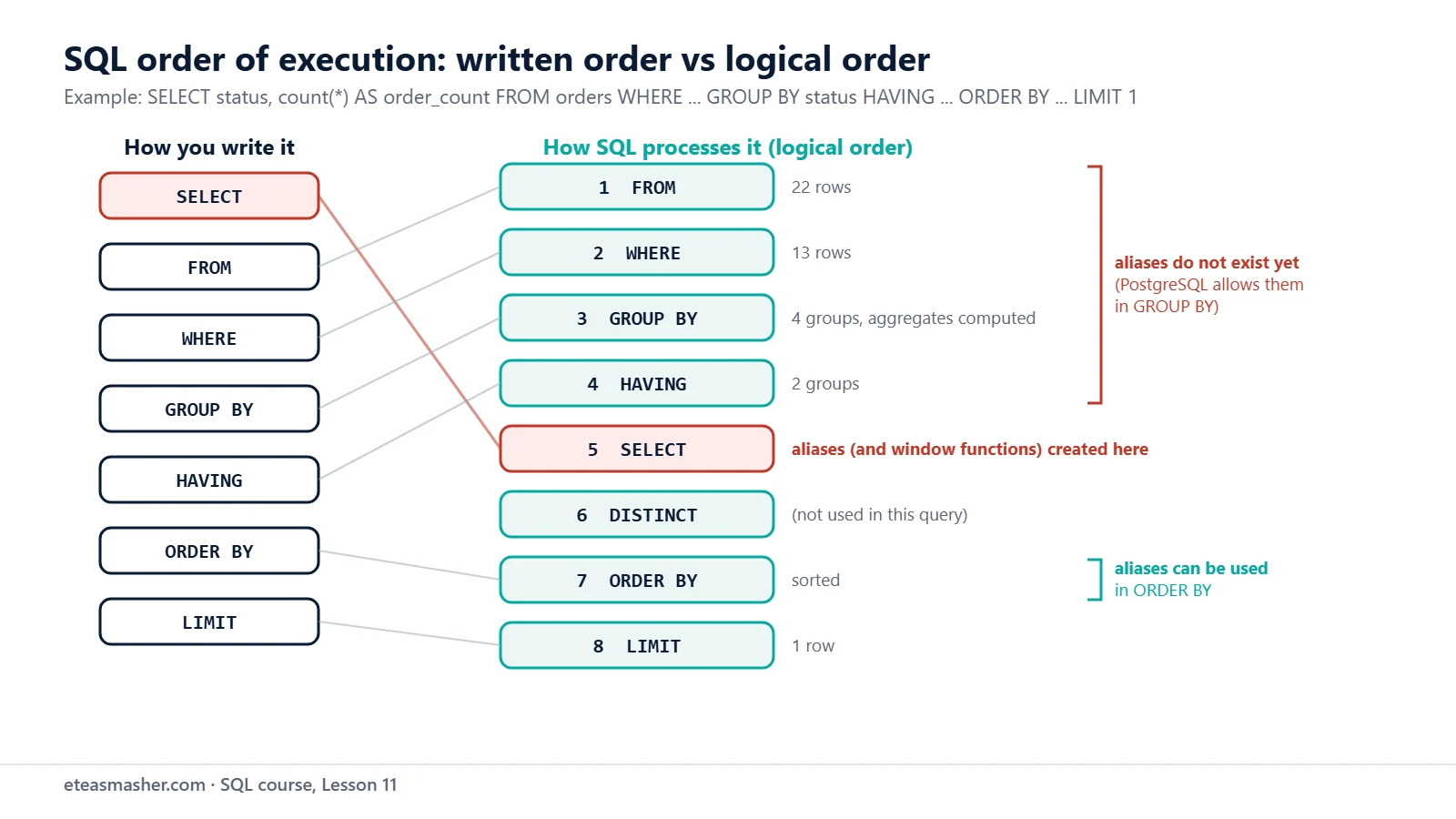
| Step | Clause | What happens |
|---|---|---|
| 1 | FROM | pick the table (later: join tables) |
| 2 | WHERE | remove rows that fail the condition |
| 3 | GROUP BY | make groups and compute the aggregates |
| 4 | HAVING | remove groups that fail the condition |
| 5 | SELECT | compute the output columns and their aliases |
| 6 | DISTINCT | remove duplicate output rows |
| 7 | ORDER BY | sort the rows |
| 8 | LIMIT | keep only some rows |
Microsoft’s SQL Server docs give the same order (with TOP in place of LIMIT) and state the main rule: because SELECT comes late, “any column aliases or derived columns defined in that clause can’t be referenced by preceding clauses. However, they can be referenced by subsequent clauses such as the ORDER BY clause” (Microsoft Learn: SELECT, logical processing order).
This is a logical order. It tells you which names and values exist at each step. The query planner may do the real work in another order if the result is the same; Lesson 32 shows how to see the real plan with EXPLAIN.
Following one query step by step
This query uses almost every clause:
SELECT status, count(*) AS order_count
FROM orders
WHERE order_date >= '2026-08-01'
GROUP BY status
HAVING count(*) >= 2
ORDER BY order_count DESC
LIMIT 1;
status | order_count
-----------+-------------
delivered | 8
(1 row)Read it in the logical order. Step 1, FROM orders, starts with all 22 rows. Step 2, WHERE, keeps the orders from August on:
SELECT count(*) AS rows_after_where FROM orders WHERE order_date >= '2026-08-01'; rows_after_where
------------------
13
(1 row)Step 3, GROUP BY status, turns those 13 rows into four groups and counts each one:
SELECT status, count(*) AS order_count
FROM orders
WHERE order_date >= '2026-08-01'
GROUP BY status
ORDER BY status;
status | order_count
-----------+-------------
cancelled | 1
delivered | 8
pending | 1
shipped | 3
(4 rows)Step 4, HAVING, removes cancelled and pending. Step 5, SELECT, names the count order_count. Step 7 sorts delivered (8) before shipped (3), and step 8, LIMIT 1, keeps the first row. So: 22 rows, 13 rows, 4 groups, 2 groups, 1 row.
Why an alias fails in WHERE
In Lesson 5 we promised to explain this kind of error (there the alias was sale_price):
SELECT order_id, quantity * unit_price AS line_total FROM order_items WHERE line_total > 100;ERROR: column "line_total" does not exist
LINE 1: ...* unit_price AS line_total FROM order_items WHERE line_total...
^WHERE is step 2, and line_total is created in step 5. When WHERE runs, there is no column with that name. The PostgreSQL manual states the rule: an output column’s name can be used “in ORDER BY and GROUP BY clauses, but not in the WHERE or HAVING clauses; there you must write out the expression instead.”
So repeat the expression in WHERE. In ORDER BY (step 7) the alias already exists, so you can use it there:
SELECT order_id, quantity * unit_price AS line_total
FROM order_items
WHERE quantity * unit_price > 100
ORDER BY line_total DESC, order_id;
order_id | line_total
----------+------------
3 | 149.00
11 | 149.00
16 | 149.00
22 | 149.00
12 | 109.80
(5 rows)Why aggregates fail in WHERE
This one looks reasonable, “products more expensive than the average”:
SELECT name, price FROM products WHERE price > avg(price);ERROR: aggregate functions are not allowed in WHERE
LINE 1: SELECT name, price FROM products WHERE price > avg(price);
^Aggregates are computed in step 3, after WHERE has already chosen the rows. The PostgreSQL tutorial explains: “the WHERE clause determines which rows will be included in the aggregate calculation; so obviously it has to be evaluated before aggregate functions are computed” (PostgreSQL tutorial: Aggregate Functions).
There are two fixes, depending on the question:
- To filter groups by an aggregate, use
HAVING, as in Lesson 10. - To compare each row with one aggregate value, compute that value first in a subquery. Subqueries are Lesson 20, but here is a preview:
SELECT name, price
FROM products
WHERE price > (SELECT avg(price) FROM products)
ORDER BY price;
name | price
-----------------------------+--------
Mechanical Keyboard | 89.00
Noise-Cancelling Headphones | 149.00
Ergonomic Chair | 259.00
(3 rows)The inner query returns one number, the average price (71.264 in Lesson 9), and WHERE compares each row with it.
Aliases in HAVING and GROUP BY
HAVING is step 4, also before SELECT, so PostgreSQL rejects an alias there too:
SELECT order_id, sum(quantity * unit_price) AS order_total FROM order_items GROUP BY order_id HAVING order_total > 150;ERROR: column "order_total" does not exist
LINE 1: ...r_total FROM order_items GROUP BY order_id HAVING order_tota...
^Write HAVING sum(quantity * unit_price) > 150 instead, as Lesson 10 did.
Dialect note. This is where databases differ. MySQL allows it: “Another MySQL extension to standard SQL permits references in the HAVING clause to aliased expressions in the select list” (MySQL 9.7 manual: MySQL Handling of GROUP BY). It still rejects aliases in WHERE, because “when the WHERE clause is evaluated, the column value may not yet have been determined” (MySQL 9.7 manual: Problems with Column Aliases). In our SQLite 3.53.1 test, aliases worked in both WHERE and HAVING. SQL Server’s docs follow the logical order: an alias “can’t be referenced by preceding clauses”, and HAVING is one of them. If you write the full expression, the query works in all four.
GROUP BY is the exception in PostgreSQL. It comes before SELECT, yet the manual says output columns “can also be referenced (by name or ordinal number) in the GROUP BY clause”. This is a PostgreSQL extension to standard SQL (PostgreSQL docs: GROUP BY and HAVING):
SELECT status AS order_status, count(*) AS order_count
FROM orders
GROUP BY order_status
ORDER BY order_status;
order_status | order_count
--------------+-------------
cancelled | 2
delivered | 16
pending | 1
shipped | 3
(4 rows)SQL Server does not allow this (see Lesson 10), so repeat the expression if your SQL must run there too.
DISTINCT runs before ORDER BY
Step 6 explains another error. Here we ask for the countries in signup order:
SELECT DISTINCT country FROM customers ORDER BY signup_date;ERROR: for SELECT DISTINCT, ORDER BY expressions must appear in select list
LINE 1: SELECT DISTINCT country FROM customers ORDER BY signup_date;
^After DISTINCT, Pakistan is one row, but four customers from Pakistan have four different signup dates. ORDER BY runs after DISTINCT and has no single date to sort that row by. Sort by a selected column, or group and sort by an aggregate such as min(signup_date).
Where window functions fit
Window functions, taught in Module 7, compute a value across many rows without merging them into one, like an average shown next to every product. The PostgreSQL tutorial says they are forbidden in WHERE, GROUP BY and HAVING because “they logically execute after the processing of those clauses” (PostgreSQL tutorial: Window Functions); they are computed with the SELECT list. So WHERE affects what they see:
SELECT name, price, round(avg(price) OVER (), 2) AS avg_price
FROM products
WHERE category = 'Electronics'
ORDER BY price DESC;
name | price | avg_price
-----------------------------+--------+-----------
Noise-Cancelling Headphones | 149.00 | 71.48
Mechanical Keyboard | 89.00 | 71.48
HD Webcam | 54.90 | 71.48
USB-C Hub | 39.50 | 71.48
Wireless Mouse | 24.99 | 71.48
(5 rows)avg(price) OVER () is the average of the five Electronics rows (71.48), not of all ten products, because WHERE ran first. For the same reason, a window function cannot be used in WHERE:
SELECT name, price FROM products WHERE price > avg(price) OVER ();ERROR: window functions are not allowed in WHERE
LINE 1: SELECT name, price FROM products WHERE price > avg(price) OV...
^To filter on a window result, you compute it in a subquery or CTE first; you will practise this in the SQL window functions practice problems.
Try it yourself
Exercise 1: Fix the sale price query
This query from Lesson 5 fails. Fix it so it shows products whose 10% sale price is under 20, sorted by sale price, and keep the alias.
SELECT name, price * 0.9 AS sale_price FROM products WHERE sale_price < 20;Exercise 2: Fix the HAVING alias
Fix this query so it shows customers with at least 3 orders, sorted by customer id:
SELECT customer_id, count(*) AS order_count FROM orders GROUP BY customer_id HAVING order_count >= 3;Exercise 3: Name the steps
Write a query that counts the products under 100 in each category, keeps only categories with at least 2 of them, and sorts by the count, largest first. Then list its clauses in logical order.
Solutions
Solution 1
SELECT name, price * 0.9 AS sale_price
FROM products
WHERE price * 0.9 < 20
ORDER BY sale_price;
name | sale_price
------------------+------------
Gel Pens 10-Pack | 6.075
Notebook Pack | 11.250
(2 rows)WHERE repeats the expression; ORDER BY runs after SELECT, so the alias works there.
Solution 2
SELECT customer_id, count(*) AS order_count
FROM orders
GROUP BY customer_id
HAVING count(*) >= 3
ORDER BY customer_id;
customer_id | order_count
-------------+-------------
1 | 4
2 | 3
3 | 3
(3 rows)In PostgreSQL, HAVING needs the aggregate itself, not its alias.
Solution 3
SELECT category, count(*) AS products
FROM products
WHERE price < 100
GROUP BY category
HAVING count(*) >= 2
ORDER BY products DESC, category;
category | products
-------------+----------
Electronics | 4
Stationery | 2
(2 rows)Logical order: FROM products, WHERE price < 100, GROUP BY category, HAVING count(*) >= 2, SELECT, ORDER BY. Home Office keeps only the Desk Lamp after WHERE, so HAVING removes it.
Common mistakes
- Using a SELECT alias in WHERE. You get
ERROR: column "line_total" does not exist. Repeat the expression. - Putting an aggregate in WHERE. You get
ERROR: aggregate functions are not allowed in WHERE. UseHAVINGfor groups, or a subquery to compare rows with one value. - Using an alias in HAVING because MySQL allows it. PostgreSQL answers
ERROR: column "order_total" does not exist. - Giving an alias the same name as a table.
SELECT customer_id, count(*) AS orders FROM orders GROUP BY customer_id HAVING orders >= 3;gives a stranger error,ERROR: operator does not exist: orders >= integer, because PostgreSQL readsordersas the table’s whole row, not as the alias. Choose alias names such asorder_count.
Frequently asked questions
Why can’t I use a column alias in the WHERE clause?
WHERE is processed before SELECT, so the alias does not exist yet. Repeat the expression, or wrap the query in a subquery or CTE (Lessons 20 and 21) and filter on the alias outside it.
Is the SQL order of execution the same in every database?
PostgreSQL and SQL Server document the same logical order, and MySQL’s manual gives the same reason for rejecting aliases in WHERE. The details differ: MySQL accepts aliases in HAVING, SQLite accepted them even in WHERE in our test, and SQL Server rejects aliases in GROUP BY. Code that repeats the expressions works everywhere.
Does the database really run the clauses in this order?
Not always. Microsoft’s docs say “The query processor determines the actual physical execution of the statement, and the order might vary from this list.” The logical order tells you which names and values each clause can see.
Summary
- The logical SQL order of execution is
FROM,WHERE,GROUP BY,HAVING,SELECT,DISTINCT,ORDER BY,LIMIT. - Aliases are created at the
SELECTstep, so they fail inWHEREand (in PostgreSQL)HAVING, but work inORDER BY; PostgreSQL also allows them inGROUP BY. - Aggregates are computed at the
GROUP BYstep, so they are allowed inHAVINGandSELECTbut not inWHERE. - Window functions run with the
SELECTlist, afterWHERE,GROUP BYandHAVING, so they cannot be used inWHEREeither. - When in doubt, repeat the expression: that works in every database.
Next lesson
Next: Lesson 12, SQL INNER JOIN Explained.
Sources
- PostgreSQL documentation: SELECT
- PostgreSQL documentation: The GROUP BY and HAVING Clauses
- PostgreSQL tutorial: Aggregate Functions
- PostgreSQL tutorial: Window Functions
- Microsoft Learn: SELECT (Transact-SQL), logical processing order
- MySQL 9.7 Reference Manual: MySQL Handling of GROUP BY
- MySQL 9.7 Reference Manual: Problems with Column Aliases